Today I did my first telepractice session with a social group of four middle school boys (emerging telepratictioner here) and am thrilled with how it went! As I've said I am making efforts here to share resources and ideas helpful for those looking to make a rapid transition to telepractice in these crazy times.
In yesterday's post I demonstrated the screen sharing feature of telepractice platforms and used this during this session. My graduate student WY Lo created these visuals with me, and they served as a support during the session targeting concepts such as The Group Plan (see Social Thinking®), conversational skills using the 6 Second Story™ (Based on Mindwing Concepts' work) and a brief discussion of the concepts of Body in the Group (Social Thinking® again) vs Social Distancing when in the community for safety. On that slide (5) the stick figures are movable if you are not in Present mode, and you make a copy (see below)
6 Second Stories along with the expectation and elicitation of comments and questions are a great activity for any session and worked well in this telepractice environment (Gallery View toggled w Screen Share are probably best, I realized). These "moves" in conversation also align with the PEERS® Curriculum.
Here is the link to the presentation. As usual please do not ask for permission to this presentation; you can click File>Make a Copy and it will be editable to you in your Google Drive
Notice how this presentation is "no big deal" nor would it be a lot of SLP talking head. That's the point: keep it simple and visually supportive. Hope you all are doing well and thanks for the response on the posts.
Friday, March 20, 2020


Thursday, March 19, 2020
What to: Sharing Screens, Giving Remote Cursor Control, Using Interactive Websites in Distance Learning and Telepractice
Or, Telepractice with a Teddy Bear.
Continuing to work here to share information for those who are considering or working to transition to telepractice given the ongoing Coronavirus Emergency. I am going to focus on "what to" rather than "how to" but this post has a little of both. In presenting with some amazing experts, Amy Reid and Nathan Curtis of Waldo County General in Maine, I have liked to say "I'm not a telepractitioner, but I play one on TV." I'm the SLP/Instructional Tech Specialist, so there's some overlap, but I'm only an emerging telepractice SLP. But I hope this is helpful.
Using Zoom (you decide what tier and apply HIPAA procedures) and other platforms you can move from videoconference to screen sharing and then remote control/giving the mouse and keyboard control to the student participant, shown here in my video:
Main idea: screen sharing and giving interactive control to the student (you can always take it away) opens worlds of contextual activities. The one shown was Draw A Stickman (I'd recommend ep 1-2)
Using interactive websites allows you to work in context; just do a little task analysis. Draw a stickman lends itself to extracting a narrative, sequencing, and using verbs and causal and conditional structures (because, so, if/then).
Some other sources of interactive websites:
-Look on Pinterest or Google in general or for a topic e.g. "interactive websites trees." (there are not many good speech-language specific interactive websites so remember, task analyze..."oh this one has categories.")*

-PBS Kids is ripe for Task Analysis
*flash based websites becoming outdated and may be an issue. If it doesn't work for you, keep looking. Develop a Google Doc or other repository of sites you like and share.
If you have other sources of interactives you like, please let us know in the comments.
Wednesday, March 18, 2020
ASHA presentation 2019 on Telepractice
Through this crisis I will be attempting to provide as much information as possible here to support clinicians working to support their students at a distance.
This presentation I did with Nathan Curtis and Amy Reid of Waldo County General Hospital (and shared here with their permission) is about the "what to" (best practices, EBP, and methodologies) of telepractice/distance learning rather than the "how to" (platform to use, technical aspects etc). For the how to (and "what to" also) I'd refer you to the amazing Tara Roehl, who is offering a "crash course" here.
The main ideas here are around the evolution of telepractice beyond the "what tos" and alignment with best practices. Simple technologies- authentic photos, PowerPoint- alignment with curriculum and themes, and use of story grammar strategies, narrative, expository resources and online videos are discussed (SGM® icons used w permission of Mindwing Concepts). Some slides will look blank as I needed to remove photos of children.
Access the presentation here (please do not request permission to edit the slides, you can simply go to the File menu and select Make a Copy and it will save to your Google Drive if you like)
Tuesday, March 17, 2020
I'm here for you
The current situation with the global Coronavirus emergency is unprecedented in our lifetime and everyone is in varying degrees of shock and scramble. I plan to be here for you and posting much more frequently as one scramble many clinicians are having is in re-connecting and/or servicing their clients through technology. This is a rapidly evolving situation and I will do my best to help out here.
But first, a trick for you. We all need to stay calm. We all need to sleep. We all need to stay healthy mentally and physically.
One technique I learned from the excellent app Buddhify (I love how you can listen to a track and then try to apply it anytime you need) is helping me in these nights of fitful, worrying sleep. It's called "flip": basically, try to distance yourself from wandering, anxious thoughts by flipping to focus on your body, allowing sensations of anxiety to relax and resting in your breath. It's invaluable.
So let's start here. Listen to this short meditation here and please, breathe.

Friday, March 13, 2020
I'm on the ASHA Voices Podcast
I'm honored to be featured in another segment of the excellent ASHA Voices podcast; the episode dropped yesterday. you can listen here, below, on Apple Podcasts, or wherever you get your podcasts. Our segment is at about 21:00. At ASHA Convention in November, host J.D. Gray and I had a conversation about tech-supported mindfulness. Apps provide some context for engaging us and students in mindful activities through visuals or engaging audio. These might be useful to you during this particularly stressful and anxiety-producing time. Some apps we discussed included:
Stop Breathe and Think (I also like the kids version, which is more playful and visual)
Calm (in web form, or grab the app)
Breathing App
Cut for time was our discussion of Buddhify, which I love for its strategic approach. These meditations offer techniques you can then use anytime, without the app guiding you.

Our segment fit in well with an excellent discussion of self-care and burnout by the creators of the podcast SLP Happy Hour Sarah and Sarie. I will be definitely listening to their episodes going forward.
Saturday, March 7, 2020
Helpful resources on Coronavirus (and hygeine in general)
In the past week, my students have had a lot of questions and comments about the Coronavirus outbreak in the USA.
On our part, working in a clinical private practice setting in which a social part of many sessions is eating a snack, we've taken steps including:
-Frequently wiping down surfaces with Clorox wipes
-Lysol spraying surfaces, doorknobs and fabrics
-Ensuring hand washing or sanitizer use before and after snack, and between sessions for clinicians
-Mitigating risk by avoiding things like playing card-passing games while having snack (hand to mouth and cards and passing cards in games like Apples to Apples).
ASHA has produced a good set of suggestions for clinicians and practice managers during this situation.
Instructionally, you may be interested in using this ongoing situation as a context for building social cognition, situational awareness and even expository language:
-NPR has shared a great comic which serves as a sensitive social narrative
-Many of my students have shared disinformation within groups; this served as a context to discuss relying on facts (Social Thinking®'s smart guess/wacky guess concept). Encourage reliance on news sources rather than looking at random videos on YouTube.
-Brainpop's free movie on the topic can be explored with expository text graphic organizers or Ward/Jacobsen's STOP strategy for situational awareness.

-You can also discuss the narrative and social aspects of stories like this.
I myself issued a small PSA this week. I hope it's helpful for you, especially Swifties:

Stay healthy and calm out there!

Saturday, February 29, 2020
10 years and 10 uses of my favorite app
This past week I noticed that I started this website 10 years ago (2/24/10). Time flies! I am grateful to all who have read it over the years, and for the opportunities it has provided me: opening doors to many friendships, presenting around the country (and Canada), many trips to ASHA Conventions, and publications there and elsewhere. Thanks everyone!


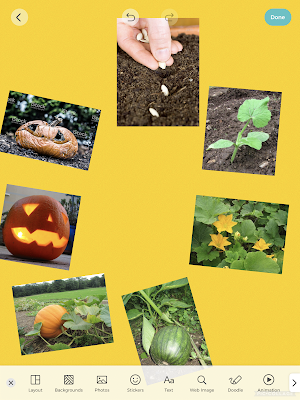

Of that decade, by far the simple but eminently useful app Pic Collage (free for iOS, Android, Windows) has been my favorite. I recall the day the awesome Sarah Ward showed it to me. It is a great resource for SLPs to make quick visual supports and to co-create with students. Here are 10 things you can do with Pic Collage:

Make a vocabulary board. Note that the Web Image Search makes this a very quick process to do with students (they can choose pictures associated well with vocab words (BING Search is nicely restricted)

Play! Play is about adding thoughts and ideas (see Social Thinking®'s We Thinkers). Here we decorated a treasure chest. Hands-on is great too but sometimes you may be lacking in materials or time. Note that any picture added by Web Image can then be double tapped to "Cutout."

More related to We Thinkers and Story Grammar Marker®- explore what different characters think about, you are therefore relating story events.

Make "Colorforms" from photos to retell/act out a story with dramatic play. In this case Gilbert Goldfish Wants a Pet.

Visualize to scaffold students' personal narrative. In this case we talked about how setting linked to actions and events.

Set the stage for cooperative play with yet another cooperative activity. These students created a sign before playing Lemonade Stand on the Echo Dot.

Target emotional vocabulary based on the 6 universal feelings (happy, sad, mad, scared, disgusted, suprprised). These high school students passed Pic Collage and added to kinds of angry (relate to Zones of Regulation®) after watching a Star Wars clip.

Create any kind of story. Here, setting, initiating event and reaction are visualized.

Use dual-focus vocabulary strategies (semantic and structural per Diane German).

Make curriculum language and categories more salient and visual. In this case a consumer science class was covering "ways to pay."

Make comics showing triggers/initiating events and use of tools and strategies such as self-talk.

Show circular sequences. Think of doing the same for Numeroff's If you Give... series.
OK, that's 12 instead of 10 but I couldn't decide which to share!
Friday, February 14, 2020
Try an Android Emulator
Mobile apps offer something in interactivity that webtools (i.e. those you access on a laptop, Chromebook, or desktop) may not always get you. There are several apps for iPad (also for Android) I love that are not approached by anything on the web: namely, the Toca Life app and Pic Collage (also available for Windows). You do have an option-- Android emulators are available that make an Android "device" run on the screen of your laptop or desktop. These are downloadable programs, so, no for Chromebooks.
One I have found runs successfully is BlueStacks. Download the program, access the Google Play Store on the screen (you'll need to sign in with a Google Account), and try a free app before making any purchases in order to make sure it works on your machine.

One I have found runs successfully is BlueStacks. Download the program, access the Google Play Store on the screen (you'll need to sign in with a Google Account), and try a free app before making any purchases in order to make sure it works on your machine.

Here's Toca Life: Farm ($3.99) running on my Mac. You have to click instead of tap, and it seems not to have the screen recording feature.
An Android emulator may be useful in therapy activities if you:
-Want to use laptop or desktop in a classroom and not deal with connecting an iPad to the board or projector
-Don't have an iPad
-Do telepractice (sharing desktop control would mean the student could take over clicking on an app such as Toca Life: Farm)
Let me know if you have other uses for an Android emulator such as BlueStacks!
Considering your professional development schedule? Check out Sean's offerings for training sessions.
Friday, February 7, 2020
Websites that Still Work!
In February I am going to closing in on blogging for 10 years in this space. Wow!
I recently discovered a VERY OLD weblist I used for some of my first presentations. It's on Diigo- anyone remember Diigo (I started bookmarking on delicious which went defunct soon after). A theme of this blog has been having a Kübler-Ross style understanding that some technology passes away.

But looking through this list, I wanted to note that some of the resources from 10 years ago are still quite useful. Keep in mind that some of these are flash-based and you'll want to use on a laptop or Chromebook:
iCivics
Interactive games promoting understanding of civics, world schema, narrative language, cause-effect (also some iPad apps)
Randall's ESL Cyber Listening Lab
Audio files with functional information (e.g. a phone message) good for building listening strategies
Popplet
A very cool concept mapping website, make graphic organizers and discussion maps (also an iPad app for this one)
Jamestown Online Adventure
Consider making a graphic organizer or decision tree for this oldie but goodie aligning with social studies curriculum
Utah Education Network
Wide selection of interactive websites on K-12 curriculum topics- many promote categorization, narrative, cause-effect and conditional thinking, and make curriculum concepts and vocab visible.
Storybird
Add text to pictures to form a "book"- good for descriptive language, "thinking with eyes," narrative
Sensory World Garden
Mindful activities about a yard setting/seasons
QR Scavenger Hunt
Make a quick scavenger hunt using QR codes- good for collaborative work, moving in a group, responding to questions. Also see other ClassTools.net tools.
Saturday, February 1, 2020
Some Tricks to Ease Language Sample Transcription Pain...
I do a lot of language sampling and analysis as part of evaluations- whether a more straightforward speech/language or social cognitive evaluation, it's an essential part of showing current functional strengths and weaknesses. And you know how much I dig narrative.
Periodically, I try to do some searching to see if there is anything tech-wise that can ease what can be some pain within this process. Speech-to-Text (STT) technology, in which a device or some kind of software is used to transcribe spoken language, continues to evolve. Best I know, we still can't play a recording into STT tools (such as those built into a Mac or Google Docs) and have it accurately transcribe. However, I found this idea recently and gave it a try, with nice results. Paraphrasing Leah Fessler of Quartz at Work (thanks for this post!), the steps are:
1. Find a quiet space.
2. Plug yourself in (you may benefit from using headphones with a mic).
3. Open a blank Google Doc (Note: only in Google Chrome)
4. Open the Voice Typing tool (Tools>Voice Typing)
5. Ensure the Voice Typing button appears.
6. Ensure your microphone is turned on and your language is set.
7. Listen to a small portion of your language sample recording (e.g. a sentence)
8. Click the microphone button, and repeat what your client/student said. Remember that you can say "comma" for commas and similar for other punctuation.
9. Turn Voice Typing off as you listen to the next part of your recording (whatever you can hold in your short term memory), then continue, repeating steps 7-9.
10. Watch along as you transcribe and make corrections and additions.

A few tips may be of help:
-I like the Voice Memos app for iPad. If using the app of the same name (this one native to the operating system, so free) on iPad or iPhone, make sure you turn your device Auto-Lock (in Settings>Display and Brightness) to something longer, like 5 min. I notice after auto-locking, my phone's Voice Memos app moves the recording back 20 seconds or so, which is annoying.
-You can use either app's 15 sec forward/back buttons liberally to re-listen or go forward.
-Finally, I think the above steps saved me time and boredom in the transcription process, but I used step 10 extensively. If you have a student with a lot of revisions or repetitions, you'll find you are better off doing a combination of typing and dictating (using dictation with the student's more fluent sentences).
Let me know if you try this and what you think, or if you have other strategies!
Subscribe to:
Posts (Atom)