Gratitude is a Thanksgivingy theme...but actually much more than that. Much research has supported that practicing gratitude as a form of mindfulness can be self-regulating and cultivate positive neural connections.
In addition, gratitude has a language lens as it:
-relates life experiences
-can/should be practiced as a "listing" activity
-expresses causality
-can be pushed to the abstract i.e. being grateful for intangible things.
Over this and coming weeks I will be using this and this video in discussion activities.
Both are accessible, short and visual. Videos from Headspace are very useful that way, and the second has a bit more of a near/practical hook that will help a lot of my boys access what could be perceived as a dismissible touchy feely message.
As a follow-up activity, Jamboard is a motivating visual way to have students journal, share, describe and discuss. Here's my model:
I have previously mentioned I am a big fan of the Scaredy Squirrel (Melanie Watt) series that is helpfully available on EPIC! Books. Over a number of weeks I had my students in one group come to a decision on the order of reviewing and discussing the books in the series, which was good practice in expressing opinions and compromise. They find the books hilarious, so they are motivating (see the above link for some social cognitive analysis as well). I wanted to share a post-activity we conducted with the original book. Hoggan and Strong describe how narrative teaching activities can include "art" activities, which was what this was in essence.
In the book, Squirrel is described as having constructed an emergency kit for all the unlikely things he is afraid of. So, as a group we created and shared emergency kits.
Here are the steps I followed:
1. Create a Google Slides presentation (and blank slide)
2. Use Insert>Image>Search the web to locate a "bag" for the kit, position and enlarge on slide.
3. Duplicate that slide for all in group (secondary click/right click on slide and select Duplicate). I put a text initial on each slide for each group member. Also click Share and make the presentation editable for anyone with the link.
4. Create a model (always), with same steps but using PNG in the search term which gives you transparent images (will look like they are over the bag, but this step is not necessary).
5. Present the activity and model and strong causals: I need iced coffee in the kit because I get Blue Zone in the afternoon. Also model how to insert an image or PNG (This provides good opportunity for following directions)
6. Copy the link and provide to group members in chat for the session (Zoom or Meet). Again, following directions.
Here was one of the students' productions:
7. Have all work independently while chatting and then share. This is a good opportunity to use a clock, Sarah Ward/Kristen Jacobsen style, for time management.
Overall the activity provides great self-description opportunities, building of "people files" (Social Thinking®) and conversation.
I've long been a fan of the contextual approach described by Hoggan & Strong in their influential article The Magic of Once Upon A Time-- that of pairing a picture book with pre- during- and post- narrative/language teaching opportunties. I have been presenting about this with many iterations for years, and last year published a pamphlet about it (free) on Teachers Pay Teachers.
We can consider "apps" in this context as including websites and webtools. Last week I used a picture book via it's YouTube read-aloud. There are usually several versions available for any picture book, I like to make choices around the style of reading and a slide-show look. I mentioned I have been picking lots of picture books with emotional vocabulary or self-regulation themes. In this case, I liked this version of Good News, Bad News (Jeff Mack) also because the visuals were a little quick. It provided the opportunity for many stopping points targeting situational observation and use of association and causals:
"Now he has an umbrella, so that's good news. What do you think the bad news will be?"
"Hmm that went by kinda fast, what did you see as the good news there?"
One post activity suggested by Hoggan & Strong is an "art" activity! I set up a collaborative art activity with the group using Jamboard- an interactive/collab whiteboard that is part of the Google Suite (find it in your little "matrix" of Google Apps- upper right corner of Gmail, Drive etc). In cases where I have used Jamboard, I have just clicked on Share and made it editable to anyone with the link, then put that link in the chat of Zoom or Meet, and students navigated to it easily. In this case, I thought we could do a good news-bad news cause effect chain in a different setting- my students chose a supermarket, I started them off and it played out like this:
Here's the resulting Jam. It owes something to Nancy Tarshis, Ryan Hendrix, and Kari Palmer who presented a verbal play activity I once saw called "Yay! Oh No!" Our activity with some coaching involved:
-Student 1: The lights go out at the supermarket!
-Student 2: But good news- the rabbit has a flashlight
-Student 1: But then bad news, dinosaurs invade the supermarket.
-Me: But good news, they are herbivores and just wanted lettuce
-Student 2: Bad news- they have no money.
-Student 1: Good news- there's a cash machine
-Student 2: But it's broken!
-Student 1: a repairman comes (but we should make him an animal to fit the story)
And we all decided everyone gets money to shop!
The boys did well with this playful narrative activity!
Wheel of What is the kind of simple app that any clinician would benefit from having on an iPad. A spinner is useful in many situations, and with a digital one you won't have to dig one out! Plus an engagement factor of offering a digital version is always handy. With Wheel of What, a bonus is that you can create customized spinners in seconds.
One activity I like to do in social groups (even up to high school) is to make up our own games or "same but different" versions of other games. That vocabulary as well as the STOP strategy (Space, Time, Objects, People-- Ward & Jacobsen 2014) provides a guide to making this type of activity clinically focused. Recently, our group made up our own version of The Floor is Lava and had to consider Space (Where to Play), Time (how much time we had, also the order of events in the game and the if/thens), Objects (e.g. construction paper tiles and the spinner, also furniture), and People (cooperative or competitive roles, how would we Think of Others during the game to keep it positive).
Hope you find this free tool useful! What might you use it for? Let us know in the comments.
As you may know, I continue to blog monthly on the website of Mindwing Concepts Inc, creators of some of my favorite tools, Story Grammar Marker® and Thememaker. This summer I wrote four posts summarizing recent research and published articles. The goal of these is to provide summer "food for thought," each post with a little tech tie-in. In case you missed them, here they are:
Note: author is paid consultant for Mindwing Concepts, Inc for provision of blog content and presentation material, but receives no compensation should you visit their website or purchase products.
WWF Free Rivers app (free, in another sense, for iOS and also Android devices) provides a cool, "immersive" experience where students can view a river and its effects on the landscape, weather, animals and people around it. The app uses augmented reality technology, overlaying a riverscape and also a world map over your teaching space (e.g. a floor or table). It is extremely easy to navigate and provides student-friendly language (and audio) about the water cycle, where you can make it rain and view above and below the clouds, the cause-effect of damming a river, and other material presented in a storytelling format. The app would be great for providing visual support and engagement in language such as:
-geographic features and landforms/continents (language/categories of social studies)
-weather processes (language/sequences of science)
-expository text structures such as cause-effect
-simpler observative social processes such as "thinking with the eyes" and "making a smart guess" (see work of social thinking)
Be sure to install this free app on your iPad for the upcoming school year- you'll surely find a context to use it in syncing with classroom curriculum!
The Internet loves a "Fail," which Urban Dictionary defines as [noun, in this case] "a glorious lack of success." From a narrative standpoint, however, a fail is an initiating event, a critical story element to work with in our students' language. Graphic organizers reduce cognitive load and help students identify and internalize narrative structure, which assists with comprehension and production of narrative language. One level I like to work with my students around is the Reaction Sequence, which looks like:
Character
Setting
Initiating Event
Reaction (what the person DOES in response to the IE, note that this is not a Response or Feeling, which is part of the next level of narrative development, often called the Abbreviated Episode)
The Reaction Sequence is sometimes represented as Somebody Wanted But So. You can use SWBS, Story Grammar Marker®, Story Champs, or other approaches such as the Gillams' SKILL for your graphic organizers, or make your own. Good idea to have some sort of consistency in the icons or GOs you use, however.
So, the tech part: humor is great in therapy, but be careful about where you get your fails. I like America's Funniest Home Videos (AFV) as it is super family-friendly. Take this video compliation:
It provides a great 15-30 min activity in having students formulate the narrative of what they see. Of course, use the pause button, and a few other ideas
-Zoom in on character, some students have a difficult time reading nonverbal signals around age and relationship between people (a skill measured in assessments like the Social Thinking® Dynamic Assessment Protocol). Scaffold statements like "a brother and sister" or "a kid who is probably like, 8 years old."
-NOTE that with the above you are working on microstructure such as noun phrases and use of conjunctions (also linking between the story elements: "A group of kids is surfing at a beach WHEN a huge wave comes.")
-Zoom in on setting, many of my students would just say "outside"- scaffold specificity such as a beach, a lake, a hiking trail, and so on.
-Consider adding a pragmatic element with an ersatz barrier task- one student can watch and narrate, then show the video to the group.
The free app Toca Life: World (available for iOS, Android, Kindle) works some device magic by uniting any of the Toca Life apps you have on your device. I've long been a fan of these sandbox-play apps that present a variety of scenes mirroring real life for sociodramatic play. Each scene is interactive such that you can manipulate objects and perform actions with characters. Look at Toca Life's settings through a language lens and you'll see many contexts for syntax (verbs, causals), semantics (categories, vocabulary) and discourse (telling a story). This past week I used the Toca Life: Vacation app to model an airport story for my student, and was thrilled to see him tell a same-but-different story (note that there is also a screen/audio recording feature in each app for your to make a movie of your stories with narration). Toca Life: World, in addition to bringing your places together, provides additional settings for purchase. I had fun with the ski resort making this model for one of my groups!
I have previously mentioned here and here that coding activities, though designed for computer science and educational initiatives such as Hour of Code, have a lot of language underpinnings. They are engaging contexts to have students practice following directions, learn vocabulary, and use causal and conditional language in their verbal (or written) interactions. These activities are also great for "Group Plan" work (see Social Thinking®).
Additionally, I wrote about the idea of "flirting" with contexts that you really don't want to get deeply into. Minecraft is one example; kids find it very engaging but playing the actual game is something I don't have time to figure out, and may be hard to structure for efficient use of therapy time. In these cases I might use something defined that is related to the context, such as a video clip that might prompt narrative language.
As in the other coding resources I have highlighted, Code.org provides an easy to use, non technical interface. Intro videos set the context and provide directions, as well as a context for students to practice stating main ideas and the overall plan. Check out the Minecraft activity page- the Voyage Aquatic and Adventurer activities are great places to start, asking students to assemble series of blocks to move and perform simple actions. Code.org can be used without sign-in, but if you create a free account, it will save your progress. The website works on full web browsers (Mac/PC/Chromebook) or in the iPad Safari browser. You can also explore their activities from other contexts, such as "dance parties" incorporating music and app creators.
In my last post, I discussed how some Star Wars conversation led a group of mine to some engaging self-regulation activities incorporating movement. I always like extending themes, and observe that both watching short videos and, for some reason, watching me type into a presentation slide both get kids talking! I found a Star Wars template easily and we used this "blank space" to map out some social narratives related to play, thinking, self-talk and regulation, and social cognition after reviewing some short videos.
I feigned some blanks in my knowledge and together we summarized that:
Character: Obi Wan
Setting: Tattoine
Initiating Event: The Rebels have put plans for the Death Star, which show how to destroy it, on R2-D2. The stormtroopers stop the group and want identification
Response: Calm
Plan: Get past the stormtroopers
Action: Uses a Jedi Mind Trick to get past
Conclusion: They continue on their mission
The narrative could also be flipped and analyzed from Luke's perspective, who at this point is mystified by Obi Wan's powers.
In addition to talking through the narrative elements, focusing on cause-effect relationships, we also talked about the theme of Jedi Mind Tricks as a way to talk about changing thoughts of ourselves and others (awareness of self-talk) in both pretend and real ways (see above re: simple uses of PowerPoint, Google Slides or Keynote for visual support):
We also role-played JMTs just for fun and playfulness.
Follow-ups! Contexts that get kids talking and thinking about concepts, skills and strategies are always worth repeating, so see also:
They say August is one long Sunday. Here in Massachusetts we still have about a month left until school even starts, so its difficult to see posts from friends across the country who have already started, as well as the ubiquitous "back to school" and "summer's almost over, so..." ads. It pulls you out of it a bit, you know? I've spent my summer working on getting fit, hiking and doing some traveling, so it's been great. But HOT!
So consider some Lemonade! Remember the old Lemonade Stand game? You are given weather information and need to decide several things: how many cups of lemonade to make, how much to charge for it, and how many signs to make to advertise your stand. In the process, we can engage students in a number of language and social competencies:
-"listening with the brain*" and language comprehension
-using visual supports, however we provide them
-applying functional math and problem solving
-causal and conditional language ("It's going to be hot, SO let's make more cups...")
-following a "group plan,*" i.e. making logical rather than silly decisions to sell as much as possible
Here are two ways to play it.
-Classic Lemonade Stand is a free app for iOS that uses the 'ol Apple IIe text interface, but is still fun
-Toward the end of the school year, I played the Alexa version on Echo Dot (enable the skill by saying "Alexa, launch Lemonade Stand"). This free skill provided a few extra elements that I found helpful: more opportunity for auditory comprehension and listening work, turn taking in speaking, using visual supports, and processing the humor and figurative language offered in this particular skill.
I always like pairing activities for further context, and our students before playing worked together to make a lemonade stand "sign." This engaged them in pretend play and lots of conversation. This could be done with poster materials or with the free app Pic Collage as we did below (You could also do this with Google Drawings on a laptop):
Presenting a video can be a simple use of tech that can establish context, provide visual support, engage students in discussion, and open the door to a related post-activity addressing language skills. A good example is this video which features about 100 unnecessary signs such as:
The video moves quickly, but pause as many times as you want! You can also screenshot to pick and choose signs you'd like to explore (perhaps a good move to work on functional reading). Some ideas on using the video:
-Metalinguistics: what makes the message obvious and unnecessary?
-Social Cognition: the video can be used to have students practice "thinking with their eyes" for the greater context of what makes the sign silly, as well as engaging in humor. Using signs in therapy activities is also a good way to introduce the related Social Thinking® concept of "Hidden Rules" (related to Dr. Brenda Smith Myles' Hidden Curriculum); there are many (more complex than shown here) rules that we need to learn through observation and experience in order to be successful socially.
-Narrative Language: Have students discuss or sketch stories depicting why someone thought these particular signs were necessary. This context would also allow for working on complex language and conjunctions like if, because, and so.
As I have mentioned here and here, coding is a naturalistic language activity in which we can engage students to build a number of skills: following directions, collaborating with peers, and expository language. This can extend to using if/then sentence constructions or explaining how they constructed a program. These activities need not take any programming expertise on your part, or extended amounts of activity time; simple, discrete activities can be conducted using the web-based (Flash in fact, so you'll need your laptop or a Chromebook) Scratch and their Getting Started page. Call it building "games" and your students will be hooked.
To get started with Scratch, you'll want to sign up for a free account. The Getting Started page has selected activities, but I would recommend downloading the entire set of "cards" and printing them on a color printer (you can also buy the whole set for $18.50)- the colors are helpful for students to find. You can also download the card set, send it to your iPad and have the visual be displayed from iBooks as the students use a laptop or Chromebook.
Here's a simple sample activity. You can't imagine the joy I saw on two 2nd graders' faces as they were successful in creating a program where you click a trackpad and a letter changes color:
In the process, they needed to practice:
-stating the "big picture" of the activity (using when or if/then)
-following written directions
-"thinking with their eyes"
-navigating categories (of scripts- Events and Looks)
The Olympics start this week! The associated topics of sports and geography are great ways to engage students around language objectives. I discovered the free book for iPad Dino Olympics, created by the makers of Puppet Pals. The app is an interactive exploration of different dinosaurs' strengths and weaknesses when competing in Olympic events; it has delightfully silly animations that are extended and further contextualized when students tap on the screen.
In terms of language development, the book is a context for targeting:
-categorization (winter vs. summer events or ones which are easy/hard for the dinosaurs)
-connecting to the concept of multiple intelligences (in Social Thinking® parlance, different kinds of smarts, though it is the dinos' bodies, not their brains, that impact upon their success)
-labeling actions and using causals, "thinking with your eyes"- e.g. observing that Apatosaurus is not good at luge because his long body makes him bounce off the curves of the track.
-I also used this book with a post-activity of creating a "luge course"- a gym scooter on the floor makes a good simulation of this and planning obstacles for the course via sketching a "future picture" is an executive function activity (see the work of Sarah Ward and Kristin Jacobsen).
Some years ago at the ASHA Convention, I saw in the program a poster entitled "A Cat In Therapy: Cute, but Effective?" I thought this title intriguing and at the same time, funny, and I was sad to have not been able to locate the poster. Fiete Cats AR ($1.99) gives you the opportunity to test this proposition out. AR--Augmented Reality-- is technology that overlays digital content over our world, often through the camera. In this case, the app makes a cat appear in any room, including your treatment space, and offers a number of interactions:
-Name up to 3 cats
-Observe the cat's needs (think with your eyes)
-Pet and play with the cat
-Feed it when it gets dirty (from playing in paint)
-Provide him food and drink when hungry/thirsty
-Put him to bed
-Record your interactions to make a short movie (saves to Photos app)
My kitty using his litter box ON MY RUG! Oh, NO!
Effective? Well, for sure the app is engaging, and provides a context for social observation, labeling actions, and using cause-effect and conditional structures.
This app is also a great pairing with picture books (narrative or expository) about cats. Consider making your own "picture book" with Book Creator, which would allow you to import screenshots or the videos recorded within the app. Students can write about their interactions with the cat, a context for any number of objectives.
One of my favorite holiday activities with students is to role-play giving and receiving gifts, and here are some updates on that.
You can do an actual gift exchange if time permits, or use an empty box or gift bag for pretend play, but there are some ways to tech up this lesson and add context, strategy and social cognition concepts, and engagement.
This coming week I am going to have students prepare for this activity by reading Llama Llama Holiday Drama (it's available on Kindle if you don't have time to get it). This book explores anxiety and mindfulness, and contains some good "hidden rules" about the season and the meaning of giving gifts. It is also multi-denominational.
As you can see, the preparation steps will target asking and answering questions, using wondering and People Files about others (Social Thinking®), as well as categorization and making choices. The "Levels of Like" concept is one I learned from SLP Jenny Sojat. She presented on this at a conference and uses this to make group decisions- poll group members to get them to state whether they love, like, are ok with (the "yes" line of compromise) or dislike an idea such as an outing, game, snack, etc. In this case students would just be using to to gauge another's opinion.
Have students save a photo of the "gift" they will be giving. On iPad you can look up photos in Safari, tap to enlarge, then tap and hold to save to the Photos app. If you want to add math concepts and flexible thinking, give them a budget and ask them to look up the item on Amazon.
I'd suggest "wrapping" the gift with Bag Game. It adds an element of a hidden item as the student hands the other student the iPad.
Pre-exchange, the 5 Point Scale provides a great tool. You can emphasize the perspectives and reactions of the giver at each level as well. I like to develop scales with students by using anchor points such as a 5 and 1 and having them label the other levels.
Then, exchange by having students deliver their iPad "gifts" to each other! Another good strategy is to provide an explicit challenge to students to generalize the concepts and report back. For example, ask students to be aware of their reactions when receiving gifts and report back on them. This is always a good narrative development activity as well.
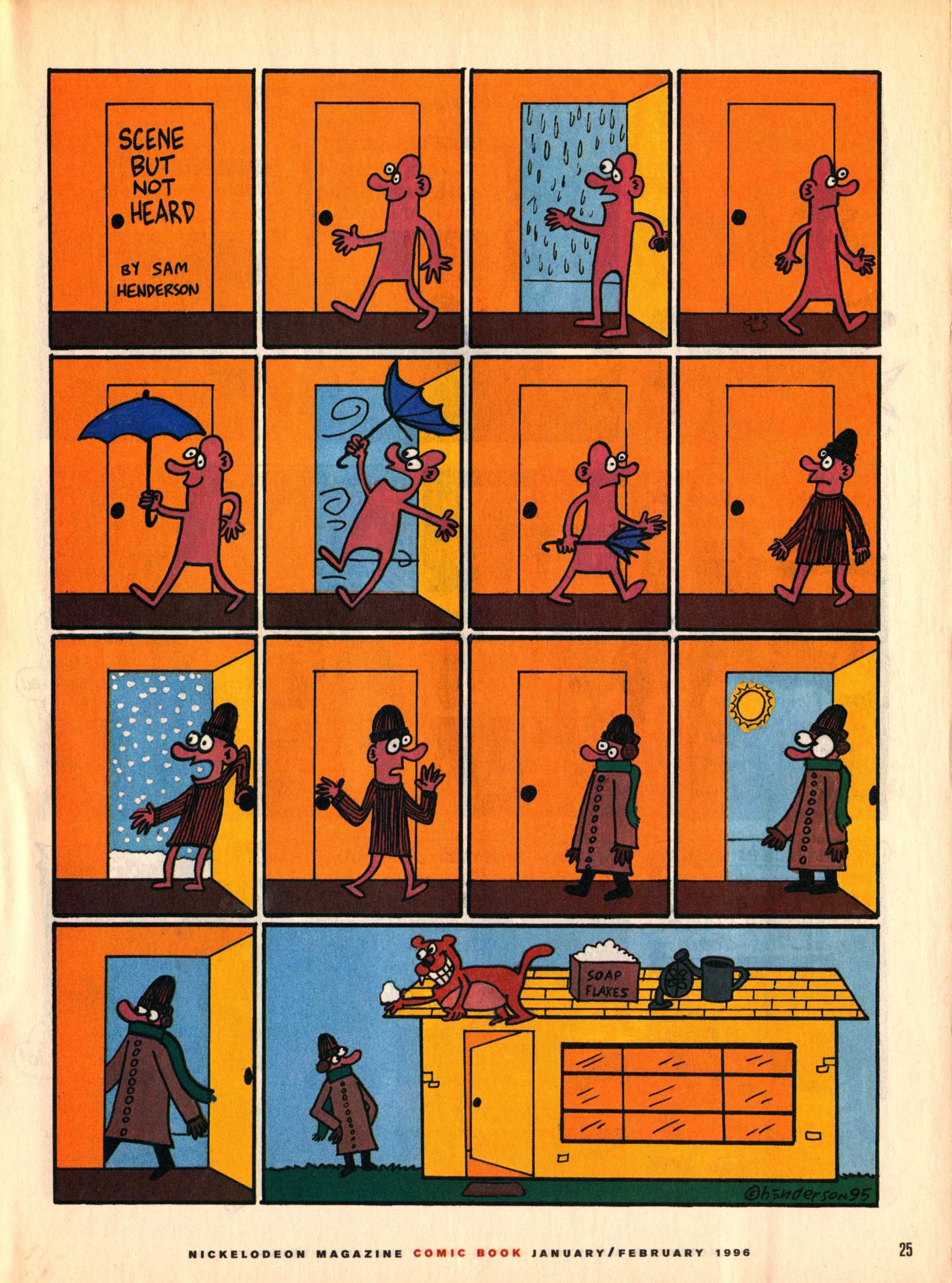
Back in the day, I used to subscribe to Nick Jr. Magazine for its ads (great expository text contexts) and visual content. This included a comics section with a series called "Scene But Not Heard" by comic artist Sam Henderson. The adventures of Pink Guy and Bear are humorous, exaggerated, and related without words. Like wordless picture books, wordless videos and comics are helpful materials for students to work on interpreting nonverbal cues, "thinking with the eyes," and constructing narrative language and the microstructure (vocab, verbs, complex sentences) within it. In those days I used to collect the series and use laminated versions in classrooms for push-in services along with graphic organizers from Story Grammar Marker®. The content is engaging for mid-elementary through high school students.
Nick Jr. is no more, but I recently discovered that much of "Scene But Not Heard" is available digitally. Just Google it and then click Images, and you have a treasure trove. This feature about the series also contains a gallery. In either case you can:
-save the comic materials to your device (tap and hold on full size image on iPad, or ctrl/right click on a laptop).
-make a collection- you can use Adobe Acrobat Reader, Mac Preview, tap the share button on your iPad and then save as PDF to iBooks, or simply make a folder in your laptop or Google Drive.
-Use the zooming features contained by these technologies to zoom in on the action and limit the visual array (I like to use these to teach students to verbally mediate and "talk out" the nonverbal content).
-Consider integrating with Google Docs- insert a comic into a Doc and have students write a summary.
In the past several posts I have been discussing resources for visually mapping expository (and by extension, narrative) topics. In the last post I outlined the use of Kidspiration's Super Grouper feature for sorting ideas into categories--it can also be used for sequencing. Kidspiration and its older brother Inspiration (again free to try, $9.99 for full app, also available for Mac or PC and even on the web) are better known for their mind-mapping or diagramming features. Like Popplet (described in this post), these apps can be used to create graphic organizers showing the connection between different ideas. Unlike Popplet, however, the text within the idea bubbles can be exported to other apps so students can see planning activities as being helpful toward actually getting their writing done.
In Kidspiration, create diagram activities by selecting Diagram from the home screen. It's fairly self explanatory to map connections between pictures and symbols using this feature. The diagram can be used to create a discussion web as displayed below. Discussion webs in language intervention are discussed in Hoggan & Strong's excellent article The Magic of Once Upon a Time: Narrative Teaching Strategies (and also this "how to"), which has served as an inspiration for my "Pairing Picture Books with Apps" presentations. A number of other narrative teaching visuals demonstrated in the article can also be created with Kidspiration and Inspiration.
Inspiration in all its versions is particularly appropriate for upper elementary through adult learners, and is often recommended as an Assistive Technology (AT) tool. Inspiration shares many of the features of Kidspiration including the picture library, ability to add photos, and helpful templates; Inspiration does not have the Super Grouper feature described in the last post.
Both Kidspiration and Inspiration allow you to create a graphic organizer with students and export the contents in outline form to a word processor, thus bringing the initial planning work to a place that it can be continued (e.g. a word processor such as Pages, Word, or Google Docs). The blank-slate nature of these apps as well as the availability of connecting bubbles and arrows make it ideal for instruction in the methodology of using expository text structures to plan writing and show the flow of ideas in a topic--making these both comprehension and expression tools. See Teresa Ukrainetz' Strategic Intervention for Expository Texts: Teaching Text Preview and Lookback (another good reason to have an ASHA SIG membership so you can access Perspectives journals) for another helpful discussion of expository text structure and other strategies.
Be sure when using Inspiration and Kidspiration to avoid creating webs unless your topic is a descriptive one. Create an organized structure by adding new detail bubbles to your topic heading shape (see above with List, tapping on the arrow button will create new connected bubbles you can drag into position). Naturally, you will want your detail bubbles to contain content related to the topic as opposed to just key words for organization. As below, switching to Outline view will then make your work result in a useful outline rather than too much hierarchy. See below, tapping the Share button will allow you to export.
In a column I contributed to August's ASHA Leader, I mentioned expository text structures as providing an important framework for organizing language for comprehension and expression, in this case around social studies topics.
First, to elaborate on expository text structure, this is the informational "sibling," so to speak of teaching story grammar--parts of a story and the connections of character, setting, initiating event, response, plan, events, and conclusion. Expository text structures can be located both in narratives and informational text (e.g. a news article, textbook, lecture or video) and include list, sequence, description, compare/contrast, and so on. An excellent recent tutorial article (Lundine & McCauley, 2016) provides more information and research tie-ins for these strategies; commercial products targeting the use of these structures include Mindwing Concepts' ThemeMaker®* and Thinking Maps.
Another good resource providing a venue for teaching these skills and strategies is Popplet Lite (Free, the full version of Popplet allows you to have multiple drafts), with built-in graphic organizers in a visual creation tool where students can combine photos, text, and drawings to explain an idea or topic.
With Popplet Lite, you can:
-tap to create "popples" to contain your ideas for the topic
-color code main ideas
-connect ideas in lines demonstrating text structures (e.g. list, sequence, cause-effect)
-add images (copy/paste from Safari is easiest) or drawings
-export your creation in several formats.
In several followup posts, I'll be discussing other resources for mapping narrative and expository text.
*Disclosure: Author provides blog content for Mindwing Concepts, Inc.
Video versions of ads can be motivating ways to target students' understanding of narrative and expository text structures. I have recently enjoyed the series from Amazon Prime in which people solve animal-related problems. Here's one featuring an adorable little horse:
As the ads are wordless, they offer an opportunity to work on student narration and also interpretation of nonverbal information.
Westby and Culatta's recently published article "Telling Tales" offers a tutorial on assessing and intervening on narrative skills (primarily personal rather than fictional), and as you know I am a big fan of (and consultant for) Story Grammar Marker® to break down and produce narrative material. I also highly recommend Dr. Anna Vagin's books (and mailing list) for terrific information on how to use video to target narrative and social cognition skills.
SpeechTechie is my take on simple and interactive technologies you can use in language lessons and interventions. Enjoy!
Interested in learning more? I am available to conduct professional development sessions, including via webinar. If you'd like to work with me to design a presentation or consultation for your school or organization, please check out the "Work with Sean" page on this website.
Sean is a MedBridge instructor for several courses (avail. Feb 2018). Click to join MedBridge at a discounted rate for high-quality online PD and CEUs. A wide variety of courses are available for SLPs.
Visit and "Like" our Facebook Page
Follow SpeechTechie on Twitter for updates!
Thanks, Guys!
Click on the badge to explore a ton of great blogs!