Showing posts with label early elementary. Show all posts

Sunday, May 1, 2022

Simple visual engagement resources for youngsters

Whether doing tele- or in-person therapy, you should be aware of the cute, simple and useful resources of Dr.  Karen Fried at Oaklander training, such as the online sand tray and dollhouse interactive activities on the site (go to the tools and resources tab). There's apparently a whole approach to using these tools as psychological therapy with young children, but as a sort of stickerbook they have specific linguistic opportunities. Consider vocabulary, concepts, syntactic expansion, and storytelling!

Thursday, April 21, 2022

TinyTap Online

Tiny Tap was previously described here as a good mobile app resource for both making interactive activities and finding visual content for lessons. I recently noticed TinyTap has ported content online, so this would be playable on your laptop or in a classroom with projector or interactive whiteboard. This format for Tiny Tap makes it also a nice resource for telepractice. Sign in at TinyTap (click Connect) and you can favorite activities to create a resource list. The activities are geared toward language basics and topic exploration, many taking the form of an interactive book, and therefore are particularly good for developing vocabulary, categories, or foundational descriptive skills. This Desert-themed activity provides a good example, but see what else you can find on the site! I was able to access many activities for free, but TinyTap provides an educator sign-in.


Friday, April 30, 2021

Elinor Wonders Why (PBS Kids)

The PBS Kids activities corresponding with the series Elinor Wonders Why provide a number of language targets and are another example of modern web design (i.e. not flash-based). I also like activities with outdoor themes that you can couple with small "field trips" of your own if working in-person. These are now added to the PBS Kids task-analysis spreadsheet.

Curious Campout- good narrative play, like a mini "Toca Life." Click to interact with objects e.g. to set up the tents or put wood on the fire.


Hide and Seek- for one or two players (one covers eyes), hide 4 characters across a wooded area and take turns finding them. Good for spatial concepts and causals, as players are more hidden with clothes colors that camouflage them. 

Two more are added to the linked spreadsheet above!

Monday, May 11, 2020

E-Learning For Kids interactive website

I just stumbled across the website E-Learning for Kids- it has tons of content applicable for a number of levels and in various subjects. You may gravitate toward Language Arts, but note that the other topics have content for teaching many language underpinnings (e.g. concepts in the Math activities, description in the Science activities. The lessons here would be good for screen sharing and having students verbalize choices, or with cursor control, and have engaging animations. I am adding E-Learning for Kids to the Teletherapy Resource List.


This activity in the Science area is about describing and categorizing based on smell (lots of 5 Senses activities in Science here). I also like that the Science area has theme related to places around the world.

Monday, April 27, 2020

Chateau Meddybemps

Chateau Meddybemps is a rich site with many activities you might consider in teletherapy, particularly for young students and for those you are experimenting with incorporation of interactive websites. Activities on this site might be ones you screen share and have the student observe the visuals and verbalize choices, or offer many opportunities for remote cursor control. For students who need buildup of skills in using the mouse in therapy, there are simple mouse skills activities. Also, there are a number of PDF based printable "activity centers" that you may be able to use for play on both sides if you've got willing parents.

Check out the Super Menu for activities like this one in which students can organize a zoo, thereby targeting naming, animal sounds, describing and using causals.


Thursday, September 19, 2019

Get on a Roll this Year (Part 4)

There's of course a difference between "helping students with homework" and working in context, and that's as Barbara Ehren calls it, "maintaining a therapeutic focus." Text mapping, or teaching expository text structures, is one tool that we can teach students in almost any context. Graphic organizers are most helpful as a visual tool in text mapping, and are generally more helpful when a) more than just beginning-middle-end or main idea-details boxes (research supports this too) and b) consistent, using graphic organizers or helping students create them with a similar look, feel and structure.

For some more background information on this, I recommend Text Comprehension: Graphic Organizers to the Rescue and Expository Discourse Intervention for Adolescents With Language Disorders available on the ASHA Website.

Kidspiration and Inspiration for iPad remain my favorite apps for teaching the structure of any contextual block of language, whether that be a BrainPop video, a student or group's reading assignment, or a classroom topic reviewed more generally.

Both of these apps are free to try (for 5 activities). Kidspiration has the advantage of allowing for contextual basic or abstract categorization (sorting) with their Super Grouper mode, essentially also targeting the expository text structure of list or enumeration.


One strategy I have used is to look for expository categories in a narrative picture book e.g. "things on a beach" or "weather conditions." That way the picture book or other context can be used for retelling/summarizing as well as the categorization/semantic skills.

Take Scaredy Squirrel has a Birthday Party, available on EPIC! Books for Kids. You can create a Super Grouper Activity about two of the relevant contextual categories. Students can sort and write or audio record (tap the symbol, then the microphone) a "why" or association for each of the items.


These apps also allow you to make "diagrams" such as lists, sequences, cause-effect maps or story maps. You can move the bubbles around so you don't get stuck always making a "web," which really only corresponds to description. Look to Story Grammar Marker®/Thememaker®, Thinking Maps and BrainFrames for consistent structures you can translate. 

I've written before about the use of Google Drawings to do similar work with graphic organizers. For a wealth of examples you can copy right into your Google Drive and use, see Matt Miller's terrific collection on Ditch That Textbook (an edtech blog I am excited to have just found).

Considering your professional development schedule this year? Check out Sean's offerings for training sessions.

Thursday, February 14, 2019

Happy Birthday!

Here at post 731, and next week is the 9 year Blogobirthday of SpeechTechie. Thanks for continuing to read!

At a recent conference, I presented how play-based apps can be contexts for all kinds of language targets within an engaging context (e.g. vocabulary, microstructure aspects of verbs, noun phrases, pronouns, causals, social langauge).

Additionally, we consider how a particular app or apps from a developer hits upon a particular play stage, moving from dramatic to removed-event sociodramatic play, thus targeting expanded semantic knowledge and cognition particularly for early learners.

Check out Bamba Birthday Cake and other apps from Bamba- at times simulating events a child would have experienced and in others moving into sociodramatic play (e.g. Bamba Post Office). This app is fre,e but you are better off paying (remember the F- Fair Pricing) a dollar or so in tokens on the home screen to offer students unlimited choices. I generally eschew in-app purchases and would prefer a full version were offered, as is the case with many other apps by this developer. However, this app fits the theme (we miss you, Toca Birthday Party) and this does a nice job with the context of making a cake, picking the birthday character and friend, and allowing for a "party," then taking a "photo!" At each step, descriptors can be used along with silly/absurd choices.


Saturday, June 2, 2018

Stop, Breathe & Think Kids

Stop, Breathe and Think Kids is a great free app that promotes age-appropriate mindfulness through video and play-based "missions." These can be a great way to start a session with youngsters and promote "portable" strategies/tools related to the Zones of Regulation®. The videos are also contextual, based in characters, settings and actions, so can be used in conjunction with narrative teaching strategies. The "Find a Mission" option in the app aligns a video with the students' current mood and emotion, thus allowing for teaching of feelings vocabulary. The app and its older brother Stop Breathe & Think, useful for older students, also offers a web app.


Saturday, February 3, 2018

A Cat in Therapy

Some years ago at the ASHA Convention, I saw in the program a poster entitled "A Cat In Therapy: Cute, but Effective?" I thought this title intriguing and at the same time, funny, and I was sad to have not been able to locate the poster. Fiete Cats AR ($1.99) gives you the opportunity to test this proposition out. AR--Augmented Reality-- is technology that overlays digital content over our world, often through the camera. In this case, the app makes a cat appear in any room, including your treatment space, and offers a number of interactions:

-Name up to 3 cats
-Observe the cat's needs (think with your eyes)
-Pet and play with the cat
-Feed it when it gets dirty (from playing in paint)
-Provide him food and drink when hungry/thirsty
-Put him to bed
-Record your interactions to make a short movie (saves to Photos app)


My kitty using his litter box ON MY RUG! Oh, NO!

Effective? Well, for sure the app is engaging, and provides a context for social observation, labeling actions, and using cause-effect and conditional structures.

This app is also a great pairing with picture books (narrative or expository) about cats. Consider making your own "picture book" with Book Creator, which would allow you to import screenshots or the videos recorded within the app. Students can write about their interactions with the cat, a context for any number of objectives.

Thursday, December 14, 2017

A Holiday Lesson...

One of my favorite holiday activities with students is to role-play giving and receiving gifts, and here are some updates on that.

You can do an actual gift exchange if time permits, or use an empty box or gift bag for pretend play, but there are some ways to tech up this lesson and add context, strategy and social cognition concepts, and engagement.

This coming week I am going to have students prepare for this activity by reading Llama Llama Holiday Drama (it's available on Kindle if you don't have time to get it). This book explores anxiety and mindfulness, and contains some good "hidden rules" about the season and the meaning of giving gifts. It is also multi-denominational.

I created a thinksheet for the activity which you can access here. Feel free to Make a Copy under File if you would like to modify it for your purposes.


As you can see, the preparation steps will target asking and answering questions, using wondering and People Files about others (Social Thinking®), as well as categorization and making choices. The "Levels of Like" concept is one I learned from SLP Jenny Sojat. She presented on this at a conference and uses this to make group decisions- poll group members to get them to state whether they love, like, are ok with (the "yes" line of compromise) or dislike an idea such as an outing, game, snack, etc. In this case students would just be using to to gauge another's opinion.

Have students save a photo of the "gift" they will be giving. On iPad you can look up photos in Safari, tap to enlarge, then tap and hold to save to the Photos app. If you want to add math concepts and flexible thinking, give them a budget and ask them to look up the item on Amazon.

I'd suggest "wrapping" the gift with Bag Game. It adds an element of a hidden item as the student hands the other student the iPad.

Pre-exchange, the 5 Point Scale provides a great tool. You can emphasize the perspectives and reactions of the giver at each level as well. I like to develop scales with students by using anchor points such as a 5 and 1 and having them label the other levels.


Then, exchange by having students deliver their iPad "gifts" to each other! Another good strategy is to provide an explicit challenge to students to generalize the concepts and report back. For example, ask students to be aware of their reactions when receiving gifts and report back on them. This is always a good narrative development activity as well.

Happy Holidays!

Friday, November 24, 2017

Dispatches from ASHA, Part 3

A third session I attended at ASHA leads me to a tech-tie-in on this blog and was called Consider the Big Picture: Using Classroom Expectations to Guide Assessments and Develop Educationally Relevant Interventions (Chinen and Ireland). A take-away from this session was that diagnostic activities such as dynamic assessment and language sample analysis are essential to supplement testing components of evaluations.

Now, I'm a HUGE narrative person, so consider that bias (if a focus on functional communication can be considered a bias). But as I was hiking through a park in LA with some friends I hadn't seen in awhile, I got meta for a moment. I thought about how much of the welcome and meaningful experience of hanging out with them again consisted of narratives. Spoiler alert: all of it.

One resource recommended by Chinen and Ireland is called SUGAR (Sampling Utterances and Grammatical Analysis Revised), and a couple of keystrokes brought me to a brand new article from July, 2017 with updated research, language elicitation protocols and norms for ages 3-7;11.

You all know how to read a research article, so besides a few points I will just say: PLEASE READ IT. The article would also make a great study-and-apply activity with colleagues

Pavelko and Owens' aim is to make these vital assessment processes easier for busy clinicians, and they do:
-"LSA (Language Sample Analysis) may be 'the only assessment measure that captures a speaker's typical and functional language use.'"
-A recent survey of school-based SLPs revealed that only 2/3 had used LSA in the last year and of those, about half had only done so in no more than 10 cases.
-The authors recommend using digital recording tools rather than attempting to transcribe live, which is stressful, inaccurate, and probably hampers clinicians' ability to elicit in a functional context. I like the Voice Memos app on my iPhone or Voice Memos for iPad. Tip: try to "rewind" as little as possible. Transcribe and get what you can. Then re-listen and edit.
-Protocol and techniques are offered for eliciting (among others):
"Ask process questions 
How did/do…
What happened…
Why did…
Use “Tell me…” or “I wonder…” statements. 
Use Turnabouts 
Comment + cue for child to talk
Use Narrative Elicitations 
Build on what the child says or what you know.
Begin with 'Your mom says you… that sounds like fun. Tell me what happened.'
'I know that you… Tell me what happened.'
'Did you ever… Tell me what you did.'"

So, the tech tie-in. Pavelko and Owens demonstrate simple uses of word processors to help clinicians quickly calculate total number of words, mean length of utterance in morphemes, words per sentence and clauses per sentence, and provide normative data for all of these for ages 3-7;11. These involve using the numbering feature and word count of MS Word; I would also point out that the same features are available in Apple's Pages and Google Docs.

Clinicians might also benefit from the File>Duplicate option or Make a Copy in Google Docs when working with the sample and taking different measures, so as not to be confused by the required edits to the sample (e.g. using spaces to mark morphemes).

In Google Docs, some of the techniques suggested:
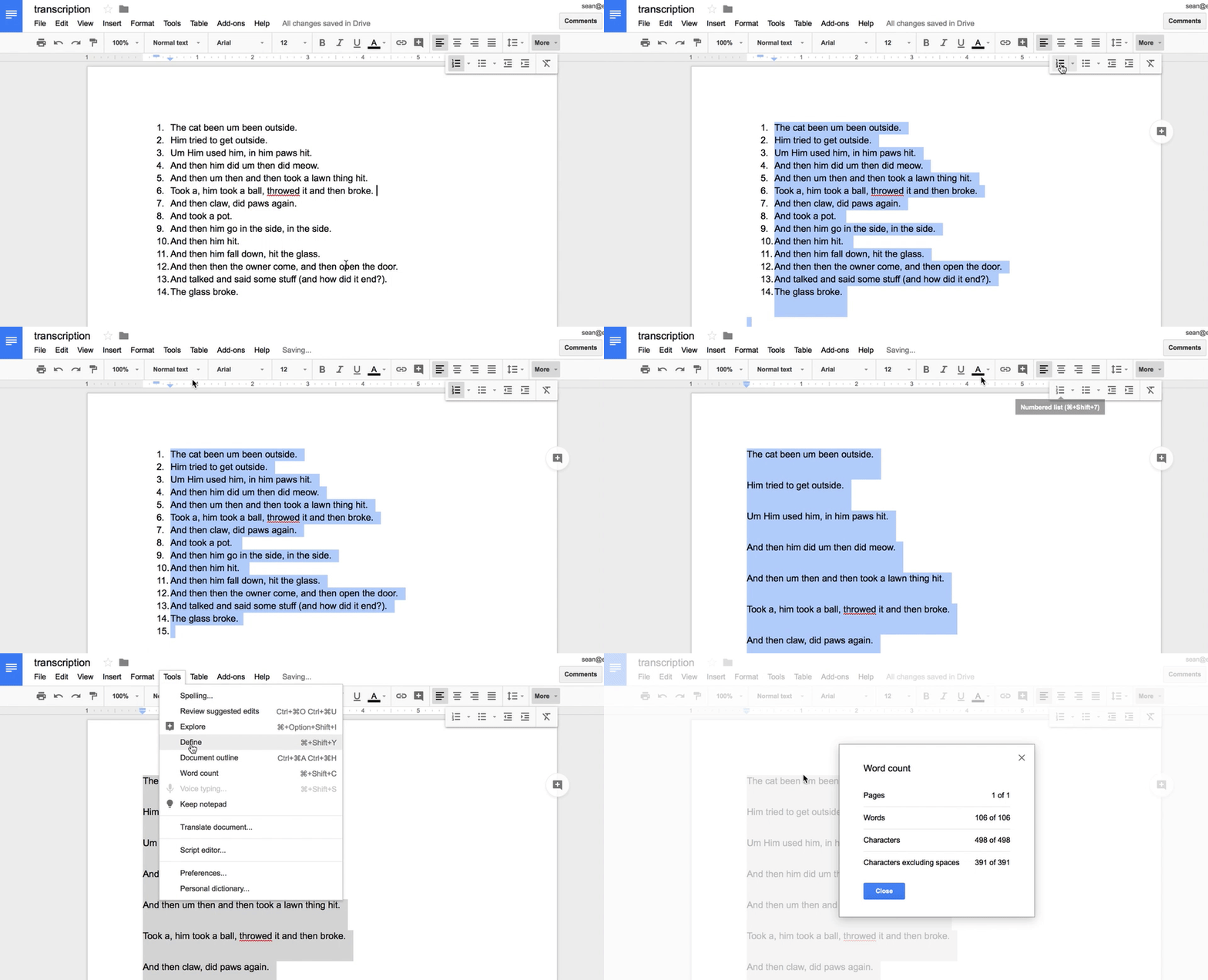
https://gyazo.com/f2722130b711e1875474a8f139c19817

An important read. If working with older students I also recommend Hadley's Language Sampling Protocols for Eliciting Text-Level Discourse and Heilmann and Malone's Rules of the Game.

Friday, January 27, 2017

Practice Following Directions with Scratch Jr.

I've mentioned before that following directions (written or oral) is an oft-needed but not so engaging goal to address. Scratch Jr. is a free app that, like its senior (mentioned here and here) was created to teach coding and programming to youngsters. These applications use object-oriented codes that are simple to put together and work a lot like LEGOs.

A great way to start with Scratch Jr., and one in which you'll instantly see the potential for working on following directions and sequencing, is to use the intro activities. For example, students need to follow a few steps to make a car drive across the screen--a surprisingly thrilling activity for the class in which I conducted this lesson. The developers give you a great quick guide if you want to learn your way around the app first.

This simple program makes the car drive across the screen.

After using Scratch Jr., you'll likely find all sorts of contexts for it. A first grade teacher I worked with had her students program how baby polar bears "trail" their mothers, thus integrating work in following directions, coding, and science concepts. The variety of backgrounds and characters suggests potential for storytelling work as well, and these can be drawn, leading to limitless contexts. Students can also be encouraged to use strategies such as re-verbalizing directions and visualizing as I discussed in this post.

You can also create direction sheets of your own with or without text by screenshotting steps and then assembling them in Pic Collage, as I did below. In making a math "game," I encouraged the students to verbally mediate the pictured steps as is important when approaching picture sequencing tasks.


Working on skills in this context, you'll also know you are helping to address technology standards and perhaps starting to prepare your students for a career in programming!

Friday, January 6, 2017

Developing Categories with Toca Life Apps

In a recent post for Mindwing Concepts, I described and demonstrated how the various contexts within the Toca Life apps, specifically Toca Life: Farm ($2.99, also available for other platforms), can be used to build narrative language skills. I have recently been using these versatile sandbox apps in other ways, including targeting category development. If you are working in the school setting, especially, working in context just makes sense. Doing so allows you to tie in with classroom topics (in this case, the basics of plant life cycles and animal biology) and sync with the topics of picture books. This practice is also supported by emerging research; Gillam & Gillam (2012) conducted a study that "revealed signs of efficacy in an intervention approach in which clinicians treated multiple linguistic targets using meaningful activities with high levels of topic continuity."

Toca Life: Farm includes scenes such as a field, barn, farmhouse and farm store, each containing movable items in a variety of basic and more abstract categories relevant to the context. Just a few I have noted and used include:

Field: fruit, vegetables, tools, containers, vehicles, ways to water plants
Barn: animals, tools, machines, cleaning items, containers for plants
Farmhouse: rooms, furniture, meats, grains, vegetables, fruit, spices/condiments, school supplies, personal care items appliances, clothing, musical instruments
Store: food categories, dry goods/refrigerated items, containers, as well as a fabulous machine that allows you to "make" products, e.g. items made from milk

Field Scene

Farm Store Scene with Machine

In context you can approach this to target both receptive and expressive categories with students:
"Can you gather 3 tools we need for planting?"
"I just had the girl sit on the chair, bed, and then couch. What category are all these in?"

Check out this and other Toca Life apps (see the Toca Boca website to start) to develop contextual storytelling and semantic skills.

Gillam, S.L., Gillam, R.B., & Reece, K. (2012). Language Outcomes of Contextualized and Decontextualized Language Intervention: Results of an Early Efficacy Study. Language, Speech, and Hearing Services in Schools, 43(3), 276-291.

Disclosure: author is a paid consultant for Mindwing Concepts, Inc to provide blog and presentation content.

Tuesday, August 9, 2016

What does an image lead to...?

I've always been a firm believer that all students benefit from visual supports--but providing images or other visuals provides a path to language. That's the V--Visual--in the FIVES Criteria.

An image leads to:

...understanding of a vocabulary word or concept.

...associations.

...expansion of categories.

...description.

...connections and narrative.

...causal, conditional, or other structural language forms.

...engagement!!!

(among others).

The above reasons are why I am constantly endorsing the use of the free, versatile and multiple-platform Pic Collage. This app hit a bump this past fall. The Web Search, which allows you to add photos to a thematic, contextual collage very quickly and in a co-creative process with students, lost its connection to Google (Web Search allows you to search for photos and add them from the app). The developers were communicative about it and made efforts to develop their own search tool, which gradually improved over the following months, but it was a tougher sell.

A few months ago, however, Pic Collage struck a partnership with Microsoft's search engine BING! So the results are back to being as good as they ever were.

Additionally, Web Search has JUST added "suggestions" which might help you in your in-the-moment creations with students. The suggestions are specific items within the category you would be searching for, or associations related to your search. How wonderfully language-enhancing!


Results and suggestions for "trees" and "national parks" depicted above. Tap on the suggestion to point your search in a specific direction and bring up new possible images to add to the collage (tap images, then the check mark in the upper right to add images to a collage).

This past year I was involved with a productive assistive technology and language consultation regarding a student who LOVED to be in all of his classes. He just needed support to participate verbally. My advice was focused on taking some of the language "out of the air" and giving the student more visual support as conversations and topics unfolded, Pic Collage being a key tool we discussed. For example, as his consumer education class discussed forms of payment, Pic Collage could be easily used to visualize cash, a credit and debit card, check, and cell phone.

For some of my previous posts on Pic Collage, look here, here and here.

Tuesday, August 2, 2016

Use the Summer Olympics as a Language Context with Fiete Sports


The apps featuring Fiete, a fun little German sailor, are simple but elegant, and just this week I discovered Fiete Sports, which was featured in Apple's Best New Apps (also take a look at Fiete Farm, which has an interesting interface promoting temporal concepts around farming activities). Fiete Sports (Free!) is a nice engaging activity to pair with current events news around the Rio Olympics (hopefully the press will turn a bit more positive) or picture books about sports or sportsmanship (Mia Hamm's Winner's Never Quit is a favorite of mine, see the book or YouTube reading). This app again features a visual, conversation-spurring interface as sporting events can be selected from an opening map filled with locations and international flags. The sporting events themselves are short, sweet, and simple, such as a swimming competition that is completed by tapping one's finger on the screen. The short nature of each activity will allow you to elicit language following each turn and allow others in the group to take a turn (a good example of how pacing within an app can be important).

Edit: I had previously discussed here whether four events were enough as I mistakenly reported the app was $2.99 (for me, it was enough), but the developer asked me to correct that (Thank you, Ahoiii!). They also informed me that they had added the shot put to the existing four events: cycling, running, hurdling, swimming. Do check out the app for its simple interactions with a rich context (ripe with concepts, verbs, comparatives, causals). Enjoy the opening ceremonies this week!


Use the Summer Olympics as a Language Context with Fiete Sports


The apps featuring Fiete, a fun little German sailor, are simple but elegant, and just this week I discovered Fiete Sports, which was featured in Apple's Best New Apps (also take a look at Fiete Farm, which has an interesting interface promoting temporal concepts around farming activities). Fiete Sports (Free!) is a nice engaging activity to pair with current events news around the Rio Olympics (hopefully the press will turn a bit more positive) or picture books about sports or sportsmanship (Mia Hamm's Winner's Never Quit is a favorite of mine, see the book or YouTube reading). This app again features a visual, conversation-spurring interface as sporting events can be selected from an opening map filled with locations and international flags. The sporting events themselves are short, sweet, and simple, such as a swimming competition that is completed by tapping one's finger on the screen. The short nature of each activity will allow you to elicit language following each turn and allow others in the group to take a turn (a good example of how pacing within an app can be important).

Edit: I had previously discussed here whether four events were enough as I mistakenly reported the app was $2.99 (for me, it was enough), but the developer asked me to correct that (Thank you, Ahoiii!). They also informed me that they had added the shot put to the existing four events: cycling, running, hurdling, swimming. Do check out the app for its simple interactions with a rich context (ripe with concepts, verbs, comparatives, causals). Enjoy the opening ceremonies this week!


Wednesday, July 6, 2016

Enter Vacation Mode with Toca Life: Vacation!

Toca Boca's "Life" series aims to reproduce real-world settings as a context for play with characters and the objects they encounter in indoor and outdoor places. As a result, the series provides a visual play space for us to work with students as they tell stories, make connections, and enact everyday sequences. The latest, Toca Life: Vacation, is another wonderful, visually rich, and highly interactive app you can use to take students on imaginary trips to this beach-y location.

The app contains a number of settings including an airport, hotel, beach, and boardwalk, the many spaces within each setting and interactive objects providing great opportunities to role-play, propose problems and solutions, and consider if-then scenarios (important for executive functioning!). The trailer is below:


Language Lens:
-Consider recommending Toca Life: Vacation to parents as an interactive way to preview an upcoming vacation, complete with the travails of navigating airport security, riding on a plane, checking into a hotel, and sharing a bed with a sibling.
-For your part, the record feature of this app lends potential planning and role-playing a bit more of a purpose: let's make a vacation movie together!
-I am just beginning to absorb the huge amount of ideas and resources for developing language and social interaction through play provided in Social Thinking®'s new We Thinkers: Volume 2 Social Problem Solvers Kit. The manual details a model for scaffolding play with fading adult involvement, and the "GPS- Group Collaboration, Play, and Problem Solving" framework can apply to the use of these open-ended sandbox apps as well as offline play. For example, the program's "Group Play Plan" form could be used for the adult to choose a scene and assign roles to form a story (Level 3) or for kids to collaborate in this process (Level 4). One good strategy is to screenshot a scene or two within Toca Life: Vacation to use as a visual support as you make a "Group Plan" for play.

I hope you have fun going on real or pretend vacations this summer. I'm going to take off for a few weeks myself, heading to Cape Cod and, later, Acadia National Park in Maine! See you in August!

Tuesday, June 21, 2016

Video Tutorial: Using Sketching Apps and Comic Creators for Comic Strip Conversations

In my recent column for ASHA Leader, Apps that Help Teach Social Perspective, I discussed the engagement and sharing factors of creating Comic Strip Conversations via iPad. First, on what Comic Strip Conversations are:

Another approach that expands clients’ narratives, if/then thinking and perspective-taking is Comic Strip Conversations, developed by Carol Gray. Comic Strip Conversations visualize social situations with simple sketches involving stick figures, situational elements, word and thought balloons, and color coding for different emotions and verbal behaviors. A comic strip can be developed to exemplify a five-point scale or for reviewing or previewing a relevant social situation.

And the tech tie-ins:

The sketching involved with Comic Strip Conversations is made at once easier, more engaging and colorful (no array of markers needed!), and sharable with apps such as Doodle Buddy (free for iOS) or Drawing Desk (free for Android). To make a conversation stretching across several pages, check out Paper (free for iOS), a sketching journal that also incorporates subtle effects to make your sketches look neater. All these apps allow you to add text for captioning, scripting and illuminating perspectives, as well as photos for additional context. For example, you can sketch over photo of an important location in your client’s daily life.

In this new video tutorial I demonstrate a quick how-to with Paper by 53 and the text-friendly Comics Head. You might choose one or the other based on what your context is!


Thursday, September 17, 2015

Toca Life Apps and Contextual Therapy

Following up on my last post on the "Toca Life" open-ended sandbox-style apps, I recently read a "Clinical Focus" article in American Journal of Speech-Language Pathology and thought it shed light on how these apps (and others) can be used in context in therapy. Fey, Long, & Feinstack (2003) sought to outline "Ten Principles of Grammar Facilitation for Children With Specific Language Impairments" with research tie-ins relevant to all ages, but particularly for ages 3-8. This is a great article for any SLP or language interventionist to read, but I wanted to present it with ideas related to the principles being used in context, in particular the features and content of the Toca Life Apps.

So, the principles and some ideas:

1. The basic goal of all grammatical interventions should be to help the child to achieve greater facility in the comprehension and use of syntax and morphology in the service of conversation, narration, exposition, and other textual genres in both written and oral modalities.

This principle asserts a general philosophy of intervention, but for me speaks to the kind of functional communication that can be elicited through conversation and play around an app such as Toca Life: City or Toca Life: Town, and the student's greater enjoyment of communication situations hopefully as a result of that intervention.

2. Grammatical form should rarely, if ever, be the only aspect of language and communication that is targeted in a language intervention program.

The authors assert that students with grammatical impairment rarely have this as their only communication problem, and that grammatical intervention alone does not always impact other areas of deficit. Toca Life apps allow for targeting of multiple goals including categorization (say, in the store or home), sentence formulation and storytelling in the context of the app.


Looking for a healthy meal, the man can lay out or collect different fruits and vegetables in the Toca Life: Town store.

3. Select intermediate goals in an effort to stimulate the child’s language acquisition processes rather than to teach specific language forms.

An example given in the article is the targeting of nominative case pronouns as a class rather than individually.


Have a party in the Toca Life: Town or City loft apartment to emphasize what I, you, we, and they are doing.

4. The specific goals of grammatical intervention must be based on the child’s “functional readiness” and need for the targeted forms.

i.e. Pick targets in the child's zone of proximal development that reflect a pragmatic need for their use in daily life.

5. Manipulate the social, physical, and linguistic context to create more frequent opportunities for grammatical targets.

6. Exploit different textual genres and the written modality to develop appropriate contexts for specific intervention targets.

This is where I think such apps provide a great tool. Of course we should manipulate low-tech contexts for language targets, but apps that have many open-ended contexts make this manipulation quite easy. AND they serve as a different "genre" to work from, along with picture books, one of my other favorite tools.


Toca Life: City has a world of contexts. Just think of all the action words that can come from a theatre!

More specifically regarding the manipulation of contexts, the authors indicate:

...making a peanut butter sandwich could be an excellent activity for a child working on negative forms. Instead of typical ingredients, however, the clinician might have on hand things like noodles, cheese, dog food, or even a pencil, as ingredients for the sandwich. Such unlikely choices will create opportunities for sentences like, “You can’t eat that,” “That wouldn’t taste good,” or “We don’t need noodles/cheese/hot dogs.” When the proper ingredients are used and the activity has been completed, recapping the entire process can create numerous obligatory contexts for the target forms in a very short time. 

Clinician: “We used/ate/needed peanut butter. We also used cheese.” 
Child: "No, we not use cheese.” 
Clinician:  “Right, we didn’t use cheese. What about dog food?”


Note that Toca Life: Town's cafe lets you complete "recipes" (see the wall or here). Silly items to prompt negative forms can be used from the cafe itself or brought in characters' hands from other locations.

7. Manipulate the discourse so that targeted features are rendered more salient in pragmatically felicitous contexts.

"The most straightforward way to increase the salience of grammatical intervention targets, especially grammatical morphemes, is to stress them by making them longer and louder and producing them with more dynamic pitch changes."


Don't put her IN the bed! She should be OUT of bed. 

The kids are playing cars BECAUSE it is fun.

8. Systematically contrast forms used by the child with more mature forms from the adult grammar, using sentence recasts.


Re: the above scene- 
Adult: What happened?
Child: The girl eat the cake.
Adult: Yes, the girl ate the green cake.

9. Avoid telegraphic speech, always presenting grammatical models in well-formed phrases and sentences.

10. Use elicited imitation to make target forms more salient and to give the child practice with phonological patterns that are difficult to access or produce.

#9 is a good reminder, and #10, noted as an "intrusive" practice for social interactionists, is described to be effective in situations where targeted forms are used pragmatically and contrastively, for example, prompting "Say, 'She will play the game,'" followed by "Say, 'She played the game,'" after the action is performed in the app.

As a context clinician (it's what makes it fun!), I really appreciated the authors' references and examples in this article. Check it out for more information.

Fey, M. E., Long, S. H., & Finestack, L. H. (2003). Ten Principles of Grammar Facilitation for Children With Specific Language Impairments. American Journal Of Speech-Language Pathology, 12(1), 3. http://doi.org/10.1044/1058-0360(2003/048)

Friday, September 11, 2015

Toca Life: City Adds Screen Recording

Toca Boca, long one of my favorite developers of contextual digital toys, has added a powerful feature to one of their already very useful apps- Toca Life: City ($2.99 for iPad). The Toca "Life" apps allow you to move characters around interactive environments; in this app, that includes a loft apartment, theatre, food park, hair salon and mall. Characters can pick up and interact with objects in each setting and even move from place to place with objects as you act out dramatic play sequences. These features in Toca Life: City have been enhanced with the addition of screen recording-- this captures the movement and records audio as you and students speak in order to create an animation. The animation can be immediately replayed, but also saved to the camera roll for later review or even sharing!


After rehearsing or storyboarding a "scene" with your students (further emphasizing your language and social targets), just tap the film icon in the upper left corner and begin recording.

Though the Toca: Life apps (see also Toca Life: Town) provide great opportunities to target play skills, cooperation and social cognition, and language targets such as sentence formulation, microstructures such as verbs and pronouns, as well as overall narrative, the screen recording feature can make this work more salient, with auditory feedback on student performance.

That this feature was added recently again underscores the importance of running and reviewing the contents of your app updates, which can be done in the App Store app Updates tab which provides text descriptions of changes within apps.
 
.