Showing posts with label concepts. Show all posts

Thursday, March 9, 2023

DALL-E, an AI image creation tool

Having been certified in Visualizing and Verbalizing® years ago, I've always found it an essential tool in my toolkit. Scaffolding students toward creating a mental image gestalt, guided by a schema of structure words that aid in descriptive details, is a process that has been useful across reading comprehension to conversation and even executive function (i.e picturing oneself performing a task).

These skills will continue to be important, but imagine if you have a tool that can combine a few elements and create an image you can see. That's a powerful bridge to this process! Also, I recently learned of aphantasia, which affects the ability to form mental imagery. Supporting other means of learning through visuals affirms this element of neurodiversity.

Check out DALL-E, another tool from Open AI, which allows you to enter a descriptive term to generate a range of corresponding images. DALL-E provides many examples which favor modes of art, for example, line drawings, digital art or watercolor, but you can also use fairly specific descriptors and vocabulary. A client for whom I identify vocabulary targets from his Pokemon interests, for example, is perfect for this kind of search using the words dual and region:


I'm sure SLPs can think of many more creative ways to use DALL-E, such as a series of images demonstrating basic concept words. If you have one, please let us know in the comments.

Thursday, November 17, 2022

You Are The Historian- First Thanksgiving

Museums appealing to children are often a great source of interactive websites. I liked this website years ago (see the blast from the past) and the now Plimoth-Pawtuxet Museum has redesigned it with a modern look and perspective. Pre-and a little post-Thanksgiving, you could bring some groups through this "adventure," the conceit being you are a teenage reporter investigating some Wampanoag and Pilgrim sites. I might be biased as a Massachusetts guy, but it's a nice site for students to practice discussing what they see in pictures, processing information, and there are some sequencing and word-fill interactives. There is a lot of content here and seemingly no way to save progress, but you could just visit a few of the sites or keep tabs open if you want to continue. 


Friday, November 11, 2022

Book Creator Templates (including Thanksgiving!)

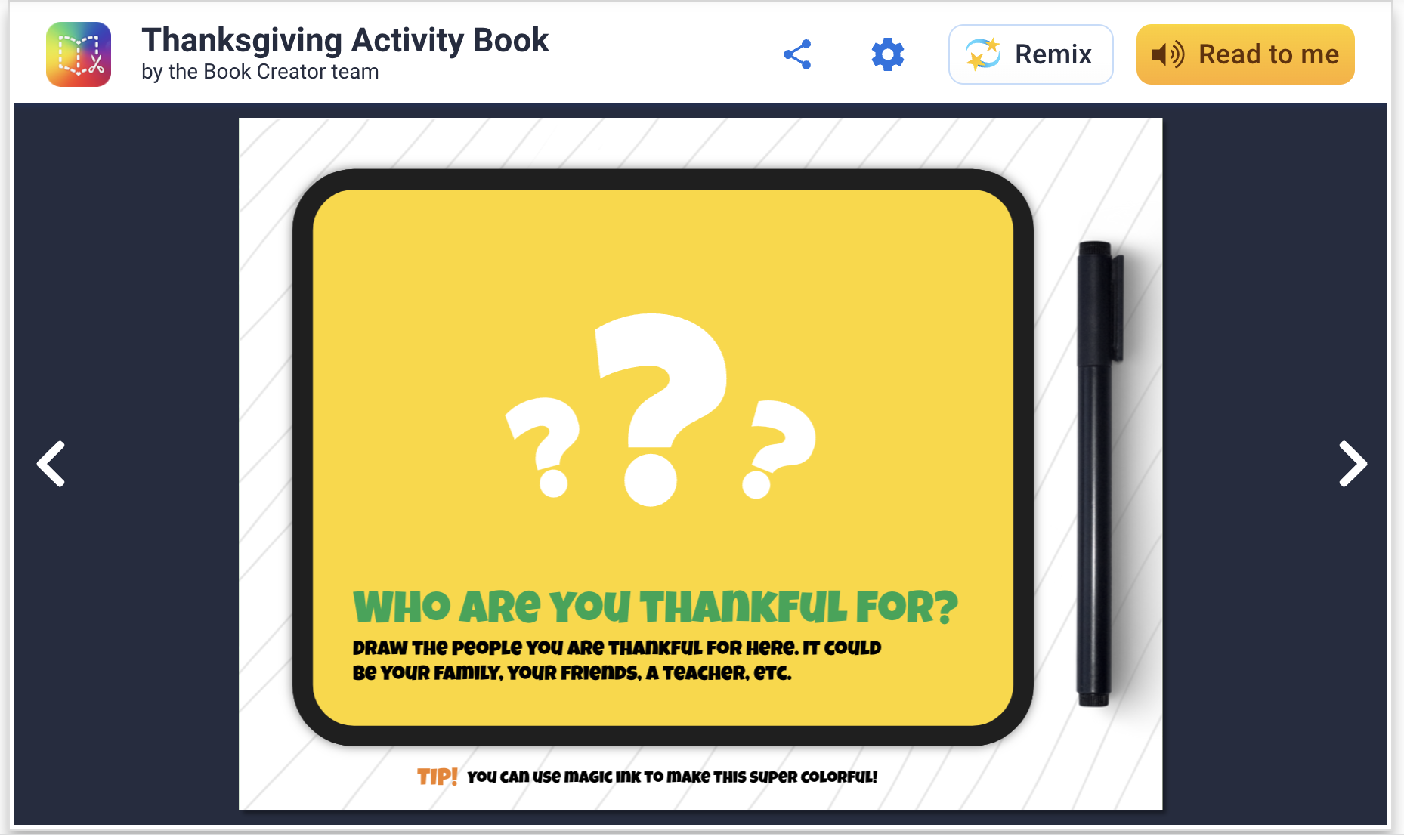
Book Creator has long been a stellar app/webtool and recently I discovered that they have templates to "remix." You can add templates to your app and do a collaborative work on your iPad among students, or if in a Chromebook environment your free account will allow you to share with students' Google accounts easily. This is an attractive option because, well, they are attractive and you don't have to design the book yourself. Richard Byrne describes the magic ink and autodraw features here.

These "activity books" are filled with language underpinnings like storytelling opportunities, semantic knowledge and vocabulary. You can easily copy and modify any page to cater to your students before starting the activity. For example, on this page below, you can zoom in on a map and have kids in the group find out where others live (generally) for spatial/academic/biographical knowledge of others. Additionally, with this template, gratitude is literally good for your brain to practice all year long.


Friday, June 24, 2022

Getting started with Minecraft

I described in a recent post coming to find some good uses for Minecraft with interested clients and groups. This previous post was about using Education Edition which not all have access to, so I wanted to make sure I described some applications for regular Minecraft. I first of all recommend getting started with the iPad edition, previously called Pocket Edition (there is also an Android tablet edition, both around $7 but then giving you everything you need). There is a lot to Minecraft that I don't even yet fathom but when you think of it as a digital LEGO set, that is a great place to start. Additionally one might add that there is evidence that involving LEGO in therapy improves communication and play skills, and these ideas can translate to Minecraft (I like good old LEGOs too). 

In this post I will briefly describe creating a world and getting started. This has been a great context in groups in the past weeks of simply deciding something to build, using visual supports to preview a "future picture" (see Sarah Ward/Kristen Jacobsen's work and just look up "make a simple ___ in Minecraft" on YouTube, e.g. a swimming pool). In the process group members work on fulfilling a group plan, adding thoughts and play moves in the app, and of course, flexibility and conversation. You can also use Minecraft in straightforward language stimulation activities as it could be used to foster description, concepts and following directions skills (you can even add signs in the world with text on them).

I keep it simple and do a play and pass situation with one iPad, but your kids could tell you there are ways to have people join a world from multiple devices. In our situation, mirroring the iPad to an Apple TV keeps everyone engaged when it isn't their turn. 

To get started, open the app and tap Play, and in the Worlds tab tap Create New. Name the world and change the game mode to Creative. Your students may balk and ask for Survival but I don't want them killing each other or being killed in the game. I wouldn't worry about all the settings but definitely scroll down and turn on Always Day so the screen doesn't maddeningly dim on you when it becomes "night" in your world. I learned that one the hard way. 

The arrows in the lower left allow you to move. Tap and drag your finger to "look around" and change your viewpoint. First step can be finding an open space to build something.


The diamond control on the right allows you to "fly" up or down as another navigation option. Note the bottom squares are your inventory of materials, and start out as empty. Tap the three dots to edit your inventory. 


Items with a + are actually a category of materials. Tap to expand e.g. the blocks. Find something you would like to add to the inventory, tap it, then a square at the bottom to add it.


From here, build! Change your view so you can see a target spot, tap to place a block. Make a mistake, long tap and that breaks (removes the block). It just takes a little practice. Maybe make yourself a summer retreat to start! 


Friday, May 13, 2022

Dino Tracker

Dino Tracker is a fictionalized interactive website that has been released as a promotion for Jurassic World Dominion, an upcoming film in the series. The premise of this film is that dinosaurs are no longer confined to Isla Nublar but living (and hunting) alongside humans. The purpose of the site is ostensibly to provide information to the public about "sightings" of various dinosaurs- the therapeutic potential in the site is scaffolding language around the locations (through a clickable Google-like map), the "descriptions" of the dinosaurs and cause-effect language of "Dos" and "Do Nots."


I was recently discussing with a colleague how high school students often have remaining difficulty with the geographic literacy aspects of continent-country-state or other division and how this connects to situational awareness and the ability to digest information about the world and current events. Browsing the world map provided could be an exciting (MS and HS students who can understand the artifice of the content) opportunity to review continents and some of the spatial strategies for recalling them, then moving down to more micro areas. The videos provided are a form of narrative and the "field report" expository text that can be mapped with graphic organizers, or used as a model to tell "same but different" creative item e.g. a report from another location.  Overall Dino Tracker represents how interactive websites designed for very different purposes can provide access to academic language- one strategy I like is to search for "interactive websites" and under tools set the time limit to the past month or week, you can find some gems.

Sunday, May 1, 2022

Simple visual engagement resources for youngsters

Whether doing tele- or in-person therapy, you should be aware of the cute, simple and useful resources of Dr.  Karen Fried at Oaklander training, such as the online sand tray and dollhouse interactive activities on the site (go to the tools and resources tab). There's apparently a whole approach to using these tools as psychological therapy with young children, but as a sort of stickerbook they have specific linguistic opportunities. Consider vocabulary, concepts, syntactic expansion, and storytelling!

Thursday, March 3, 2022

Globle can become a cooperative group game

I have been a longtime fan of maps as therapy tools. They promote spacial description skills, situational awareness and (literal) world knowledge, and can be used to link to narrative and expository language. 

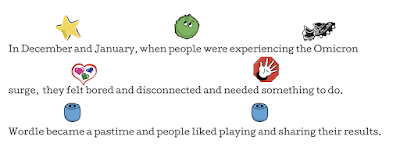
Let's start with Wordle though. A huge fad, one this Jeopadevotee has used to shore up his skills with the anagram category that didn't appear in his game...yeah, I am still in some kind of transitional phase. Anyway, I am not sure it is such a great therapy tool unless it is paired with a visual support such as searching for words with various forms (see same but different below), but it kind of has a story. Here related in Story Grammar Marker® icons:

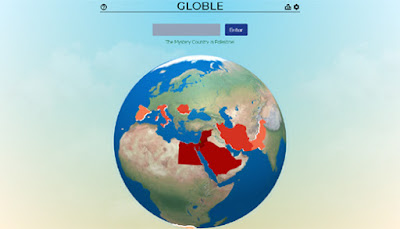
There have been many spin-offs of Wordle including one in IPA that SLPS would love, and Globle is one in which you guess the "country of the day." As mentioned above, for students working on building this knowledge, it's great to have a tab open for reference and research to help them make educated guesses. As I described to families of students I played with this week, "In a cooperative way we enjoyed an introduction to the game Globle, a variation on Wordle where we guess countries, get color coded clues back, and zero in on the day's target, therefore using thinking with the eyes, following the plan, and adding connected thoughts based on the info that we were receiving. The boys figured out Portugal quickly by building off each others' clues!"


Friday, October 1, 2021

Consider This: Classtools.net

The V in the FIVES criteria is for Visual! Visual supports are a simple Evidence Based Practice- give students something to explore with their eyes and you can tap:

-description/main idea
-vocabulary
-narrative language and complex sentence formulation
-social/situational awareness
-their interests/humor!

Classtools.net is an oldie but goodie, and has been around forever. In addition to its classroom tools such as Random Name Picker, a simple Soundboard and such, there are many visual activities you can use to create an "opener" or have students create something themselves. This may be particularly useful for older students.

Consider These:

Twister: create a "tweet" from any character, tap main idea, perspective taking, sentence formulation

Image Labelling Tool: upload an image and create text "hotspots" for part/whole thinking, abstract or advanced categories, description

Breaking News and Headline Generators: main idea of a narrative or expository topic, with humor!

Image Reveal: Gameify "Thinking with the eyes"


Interested in professional development for your department, school, or organization? Sean is booking in-person or remote trainings for the 2021-2022 school year


Friday, April 30, 2021

Elinor Wonders Why (PBS Kids)

The PBS Kids activities corresponding with the series Elinor Wonders Why provide a number of language targets and are another example of modern web design (i.e. not flash-based). I also like activities with outdoor themes that you can couple with small "field trips" of your own if working in-person. These are now added to the PBS Kids task-analysis spreadsheet.

Curious Campout- good narrative play, like a mini "Toca Life." Click to interact with objects e.g. to set up the tents or put wood on the fire.


Hide and Seek- for one or two players (one covers eyes), hide 4 characters across a wooded area and take turns finding them. Good for spatial concepts and causals, as players are more hidden with clothes colors that camouflage them. 

Two more are added to the linked spreadsheet above!

Friday, March 19, 2021

Clifford- A Dog's Life Activity

You may have noticed that the Flashpocalypse occurred at the beginning of 2021. Flash was long fated to disappear eventually and a number of your favorite websites or interactives would have become inaccessible after December 2020 as web browsers stopped supporting Flash. This happens, and is part of the life cycle of technology. We grieve and move on. PBS Kids, however, is generally cleaned up enough that you aren't going to run into disappointments as you search for interactive activities. I have been working to update a spreadsheet developed by Waldo County General Hospital in Maine, the folks there you may know as longtime collaborators of mine and telepractice mavens! 

The original spreadsheet was presented some years ago by Nathan Curtis in a session we did that many viewed at the beginning of the COVID emergency under ASHA's free Learning Pass. As I mentioned I am working to update it but that work is in progress (some links may not work). Please do not request permission for the spreadsheet, you can make a copy or download if you wish but that would not reflect the updates I plan to make. Click here to view PBS Kids resources spreadsheet.

Let's take Clifford- A Dog's Life, a game that has 4 parts. Emily Anne greets us and asks us to take care of Clifford awhile (character, setting, initiating event...). There are four activities we can engage Clifford (and our students) with including playing fetch and washing him. Looking at the language contexts for Fetch, it's a beach setting we can observe and describe, and we can throw different objects (function talk) near or far. Sometimes something cool happens besides Clifford retrieving the object, such as a crab catching it (WH-questions). The bath activity has neighborhood helper characters and spatial concept contexts such as needing to go high/low/left/right to rinse Clifford!

I'm all about the Pairing Picture Books with Apps/Interactives thing, so see this resource from Mindwing Concepts detailing how Clifford's books can be used for story grammar!

Thursday, October 22, 2020

Google Earth's Spooky Spots Quiz

You know I am a Google Earth Geek. Always have been, but in this time it is nice to be able to use the context of "going someplace" to engage my students. Google Earth's quizzes (find in the Explorer captain wheel tab) provide very structured experiences with the interactive globe, posing questions, providing images that prompt observation and discussion, and popping you into an interactive window to "look around." With Halloween coming, you can use the Spooky Spots quiz through nine multiple choice questions (it doesn't matter if you or your students know the answers) bringing you to spots around the globe. The content is free of violence but mentions "The Shining" and "Rosemary's Baby" so probably best for 5th grade or above. As each question is posed, unlabeled placemarks would allow you to ask students to observe potential locations (e.g. "that one looks like its Colorado."). Once answered, you can use the interactive window on the left to navigate the space (oooh an abandoned amusement park near Chernobyl) and work on description and conversation. You may be interested in asking group members to get more information on one of the topics and report back to the group (Wikipedia is fine for general knowledge!). 


Friday, October 2, 2020

Full Moon

October has two full moons, including the current one! Full Moon is a good example of the kind of game adaptable to therapy given a task analysis.


In this game you navigate a bunny through various levels to get what he wants. In the above level, to get the apple, you have to infer that you need to click on the light bulbs, discover that the middle one turns all the bulbs off, illuminate the apple (in the right tree) and click the apple to drop it to the bunny.

This game prompts:

-use of remote cursor control, or perhaps not (might be better if students have to tell you what to do)

-spacial concepts

-cause and effect reasoning

-observation, collaborating and conversation

It is untimed so you can move at any pace you wish. Plus it has thought balloons which I love in any context as a social cognitive symbol! Here's a walkthrough (always useful if you are going to use games in therapy).

Tuesday, June 23, 2020

GIFs- simple animations

In a terrific recent PD I watched, Rachel Madel made a great point: why use static photos or drawings to demonstrate verbs, when we have GIFs. GIFs (arguably pronounced with a soft "g" or like the peanut butter) are a format that shows photos or cartoons as a short looping video. Like this:


The weather today in Boston got me like...

As Rachel said, GIFs can be great for verbs but also:
-emotions
-basic narratives
-sentence formulation
-connection to curriculum
-concepts
-figurative language
-are simple stimuli that don't require much sustained attention
-and not least of all, are cool.

GIFs live best in Google Slides, which would give you a place to put them in a flow of context, and you can place them next to typeable space for formulating and visually supporting language.

GIPHY is a great place to get GIFs. To put one in Slides, search for what you would like, select it and click through to it. Click Copy Link and copy the FULL link. Back in Google Slides Insert>Image> By URL. Click to select the image and click INSERT.

Tuesday, June 16, 2020

Myvocabulary.com

Myvocabulary.com is a great source of contextual vocabulary lists. I found it recently when looking for lists like those contained in the terrific WWP-Vocabulary app. Working with vocabulary is a great way to aim for contextual therapy. From MyVocabulary, I have been using an A-Z list related to travel, an area of interest for my student. Go to the general interest area on this page to find similar thematic lists.

Research suggests that vocabulary depth, or ability to make connections between words and concepts in context, can be targeted with multiple exposures, providing explicit meanings, practice forming categories/taxonomies, as well as book reading and “playful” activities (Hadley, Dickinson, Hirsch-Pasek, & Golinkoff, 2018). Bringing Words To Life breaks these techniques down with many engaging activities that are great for verbal exchanges in teletherapy. These can include:

-Word Associations: which word goes with far? Abroad or Aquatic? Why?
-Have you ever? Describe a time when you went somewhere aquatic.
-Applause, Applause! How much would you like to have an adventure? To stay in lodging that has atmosphere?
Which would…?/Examples: Which would be abroad: Disney World or Spain?
Making Choices: If any of the things I say might be examples of affordable, say “affordable”- if not, don’t say anything
Relating words in sentences: How does a host show hospitality?

It's very easy to support these activities visually as-you-go with Google Slides (Insert-Image-From the Web).

Monday, June 1, 2020

Mr. Nussbaum's Learning Fun

Mr. Nussbaum's Learning + Fun is a collection of interactives that could be used to develop many language underpinnings (e.g. descriptive skills with the EET). For example this section of science games offers many opportunities. Some require a subscription (offered currently at a discount) but many are offered for free. Check it out- I'm adding to the Teletherapy Resources List.


Tuesday, May 26, 2020

A Model Lesson About Re-openings

I recorded this for a client who can not attend a makeup session offered for the holiday Monday, but thought it was also worth sharing here. As I watched our governor in MA announce the four phase reopening plan last week, I thought how it might be some important information to discuss in my social groups for a number of reasons:
-all students will need to utilize strong situational awareness in the community as we go forward, being aware of the restrictions and visual markers for social distancing etc.
-This plan is essentially a Five Point Scale and involves a lot of nuances, understanding why one phase is same but different (vocabulary from Sarah Ward and Kristen Jacobsen)  from the previous and future phase etc, as well as many IF/THENs
-Any lesson about time is also an executive function lesson.
-and so on...

I did discuss this plan with parents beforehand, emphasizing that:
-I am encouraging students to initiate conversations with them about the pandemic and what restrictions mean within their family.
-Just because something is open or now "allowed" does not necessarily mean every family is going to go forward with that- also a lesson in perspective taking.

And naturally, I did not present this activity as in the video below, there has been a lot more "stop and discuss" e.g. before moving to the next category having students predict what falls in each phase.


Resources shown in this video/following up:
-Fair Play read aloud (skip the odd opening first 50 seconds)- this book was recommended by Michelle Garcia Winner in her book Thinking About You, Thinking About Me for the lesson about JustMe thinking, but is also a great establisher of the main idea connections between government and social cognition
-Reopening Massachusetts visuals (if you're in MA, or you can do a same but different lesson)
-A Kahoot for students to play with what they learned. Again, you can make a same but different one if not in MA.

Video model lesson


Monday, May 11, 2020

E-Learning For Kids interactive website

I just stumbled across the website E-Learning for Kids- it has tons of content applicable for a number of levels and in various subjects. You may gravitate toward Language Arts, but note that the other topics have content for teaching many language underpinnings (e.g. concepts in the Math activities, description in the Science activities. The lessons here would be good for screen sharing and having students verbalize choices, or with cursor control, and have engaging animations. I am adding E-Learning for Kids to the Teletherapy Resource List.


This activity in the Science area is about describing and categorizing based on smell (lots of 5 Senses activities in Science here). I also like that the Science area has theme related to places around the world.

Friday, April 24, 2020

Creating a make-a-scene in Google Slides

Make-a-scenes are like Colorforms, for people who remember those. They present a setting, and allow for choices of elements to put in the setting. They therefore can work on thematic vocabulary, categories, syntax such as verbs, present progressive or causals, or on several levels of narrative- descriptive if choices are just items in a setting, action sequence if actions, or reaction sequence if more initiating events/problems.

Pic Collage has always been my go to for this, but if you want to involve some simple interaction in a teletherapy session, try with Google Slides. Even if you are using Google Hangouts Meet you have the potential to share the Google Slide file with the student so they can choose elements.

Here's a short video showing some tricks on creating a Make-a-scene in Google Slides. Have a good, safe, and as-positive-as-possible weekend.

Wednesday, April 22, 2020

Repost: Geoguessr works well for group conversations/collaboration/inference in teletherapy

Reposting this one from January 2019 as in the context of readers needing resources for distance learning and teletherapy. Geoguessr lets you play one "game" a day for free.

Geoguessr is a web-based game that plops you into an unknown place so that you can attempt to guess where you are. The game incorporates Google Street View and allows you to "drive" around by clicking the arrows; you can also click and drag on the screen to take a "look" at the surroundings.


Students then use a map interface to zoom in on a continent and country and make a guess. The game then reveals the location and how far off you were in terms of miles.

This game can be used to work on academic language and a number of other skills:
-recognizing geographic features, continents and countries
-distance concepts and measurement
-"thinking with the eyes" (looking for clues ala Social Thinking®)
-pretending together via taking roles in "driving" (in teletherapy, have participants tell you how to move while using screen sharing)
-persistence and self-talk

Many locations don't feature a ton of context so it is helpful to find a sign, look at the landscape, where cars are driving and perhaps use a web search to get some information about where one might be.

A participant at a workshop asked today if you can restrict yourself to say, the USA or important landmarks. No, but that gave me an idea. This game uses Google Street View which is accessible via Google Earth (via Chrome browser or the iPad app, just click on the little person icon and drag onto the map). You can certainly structure your own version of the game by placing students in Street View into a location that is more contextual or near a landmark, and instructing them that they can only use the arrows to figure out where they are!

Thursday, April 16, 2020

TinyBop Schools' Interactive Models

I have long been a fan of the TinyBop interactive apps for iPad. These smartly designed visualizations of "systems" are fun to use, linked to important curriculum topics, and language-neutral, so lots of talk can come out of them. They have ported them to web form as TinyBop Schools and made them free for the next several months, so I would highly recommend checking them out. In teletherapy these would provide for great interactions especially if you are sharing cursor (remote) control


Each model comes with a handbook. These are important to explore because the TinyBop models are so language-neutral that sometimes you don't know what they can do! The models also have journal and graphic organizer activities that are ideal for language therapy. 
 
.