Showing posts with label upper elementary. Show all posts

Friday, October 15, 2021

Consider This: Civics!

Consider This has mostly been an exploration of resources used a bunch of different ways, but we also can consider how different curriculum topics can be used to target many speech and language and social communication objectives (and in this case, some resources that go with this idea). Speech and language pathologists can wrap interventions in contexts; check out this recent study, one that I'd like to describe in detail at some point, on science and Tier 2 vocabulary.

I think of civics as important world and social knowledge. Though it's unlikely to fix everything, we could do worse than helping students understand how government and laws work. Within civics contexts, there's much opportunity to target narrative, expository language, reading comprehension, vocabulary, and sentence formulation.

Years ago, Social Thinking® recommended Munro Leaf's (quite old) picture book Fair Play, which in its opening pages explores social norms in terms of moving from why we don't all get to do everything we want to do to why we have government. There are also several vignettes about a character he calls JustMe who behaves without considering others's needs that Social Thinking® formulated into a concept around JustMe vs Thinking about Others. We want to handle this topic with nuance and acknowledgement that everyone has JustMe "moments" to model the concept carefully, of course. The book is hard to find, but there is a read aloud version below. Skip the weird intro, consider handling the JustMe vignettes with further nuance, e.g. what the kids could have done to help JustMe be part of the group, and avoid the latter parts which are just way too harsh! I have generally used just up to about 4:30


In a much more straightforward way, iCivics remains a very useful tool. Sign in as a teacher and you can access lesson plans, worksheets, and of course the interactive games (varying in length, so explore) which can open up great expository conversations and vocabulary development. Sign-in also allows you to save games and pick up in later sessions. Recently I used Cast Your Vote with some students to explore the local election process and vocabulary like infrastructure, juvenile, enrollment, and minimum wage


Fablevision's Civics! An American Musical (free with signup) will delight fans of Hamilton and engages students in civics topics while targeting comprehension of primary sources. The language underpinnings, however, include situational interpretation of pictures and comprehension of texts. The game contains multiple paths you can return and reroute to (e.g. making a few musicals about a few different topics, if you have a group that gets into it), and again, saves your progress.


Civics topics are also great to explore with very simple resources such as newsela!

Interested in professional development for your department, school, or organization? Sean is booking in-person or remote trainings for the 2021-2022 school year

Friday, April 2, 2021

Not Going Anywhere? You can still go places!

"Virtual field trips" can generate a lot of language and conversation. From spatial concepts about the globe to descriptive setting narrative work, providing a visual of a location can be a fun contextual experience.

Google Earth is of course a great resource for all of this, but if you'd like more of a guided tour, here are a few resources for you.

CityWalks walks you through the streets of international cities. You can choose to view the city pre-COVID to be less depressing! City Sounds are available on the walk, so you truly feel like you are there.

Drive and Listen provides a driving tour of global locations. You can speed up the car to go faster and the "listen" part allows you to listen to local radio stations!


With both, you can call for some mindful listening and discussion of what everyone hears on their "tour," and pair with other resources to learn more about the city. Being easily navigable websites, both are nice options for teletherapy. I will add these to the Teletherapy Resource List!

Thursday, October 22, 2020

Google Earth's Spooky Spots Quiz

You know I am a Google Earth Geek. Always have been, but in this time it is nice to be able to use the context of "going someplace" to engage my students. Google Earth's quizzes (find in the Explorer captain wheel tab) provide very structured experiences with the interactive globe, posing questions, providing images that prompt observation and discussion, and popping you into an interactive window to "look around." With Halloween coming, you can use the Spooky Spots quiz through nine multiple choice questions (it doesn't matter if you or your students know the answers) bringing you to spots around the globe. The content is free of violence but mentions "The Shining" and "Rosemary's Baby" so probably best for 5th grade or above. As each question is posed, unlabeled placemarks would allow you to ask students to observe potential locations (e.g. "that one looks like its Colorado."). Once answered, you can use the interactive window on the left to navigate the space (oooh an abandoned amusement park near Chernobyl) and work on description and conversation. You may be interested in asking group members to get more information on one of the topics and report back to the group (Wikipedia is fine for general knowledge!). 


Thursday, April 16, 2020

TinyBop Schools' Interactive Models

I have long been a fan of the TinyBop interactive apps for iPad. These smartly designed visualizations of "systems" are fun to use, linked to important curriculum topics, and language-neutral, so lots of talk can come out of them. They have ported them to web form as TinyBop Schools and made them free for the next several months, so I would highly recommend checking them out. In teletherapy these would provide for great interactions especially if you are sharing cursor (remote) control


Each model comes with a handbook. These are important to explore because the TinyBop models are so language-neutral that sometimes you don't know what they can do! The models also have journal and graphic organizer activities that are ideal for language therapy. 

Thursday, January 2, 2020

A good app to take self-data

Streaks is an award-winning app (Apple Design Awards) that allows you to keep track of up to 12 good habits/intentions and simply mark on the calendar when you have completed the task (e.g. read for 15 min). The app is designed for the "don't break the chain" concept, but you can indicate how often you intend the habit to be completed so that you still construct a streak.


This type of app would be helpful for us as clinicians who need to practice self-care routines in the New Year (decade). It also would be a tool for use with older clients who may need to practice speech exercises or positive social/language activities.

The same principles could be enacted using Google Calendar as a (free) data-taking tool; the benefits here would include the ability to add more text/data for tracking.


Happy New Year!

Considering your professional development schedule? Check out Sean's offerings for training sessions.

Thursday, September 19, 2019

Get on a Roll this Year (Part 4)

There's of course a difference between "helping students with homework" and working in context, and that's as Barbara Ehren calls it, "maintaining a therapeutic focus." Text mapping, or teaching expository text structures, is one tool that we can teach students in almost any context. Graphic organizers are most helpful as a visual tool in text mapping, and are generally more helpful when a) more than just beginning-middle-end or main idea-details boxes (research supports this too) and b) consistent, using graphic organizers or helping students create them with a similar look, feel and structure.

For some more background information on this, I recommend Text Comprehension: Graphic Organizers to the Rescue and Expository Discourse Intervention for Adolescents With Language Disorders available on the ASHA Website.

Kidspiration and Inspiration for iPad remain my favorite apps for teaching the structure of any contextual block of language, whether that be a BrainPop video, a student or group's reading assignment, or a classroom topic reviewed more generally.

Both of these apps are free to try (for 5 activities). Kidspiration has the advantage of allowing for contextual basic or abstract categorization (sorting) with their Super Grouper mode, essentially also targeting the expository text structure of list or enumeration.


One strategy I have used is to look for expository categories in a narrative picture book e.g. "things on a beach" or "weather conditions." That way the picture book or other context can be used for retelling/summarizing as well as the categorization/semantic skills.

Take Scaredy Squirrel has a Birthday Party, available on EPIC! Books for Kids. You can create a Super Grouper Activity about two of the relevant contextual categories. Students can sort and write or audio record (tap the symbol, then the microphone) a "why" or association for each of the items.


These apps also allow you to make "diagrams" such as lists, sequences, cause-effect maps or story maps. You can move the bubbles around so you don't get stuck always making a "web," which really only corresponds to description. Look to Story Grammar Marker®/Thememaker®, Thinking Maps and BrainFrames for consistent structures you can translate. 

I've written before about the use of Google Drawings to do similar work with graphic organizers. For a wealth of examples you can copy right into your Google Drive and use, see Matt Miller's terrific collection on Ditch That Textbook (an edtech blog I am excited to have just found).

Considering your professional development schedule this year? Check out Sean's offerings for training sessions.

Thursday, March 23, 2017

Target spatial concepts, description, narrative with Google MyMaps

Google Earth has always been a great, though not exactly user-friendly, tool for making maps that can target language. Consider the way that certain novels your students have to tackle require an understanding of setting and shifts in setting. Or their 4th grade year and the focus on places they have never been, like 50 States and National Parks. A "virtual field trip" can be great for giving them some experiential hooks on which to hang all this narrative and expository language. The problem with Google Earth was always the saving and movement of files as well as the addition of content such as images, which actually required some HTML coding. Ick.

Now, your Google Account has these tools right in Drive, through a tool called MyMaps. From Drive (you need to use a more full featured web browser for this like on a laptop or Chromebook), select New, then More, and you will see MyMaps there. You can also just go to MyMaps. If you are accessing your education account and you don't see it there, contact your IT support person and ask to have it turned on (I turned it on for a school I consult with, quite easily through the administrator panel). With just a few clicks, MyMaps allows you to:
-Create a personalized map or tour
-Add placemarks for each important location, either on a macro level (across a wide geographic area) or micro, such as a neighborhood or park
-Name your placemarks and write a description
-Add a photo to the placemark. This is my favorite feature because you can do so from a Google Search, instantly creating a visual support.
-Embed YouTube clips related to the location, making your map more experiential
-Because this is all done in Drive, saving is automatic and collaboration features (sharing and editing between users) are also available.

Here's a nice tutorial to give you some more info:


Check out Google MyMaps and consider making a map for or with your students- it's also a great telepractice tool!

Thursday, January 9, 2014

Cloudart

Wordle has long been hailed as a great visual way to work with language. Text or a web address (URL) can be pasted into this tool and then a word "cloud" is displayed, with emphasis on more frequently used words. In this way, the tool can be used with any digital text passage or content related website, and the visual that results can be used to develop vocabulary and skills of identifying main idea.

Worldle is not iPad-friendly due to its basis in Java, but Cloudart ($.99) is a great translation of this tool to the iPad platform.


Cloudart has a very simple interface, but with many features that make it useful! Simply copy a block of text via Safari or perhaps from an electronic book in iBooks (many samples of novels commonly used in educational settings are free), or a text-based URL (e.g. the Wikipedia article on any academic topic), and the app will generate your cloud. You can then customize it visually, and even tap to remove or change the emphasis of irrelevant/key words. The cloud can be saved as an image to the camera roll or emailed. 

Common Core Connection:
CCSS.ELA-Literacy.RL.5.2 Determine a theme of a story, drama, or poem from details in the text, including how characters in a story or drama respond to challenges or how the speaker in a poem reflects upon a topic; summarize the text.
CCSS.ELA-Literacy.RI.5.2 Determine two or more main ideas of a text and explain how they are supported by key details; summarize the text.
CCSS.ELA-Literacy.RI.5.4 Determine the meaning of general academic and domain-specific words and phrases in a text relevant to a grade 5 topic or subject area.

Wednesday, October 23, 2013

Take Students on a Scientific Walk in the Woods

Thankfully the Smithsonian is now reopened after the government shutdown, but their Walk in the Forest interactive website never closed! This site (Flash-based, so iPad-unfriendly) allows you to take older elementary, middle or high school students on "walks" that serve as scientific investigations. In the process, you can connect the topics of trees and habitats (relevant at many grade levels) to language aspects such as causality and language schema. For example, the first walk has students testing soil texture and pH (schema for describing soil besides color) and linking this to the type of tree that could grow there. This is a perfect website for you to construct graphic organizers for students to use as tracking sheets during use, to help them visually connect the ideas involved. This website would be great to use in conjunction with the app Leafsnap, a visual field guide to trees that can serve as stimuli for descriptive language.


Happy walking!


Thursday, February 16, 2012

Animonths: DoInk, Food for Thought

If you were intrigued by my post on Scratch yesterday, but have committed to being an iPad-only kind of person, I mentioned there was an analogue app.  Now, don't get me wrong, neither Scratch nor DoInk, the subject of this post, are really simple tools.  They are in the realm of object-oriented programming and vector animation, respectively, so I wouldn't recommend them unless you are comfortable stretching your techie boundaries. That said, Scratch's instruction cards make it pretty accessible. DoInk is a bit of a different matter, but I thought I would point it out and maybe over the coming months, those interested can share their experiences.

DoInk ($4.99) is an animation creation app that allows you to create basic flip book-like or more complex compositions.  You can draw your own objects, use a shape menu and import items from an online library.  Let's first look at what is possible with DoInk:


Interested? I think that video does a good job of establishing DoInk as a viable tool when viewed through a Language Lens to use animation to develop vocabulary, concepts, storytelling and exposition skills, and all the social interaction that would be involved when creating a project with a group.

DoInk provides two pretty clear tutorials on how to get started:


I do wish DoInk would come out with the kind of simple step-by step resources provided by Scratch's "Cards," but I DoThink it is worth exploring.  Let me know your thoughts, I'll be trying it out with some kids to target their classroom vocabulary lists.

Tuesday, December 20, 2011

Blog Awareness Month: Zite Personalized Magazine

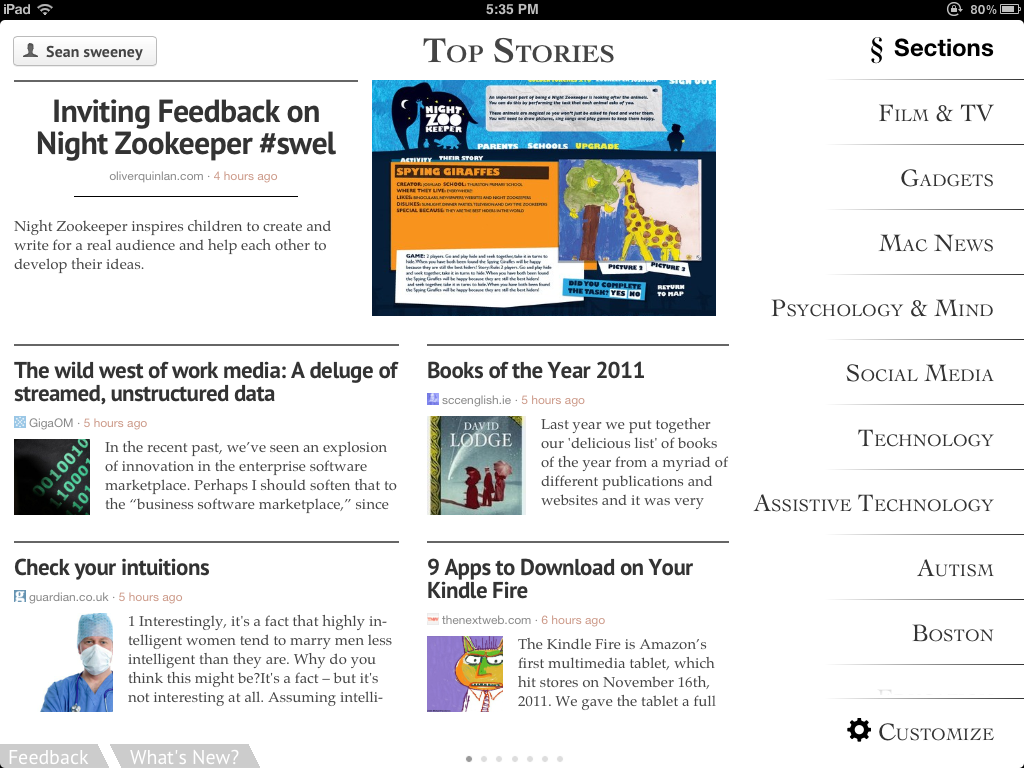
All month I have been singing the praises of blogs as a route to professional development and therapy planning, and I am ending with a bit of a twist- Zite Personalized Magazine (Free, iPad only for now) an app that allows you to subscribe not to blogs but to topics. Select topics of interest and Zite will pull in posts from various news sources (including blogs) that correspond with your selections.  Here's my Zite home page:


Zite works somewhat like music app Pandora in that you can then further customize your feeds by giving a thumbs-up or -down to articles that appear or request more from the author, source, or subtopic.  It is easy to share articles by email or send to Twitter, Facebook or other services, making Zite a great tool for participating in your Personal Learning and Sharing Network.


Zite is somewhat more of a leisurely experience than using Google Reader as you don't have a number of unread posts to contend with; just read what you want! Because Zite allows you to set up multiple profiles within the app, it could also be a tool for helping older students do research or explore topics of interest and work on comprehension and language strategies.

This will be my last post until 2012- hope you all have a wonderful holiday season and Happy New Year!!

Monday, September 12, 2011

First World Problems

The beginning of the school year is a great time to talk about essential concepts around being part of a group(see the Social Thinking® approach)- whether that group be a pull-out or private social skills group, or an entire classroom.  One of my favorite resources in this regard are the opening lessons of Think Social!, the character of GlassMan (for younger students) and The Incredible 5-Point Scale.  Through discussion and rating of a variety of problems, students can learn to respond in an expected way to things that come up in group settings!

I recently stumbled upon the First World Problems Rap on YouTube, a funny, visual, and kid-relatable context for opening and continuing a lesson on evaluating problems.


Be sure to check out my strategies regarding using YouTube at school (even if it is blocked)

Also, click through to see a printable Incredible 5-point Scale of Problems and info on how it can be used to build narrative language in conjunction with the SGM.

In the meantime, please forgive my less-frequent posting as I am dealing with my own #firstworldproblem: a WiFi issue at home, hopefully to be resolved today. The Horror!

Monday, August 22, 2011

Planet Orange

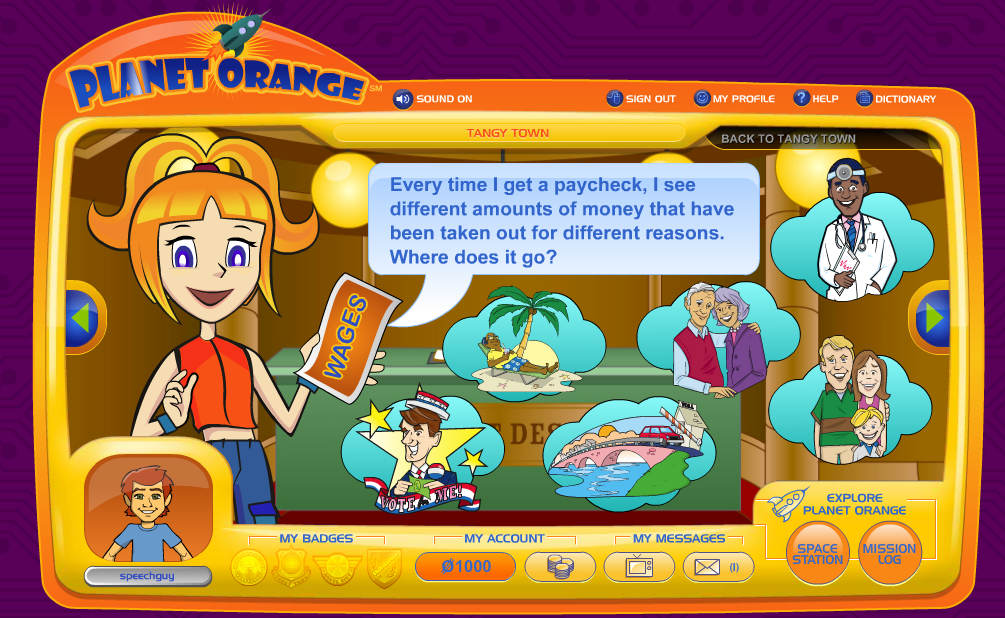
Planet Orange is a robust interactive site from ING investing company that teaches kids about money.  After a quick free registration, you can guide kids to complete missions on 4 different "continents" in order to earn  "OBucks." Because you have registered, you can save your progress within a group session and return to continue the activities. The site is fun, simple, and practical, and besides all of that, I really like orange.

Planet Orange offers highly visual stopping points and audio narration.

What could be more practical and real-world than teaching kids to budget?
Language Lens:
-The site would align well with math and social studies units around money and economics (perhaps those economics standards that teachers never have the time to really get to?) and help kids develop world knowledge.
-The categorical and sequential nature of the missions provides much opportunity to develop semantic and organizational skills, and causality and conditional forms could be emphasized throughout each activity.
-As an extension, you could devise missions of your own around the school to earn further Obucks and practice communication skills in a fun context.

Thank you to Free Tech for Teachers for featuring this site.

Wednesday, August 10, 2011

B-Movie TV

B-Movie TV is a fun site that features clips from old, silly American commercials and films that are overdubbed in another language.  You can type in subtitles narrating or dialoging the scene, and can also choose to use text-to-speech or record over the clip. For more fun, you can switch to Bombay TV (see "switch channels") and do the same with Bollywood movies, which, not to be culturally insensitive, are notoriously over-the-top in terms of costumes, plotlines, and even frequent choreography.


Language Lens:
-B-Movie TV is an engaging way to explore inferential thinking, story grammar and exposition (for the ads), humor and interpretation of body language when you are choosing a clip with your students and mapping out the "plot."
-The opportunity to write or record the language for the track can target vocabulary, sentence formulation or speech production strategies.

This site is Flash-based and therefore is NOT iPad-friendly.

Thank you to Larry Ferlazzo for featuring this website.

Monday, March 8, 2010

Yet more (Mad) grammar

Kids, with their sophisticated humor, love the silliness of Mad Libs! This type of activity is yet another method for touching on categories and parts of speech.


Funbrain's version is dynamic and good if you want to avoid (but still have the option of) typing.


Wacky Web Tales
is nothing new, but has more story forms and calls for kids to generate more category items such as plants, states, or liquids.

Sunday, March 7, 2010

Grammar in Song


Using the short music videos from Schoolhouse Rock is another motivating way to review grammatical categories with your students prior to their annual testing sessions. Kids' enjoy these, never having had the opportunity to see them every Saturday morning as we did. They are all up on YouTube!


Language Lens:
  • These songs really get in one's head, and as we know, music uses a different side of the brain than language, resulting in a handy mnemonic.
  • Using printed lyrics of each song is a good follow-up activity, with kids being asked to identify examples of the parts of speech in each song.

Saturday, March 6, 2010

That time of year...

I am not huge on the idea of SLPs being responsible for teaching parts of speech...I think this grammatical content needs to be explicitly taught in the classroom, and has been deemphasized a bit, perhaps rightly, in favor of other things. However, they are abstract categories that our kids tend to struggle with, and we can assist in reviewing them during this high-stakes-testing time of year.

One new interactive, part of Sheppard Software's set of cool visual pages, is the Grammar Tutorial. This series of games emphasizes identifying nouns, verbs and adjectives, a common type of question at least on the MCAS. You also can create a character on a stage using a noun, verb, and adjective--here is my green cloud laughing.


BBC Schools also has some nice interactives for review. One is embedded below, and the link is here. I always like visiting their site to see the interesting dialectal variations and slightly off-color (according to American standards) educational content--one of the animations below has a boy falling down the stairs...


Language Lens:
  • Lessons in parts of speech and traditional grammar build metalinguistic and writing skills, as well as abstract categorization abilities.

Monday, March 1, 2010

Virtual Smoothies!

The Smoothie Operator from Planet Science is a wonderful health and wellness activity that has instructional relevance for our students.

The activity allows you to add ingredients from 6 different categories (see, categories! e.g. fruit, vegetables, dairy, meat (!), starches, etc) and then blend your virtual smoothie to perfection as you listen to the sounds of some catchy Island tunes. You are then given an assessment of the healthiness of the smoothie in "main idea" and chart form.

Language Lens
  • The Smoothie Operator is a great way to teach/review food categories and subcategories.
  • Great causal and conditional sentence structures are triggered by what can happen if you don't close the lid of the blender, and of course by the results of the smoothie assessment- "It wasn't a great smoothie because you only added two ingredients."
  • With older students, this would be a good context to use a graphic organizer like the one seen here to track their choices.
  • Challenge students to make the healthiest or unhealthiest smoothie to work on those concepts and comparatives.
  • This could be a good context for procedural narrative writing, especially if followed by actual smoothie making if your district allows food sharing (mine didn't).

Saturday, February 27, 2010

Visible Thinking

Visible Thinking is a terrific teaching resource from Harvard University promoting the use of activities called Thinking Routines to develop students' higher-level thinking skills. Language is, of course, a manifestation of thinking, so all of the Thinking Routines promote language skill development. The routines are game-like, structured discussions (if you are familiar with KWL charts, these are basically Thinking Routines) that take place around a topic or visual context (e.g. a YouTube video, map, or picture) and lead students toward operating on higher levels of Bloom's Taxonomy. I often would turn to a Thinking Routines activity when I found something visually interesting, such as a book cover, and wanted to use it to elicit language within a session. A good example is the "Headlines" Routine:

"This routine draws on the idea of newspaper-type headlines as a vehicle for summing up and capturing the essence of an event, idea, concept, topic, etc. The routine asks one core question:
1. If you were to write a headline for this topic or issue right now that captured the most important aspect that should be remembered, what would that headline be?"

This article on the blog Infinite Thinking Machine provides more examples of how Thinking Routines can be used in relation to YouTube videos, such as this one:


Language Lens
  • Thinking Routines are great discussion structures when you are working at the discourse level with students.
  • The prompts in each routine are often related to the classic "main idea and details" type of goal, but also move students toward higher level thinking.
  • The elements within each routine generally link together in ways that foster complex sentence formulation skills.

Friday, February 26, 2010

Another Approach to Graphic Organizers-Google Docs

Both PowerPoint and Google Docs can be used to organize information graphically as a pre-writing activity, with students creating the writing spaces as they generate the ideas (rather than using a pre-made organizer). Previously I highlighted the use of PowerPoint to make defined graphic organizers for students. The as-you-write approach is recommended in expository writing programs such as EmPOWER.

Google Docs provides an entire free suite of tools similar to MS Office, and can be used in much the same way. With your Gmail account, you can access the document creation interface, which works quite intuitively. Several social studies teachers I am working with are implementing EmPOWER techniques in their classroom as their students use Google Docs to write out their positions on various ecological issues, eventually culminating in a "Rainforest Conference." For prewriting, the students can create the EmPOWER BrainFrames in a Google Document (Create New>Document>Insert>Drawing). The tool and some student work -a compare/contrast frame- are shown below. Students internalizing and generating a structure for organizing their language- what's better than that?


Thanks to 6th grade teachers Megan Flaherty, Peter Spiegel, and Susan Levy for showing me how you are incorporating EmPOWER in your classrooms.

Language Lens
  • Creation of graphic organizers helps students to break down lengthy language or text into chunks they can understand, and see connections between their own ideas in pre-writing/pre-speaking activities.
  • Alignment with expository text structures (e.g. sequencing, compare/contrast) promotes generalization and recognition/use of these structures in other contexts.
 
.