Showing posts with label holidays. Show all posts

Thursday, November 17, 2022

You Are The Historian- First Thanksgiving

Museums appealing to children are often a great source of interactive websites. I liked this website years ago (see the blast from the past) and the now Plimoth-Pawtuxet Museum has redesigned it with a modern look and perspective. Pre-and a little post-Thanksgiving, you could bring some groups through this "adventure," the conceit being you are a teenage reporter investigating some Wampanoag and Pilgrim sites. I might be biased as a Massachusetts guy, but it's a nice site for students to practice discussing what they see in pictures, processing information, and there are some sequencing and word-fill interactives. There is a lot of content here and seemingly no way to save progress, but you could just visit a few of the sites or keep tabs open if you want to continue. 


Friday, November 11, 2022

Book Creator Templates (including Thanksgiving!)

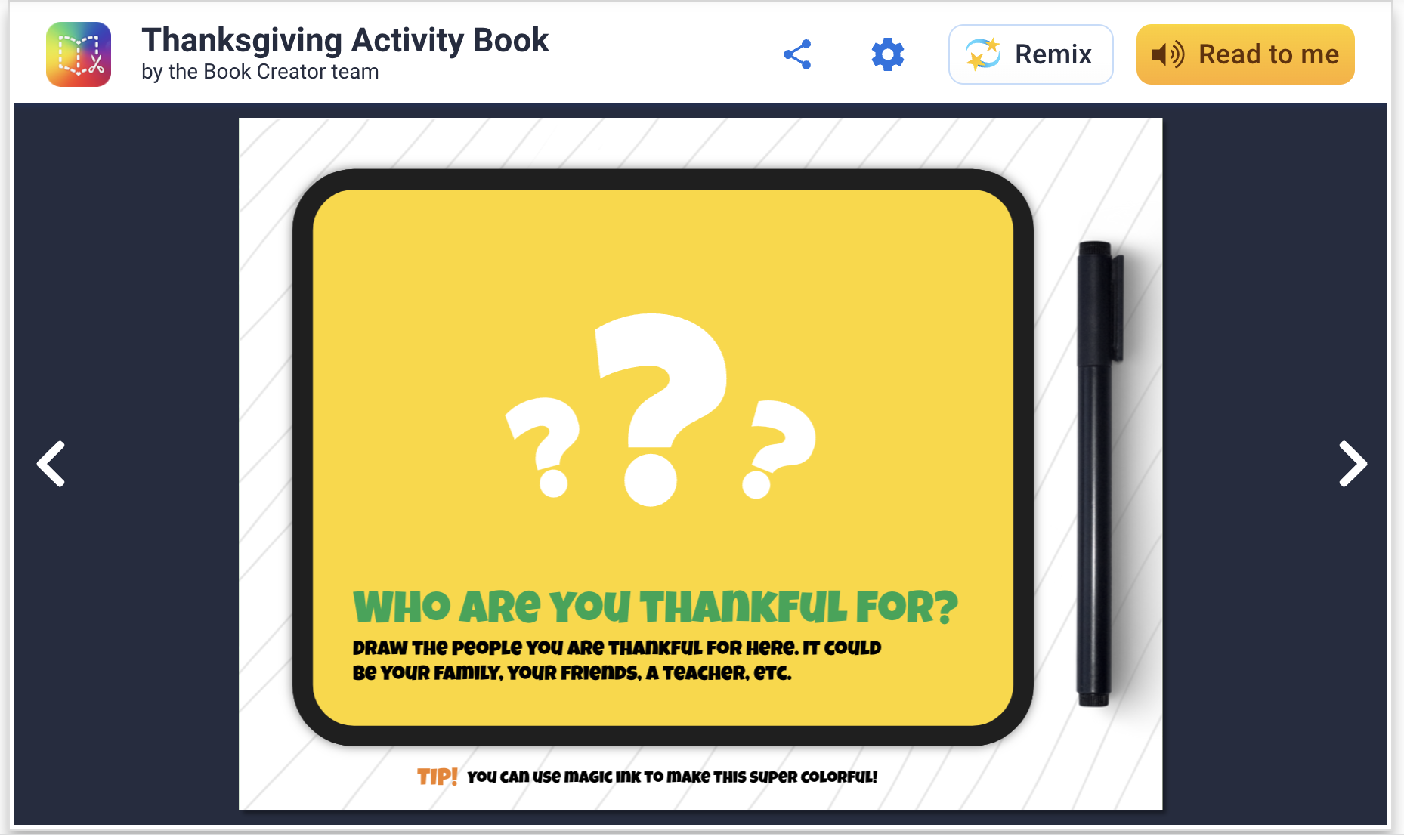
Book Creator has long been a stellar app/webtool and recently I discovered that they have templates to "remix." You can add templates to your app and do a collaborative work on your iPad among students, or if in a Chromebook environment your free account will allow you to share with students' Google accounts easily. This is an attractive option because, well, they are attractive and you don't have to design the book yourself. Richard Byrne describes the magic ink and autodraw features here.

These "activity books" are filled with language underpinnings like storytelling opportunities, semantic knowledge and vocabulary. You can easily copy and modify any page to cater to your students before starting the activity. For example, on this page below, you can zoom in on a map and have kids in the group find out where others live (generally) for spatial/academic/biographical knowledge of others. Additionally, with this template, gratitude is literally good for your brain to practice all year long.


Friday, October 28, 2022

Monday Halloween?

Looking for an engaging activity this Monday? Check out this fun one from Control-Alt-Achieve (also a great resource in general). In this you use Google Docs as a visual creator to make a Halloween "Rebus" story. I have mentioned before the principal that typing into a white space is a visual support for language formulation and (many of) your students will be engaged by it- tech integration need not always be super interactive or fancy! This activity integrates the use of emoji and don't miss the way expanded context provided by going to what is now available as Insert>Emoji. How fun! I did this activity with several middle school groups this week and they were super-engaged. In addition to targeting some story grammar, complex sentences or vocabulary, I integrated the work described in this ASHA article to make this an improv game focusing on conversation building and flexibility. Note: I always accompany some encouragement of "yes, and" with neurodiversity- and human-affirming takes on "it's also ok to say no."

It doesn't have to make total sense, haha. In another group, a kiddo told me he hated this font, lol. So we changed it, easy enough! 


Friday, November 6, 2020

A focus on gratitude

Gratitude is a Thanksgivingy theme...but actually much more than that. Much research has supported that practicing gratitude as a form of mindfulness can be self-regulating and cultivate positive neural connections. 

In addition, gratitude has a language lens as it:

-relates life experiences

-can/should be practiced as a "listing" activity

-expresses causality

-can be pushed to the abstract i.e. being grateful for intangible things.

Over this and coming weeks I will be using this and this video in discussion activities.


Both are accessible, short and visual. Videos from Headspace are very useful that way, and the second has a bit more of a near/practical hook that will help a lot of my boys access what could be perceived as a dismissible touchy feely message.

As a follow-up activity, Jamboard is a motivating visual way to have students journal, share, describe and discuss. Here's my model:


Thursday, October 22, 2020

Google Earth's Spooky Spots Quiz

You know I am a Google Earth Geek. Always have been, but in this time it is nice to be able to use the context of "going someplace" to engage my students. Google Earth's quizzes (find in the Explorer captain wheel tab) provide very structured experiences with the interactive globe, posing questions, providing images that prompt observation and discussion, and popping you into an interactive window to "look around." With Halloween coming, you can use the Spooky Spots quiz through nine multiple choice questions (it doesn't matter if you or your students know the answers) bringing you to spots around the globe. The content is free of violence but mentions "The Shining" and "Rosemary's Baby" so probably best for 5th grade or above. As each question is posed, unlabeled placemarks would allow you to ask students to observe potential locations (e.g. "that one looks like its Colorado."). Once answered, you can use the interactive window on the left to navigate the space (oooh an abandoned amusement park near Chernobyl) and work on description and conversation. You may be interested in asking group members to get more information on one of the topics and report back to the group (Wikipedia is fine for general knowledge!). 


Friday, October 9, 2020

Therapeutic Gaming Can Be Messy...

 ...and that's ok. Particularly in social intervention contexts, it's important to facilitate natural situations. That includes trying and failing with games- either because the group doesn't like the game and wants to try something else, the game itself sucks, or for other reasons. Isn't that what friends do when they get together-- evolve "group plans" and move on when something doesn't work for the group (see Social Thinking® Group Plan concept)? I like to use games within intervention sessions as a seeming reward near the end, but in themselves they have working teachable moments and lots of opportunities for my students to practice self-regulating. In teletherapy, with or without cursor control (have the students tell you what to click on), you can try a flash game like this (seasonal!) corn maze. Flash games come in a wide range of quality but this one is not bad at all!

While accepting that games like this might not go perfectly in a group, we can prepare to facilitate success. Notice that button that says "walkthrough?" In this case it leads to a video that shows you a sped-up view of game moves. For most other games, you can find a walkthrough with a Google. This arms you with information so you can provide cues like "Oh, what do you think that quarter will be for? What might you buy in a corn maze? Oh, nice smart guess!"

Friday, October 2, 2020

Full Moon

October has two full moons, including the current one! Full Moon is a good example of the kind of game adaptable to therapy given a task analysis.


In this game you navigate a bunny through various levels to get what he wants. In the above level, to get the apple, you have to infer that you need to click on the light bulbs, discover that the middle one turns all the bulbs off, illuminate the apple (in the right tree) and click the apple to drop it to the bunny.

This game prompts:

-use of remote cursor control, or perhaps not (might be better if students have to tell you what to do)

-spacial concepts

-cause and effect reasoning

-observation, collaborating and conversation

It is untimed so you can move at any pace you wish. Plus it has thought balloons which I love in any context as a social cognitive symbol! Here's a walkthrough (always useful if you are going to use games in therapy).

Thursday, June 18, 2020

Juneteenth: a sequence and settings

Every context has language underpinnings. Why not use contexts that promote anti-racism?

Tomorrow is Juneteenth, the day that commemorates word of the Emancipation Proclamation reaching Texas, two and a half years after it was issued. It's history that isn't taught enough in schools.

So, sequence of events is critical to understand here. A number of books on EPIC! about Juneteenth are on point.

Using Google Street View is a great way to have students observe, describe, "think with their eyes," or complete a setting-based graphic organizer. A number of VA slave dwellings are rendered in Google Street View listed here and given more context here. Be sure to click through to View on Google Maps for the best visual/interactive experience.


Monday, July 1, 2019

Repost: Play with Fireworks Virtually (IRL leave it to the professionals)

This post is a throwback for a free app that is still available- check it out. I'll be off for July and see you back in August. I am excited for adventures down in Cape Cod, then a visit to Shenandoah and a BIG National Parks trip from Utah to Vegas, hitting Arches, Canyonlands, Monument Valley, Bryce Canyon, and Zion! Have a great July!

Interactive apps have long been one of my favorite topics because they replicate world schema, and every schema has language that goes with it. As the 4th approaches (or other holidays in the future), you may have fireworks on your mind.

Apps give us a window to simulate removed events (and safely!), so you might be interested in Fireworks Lab. This free app allows students to organize and operate a fireworks display. The app is gloriously language-neutral, so students can be encouraged to label their choices in elaborated noun phrases (e.g. "green sparkly rocket") and then set them off.


A few supplemental ideas:
-The app is perfect for pairing with a written language or reading activity. Write or sequence cards with the different attributes of the fireworks and use these as a "plan" for the display.
-Have students research fireworks displays in your town, or for older students, pair with the story of this famous fireworks fail for a narrative activity. The article is safe to use with kids and has some good figurative language too!

Have a happy (and SAFE) 4th of July--and to my Canadian friends, Happy Canada Day!

Considering your professional development schedule next year? Check out Sean's offerings for training sessions.

Thursday, October 25, 2018

Lesson: 5 Point Scale of Halloween Problems

The Five Point Scale is one of my favorite tools. It is versatile to talk about many different kinds of social observations, norms, problems and nuances; it is also narrative in form and sparks discussion about perspective taking.

So I made you a lesson! Use this Google Slides, uh, slide as a template to have kids generate examples of problems that occur on Halloween. I like the framework contained in both this TpT packet by Speechie Musings and Social Thinking's® Size of the Problem book: problems become bigger with 1) time needed to solve 2) needing help 3) someone being physically or emotionally hurt and 4) affecting other people. So, a 3 might ruin your day (time) and cause light physical or bigger emotional hurt, and you may need to talk to someone about it.

You can use humor and lightness/darkness appropriate to your group in developing examples, so, a 5 for your HSers might be "your friend becomes a zombie" where with 2nd graders maybe "a ghost decides to live in your house."

To use this template, please do not request access. That results in my getting emails...thanks. Open a browser and sign into your Google account. Go to this link. From the file menu, choose Make a copy. Then it is yours. Consider duplicating the slide or the file itself to use for many groups. Also, Tools>Explore will let you search for images to add extra visual support (e.g. "throwing up," a 3). This activity is great for pairing with a book about Halloween.


Have a great Halloween!

Thursday, December 14, 2017

A Holiday Lesson...

One of my favorite holiday activities with students is to role-play giving and receiving gifts, and here are some updates on that.

You can do an actual gift exchange if time permits, or use an empty box or gift bag for pretend play, but there are some ways to tech up this lesson and add context, strategy and social cognition concepts, and engagement.

This coming week I am going to have students prepare for this activity by reading Llama Llama Holiday Drama (it's available on Kindle if you don't have time to get it). This book explores anxiety and mindfulness, and contains some good "hidden rules" about the season and the meaning of giving gifts. It is also multi-denominational.

I created a thinksheet for the activity which you can access here. Feel free to Make a Copy under File if you would like to modify it for your purposes.


As you can see, the preparation steps will target asking and answering questions, using wondering and People Files about others (Social Thinking®), as well as categorization and making choices. The "Levels of Like" concept is one I learned from SLP Jenny Sojat. She presented on this at a conference and uses this to make group decisions- poll group members to get them to state whether they love, like, are ok with (the "yes" line of compromise) or dislike an idea such as an outing, game, snack, etc. In this case students would just be using to to gauge another's opinion.

Have students save a photo of the "gift" they will be giving. On iPad you can look up photos in Safari, tap to enlarge, then tap and hold to save to the Photos app. If you want to add math concepts and flexible thinking, give them a budget and ask them to look up the item on Amazon.

I'd suggest "wrapping" the gift with Bag Game. It adds an element of a hidden item as the student hands the other student the iPad.

Pre-exchange, the 5 Point Scale provides a great tool. You can emphasize the perspectives and reactions of the giver at each level as well. I like to develop scales with students by using anchor points such as a 5 and 1 and having them label the other levels.


Then, exchange by having students deliver their iPad "gifts" to each other! Another good strategy is to provide an explicit challenge to students to generalize the concepts and report back. For example, ask students to be aware of their reactions when receiving gifts and report back on them. This is always a good narrative development activity as well.

Happy Holidays!

Friday, October 27, 2017

Haunted Listening Practice

Amazon's devices powered by Alexa provide great listening and social practice, as I mentioned in a previous post. This week I played the Haunted House skill* with a few groups, and though it wasn't perfect (some choices loop back to a conclusion you've already heard), it is free, engaged my students and helped us work on a few skills and strategies:

-The game is a choose-your-own-adventure style activity where a walkthrough of a "Haunted" House is narrated and you are provided with choices, thereby providing a narrative.
-We imposed a "round the table" rule for answering Alexa, in the process working on "group plan" and whole body listening.
-The auditory input gives you an opportunity to work on the skill of visualizing- consider using your Visualizing and Verbalizing® structure words or having the students sketch a collaborative "map" of the house and the events in different locations, Stickwriting Stories style (Incidentally, there's a good "Scary Visitor" story here to model).


*Alexa's skills are like apps, so to speak. To use these you will need an enabled device; The Echo Dot is a terrific and inexpensive device. You can enable skills via audio command as shown in the image, but there are several skills with this name. You might want to use the link in my second sentence or look it up in your Alexa app.

Saturday, October 24, 2015

Toca Boo- Currently Free and Full of Fun Scares

This is partially a repost from last year- Thanks Smart Apps For Kids for letting us know that Toca Boo is Free for a short time- please click through to the App Store from their site to support them.

This highly interactive app allows you to play the role of a "ghost" and wander a darkened house scaring members of a family. Seems a strange concept, but it's loads of fun.

Have you ever played hiding games with kids who proceed to hide themselves or items in plain sight? This illuminates, pun intended in the context of this app, problems around perspective taking and "thinking with the eyes" (see the work of the folks at Social Thinking®). In Toca Boo, to achieve a maximum scare, the ghost needs to avoid the family members' flashlights and hide in hotspots (e.g. under the covers of the bed or in a box) or behind furniture. Watch the trailer below:


The process of coaching students to effectively scare the characters will give you the opportunity to model and elicit if/then and causal language, as well as target spatial and positional concepts, in addition to the social cognitive ideas mentioned above. The app provides a good context for building the category of rooms of a house as well.

Do use your judgment of the trailer to consider which of your students would like this app, and whether it might be too scary for some. I do think they go a little far in having you scare (and knock over) the comical older man with the cane. I admit I laughed at this, though (America's Funniest Home Videos being a guilty pleasure of mine)! Toca Boca as always does a good job of discussing the ideas around the app in the "For Parents" section of the app, but I'm a believer in a little scare, suspense or humor being a great context to get kids talking.

New idea: try following this app with some dramatic play, perhaps filming with your video camera an "unsuccessful scare" vs. a "successful scare," at the same time targeting the sequential language of hiding and popping out and some feelings vocabulary.

Saturday, October 25, 2014

Toca Boo!

I'm taking a brief break here from talking about calming/regulating apps to discuss the power of a little scare. Toca Boca, a studio I have long been a fan of, just released Toca Boo ($2.99), a great app to grab and have some language-based fun this pre-Halloween week.

This highly interactive app allows you to play the role of a "ghost" and wander a darkened house scaring members of a family. Seems a strange concept, but it's loads of fun.

Have you ever played hiding games with kids who proceed to hide themselves or items in plain sight? This illuminates, pun intended in the context of this app, problems around perspective taking and "thinking with the eyes" (see the work of the folks at Social Thinking®). In Toca Boo, to achieve a maximum scare, the ghost needs to avoid the family members' flashlights and hide in hotspots (e.g. under the covers of the bed or in a box) or behind furniture. Watch the trailer below:


The process of coaching students to effectively scare the characters will give you the opportunity to model and elicit if/then and causal language, as well as target spatial and positional concepts, in addition to the social cognitive ideas mentioned above. The app provides a good context for building the category of rooms of a house as well.

Do use your judgment of the trailer to consider which of your students would like this app, and whether it might be too scary for some. I do think they go a little far in having you scare (and knock over) the comical older man with the cane. I admit I laughed at this, though (America's Funniest Home Videos being a guilty pleasure of mine)! Toca Boca as always does a good job of discussing the ideas around the app in the "For Parents" section of the app, but I'm a believer in a little scare, suspense or humor being a great context to get kids talking.

Thursday, March 13, 2014

Have a "Smashing" Saint Patrick's Day

"App Smashing" is a term I am starting to tell people about at workshops. Apps do discrete things, and no one app does everything. But we can capitalize on one app's capabilities when combined with another's- chiefly through saving a product to the camera roll. This provides both an opportunity for us to expand our tech comfort and for kids to follow multiple step directions. "App Smashing" was coined by Massachusetts educator Greg Kulowiec and you can learn more about it here.

St. Patrick's day can indeed be about more than the stereotypes (no comment, but I am too old, basically, anyway), and this week I used the context to do an activity about positive self-talk. In a brief lesson we illustrated how our self-talk can influence our feelings and therefore our social behaviors- it's the difference between "Lucky Thinking" and "Unlucky Thinking."


Students then used the free app St. Patrick's Day Booth Free to snap a selfie- you may have to try a few to make sure the top of the head is hat-ready- and add festive stuff. This app allows you to save to the camera roll (tap the download/box symbol).

Next, use a photo comic app such as Story Me or Strip Designer. Add the photo to a single-paned comic from the camera roll, and add a word balloon or thought balloon after working with the student around some "Lucky Thinking" from their day or week. This also targets sentence and narrative formulation as well as social cognition. 

See our model used with our center's doggie, Stella!


Have fun with App-Smashing!

Thursday, December 12, 2013

When apps go away, be creative!

I wrote about an app some time ago, and it is one of my favorite apps to revisit during this season of giving (even though Hanukah and Christmas were quite far apart this year), so I wanted to mention it again. The Gift Wrap App was used to "wrap" any image from your camera roll, and allow someone to "unwrap." It therefore can be used for a play and "sharing imagination" activity (see the work of Social Thinking®) to target a variety of language objectives, as well as social behaviors around receiving gifts. It also was a nice app to use to expand your comfort level in quickly saving and using images within apps.

Here's the thing: it's no longer available in the U.S. Store, as I discovered when I sat down to write this post. Crap! Though I have it on my iPad, you can't get it, at least for now.

I couldn't find anything else like it!

EDIT: Rachel Smith on Twitter (@lancslassrach) alerted me to the free Wrapped app (works better on iPad). It's a little less slick but serves the same purpose/features (see below)

but when I sat and thought about its process and features:

1. Save a photo of a gift using Safari
2. Add it to the app (or have student do steps 1-2) so it is "hidden"
3. Practice all the verbal and nonverbal behaviors that go with a gift exchange

...I realized that All4MyChild's Bag Game ($1.99, also available in the excellent Social Adventures app) could be used in just the same way! Just save the pic to the camera roll in Safari and choose "Hide Photo." Notice my racetrack pic on the camera roll.


The wrapping may be simple, and you can opt to skip the guessing game, but the idea is the same. The receiver can pinch to open the gift, and there you go!


Language Lens:
-Use this app to target the concept of "People Files" (per Social Thinking, also well explored in Thinking About You, Thinking About Me and the new Superflex Takes on One-Sided Sid, Un-Wonderer and the Team of Unthinkables), the expected knowledge we accumulate about others and use as a basis for interaction.
-Have kids use descriptive language and causals while selecting the photo from Google Images.
-Target verbal and nonverbal interactions while one child "gives" the gift to another by handing over the iPad, and on the receiving side as well.
-This activity also pairs well with Braidy/SGM® Character Maps about what we know about another person- likes and dislikes, as well as the Incredible 5-Point Scale. I created a 5-Point Scale of Gift Receiving with my students:


Common Core Connection:
CCSS.ELA-Literacy.SL.2.5 Create audio recordings of stories or poems; add drawings or other visual displays to stories or recounts of experiences when appropriate to clarify ideas, thoughts, and feelings. 
CCSS.ELA-Literacy.SL.2.6 Produce complete sentences when appropriate to task and situation in order to provide requested detail or clarification.

Happy Holidays to you all!

Want to give me a gift? Vote for me for Best EdTech/Resource Sharing Blog in the 2013 Edublog Awards!

How?
Click on the link above. Find "Speechtechie" and click on the arrow up button in lower left.
Sign in to list.ly with Facebook, Twitter or Google. You can "skip" letting listly post for you.
You haven't voted yet. Click the arrow up button again in my "rectangle." Now you've voted.
Voting is open until 12/18. Please also support other SLPs in the running. You can vote for all of us, even multiple resources in a category, but only once each. Thanks!


Tuesday, October 23, 2012

Appy-Picking Month: It's the Great Pumpkin, Charlie Brown

I am Linus, for sure.  I grew up somewhat of a Peanuts fanatic and have recently mentioned the potential of leveraging the comic strip's downbeat tone to develop narrative and positive social behaviors and self-talk. The Christmas special was transformed into a beautiful app last year, and I have to mention the wonderful Halloween one that was just released.  It's the Great Pumpkin, Charlie Brown (at $4.99, probably only for Peanuts lovers) allows you to create and costume an avatar who shows up at a number of places in the story, trick or treating with the characters.  The story itself (if a bit mean) is ripe for narrative-building and discussion of the social behaviors of the characters.  The pages contain pop-up-like effects and the story also has a few other interactive elements such as bobbing for apples.  Enjoy, and reminisce with the kids!

Monday, October 22, 2012

Appy-Picking Month: A Reminder about Scan

As I am getting ready for short workshops on QR Codes and emerging tech at Masscue's conference this week, and soon at ASHA, I wanted to again mention Scan.  Scan (free) is used to scan QR Codes you access or create yourself.  Check here for my entire series on QR Codes, including video tutorials.


This post is also timely because I have a Spooooky Halloween Lesson involving QR Codes and Story Mapping from last year I would love you to use, whether or not you have a Story Grammar Marker (though you should get one)!

Note: author is a contractor for Mindwing Concepts and provides blog content

Thursday, October 20, 2011

LearnEnglish Kids' Haunted House

The British Council's LearnEnglish Kids' Haunted House is a fun activity you might consider exploring Halloween week with your kids.  The activity contains six creepy rooms filled with scary surprises, and kids are tasked to find one item in each room beginning with a certain letter.

The clues are presented in a rather unsettling voice, so make sure you preview it and use with "no tears" kind of kids!
Language Lens:
This fun Halloween activity can be used to target semantic skills (rooms in a house, furniture) temporal structures- "When you click on the ____, it _____"- and phonemic cueing.

You might also be interested in Carving a Pumpkin!

Sunday, March 13, 2011

A Shamrock Optical Illusion

Some years ago I was looking for a St. Patrick's Day activity and stumbled upon this simple, great one related to the five senses. See, (pun intended) if you stare at a red object for 30 seconds or so, then look at a white background, it creates an illusion of a green floating object of the same shape, for most people. Kids really loved the activity and, the following year, I created a worksheet for it using PowerPoint that would allow it to be repeated at home. It gives kids a great opportunity to practice giving sequential directions to a peer or family member, and use causals in explaining why it happens. Give it a try yourself! The PowerPoint is embedded below; the first slide can be used to glue the red shamrock and provide a white space, and the second is the directions. Happy St. Patrick's Day!


Click on the rectangle icon next to "Slide 1/2", then "Actions" to print this file.
 
.