I’m just returning from speaking at a two-day conference in Florida for the Center for Autism and Related Disabilities hosted at Nova Southeastern University. The topic was “Apps in Context: Aligning Technology with Methodologies and Clinical Objectives for Students with Autism,” one which
Dr. Carole Zangari and I put together for the varied (and terrific!) group of SLPs, OTs and teachers.
It was great seeing and working with Carole! Carole and I also wanted to honor Dr. Robin Parker, also a professor at Nova—sadly, Robin passed away last year. To me, Robin was a wonderful friend and supporter and force of nature, really, who had a passion for putting resources in people’s hands, including technology. We thank the many app developers who donated codes for participants in Robin’s name, including
all4mychild,
Mindwing Concepts,
Mobile Education Store,
Tactus Therapy,
Bump Software,
Bee Visual, Smarty Ears,
Irmgard Raubenheimer, and
LessonPix.
One “module” in the conference that I really enjoyed developing was the use of “authoring” apps: apps for you to create interactive activities in any context. Participants really gravitated toward the versatile Tiny Tap (free for iOS and Android), which allows you to make “apps,” so to speak, following a very simple series of steps!
Use the visual tools in Tiny Tap to create a "slide" or array. We discussed that though the tools are fine, and include text, drawing, image addition, etc, that you can create a visual in Pic Collage or Keynote (and screenshot it) perhaps easier if you are doing something more complicated for your slide.
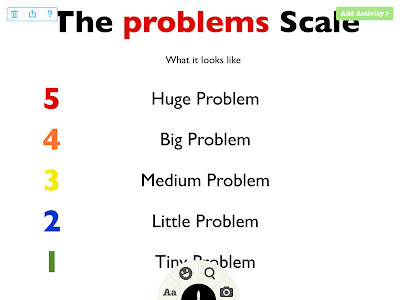
You can then "add an activity" to your slide/image- these include:
-recording audio questions which are answered by tapping on an area of the slide
-recording audio/sounds that play when an area of the slide is tapped ("Sound Board")
-cutting a Shape Puzzle so that the image can be used for categorization or sequencing
-and more "presentation" elements such as playing a video or recording a message to be played over the slide.
These options, like everything else in the app, are nicely explained as you go:
An example of cutting a Shape Puzzle to be put back in order by the student:
After recording an audio question, e.g. "This type of problem may ruin your day, and you probably need to ask for help in solving it," you trace an answer area that the student must tap to get the item "correct."
Upon saving your work, your lesson can be played and also shared if you create an account. Tiny Tap also gives you access to a library of many activities, some of them created by SLPs (some at cost). Though you see it demonstrated in a particular context here, hopefully you can think of many ways to use Tiny Tap!
Be sure to check out Tiny Tap enthusiast SLP Ellen Weber's column on the app for ASHA Leader. Let us know some other ideas in the comments!
I will be presenting in the Washington, DC area in September for the Center for Communication and Learning, LLC- hope to see some of you there!
Click here for details.