During this time of year, we often do the obligatory lessons about gratitude that go well with the thanksgiving holiday. From a language perspective, practicing gratitude involves reflecting, listing and describing life events, so it is a therapeutically relevant context for sure. However, I always emphasize that there is science behind it for self-regulation, and we should try to practice it all year round! Here's a good video to detail those points.
If you have students that need an engaging angle, Mr. Thankful made me (and them) smile. While the gratitude here is over-the-top, it provides a view of what the practice writ large looks like. At the end (2:02) there is a bit of religiosity, so stop it before that to avoid this particularly in public school settings.
As I have been writing about AI tools, thanks to Tony Vincent of Learning in Hand for sharing this simple tool that generates a thank you letter based on a simple list, which would make a great writing activity in the coming week.
Also, I'm at ASHA this week in my hometown- please say hi if you bump into me. I will be presenting in a MasterClass on innovations in telepractice, MC27: Telepractice Innovations: Current, Emerging, and What We Wish For. There is an additional fee to attend, but I will be sharing my slides here following the session.
This summer I became addicted to the New York Times' new Connections puzzle. I enjoyed each morning tackling this often-tricky categorization activity and comparing results (or sometimes providing or receiving hints) with my husband. I've always thought of categorization as one of the most important skills--it's how we organize information, and much expository text takes on a list structure--and our literature backs this up. Approaches like the EET also use Green-Group to target describing by category, among other attributes. We can be explicit with our students (see Ukrainetz' helpful RISE acronym) and teach that categories are important ways to organize and describe words and information.
ABCYa provides a wealth of categories through its activities- you just have to look for them.
You can practice contextualized language intervention by locating a narrative picture book about weather, dogs and weather, or weather and clothing and target another skill within the same topic.
Here's five more categories you can target with ABCYa:
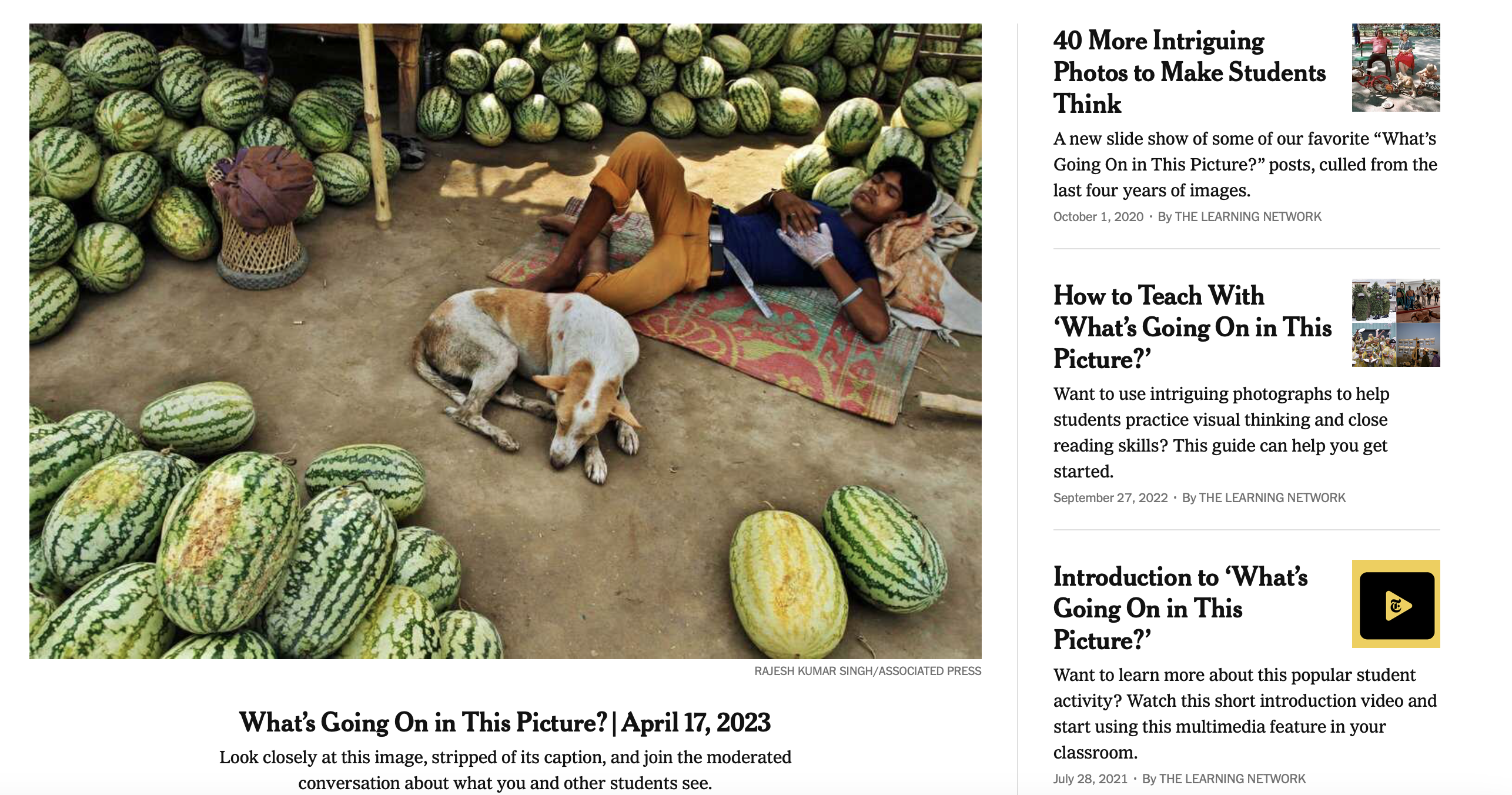
Any tech resource that is simple, reliable, with content worth more than one visit, and that will tie in with instructional strategies is one to save on your list. Such a thing is the New York Times' What's Going on in this Picture? The site provides a weekly Interesting Image and instructional tips.
You can consider using this content with:
-Instruction on story grammar, as each picture can be used to form a story
-Visualizing and Verbalizing® strategies
-tie-ins with forming inferences and Social Thinking® concepts such as Thinking with the Eyes
Museums appealing to children are often a great source of interactive websites. I liked this website years ago (see the blast from the past) and the now Plimoth-Pawtuxet Museum has redesigned it with a modern look and perspective. Pre-and a little post-Thanksgiving, you could bring some groups through this "adventure," the conceit being you are a teenage reporter investigating some Wampanoag and Pilgrim sites. I might be biased as a Massachusetts guy, but it's a nice site for students to practice discussing what they see in pictures, processing information, and there are some sequencing and word-fill interactives. There is a lot of content here and seemingly no way to save progress, but you could just visit a few of the sites or keep tabs open if you want to continue.
In my session on creating "stories" for SLP Summit last week (recording available free until August 15, Register here), I focused on thinking about features of resources that might make a clinician pick one over another. You may pick Pic Collage if you like using your iPad, doing a pass-and-add playlike activity (I learned from the authors of We Thinkers that add-a-thought=play=conversation), or want the versatility of being able to quickly cut around any image. You may have seen in my recent post on Google Slides/Jamboard that this is not always QUITE as easy there. So always be thinking FEATURES.
Pic Collage, free, available for iPad, Android, and runnable on new Macs (M1 chip) allows for the creation of a visual as-you-go, so that student contributions to the context can be instantly reinforceable, and it is easy enough for them to use themselves. The menu allows you to add photos from your library, search the web for photos (a school-clean version of BING), and also add text or doodles (powerful because you can sketch things that may be hard to find photos of, or sketch over a photo)
As I showed in the session, you can start with a setting (story element teaching) and add elements of the setting (descriptive sequence level of narration) or introduce an initiating event, such as the bear! Double tap on any picture you add to be able to "trim" around it.
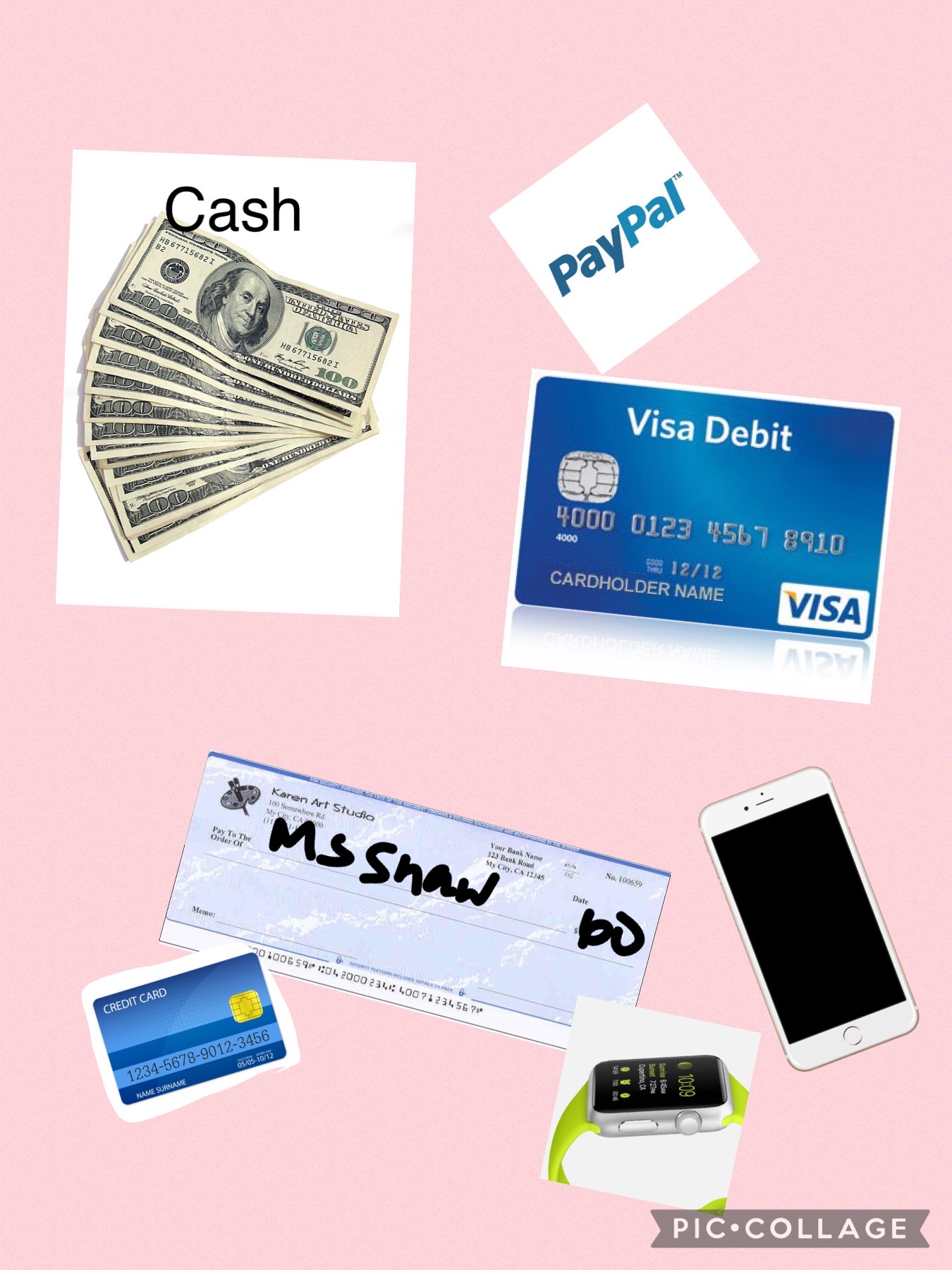
We also talked briefly about expository vs. story language (a good resource is here) and adding to LISTs-one key informational macrostructure- can also be a playful or academically important task. This was made with Pic Collage with/for a student who was learning about the topic/list of "different ways to pay" during a consumer science class.
I had great experience presenting live for SLP Summit yesterday! The people and responses were wonderful. My session will be available in its recorded form as will the other excellent presenters' until August 15. Register here, the conference is presenting more live sessions practically as we speak; CEUs for live/recorded sessions are available for a small fee. To thank the many who attended and (I noticed!) subscribed to this blog as a result of the conference, I thought I'd elaborate on the content with some additional examples over the coming weeks.
In the session I started by describing how Google Slides and Jamboard can be used to create, interact with and retell stories through activities like making a scene or story mapping. I had previously posted a video on this you can check out. Another example is making a visually supported story retelling activity, in which you can think of Slides or Jamboard as sort of like the old Colorforms- images you insert can be like your stickers!
You can do this with most any context or story, but this past spring I really enjoyed reading We Found A Hat (Jon Klassen) with some groups. There are others in this series but they are a bit darker in ending. The author uses exaggerated eye illustrations (and not much else) to signal thoughts and intentions. Use the book or a video like this one!
For a playful way to work on retelling, make this book a scene. You can do this in either Slides or Jamboard. Slides would offer you more ways to play with formatting; Jamboard would allow easier collaboration (and if you wanted to sketch to change/highlight eye gaze you could do it more easily here). The basics as I show below would be the same.
Start with a blank slide- (either remove any text boxes and such or insert a new blank slide). If you have nothing selected on the slide you should see Background on the bottommost menu. Click that, Choose Image and the Google Image Search choice usually does a good job for any kind of background.
For your mobile (to click and drag about) turtles and hat you can try Insert>Image>Search the Web. This worked well for a hat. Remember to use the term PNG to try to get images without backgrounds.
Sometimes you may have trouble getting images that actually are PNGs. I just go over to Google Image Search (open a new tab and search on Google, again using PNG). From here you can right click and copy images to your creation.
A word about this- be aware of copyright, don't republish or attempt to sell something you have created using Google Images unless you have searched for images that are ok for reuse. This goes for all digital storytelling creations.
Here I copied and pasted the turtle and clicked on Format Options to flip one of them.
From here, use your imagination!
-move the elements to model a story retell and then have students do the same (a SmartBoard might be fun here)
-You can make Google Slides look less cluttered by collapsing menus or hiding elements under View.
-Add text boxes or shapes for dialogue.
-Make a "same but different story" where the turtles find something else besides a hat. Would they make a different decision? Why?
-Talk about cool things you've "found" (bridge to personal narrative)
Dino Tracker is a fictionalized interactive website that has been released as a promotion for Jurassic World Dominion, an upcoming film in the series. The premise of this film is that dinosaurs are no longer confined to Isla Nublar but living (and hunting) alongside humans. The purpose of the site is ostensibly to provide information to the public about "sightings" of various dinosaurs- the therapeutic potential in the site is scaffolding language around the locations (through a clickable Google-like map), the "descriptions" of the dinosaurs and cause-effect language of "Dos" and "Do Nots."
I was recently discussing with a colleague how high school students often have remaining difficulty with the geographic literacy aspects of continent-country-state or other division and how this connects to situational awareness and the ability to digest information about the world and current events. Browsing the world map provided could be an exciting (MS and HS students who can understand the artifice of the content) opportunity to review continents and some of the spatial strategies for recalling them, then moving down to more micro areas. The videos provided are a form of narrative and the "field report" expository text that can be mapped with graphic organizers, or used as a model to tell "same but different" creative item e.g. a report from another location. Overall Dino Tracker represents how interactive websites designed for very different purposes can provide access to academic language- one strategy I like is to search for "interactive websites" and under tools set the time limit to the past month or week, you can find some gems.
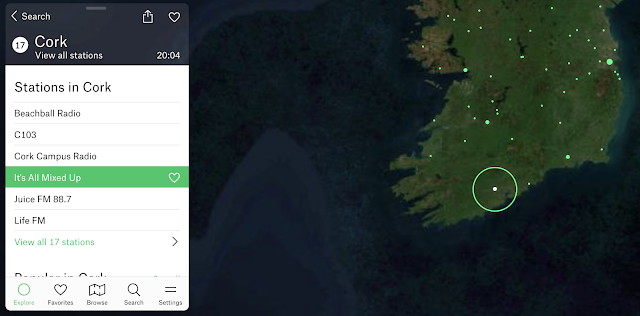
Flowing a bit from my last post (context is your friend), Google Experiment Radio Garden is worth a therapeutic visit. Your students will think it's just a chill moment, but secretly it can be a great way to practice having them call out:
-Continents and then countries -Responses (conversation/comments) to what they hear -Characterization of the language (nonverbal aspects such as tone etc) and type of music you may hear. Music genres are a category and can connect us with peers!
Why not pair this with looking up a current event from the country you "visit" for narrative/expository comprehension?
Now more than ever, it's important to foster global awareness.
Oh, and Happy St. Patrick's Day, here's my homeland:
I'll wrap up Consider This with an example from this week. I have a student who is a Red Sox fanatic (a husband too) and they are of course in the playoffs. This story surfaced and has a lot of nuance to it, with targets regarding story grammar, perspective taking (which is really just story grammar times 2, 3, or however many people are involved), figurative language and body language. For brevity's sake I'll let you check out the link and the couple of videos there for the context.
This is the kind of scaffolded discussion that could take place via telepractice or in person, but I happen to be working with this student online. Zoom's annotation tools are a bit clunky (easy to click off your text box and need to make another, you scroll down on a webpage and they stay in the same place), but did the trick. If this annotation drives you nuts, it's an easy shift to Google Slides to toggle between tabs and use your preferred story grammar frame. In this case we just took some notes as we discussed; it's almost always better to provide visual support, which aids in working memory, processing, and further formulation.
Not to alienate any Astros fans, we did go on to note Correa's response to the incident was pretty positive, though there may be some nuance there too.
To go from the specific to more general, using current events can:
-activate students' interests
-provide contexts for story and expository text structure (and microstructure: sentence formulation and vocabulary)
-within the former, open doors to targeting social cognition, emotional vocabulary, or Zones®
My biggest trick in this regard has been keeping up with news myself, listening to the local news radio station, NPR, or subscribing to digests from local news sources to skim. As I've mentioned before, newsela is also a great go-to. I also have a student who loves CNN 10, a video resource.
Consider This has mostly been an exploration of resources used a bunch of different ways, but we also can consider how different curriculum topics can be used to target many speech and language and social communication objectives (and in this case, some resources that go with this idea). Speech and language pathologists can wrap interventions in contexts; check out this recent study, one that I'd like to describe in detail at some point, on science and Tier 2 vocabulary.
I think of civics as important world and social knowledge. Though it's unlikely to fix everything, we could do worse than helping students understand how government and laws work. Within civics contexts, there's much opportunity to target narrative, expository language, reading comprehension, vocabulary, and sentence formulation.
Years ago, Social Thinking® recommended Munro Leaf's (quite old) picture book Fair Play, which in its opening pages explores social norms in terms of moving from why we don't all get to do everything we want to do to why we have government. There are also several vignettes about a character he calls JustMe who behaves without considering others's needs that Social Thinking® formulated into a concept around JustMe vs Thinking about Others. We want to handle this topic with nuance and acknowledgement that everyone has JustMe "moments" to model the concept carefully, of course. The book is hard to find, but there is a read aloud version below. Skip the weird intro, consider handling the JustMe vignettes with further nuance, e.g. what the kids could have done to help JustMe be part of the group, and avoid the latter parts which are just way too harsh! I have generally used just up to about 4:30
In a much more straightforward way, iCivics remains a very useful tool. Sign in as a teacher and you can access lesson plans, worksheets, and of course the interactive games (varying in length, so explore) which can open up great expository conversations and vocabulary development. Sign-in also allows you to save games and pick up in later sessions. Recently I used Cast Your Vote with some students to explore the local election process and vocabulary like infrastructure, juvenile, enrollment, and minimum wage.
Fablevision's Civics! An American Musical (free with signup) will delight fans of Hamilton and engages students in civics topics while targeting comprehension of primary sources. The language underpinnings, however, include situational interpretation of pictures and comprehension of texts. The game contains multiple paths you can return and reroute to (e.g. making a few musicals about a few different topics, if you have a group that gets into it), and again, saves your progress.
Civics topics are also great to explore with very simple resources such as newsela!
The V in the FIVES criteria is for Visual! Visual supports are a simple Evidence Based Practice- give students something to explore with their eyes and you can tap:
-description/main idea -vocabulary -narrative language and complex sentence formulation -social/situational awareness -their interests/humor!
Classtools.net is an oldie but goodie, and has been around forever. In addition to its classroom tools such as Random Name Picker, a simple Soundboard and such, there are many visual activities you can use to create an "opener" or have students create something themselves. This may be particularly useful for older students.
Consider These:
Twister: create a "tweet" from any character, tap main idea, perspective taking, sentence formulation
Image Labelling Tool: upload an image and create text "hotspots" for part/whole thinking, abstract or advanced categories, description
Mindfulness should be considered right in the SLP wheelhouse. It a) is evidence-based, b) promotes self-regulation which underlies executive function, academic performance, social communication and c) practicing and discussing mindfulness encompasses expository language and metacognition (talking about thinking).
Through the mandated teletherapy period and beyond, I have found videos about mindfulness to be particularly useful as they are visual, prompt practice, and serve for post activities.
It's great. Well-paced, specific, promoting a strategy that can be used without the video at other times, and an example of an abstract, complex idea. In using this I have needed to recast my students' understanding of it: Being present helps you be in the moment to pay attention, but also regulates your emotions away from thinking/feeling about the past or future. There's much personal narrative that can come from exploring this as well as descriptions of what we notice in the moment (often a complex sentence formulation prompt as well with any cognitive verb).
In addition to other videos by the Partnership in Education, you can explore ones for various age levels from Cosmic Kids, MyLife, or Headspace.
It's a good idea to do this kind of activity with regularity (it need not take more than 10 minutes) or in a series as mindfulness is really about developing a practice. I always think of it as a toolkit (aligning with models like Zones®), so it is also wise to find videos that promote different strategies such as presence, above, deep breathing, gratitude, etc.
Picture (or other) books as an excellent therapy tool has always been one of my themes. In this post/video I demonstrate how to use Overdrive, which is one option for obtaining free e-books using your public library access. The tools here can be useful for tele-, individual, small group or classroom-based therapy.
As SLPs, at times we need to assist our students with work that is a bit pointless. I recall that Social Thinking® had some material about this; as students we are expected to follow the "group plan" and sometimes complete tedious tasks. Memorization of lists or passages is perhaps a good example. I recently needed to assist a student with memorizing a lengthy section from a book, I won't say which one. While the requirement was maybe in that zone of "Why tho?" it still was a good opportunity to apply Ehren's concept of the "strategic/therapeutic focus" and work on:
-ensuring comprehension of the passage as a whole and its vocabulary, sentence structure -paraphrasing -looking for opportunities for visualization -noting language structure such as the flow from main idea to details in the passage, also several sentences had parallel structures that could be used as a memory trick i.e. adjective-infinitive, adjective-infinitive, adjective-infinitive.
Putting the passage in Google Docs and commenting in the sidebar with these memory tricks while discussing and eliciting paraphrasing and connections from the students made for a good teletherapy activity for a high schooler!
A quick Google search also found us this gem, which was great to leave my student with so that he could work on the actual memorization independently. Memorizer.me allows you to paste a passage or ordered list, then provides strategies and prompts to help you work on memorizing the language. For example, the website manipulates your pasted text to provide first letter or beginning of line cues.
I recall having to memorize this above passage from Henry IV, Part 1 in high school and I wish I had had this tool!
I have mentioned here many times that I am often seeking to target language and social competencies through a self-regulation lens of late. An example of a context for this is the great series of videos from the Stop, Breathe and Think-Kids app, now available free in full on YouTube in this playlist, see the right sidebar for full list.
SBT-K presents mindful activities in a playful, narrative way and so is very useful for elementary students. As SLPs we can think of mindfulness cues like these as potential narrative/expository prompts (What did you think of when it said...?), connections to metacognition and self-regulation/social strategies such as Zones of Regulation®.
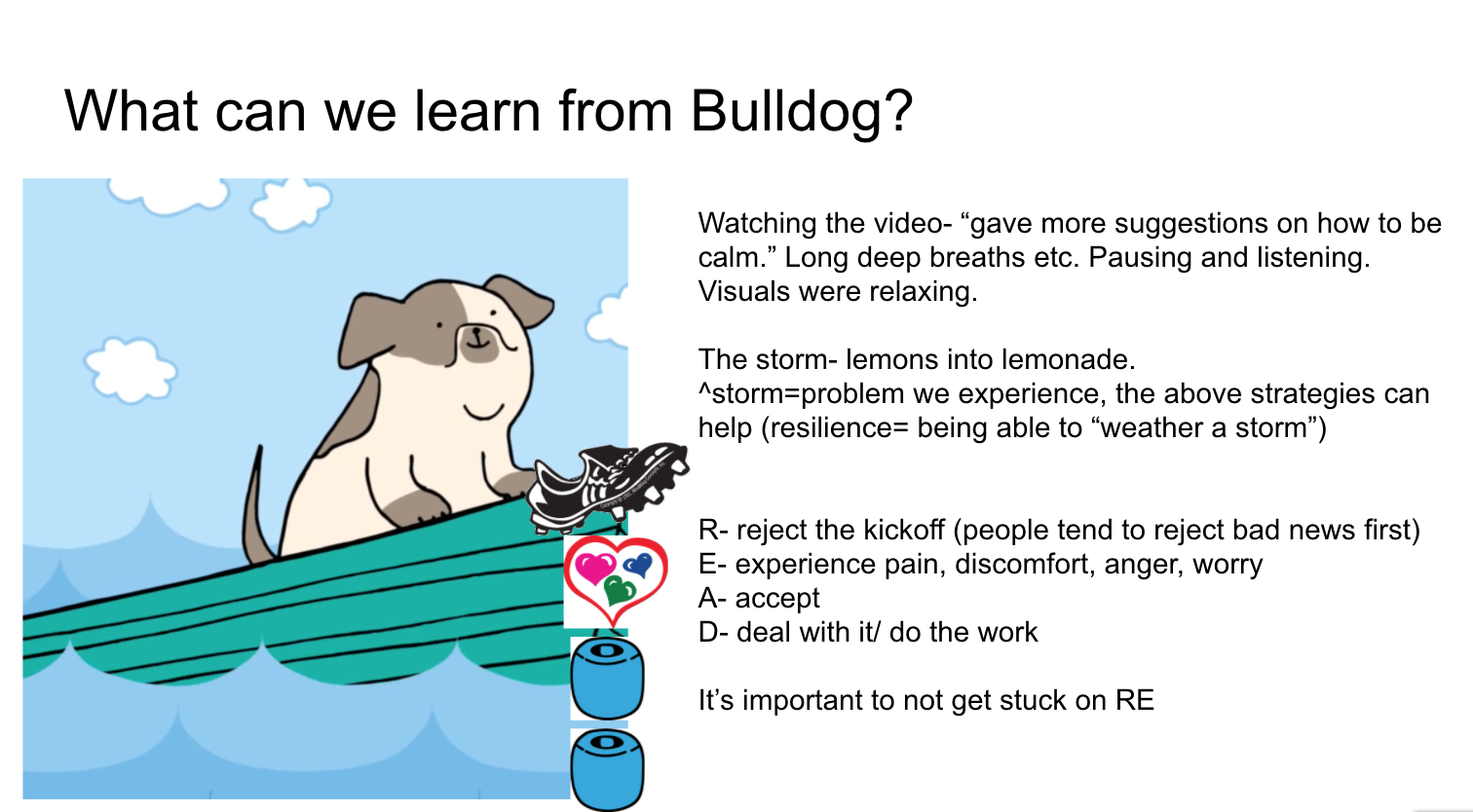
For a particular client these past several weeks, I have been using this series as a "flow" and creating in-the-moment visuals in Google Slides while scaffolding complex/abstract/how-can-you-use-this kind of language. A few examples are below, and remember that screenshots/screengrabs are your friend!
The READ acronym is one that I learned from MY therapist- how lucky I am to have a super solution-focused CBT support during a pandemic, and it corresponds well actually to story grammar (icons from Story Grammar Marker®)
As I mentioned, these are visuals we formed as the student, my graduate intern and I had this conversation over teletherapy; it occurred to me in the moment that many mindfulness activities are focused on lists, which are organized expository thinking!
Gratitude is a Thanksgivingy theme...but actually much more than that. Much research has supported that practicing gratitude as a form of mindfulness can be self-regulating and cultivate positive neural connections.
In addition, gratitude has a language lens as it:
-relates life experiences
-can/should be practiced as a "listing" activity
-expresses causality
-can be pushed to the abstract i.e. being grateful for intangible things.
Over this and coming weeks I will be using this and this video in discussion activities.
Both are accessible, short and visual. Videos from Headspace are very useful that way, and the second has a bit more of a near/practical hook that will help a lot of my boys access what could be perceived as a dismissible touchy feely message.
As a follow-up activity, Jamboard is a motivating visual way to have students journal, share, describe and discuss. Here's my model:
You know I am a Google Earth Geek. Always have been, but in this time it is nice to be able to use the context of "going someplace" to engage my students. Google Earth's quizzes (find in the Explorer captain wheel tab) provide very structured experiences with the interactive globe, posing questions, providing images that prompt observation and discussion, and popping you into an interactive window to "look around." With Halloween coming, you can use the Spooky Spots quiz through nine multiple choice questions (it doesn't matter if you or your students know the answers) bringing you to spots around the globe. The content is free of violence but mentions "The Shining" and "Rosemary's Baby" so probably best for 5th grade or above. As each question is posed, unlabeled placemarks would allow you to ask students to observe potential locations (e.g. "that one looks like its Colorado."). Once answered, you can use the interactive window on the left to navigate the space (oooh an abandoned amusement park near Chernobyl) and work on description and conversation. You may be interested in asking group members to get more information on one of the topics and report back to the group (Wikipedia is fine for general knowledge!).
I recorded this for a client who can not attend a makeup session offered for the holiday Monday, but thought it was also worth sharing here. As I watched our governor in MA announce the four phase reopening plan last week, I thought how it might be some important information to discuss in my social groups for a number of reasons:
-all students will need to utilize strong situational awareness in the community as we go forward, being aware of the restrictions and visual markers for social distancing etc.
-This plan is essentially a Five Point Scale and involves a lot of nuances, understanding why one phase is same but different (vocabulary from Sarah Ward and Kristen Jacobsen) from the previous and future phase etc, as well as many IF/THENs
-Any lesson about time is also an executive function lesson.
-and so on...
I did discuss this plan with parents beforehand, emphasizing that:
-I am encouraging students to initiate conversations with them about the pandemic and what restrictions mean within their family.
-Just because something is open or now "allowed" does not necessarily mean every family is going to go forward with that- also a lesson in perspective taking.
And naturally, I did not present this activity as in the video below, there has been a lot more "stop and discuss" e.g. before moving to the next category having students predict what falls in each phase.
Let's be honest...Zoom and other Tele platforms are not just a now thing.
...school may be hybrid or more in the fall
...social distancing may continue for some time or have periods with flareups
...industries are discovering that working from home has benefits and some are making it the norm.
See previous post about discussion webs as a way to scaffold complex language in teletherapy. In the process we also evaluated some of the behaviors shown and put them in a sequence from most to least expected (most distracting to others). This was a fun discussion and we were all able to acknowledge things we have done on Zoom that might have been "unexpected" and acknowledged our growth as well (self-awareness)
I have been working on a list for some time that has been available in the sidebar of the blog, but wanted to wait until it got a bit beefier before making any kind of deal about it. The list sections include:
Interactive websites useful in teletherapy
Video resources
Mobile apps useful in teletherapy
Sources of e-text
Professional development (mostly free) related to telepractice
As I say in the document, it is a work in progress. If you have items you would like to share for addition, please email me (link on the website).
Please do not request edit access to the document, it is available as View Only. You could go to the file menu and select Add to My Drive and you would be able to see any updates added on an ongoing basis. Feel free also to download, but you would not see updates in that case as it is a Google Document.
SpeechTechie is my take on simple and interactive technologies you can use in language lessons and interventions. Enjoy!
Interested in learning more? I am available to conduct professional development sessions, including via webinar. If you'd like to work with me to design a presentation or consultation for your school or organization, please check out the "Work with Sean" page on this website.
Sean is a MedBridge instructor for several courses (avail. Feb 2018). Click to join MedBridge at a discounted rate for high-quality online PD and CEUs. A wide variety of courses are available for SLPs.
Visit and "Like" our Facebook Page
Follow SpeechTechie on Twitter for updates!
Thanks, Guys!
Click on the badge to explore a ton of great blogs!