Showing posts with label social pragmatics. Show all posts

Tuesday, May 27, 2025

Lifetoon for story creation

Lifetoon is a fun entry in the range of generative AI tools being offered to us-- it creates a comic from your text/image of a character(s) and description of a story. It does require an image for character creation but you can just use a Googled image based on a character description. You can use yourself of course, but I would avoid uploading images of students into an AI.

I very frequently use this very 70s personal narrative as a model for teaching a complete episode with Story Grammar Marker®. Yes, it's true- I once fell out of a moving car and my mom, driving, failed to notice. I ran this through Lifetoon and it did a fairly good job of rendering it as a comic! 


Lifetoon is a good tool to experiment with! Comics such as these could be useful for visualizing the plot of a chapter book or a historical event, curriculum concepts, social scripts and social or executive functioning problem solving situations.

Thursday, May 22, 2025

Subscribe to First Five

Edmorrow's First Five is a great free resource that comes to your mailbox each school day and provides a set of resources (primary and secondary versions available) related to social and emotional learning. These include, among other activities, a meme (often animated) that can prompt narrative responses, conversational questions for connection, a quick connect debate question, and a contextual self-regulation rating scale. Previous days are archived, so you can use any you choose, and the site also provides a great daily brain game using Wordwall that targets sorting of topics like US States to crops and Star Wars characters to light or dark side. These resources would be great for both individual and group therapy, so check out this site from these professionals focusing on restorative practice and counseling.


Friday, March 8, 2024

Goblin Tools

Working with teens and young adults and interested in showing them how to use an AI tool that helps them be more independent? As this free (and committed to remaining free) site proclaims, "goblin.tools is a collection of small, simple, single-task tools, mostly designed to help neurodivergent people with tasks they find overwhelming or difficult." The site is powered by generative AI, specifically OpenAI's large language models, which basically means it can understand and produce prompts written in natural language. It currently features:

Magic To-Do: enter a task and tap the magic wand to have it broken down into smaller, manageable steps, along with the option to estimate time for each step and the task as a whole.

Formalizer: enter casual language to get a suggestion of more formal language (or a wide variety of "tones" in a drop down) e.g. for writing an email.

Judge: receive feedback on the tone of inputted text

Estimator: stand-alone tool providing estimate of time for a task

Compiler: "compile my brain dump into a list of tasks"

Chef: 

Here's an example of a task I put into the Magic To-Do (please don't ask why I have to do this task):


I hope you find this tool useful for your students, clients, maybe associates, partners or spouses, or yourself!

Friday, January 19, 2024

What's the Hoopla?

Within sessions I strive to achieve what we might call media balance, using a variety of materials including hands-on, paper, and digital. If I feel the plan involves too much tech, I try to adjust. This has been a helpful model in supervising graduate students too. At the start of each semester, I encourage each of them to make sure they get a library card and visit the local library to practice identifying actual books they can use in therapy sessions. A library card is also essential for the resource I want to highlight here: hoopla!

hoopla is an extension of public libraries' digital resources (note: I speak as a Boston Public Library patron and this may not be available to all who read this- check with your library or their website!). Of course, Overdrive/Libby are great for digital books that sync to your Kindle app (I use on iPad or Mac), but I rediscovered hoopla entries recently when looking for books on my library's website. hoopla has a wide range of picture books, many on SEL topics from authors such as Julia Cook or Bryan Smith:


I have a learner who really gets into these books, posing great questions. Some SEL books can be a bit black and white, but with our teaching we can infuse nuance and neurodiversity-affirming approaches.

hoopla also has a range of short movies created from picture books, which can be terrific for media balance, engagement, and providing animation which creates narrative and interpretive opportunities.


I hope you find your way to hoopla!


Tuesday, July 25, 2023

Gartic Phone

Over the spring semester, in several of my social learning groups, we were experimenting with games that allowed for association, storytelling and humor (essentially the same skills used in improv games, which I also like to use non-digitally). It was helpful to use some free versions of games as opposed to the excellent games offered by Jackbox because a) I could hand over the reins to graduate students practicing independence and b) the students could perhaps use the games at home with family or friends at no charge and c) the varied ways the students needed to "join" the game allowed for practice in situational awareness and self-regulation. 

I found many great examples (and yes, some less-great) from this post on The Gamer, but I wanted to highlight Gartic Phone here. Gartic Phone is a "telephone" type game in which players label drawings successively in increasingly silly ways that become removed from the original meaning. There are a variety of ways to play including creating a story, such that it is worth revisiting over multiple sessions, and it is easily playable in 10 minutes once kids get the hang of joining. I often use bit.ly to shorten the URL for joining for games like these. Remember that these games can be worth spending time with pre-loading game-play "moves" that will help everyone to feel successful and/or revisiting results (I often screenshot to remind them of what went well).


Saturday, January 21, 2023

More on using music in therapy

Music is motivating, self-regulating and full of language. Recently I have used songs with individuals and groups in a couple of specific ways.

For an individual client I see, I have been working to incorporate many of his interests as part of a neurodiversity-affirming approach. When he mentioned liking the Beatles, I instantly knew this could be a great path to engagement. We started with "Here Comes the Sun" and using Wikipedia to look up some details about the song brought some great conversation. In addition, the famous album cover of "Abbey Road" brought some Visualizing and Verbalizing-style picture description into the session. Songs with lyrics are available on YouTube and through this we discussed figurative language with this song and "Yesterday."


Simple sketches helped with some back and forth- "Wait, 'Here Comes the Sun' is about the sun coming right at us and crashing into us, right?" "Is 'Yesterday' literally about yesterday?"

For a group activity focusing on different kinds of conversations, I was inspired by this TikTok, in which a teacher polled her students for opinions on the #1 song when she was their age. This made a good executive function activity- what would this look like if we did this? What do you need to know? What objects do we need? See Ward/Jacobsen's Get Ready, Do, Done model. All comments were welcome and I was pleased to learn some new slang when one of the kids reported that Heart's "Alone" (showing the music video in this case provided some extra visual engagement- such big hair!) was "mid," meaning "just OK." 

Do you have other ways you like to incorporate music? Let us know in the comments!


Saturday, December 17, 2022

Exploring Emotional Vocabulary

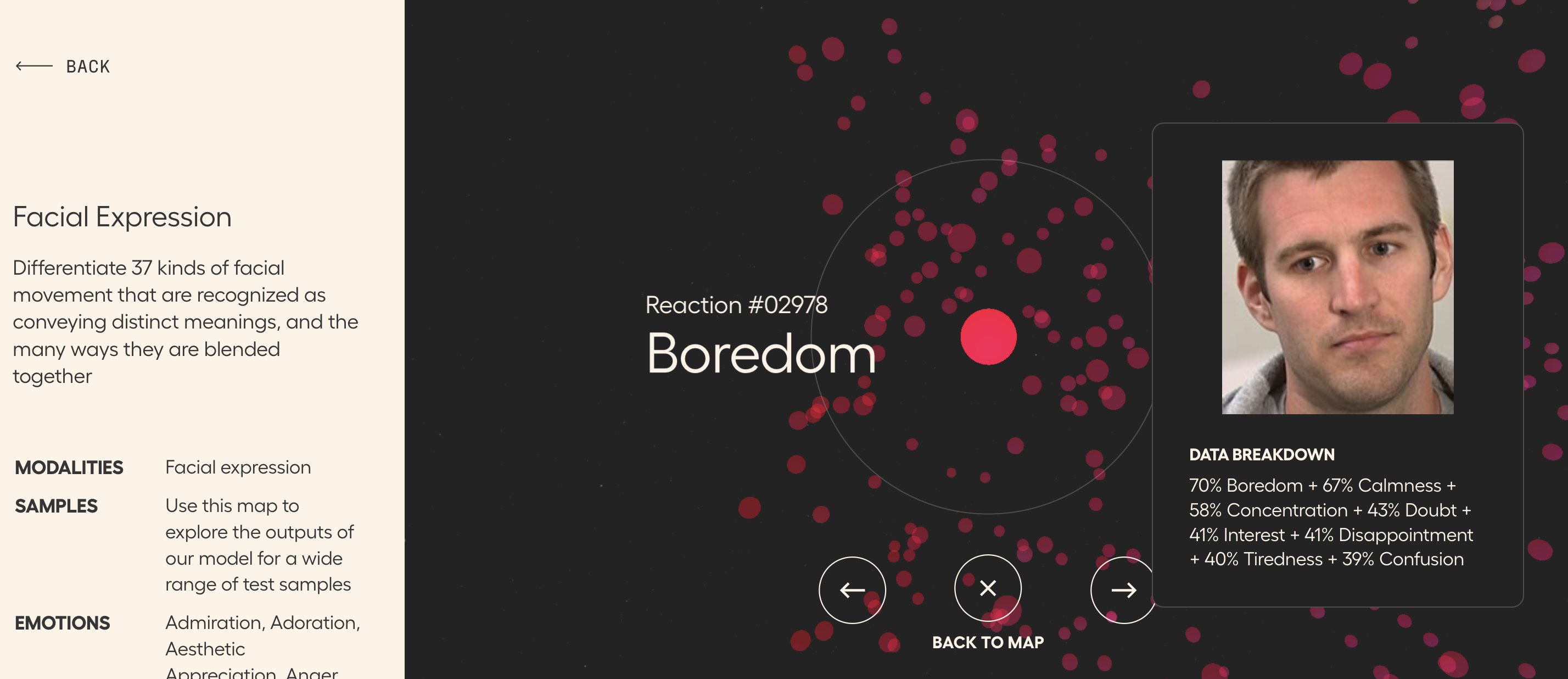
Check out Hume AI's website for a number of maps of various types of nonverbals that may be useful to you in therapy activities, particularly with teens, young adults or adults. I say that because some of the content on the website-- particularly the expressive language map-- is more mature. 

I'd suggest starting with the facial expression "galaxy" as I labeled it with students. Click within a cluster and explore nearby facial expression to discuss, for example, what makes surprised look surprised, in terms of what the face is doing.


We used this as a preparatory set with students before checking out videos with some kind of prevailing emotion. Anna Vagin has a great list on her site (and you'll really benefit from her email newsletters) and you can also check out resources such as this one from A Fresh Breath on TpT.

Scroll down on the main site and you'll see other datasets such as Emotional Speech, "Recordings of sentences being spoken in dozens of emotional intonations around the world"

Friday, June 24, 2022

Getting started with Minecraft

I described in a recent post coming to find some good uses for Minecraft with interested clients and groups. This previous post was about using Education Edition which not all have access to, so I wanted to make sure I described some applications for regular Minecraft. I first of all recommend getting started with the iPad edition, previously called Pocket Edition (there is also an Android tablet edition, both around $7 but then giving you everything you need). There is a lot to Minecraft that I don't even yet fathom but when you think of it as a digital LEGO set, that is a great place to start. Additionally one might add that there is evidence that involving LEGO in therapy improves communication and play skills, and these ideas can translate to Minecraft (I like good old LEGOs too). 

In this post I will briefly describe creating a world and getting started. This has been a great context in groups in the past weeks of simply deciding something to build, using visual supports to preview a "future picture" (see Sarah Ward/Kristen Jacobsen's work and just look up "make a simple ___ in Minecraft" on YouTube, e.g. a swimming pool). In the process group members work on fulfilling a group plan, adding thoughts and play moves in the app, and of course, flexibility and conversation. You can also use Minecraft in straightforward language stimulation activities as it could be used to foster description, concepts and following directions skills (you can even add signs in the world with text on them).

I keep it simple and do a play and pass situation with one iPad, but your kids could tell you there are ways to have people join a world from multiple devices. In our situation, mirroring the iPad to an Apple TV keeps everyone engaged when it isn't their turn. 

To get started, open the app and tap Play, and in the Worlds tab tap Create New. Name the world and change the game mode to Creative. Your students may balk and ask for Survival but I don't want them killing each other or being killed in the game. I wouldn't worry about all the settings but definitely scroll down and turn on Always Day so the screen doesn't maddeningly dim on you when it becomes "night" in your world. I learned that one the hard way. 

The arrows in the lower left allow you to move. Tap and drag your finger to "look around" and change your viewpoint. First step can be finding an open space to build something.


The diamond control on the right allows you to "fly" up or down as another navigation option. Note the bottom squares are your inventory of materials, and start out as empty. Tap the three dots to edit your inventory. 


Items with a + are actually a category of materials. Tap to expand e.g. the blocks. Find something you would like to add to the inventory, tap it, then a square at the bottom to add it.


From here, build! Change your view so you can see a target spot, tap to place a block. Make a mistake, long tap and that breaks (removes the block). It just takes a little practice. Maybe make yourself a summer retreat to start! 


Thursday, March 10, 2022

Radio Garden

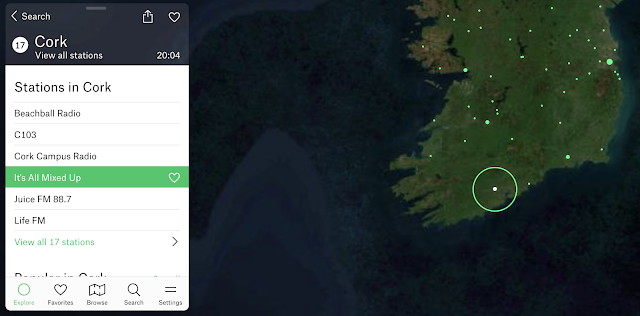
Flowing a bit from my last post (context is your friend), Google Experiment Radio Garden is worth a therapeutic visit. Your students will think it's just a chill moment, but secretly it can be a great way to practice having them call out:

-Continents and then countries
-Responses (conversation/comments) to what they hear
-Characterization of the language (nonverbal aspects such as tone etc) and type of music you may hear. Music genres are a category and can connect us with peers!

Why not pair this with looking up a current event from the country you "visit" for narrative/expository comprehension? 

Now more than ever, it's important to foster global awareness.

Oh, and Happy St. Patrick's Day, here's my homeland:


Friday, November 26, 2021

ASHA Wrapup

ASHA Convention was different, but it happened! Thanks to all the organizers for providing a safe and very educational event. I was honored to present on Thursday to a great in-person crowd. 

The focus of the session was on "playful" activities for language and social interventions across the age levels.

A few resources I presented:


Improv games are supported in our literature and mirror the format and communicative behaviors of conversation. Be sure to teach the nuance of "yes, and..." and couple with lessons on when we say no, and that it is OK to disagree (avoid ableism and support neurodiversity)..


Books are their own therapy tool and give you great ideas for playful followups. In this case Spencer's New Pet gives lots of opportunity for nonverbal situational interpretation and narrative development. (see this post for tips on using Youtube to present picture books). Balloon Animals! app made a nice pairing for a playful post activity here, following a quick lesson to pre-load some social strategies. See my free booklet on Pairing Picture Books with Apps!


You can use game contexts (e.g. Minecraft, Pokemon) without ever actually playing those games. A recent example: I have been leveraging a student's interest in Pokemon to use Pokemon Adventure comics (available via my public library on Overdrive which exports to the Kindle app) for nonverbal and emotional interpretation, narrative retell, and identifying and working with vocabulary. The vocabulary words need not be in the text to be relevant and motivating!

Hope you all had a great Thanksgiving!

Friday, November 12, 2021

Free Options for Group Games

I have previously written about the motivational and engagement value (thus promoting communication) of "room based" games. Now that we have transitioned back to in-person groups, we are incorporating some distanced card play, but this tech-mediated piece still serves a purpose (kids can use their own devices, stay far apart). Jackbox is a bit pricey and I wanted to share a few free options I have tried out. 

VXN's Mutter Nonsense and Drawn Out offer good potential for building communication skills in a fun way (including joining in a paced manner, using humor, visualization, association).  Here's a trailer for Mutter Nonsense (think Apples to Apples).


I also recently discovered that Jeopardy Labs has millions of pre-made games that you can choose from, including many related to vocabulary and social skills. Choosing and using group topical interests can also be a great way to use a resource like Jeopardy Labs. Don't fully love the content of a board? Clone it and make some changes. Do I have anything else to say about Jeopardy? Stay tuned...


Speaking of play, if you're headed to ASHA Convention, come see my session next Thursday!

Friday, October 1, 2021

Consider This: Classtools.net

The V in the FIVES criteria is for Visual! Visual supports are a simple Evidence Based Practice- give students something to explore with their eyes and you can tap:

-description/main idea
-vocabulary
-narrative language and complex sentence formulation
-social/situational awareness
-their interests/humor!

Classtools.net is an oldie but goodie, and has been around forever. In addition to its classroom tools such as Random Name Picker, a simple Soundboard and such, there are many visual activities you can use to create an "opener" or have students create something themselves. This may be particularly useful for older students.

Consider These:

Twister: create a "tweet" from any character, tap main idea, perspective taking, sentence formulation

Image Labelling Tool: upload an image and create text "hotspots" for part/whole thinking, abstract or advanced categories, description

Breaking News and Headline Generators: main idea of a narrative or expository topic, with humor!

Image Reveal: Gameify "Thinking with the eyes"


Interested in professional development for your department, school, or organization? Sean is booking in-person or remote trainings for the 2021-2022 school year


Friday, September 24, 2021

Consider This: Videos about Mindfulness

Mindfulness should be considered right in the SLP wheelhouse. It a) is evidence-based, b) promotes self-regulation which underlies executive function, academic performance, social communication and c) practicing and discussing mindfulness encompasses expository language and metacognition (talking about thinking). 

Through the mandated teletherapy period and beyond, I have found videos about mindfulness to be particularly useful as they are visual, prompt practice, and serve for post activities

Check out this example:


It's great. Well-paced, specific, promoting a strategy that can be used without the video at other times, and an example of an abstract, complex idea. In using this I have needed to recast my students' understanding of it: Being present helps you be in the moment to pay attention, but also regulates your emotions away from thinking/feeling about the past or future. There's much personal narrative that can come from exploring this as well as descriptions of what we notice in the moment (often a complex sentence formulation prompt as well with any cognitive verb).

In addition to other videos by the Partnership in Education, you can explore ones for various age levels from Cosmic Kids, MyLife, or Headspace.

It's a good idea to do this kind of activity with regularity (it need not take more than 10 minutes) or in a series as mindfulness is really about developing a practice.  I always think of it as a toolkit (aligning with models like Zones®), so it is also wise to find videos that promote different strategies such as presence, above, deep breathing, gratitude, etc.

Interested in professional development for your department, school, or organization? Sean is booking in-person or remote trainings for the 2021-2022 school year

Friday, September 10, 2021

Consider This: Visual electronic books on EPIC!

I'm sick of talking about COVID. Obvi it's still with us, but I thought I'd frame the path forward instead of backward, and 6 parts of "Lessons from COVID" was enough anyway. A new school year, so Consider This. In coming posts I will be encouraging flexible thinking, planning, and contextualizing of language interventions fostered by simple tech resources. 

I'm still a working clinician of course but have the privilege of doing consulting as well. This week I was discussing with an amazing SLP colleague a "way forward" for social learning lessons for a group of moderate to high-support high-schoolers. With delivery in their dedicated classroom, use of the board and projector is really helpful for keeping up engagement. We had at our fingertips a book she had identified, 125 True Stories of Amazing Animal Friendships, a great visual resource from National Geographic.


Interactive read-alouds, though still effective, get tougher as students get older. They no longer gather around in a circle on the carpet, do they? We thought of digitizing through Slides (easy enough, and one option), but then I thought to check EPIC! It had the book! Hopefully you know this repository of digital books offers (still!) free accounts to educators. Consider also this entire publisher's library and other visual treasures, which help us see how a resource like this can be useful beyond the primary grades.

Yes, you can zoom in...

So Consider This, in brief, and comment with other thoughts, please!
-Each entry, and there are many, can be mapped as a narrative
-The book as a whole is also an expository example and graphic organizers can be used for list, sequence, cause-effect etc.
-Our primary interest here was social "same but different" thinking. Many of these episodes can be used to extract human friendship "hidden rules" 
-Conversation building: what connections can you make in your experiences with pets?
-EPIC is very vocab-friendly. Click on a word and you get a definition.


What other ideas do you have when you Consider This?

Friday, July 2, 2021

Lessons from COVID, Part 4: Slide It!

In this series I have been discussing "lessons" from this difficult year: things that helped me get through but also will influence my work going forward back into "normal." One of these is the use of simple visual tools such as Google Slides. I had found Slides useful pre-pandemic as a way to lay out lesson and discussion visuals, but it became more so diving into telepractice. This "lesson" actually has some component parts, so I will letter those!

a. Keep a deck for each session or group: doing so helped with organization, review, and contextual flow. As I supervised graduate students throughout the pandemic, this also allowed for easy digital collaboration through Sharing.


b. Slide 1 is a good place for the agenda, which I always frame with the Social Thinking® concept of The Group Plan.

c) Like this overlaid Shapes>Callouts of thought balloons, Shapes are always your friend in Slides. Add any shape and it can be made colorful via the paint can, and is automatically typable (easier than text boxes) by double clicking in the shape. 

d) Shapes can also be made interactive like I did here applying a great visual about problem solving from Kristin Wiens at northstarpaths.com:


I used the shapes to put a desequenced example (from January 2021) and Remote Control in Zoom to have the students in the group put it in order. You can see that we also linked it to Story Grammar Marker® and Zones of Regulation.

e. As in the agenda above, I'll say it again, no need to type everything out in advance. Often that can be visually overwhelming anyway. I often find a title or frame sets the topic and kids are quite happy to attend and comment as you type!

f. Images are easily insertable on the go in Slides, much like the venerable Pic Collage. Insert>Image>Search the web to work on vocabulary, add a quick visual support or engaging image. Let your students decide (with help) what images go best with the language!


Speaking of images, any slide can be quickly screenshot and shared with parents or others who should know what went on in your lessons.

g. Shapes (again) make great discussion webs or make language visible to foster conversations. Anna Vagin's Conversation Paths slides really saved my life and are modifiable for many contexts. In this case my students asked my graduate student a couple questions to get to know her and the path visuals provided schema, in this case a mnemonic I made up about "people files" (FILE).


h. Lastly, each deck provided me an organizational frame for a group. I'd open a window in Chrome for the group, open the group's Slides, and then use tabs for any resources (e.g. an interactive website) I might be planning to use in the session.

I am looking forward to in-person groups being much less digital, but I am sure Slides will remain an important visual tool for me going forward!

I'll be taking a few weeks off- see you back here in late July!

Wednesday, June 23, 2021

Lessons from COVID, Part 3: Get a Room

Just playing on the title of last week's post, one lesson from this experience (almost all teletherapy, all the time) is the power of resources which allow you to have group members join a space, almost like a room. I believe for me this will continue beyond the pandemic as a helpful language and social engagement tool, incorporating technology to provide visual guidance, context, motivation to participate, language practice in various forms, and fun! Here are some examples:

Backyard is a free resource; create a space by signing in with your Google account, and students can join via a shared code. I found out about Backyard from Speech Dude Chris Wegner (see his helpful video tutorial) and it helped power me through my last few months of group therapy. With Backyard you can play fun language-y games like Doodle, basically a form of Pictionary with the tech providing structure and engagement. Backyard looks to be undergoing some sort of hiatus soon, but use it until June 26 and sign up for their updates on its later form (I see with dismay after writing this paragraph, but still worth looking at to see what is to come).

Jamboard, I've sung your praises many times. This collaborative drawing and writing space from Google provides infinite opportunities for bringing students together to the same space for a defined context or task. One of my latest uses was a modification of Wacky Words by Cranium (as always, please don't request access, just click on the 3 dots and make a copy). I left the second game as one in progress so you can see how it works. The rules for the game are here (also a handy visual site) and you can use a random letter generator like this one. For any Jamboard, Share will give you a link to modify as editable, Share directly with Google accounts or in Google Classroom.


Kahoot, as always, came in handy. Quizzes generate conversation between items, so scaffold that, and you can easily create/modify quizzes related to language/social content or conduct decision-making and compromise sessions related to playing Kahoots about trivia topics. This Google Slide visual is one I used to teach about Levels of Like (compromise means picking something all are "ok" with); use shapes and change their sizes to show what the group "thinks" about the option.


Jackbox, a series of games that actually use the term "room code," provides many engaging games, especially for middle and high schoolers. Watch for sales on their website (sign up for mailing list) as these are frequent, and I buy the codes to run through Steam. Be aware that many schools may block running Steam over their network in order to stop students from gaming inappropriately; I have used my hotspot on a few occasions. This site provides a helpful list and descriptions (e.g. which games have family-friendly settings).


Thursday, May 20, 2021

GoReact (Update)

I wrote about Chicago's Museum of Science and Industry's GoReact app some years ago, but their porting of it to a web version is even more useful in teletherapy or if students have their own devices available. GoReact is an interactive Periodic Table of the Elements; click on any element and you will see a photo of a functional real-life use of it. Even more fun, the Featured Reactions have categories such as health and beauty aids which you are given directions to "assemble." It therefore is a great source of activities for following directions, play, and language links to curriculum.


Consider pairing this activity with Julia Dweck's GiftedTawk's Periodic Table Jamboard, which has great contexts for describing visuals and inferring as you match element "comic book superheroes" with their elements.

We also had fun sliding this into a social topic and making characters ourselves that personify elements with Plotagon Story and having them have conversations that show big, medium and small reactions!

Friday, April 30, 2021

Elinor Wonders Why (PBS Kids)

The PBS Kids activities corresponding with the series Elinor Wonders Why provide a number of language targets and are another example of modern web design (i.e. not flash-based). I also like activities with outdoor themes that you can couple with small "field trips" of your own if working in-person. These are now added to the PBS Kids task-analysis spreadsheet.

Curious Campout- good narrative play, like a mini "Toca Life." Click to interact with objects e.g. to set up the tents or put wood on the fire.


Hide and Seek- for one or two players (one covers eyes), hide 4 characters across a wooded area and take turns finding them. Good for spatial concepts and causals, as players are more hidden with clothes colors that camouflage them. 

Two more are added to the linked spreadsheet above!

Tuesday, April 20, 2021

A Little Motivation Goes a Long Way

I have been doing social groups through teletherapy since March of last year. For absolutely everyone involved, in the context of this very looooong situation and too much online learning, it wears. So we need to keep it targeted and focused but find new ways to induce fun and flow. 

Lately I have found a double-purpose in acquiring some of the Jackbox games. If you have not used them, Jackbox's games are in the "party" genre but tap many communication skills. Players join a game via a browser tab or the browser on their mobile devices, navigating to jackbox.tv and putting in a code to join the room. The double-purpose is that the games are fun for you as a family or adult friends gathering in person or online as well.

Jackbox games are available through "Packs" of games or some individually. I generally use these through Zoom by running Steam, a free gaming platform which allows the purchase of games (Share Screen>Desktop is the best way to go in Zoom). It's also possible to purchase through your Apple TV and/or iPad and show your iPad screen to run the game. 

Some games I have found useful in teletherapy, particularly because they are satisfying enough for the group when you run just one round (10-12 min):

The Devils and the Details (Jackbox Party Pack 7): players are a family of demons who are forced to live in suburbia and complete cooperative chores toward a common goal. Great for accompanying with discussion of taking on chores at home. Here one player verbally helps another with fixing the TV:


Drawful (any version): Interpret a descriptive phrase with a sketch and then players interpret you in turn:


Quiplash (also several versions): Kind of a phrase-completion Apples to Apples, but all get to vote. Great for targeting use of humor and strategies like incongruity, randomness and irony:


Also see Patently Stupid (Jackbox 5) we rename it in the group!) which is about "inventing" items to solve problems, writing taglines (main idea) and again, voting.

A few tips:
-Besides the one above about how to show the game, you will want to go into the settings of any game before playing with a group. It is a good idea to turn on family friendly mode and lower the volume significantly so that everyone doesn't get drowned out if doing in teletherapy.
-Your district may block Steam over wifi, so while it may be on your machine, you may not be able to activate it in your building. I ran it over my phone's hotspot and that worked fine.
-The games move fast! Many have archive features so you can view and laugh again about (with time to process the language "oh, that was a great example of...") everyone's turns. You can also screenshot during the game.
-I like to use the strategy of "planning for problems" (Social Thinking®) lingo- discussing what could go wrong and what thinking strategies might help the students, which turns the game into a true lesson.


A note to all: You may have received an email re: this blog as previously you had "subscribed" using a tool called Feedburner. Google is retiring Feedburner soon so I was able to move (hopefully) all who wished to receive these posts via email and confirmed this to a new service called follow.it. If you would like to receive posts via email, the form to sign up is in the upper right corner of the full website. 


Thursday, January 14, 2021

Multiple Meaning Commercials

Sometimes it pays to watch the commercials! GEICO has been doing a series of humorous ads for home insurance where the homeowners make a complaint that turns out not to be what we thought they meant- rather an alternate meaning of their plight. Video can be a motivating way to explore metalinguistics with your students, and each of these has a social/situational awareness element as well (e.g. why passive aggressive comments from aunts--pronounced ants--can be a problem). 

Aunt Infestation

Fencing Problem


.