Showing posts with label video. Show all posts

Friday, January 19, 2024

What's the Hoopla?

Within sessions I strive to achieve what we might call media balance, using a variety of materials including hands-on, paper, and digital. If I feel the plan involves too much tech, I try to adjust. This has been a helpful model in supervising graduate students too. At the start of each semester, I encourage each of them to make sure they get a library card and visit the local library to practice identifying actual books they can use in therapy sessions. A library card is also essential for the resource I want to highlight here: hoopla!

hoopla is an extension of public libraries' digital resources (note: I speak as a Boston Public Library patron and this may not be available to all who read this- check with your library or their website!). Of course, Overdrive/Libby are great for digital books that sync to your Kindle app (I use on iPad or Mac), but I rediscovered hoopla entries recently when looking for books on my library's website. hoopla has a wide range of picture books, many on SEL topics from authors such as Julia Cook or Bryan Smith:


I have a learner who really gets into these books, posing great questions. Some SEL books can be a bit black and white, but with our teaching we can infuse nuance and neurodiversity-affirming approaches.

hoopla also has a range of short movies created from picture books, which can be terrific for media balance, engagement, and providing animation which creates narrative and interpretive opportunities.


I hope you find your way to hoopla!


Saturday, December 17, 2022

Exploring Emotional Vocabulary

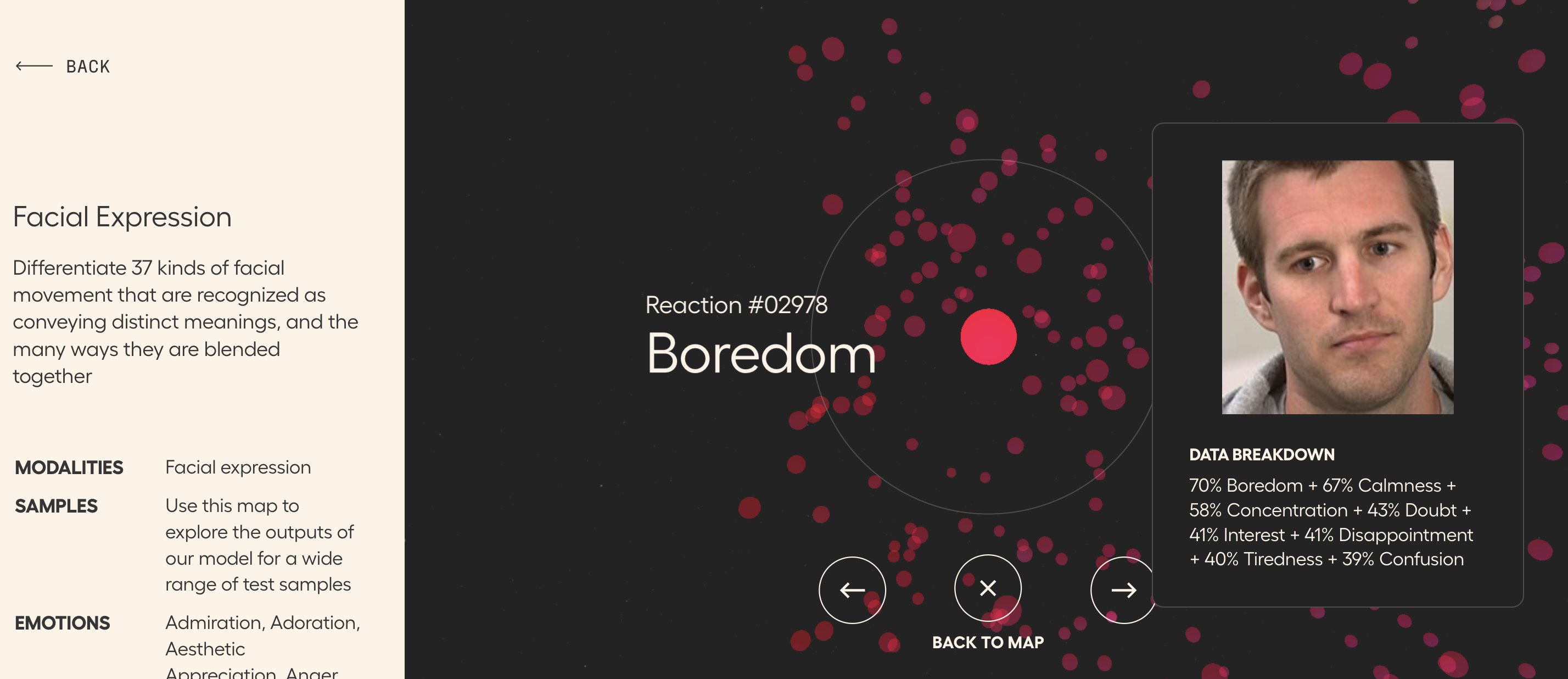
Check out Hume AI's website for a number of maps of various types of nonverbals that may be useful to you in therapy activities, particularly with teens, young adults or adults. I say that because some of the content on the website-- particularly the expressive language map-- is more mature. 

I'd suggest starting with the facial expression "galaxy" as I labeled it with students. Click within a cluster and explore nearby facial expression to discuss, for example, what makes surprised look surprised, in terms of what the face is doing.


We used this as a preparatory set with students before checking out videos with some kind of prevailing emotion. Anna Vagin has a great list on her site (and you'll really benefit from her email newsletters) and you can also check out resources such as this one from A Fresh Breath on TpT.

Scroll down on the main site and you'll see other datasets such as Emotional Speech, "Recordings of sentences being spoken in dozens of emotional intonations around the world"

Monday, April 20, 2020

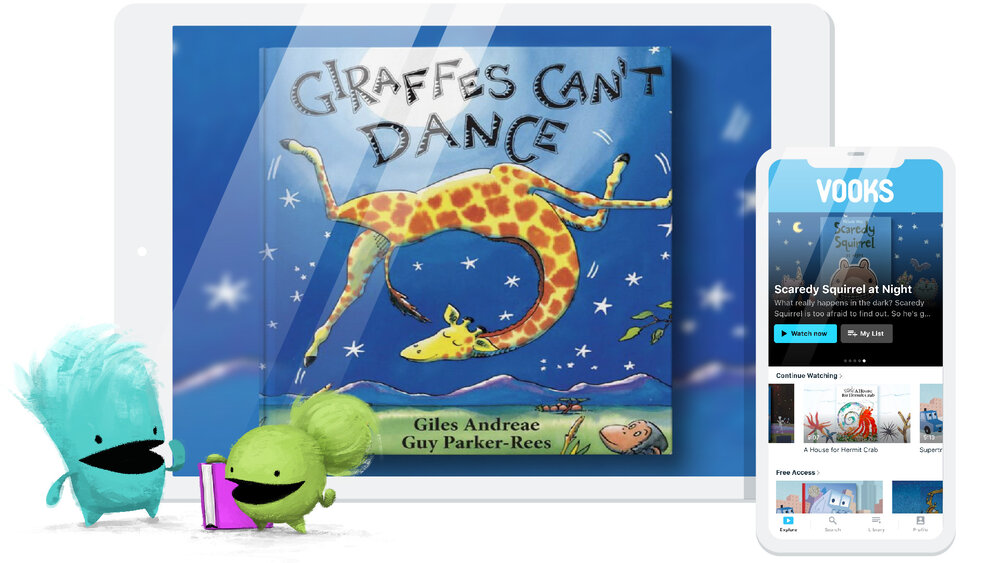
Vooks is another great resource for books, context.

Vooks has produced beautiful, slow-paced video animated books, and offers a free year to educators (quite a snarky teacher video there, lol). The selection of books looks great and many are titles I have in my library of picture books. There is a process to request free access but I was approved quickly. The titles also have lesson plans with activity suggestions, ideas for questions and vocabulary cards. I definitely recommend Vooks for your toolkit; you can share books in sessions through screenshare.


Friday, April 3, 2020

Repost in Tele-Context: Cookies Crumby Pictures Address Self-Regulation

Originally posted 3/14/19.

I'm reposting this now because people could use ideas for videos that set contexts in telepractice sessions. These are all great social cog/self-regulation videos and could also be used for language lessons- for example story grammar or sentence formulation, or compare-contrast to the inspiration stories for the videos.

For a self-regulation curriculum in addition to Zones of Regulation, very reviewable in teletherapy, see also Hanna Bogen and Carrie Lindemuth's Brain Talk.


Sesame Street has been on a self-regulation initiative for the last several years. A series of skits called Cookie's Crumby Pictures parody popular movies and model strategies for listening, recalling directions, waiting one's turn and self-control. Children would not get the references to Karate Kid or When Harry Met Sally, but find the videos entertaining nevertheless. You can even sell them to older kids with a little effort. As always, a video that covers a social-emotional concept in the context of a story offers both a social cognition and narrative teaching opportunity. Check out this full playlist here, and a few sample videos are embedded below (email subscribers, click through to the full post).

Whole Body Listening:


"Thinking with the Eyes" (see Social Thinking®) and Problem Solving:


Considering your professional development schedule next year? Check out Sean's offerings for training sessions.

Friday, June 7, 2019

"Fails" as Narrative Instruction

The Internet loves a "Fail," which Urban Dictionary defines as [noun, in this case] "a glorious lack of success." From a narrative standpoint, however, a fail is an initiating event, a critical story element to work with in our students' language. Graphic organizers reduce cognitive load and help students identify and internalize narrative structure, which assists with comprehension and production of narrative language. One level I like to work with my students around is the Reaction Sequence, which looks like:

Character
Setting
Initiating Event
Reaction (what the person DOES in response to the IE, note that this is not a Response or Feeling, which is part of the next level of narrative development, often called the Abbreviated Episode)


The Reaction Sequence is sometimes represented as Somebody Wanted But So. You can use SWBS, Story Grammar Marker®, Story Champs, or other approaches such as the Gillams' SKILL for your graphic organizers, or make your own. Good idea to have some sort of consistency in the icons or GOs you use, however.

So, the tech part: humor is great in therapy, but be careful about where you get your fails. I like America's Funniest Home Videos (AFV) as it is super family-friendly. Take this video compliation:


It provides a great 15-30 min activity in having students formulate the narrative of what they see. Of course, use the pause button, and a few other ideas
-Zoom in on character, some students have a difficult time reading nonverbal signals around age and relationship between people (a skill measured in assessments like the Social Thinking® Dynamic Assessment Protocol). Scaffold statements like "a brother and sister" or "a kid who is probably like, 8 years old."
-NOTE that with the above you are working on microstructure such as noun phrases and use of conjunctions (also linking between the story elements: "A group of kids is surfing at a beach WHEN a huge wave comes.")
-Zoom in on setting, many of my students would just say "outside"- scaffold specificity such as a beach, a lake, a hiking trail, and so on.
-Consider adding a pragmatic element with an ersatz barrier task- one student can watch and narrate, then show the video to the group.

May your summer be free of Fails!

Considering your professional development schedule next year? Check out Sean's offerings for training sessions.

Thursday, May 2, 2019

Toca World unites many Story Grammar Settings

The free app Toca Life: World (available for iOS, Android, Kindle) works some device magic by uniting any of the Toca Life apps you have on your device. I've long been a fan of these sandbox-play apps that present a variety of scenes mirroring real life for sociodramatic play. Each scene is interactive such that you can manipulate objects and perform actions with characters. Look at Toca Life's settings through a language lens and you'll see many contexts for syntax (verbs, causals), semantics (categories, vocabulary) and discourse (telling a story). This past week I used the Toca Life: Vacation app to model an airport story for my student, and was thrilled to see him tell a same-but-different story (note that there is also a screen/audio recording feature in each app for your to make a movie of your stories with narration). Toca Life: World, in addition to bringing your places together, provides additional settings for purchase. I had fun with the ski resort making this model for one of my groups! 


Considering your professional development schedule next year? Check out Sean's offerings for training sessions.

Monday, March 18, 2019

Google Earth's Where in the World is Carmen Sandiego?

Who remembers this game? I actually was an 80s kid, so mine came in a box with a World Almanac (!) and several huge discs for the Apple IIe. It looked like this:


See video

First of all, show that video to your students to elicit laughs, questions and comments. There are also YouTube samples of the 90s Carmen Sandiego game and PBS TV Show (with the inescapable theme song). After my time, sadly.

THEN, check out this amazingly cool overlay on Google Earth developed with Houghton Mifflin Harcourt (on full Chrome, laptop or Chromebook, or in the iOS Google Earth app under the Voyager menu). This Google Earth version of Where in the World is Carmen Sandiego brings you through a simplified version of the game, and you can use for language underpinnings such as:
-identifying category items (continents and cities)
-spatial concepts
-making inferences
-describing (places, maybe with the EET)
-using research tools

You can zoom in on landmarks in the view window, but interacting with the menu will kick you out of the game. I'd recommend using this game as a way of teaching students to use tabs:
Tab 1- Run the game
Tab 2- Run Google Earth to get further info about the landmarks (Wikipedia articles appear- don't attack me, I know Wikipedia is not good for research, but it is good for general semantic knowledge about any topic)
Tab 3- use for research related to the clues

Enjoy the game- use it a lot and maybe they will make another one!

Considering your professional development schedule next year? Check out Sean's offerings for training sessions.

Thursday, March 14, 2019

Cookie's Crumby Pictures Address Self-Regulation

Sesame Street has been on a self-regulation initiative for the last several years. A series of skits called Cookie's Crumby Pictures parody popular movies and model strategies for listening, recalling directions, waiting one's turn and self-control. Children would not get the references to Karate Kid or When Harry Met Sally, but find the videos entertaining nevertheless. You can even sell them to older kids with a little effort. As always, a video that covers a social-emotional concept in the context of a story offers both a social cognition and narrative teaching opportunity. Check out this full playlist here, and a few sample videos are embedded below (email subscribers, click through to the full post).

Whole Body Listening:


"Thinking with the Eyes" (see Social Thinking®) and Problem Solving:


Considering your professional development schedule next year? Check out Sean's offerings for training sessions.

Friday, December 7, 2018

ClipGrab

Downloading videos from YouTube can have a number of uses for intervention.
-Downloaded vids don't have the sidebar of distraction from which students will ask to see other things.
-Or ads (another way to avoid these is to insert a video in a Google Slides presentation, sometimes also helpful because you can put a story grammar visual or other support on a following slide, or otherwise put the video in context)
-If you download, you can keep an archive as you wish
-Downloading helps you skirt blocking within a district, or poor wifi
-Occasionally I have found a video that is perfect to illustrate a concept except for one sweary or inappropriate-to-show part- in those cases I have downloaded and used iMovie to edit out that part.

Previously I have recommended a website to do this downloading, but it appears to have become no longer useful for the purpose. You can now download the free application ClipGrab from here for your Mac or PC. It's very easy to use, just copy the YouTube URL (the address at the top bar when the video is playing) and paste into the bar, or ClipGrab also lets you search YouTube from the application. Click Grab This Clip! and you can save to your Downloads folder.


To get started with YouTube clips with some great models of clinical uses, be sure to see Anna Vagin's website and books.

Saturday, May 12, 2018

Video Tips from Students...Part 1

I use YouTube videos in social cognition groups for many purposes, and they often prompt clients to ask, "Can we watch...?" My rule is I have to watch it first so, "Not today, but maybe next time." Sometimes this leads to really engaging, fun contexts and lessons.

For example, I learned about Doge. Doge is a meme, basically, and series of silly animations often showing the inner monologue of a dog. My student asked about Call of Doge which was filled with explosions, so, uh, no. But then (showing flexibility in his response) he said, "Well OK...maybe watch Doge Adventure?" This turned out to be a silly music video BUT connected to the idea that different settings and events lead to different thoughts (narrative landscape of consciousness, anyone), so led to a good discussion and post activity drawing comics with thought balloons. It also paired well with the mindfulness-oriented picture book Puppy Mind, which my students probably wouldn't have bought my reading them without this video segue. I always like a balance of materials so I read the actual book. Another tip and lesson next time!


Thursday, August 31, 2017

Looking for engaging therapy ideas? Check out Anna Vagin's YouCue Feelings video series

Anna Vagin has been sharing wonderful ideas about using electronic media in therapy. Anna has a strong focus on social learning but her resources on using YouTube also have implications for narrative language, sentence formulation and categorization. I've long been a fan of her YouCue Feelings book (available also as a handy Kindle edition you can put in the Kindle app on your iPad), but she has also produced a series of short videos available on YouTube, including this one featuring recommendations for younger students.


Dr. Vagin (an SLP) shares broad ideas about resilience and friendship here, but the videos mentioned can also be used to work on more discrete skills. I often use her recommendations in conjunction with narrative tools like Story Grammar Marker® so that students "get" the narrative and have practice retelling it. Spins on story retelling such as analyzing the story elements of initiating event, response and plan from two different perspectives are suggested by the Bert and Ernie example (see specifically Mindwing's Perspective Taking or Critical Thinking Triangle maps). Also contained in this video are alignments with Zones of Regulation® and work on categorization (feeling words) and association. The app Lists for Writers is a good source of many lists including emotions and personality traits. Dr. Vagin recommends the use of whiteboards (which I love) but Book Creator or more simply, Doodle Buddy, can also be used for the sketching and association activities (e.g. plane and runway) she describes.

See Dr. Vagin's full offerings here.

Disclosure: author provides blog content for Mindwing Concepts, Inc.

Saturday, April 29, 2017

Find on-point videos with Classhook

Classhook is a free service for educators that seeks to "hook" students with clips from popular culture (movies, TV, etc) that connect to academic concepts. I use video clips in many sessions to target narrative language as well as social cognitive concepts. Video is easy to access and naturally engaging to students, prompting observation, discussion and retelling opportunities, as well as post activities such as sketching or discussion webbing.

Classhook has a wide range of topics in which videos are catalogued. SLPs and literacy specialists would naturally be interested in the English and Communication categories, but also should look at Psychology and other disciplines as well. Additionally, using videos to link to concepts in any curriculum area and constructing language activities around them is a good way to incorporate educationally relevant interventions.


You can use Classhook on a laptop, Chromebook or a mobile device such as an iPad. I find it is a good practice to curate your own video links in a service such as Pinterest or Pocket.


Thursday, April 6, 2017

YouTube clips about board/card games can serve as video models.

Hands-on games, i.e. board or card games, can be used in helpful social contexts and align with specific skills one is trying to teach. Realizing this week that my group could benefit from a solid model of how to play a particular game, I thought of shooting one with video, but realized that YouTube might be a resource. Though YouTube is not a great source of video modeling in general, it has specific material such as all kinds of brief "how to play"and review videos about commonly used games. We know what it looks like when we have to explain a game; it can be a lot of words. I sometimes go in that route when it's clear my students need to grapple with processing more language. In this case, I wanted them to work on some of the pieces that could be demonstrated more clearly in a video: contingency, prompt responses, moderating humor, and the situational awareness of the game. As it is a silly group, I wanted them to deal with a silly game.

We used this video about Bubble Talk, a simple family demonstration:


As a pre-lesson in a portable strategy, we talked about the Space, Time, Objects, and People aspects of the game. Having seen "a round," as opposed to my giving directions, we also made a goal for how many rounds we should play in our time period for the activity to feel complete and fun. Ward/Jacobson's 360 Thinking Time Tracker came in handy here to self-monitor our progress toward our goal. Finally, we talked about the expected behaviors (see Social Thinking® and particularly the Unthinkable Wasfunnyonce) that would help us meet our goal. All went great and the video, also an engaging way to bounce into other concepts, helped facilitate that.

Check out YouTube for models of many other games.

Tuesday, July 21, 2015

Video Modeling and iMovie (Part 2)

In my last post, I reviewed (briefly) a meta-analysis (Bellini & Akullian, 2007) supporting video modeling (VM) and video self-modeling (VSM, the difference being that the student or students are included in the video produced to promote the use of the target behavior). In the study, the authors recommended the therapeutic technique of storyboarding targeted interactions before videoing students, which is also supported in literature describing interventions for social and executive functioning (Ward & Jacobsen, 2014).

The authors also highlighted the technical skill that was needed to produce and edit personalized videos. In 2007.

In 2015 (and for a few years back), it is not at all as hard to produce and edit video clips, because we have iMovie for iOS. Now, I originally taught myself iMovie about 14 years ago on the Mac, and it was quite a chore. After shooting video or compiling photos somewhere else, often a comparatively small but still clunky DV camera, you had to import the video (in real time) and use a complicated interface to edit it. iMovie for iOS (Free if you have purchased an iDevice after Oct 2013, otherwise $4.99) still has a bit of a learning curve--but the fact that you can shoot and edit by touch all on the same device goes a long way toward making these techniques accessible to our profession. Note that you can do much of the below on an iPod or iPhone as well, though the small screen will make it a bit trickier.

I had a great time with a group at Nova Southeastern doing an interactive demo session on iMovie recently--I'd like to make this a habit! As a group, we discussed the study mentioned above and decided on a task that I could be "prompted through," as an organizer recorded me and another gave me some cues when I "forgot" a step. We decided on something simple--pushing in a chair after leaving a table!

When you open iMovie, you begin by adding a new project, as in many other apps with the + symbol.  iMovie has this great interface where you can create a Movie Trailer, but in this case we select "Movie."


Once you have created a project, you can add video previously shot from your camera roll, or tap the camera to record directly into the timeline (the area used to build and edit the project). In this case we just added the recorded single clip of my being prompted to stand up and push in the chair!


Once the clip is added to the project, you'll want to navigate to any segment you want to edit, such that the play head (white line) is over the beginning or end of the segment. In this segment, the person to the side was giving me a verbal prompt we wanted to edit out. Be sure to tap the clip so it is highlighted in yellow, then tap Split. This creates two separate clips so you can simply edit the end of one or the beginning of the next, like so:


The beauty of editing in iMovie is that you can "trim" footage by moving the trim handle (yellow bar) to the left or right, which cuts or re-adds footage as you like. If you make a mistake, simply adjust--no need to start over. In this case, we moved the handle to the right until the video clip no longer contained the verbal prompt.

Proceed in this way to edit out any footage, including prompts or errors, so that students can see the situation going "as planned." iMovie allows you to do a lot more than this, and nice guides are here and here.

Like many iPad apps, your project saves automatically and you can return to edit it. Tapping on your project in the Projects area gives you many options for sharing: saving the edited video to the camera roll or publishing to YouTube, sending to Dropbox, etc.

I could spend a lot more time on iMovie, but hope this gives you a start!

Tuesday, July 14, 2015

Research Tuesday- Video Modeling and iMovie (Part 1)

At my recent presentation at Nova Southeastern University, we reviewed research around video modeling and how this speaks to use of the app iMovie (free for devices after Oct, 2013/$4.99). For this reason, I am happy to discuss this material today as part of Research Tuesday.

In researching this topic, I was happy to find a recent meta-analysis (Bellini & Akullian, 2007) that looked at a range of published studies on video modeling (VM). Here are some details of that study:
  • The authors emphasize the importance of evidence-based practices in treating autism and the sense of urgency around helping these clients and students to make progress. Single-subject research is defined as EBP when it involved defined practices (methodology and context) that are "implemented with fidelity," resulting in "the practice...functionally related to change in dependent measures," and that the results around the practice be replicated in at least 5 peer-reviewed journals. The study also emphasizes the importance of social validity, meaning that the practice have "social importance and acceptability" from the point of view of the client.
  • The study describes video modeling as grounded in Bandura's social learning theory and defines it as "demonstration of desired behaviors through video representation of the behavior." The intervention around VM typically involves watching the video demonstration and then assisting the student in imitating the behavior in context. In video self-modeling (VSM), the student observes himself in video successfully performing a behavior, related to Bandura's concept of the motivation factors around "self-efficacy."
  • The meta-analysis examined 29 studies involving VM and VSM applying selection factors (publication in peer-reviewed journal, participants with ASD, focus on VM and VSM for functional behavioral outcomes alone or in combination with other interventions, other factors) and identified 23 studies meeting their criteria. Examining these 23 studies found moderate intervention, maintenance and generalization effects for the methodologies (less generalization found with VSM). Statistical analysis involved application of PND (percent of non-overlapping data), a statistic often used for analysis of single subject designs, for the purpose of establishing these effect sizes. Use of video modeling was also noted as promoting learning factors such as attention and motivation.
  • The researchers go on to give specifics about each study, as well as categorized studies according to focus on social or functional (life) skills. For example, in one study, students were supported with prompts to use the skill of requesting items during play, and these prompts were edited out for the video used for repeated viewing by the children. Editing out "hidden supports" is a subcategory of VSM known as video feedforward, according to the article. In this study the 4 participants were found to have a substantial increase in spontaneous requests for toys and items after the intervention. Many other examples are given in the meta-analysis.
A few points in the authors' discussion particularly interested me. As it was written in 2007, the article emphasized the technical expertise required to edit the video footage, particularly in techniques such as feedforward. With the availability of mobile apps for video editing, this is not so much a factor anymore. Additionally, the authors suggested therapists use a storyboard or script, then record the child or children engaging in the desired behavior. I find this a great suggestion as it places video modeling in the context of a larger therapeutic and language process, particularly for higher functioning students who can participate in the storyboarding and planning phase of the activities.


For some practical ways to apply video modeling with pre-made videos in your work, see my recent post for Mindwing Concepts, where I particularly focused on strategies of using situational analysis and story grammar during and after viewing activities.

In next week's post, I'll be looking to back up what I said above about the relative ease of recording videos and editing out prompts (feedforward), in a discussion of iMovie.

Bellini, S, & Akullian, J. (2007). A meta-analysis of video modeling and video self-modeling interventions. Exceptional Children, 73 (3),  pp. 264-287

I will be presenting in the Washington, DC area in September for the Center for Communication and Learning, LLC- hope to see some of you there! Click here for details.

Note: author is a paid consultant for Mindwing Concepts, Inc, for the provision of blog content as relates to the link above. 

Thursday, July 24, 2014

Some TED Talks of interest to SLPs and Language Folks

Summer is a great time to slow down and think. TED Talks have long been one of my favorite ways to take in some new info- these short (varying from 5-20 min) presentation recordings are created at Technology-Entertainment (the E should be Education for as much as these talks address that area)-Design conferences around the world and feature leading researchers and creative people speaking on important topics. TED Talks are naturally facilitated by technology as they are available on YouTube and the free TED app.

All of the talks are food for summer thought but a few have caught my eye recently as relevant to speech and language:

Disability-led innovations for the masses- SLP and Assistive technology trainer Chris Bugaj, author of The Practical and Fun Guide to Assistive Technology in Public Schools and the A.T.TIPSCAST, explores the many examples of accommodations for people with disabilities (e.g. touch screens) that have become the norm, illuminating principles of Universal Design.

How to speak so that people want to listen- Sound consultant Julian Treasure discusses subtly "unexpected behaviors" in social communication and the effects of aspects of speech such as register and prosody, providing a good resource to use with clients working on these areas.

Autism — what we know (and what we don’t know yet)- Geneticist Wendy Chung shares what we know about autism, both from a genetic and developmental perspective.

What makes a word "real"?-English professor and linguist Anne Cuzan explores our evolving language and the notions that word changes reflect the populace's usage and not just our judgments of what should be "correct" English.

Use these as jumping off points to other talks- I am happy to have just discovered the "Words, words, words" playlist while writing this post!

Tuesday, March 4, 2014

Travolta's Teachable Moment

YouTube is a great resource when it comes to finding timely video clips- just preview the exact one to make sure you know what you are showing.*

Sunday at the Oscars, John Travolta made somewhat of a gaffe by, I guess you could call it mis-introducing singer Idina Menzel, because it went far beyond simply mispronouncing her name. Your students are likely to have background information about this as the song she was singing is from the animated hit Frozen.

I know many have sympathy for Mr. Travolta for various reasons, but nevertheless, the humorous situation can be used as a teachable moment for students (and us)! Though we emphasize social concepts such as "People Files" (see Social Thinking® and the work of Michelle Garcia Winner) regularly, students still benefit from regular review of why it is important to at least use others' names purposefully, if not have deeper knowledge about them, and this situation seemed totally on point. Use YouTube to look up the occurrence, or see this link for video, and for an engaging twist, a little interactive that lets you "Travoltify" your students' names.

You can also show at least the beginning of the performance immediately after and discuss why it was important for Ms. Menzel to react professionally:

If you have been to one of Sarah Ward's workshops, her STOP strategy for situational awareness (Space, Time, Objects, People) goes well with this situation.

Space- onstage, backstage, audience, well, uh, the world.
Time- Before the show, each piece of the show is rehearsed several times. What happened right after this? What should Mr. Travolta do to make up for his mistake after this?
Objects- Paper (could have been used as memory aid), teleprompter.
People- What do we know about Mr. Travolta? What about Ms. Menzel- unfortunately this was a shining moment for her that got messed up a bit. What did others think about his mistake? What are the emotions involved for the speaker, singer, viewer. See this ad by the promoters of Idina Menzel's new Broadway show capitalizing on the humor of the story.

The concepts established with the clip can then be applied to activities emphasizing names and people files within the group.

*I also like to use apps such as TubeBox to save clips (avoiding connection/blocking problems in buildings) and remove distracting adds and sidebar clip libraries.


Thursday, October 17, 2013

Working around the App

It's important to emphasize that apps and the iPad itself are simply tools we can use in our work to address student objectives. Apps can provide or extend a context in which we are targeting particular skills, and I love talking about the activities that can be going on "around the app."  A few resources related to this recently came to my attention.

I have long been a fan of Toontastic, and whole-heartedly recommend the All-Access version to elementary SLPs. This stellar app is so engaging to students, and the full version allows access not only to a huge array of settings, characters and props, but also the ability to use photos of real-world or saved Google Image backgrounds (but be careful of copyright if sending to their website, ToonTube), or to integrate photos of students into character figures. With creation tools such as Toontastic, I often think of the product created as beside the point, as the students get so much language practice from the process. Using graphic organizers or story maps to plan the animation are valuable activities that can be going on around the app, but Launchpad also provides terrific "Paper Puppets" for you to use for practice and scaffolding. These full-color printouts can be cut, laminated and used as tools to immerse kids in the context of the app, before you even open the app! You can use them for storyboarding and role-play, or all sorts of creative extensions of the context.


In another example, Flummox and Friends is a resource I wrote about last year- it is the pilot episode of a children's TV series about social cognition. I was thrilled to hear that plans are moving forward to produce more episodes. Flummox and Friends, while not an app (yet) is a resource that fosters much activity around it- discussions, role play, etc. Just released also: an extension activity within the terrific Kid in Story app. This book-making app comes with the twist of allowing you to "cut out" a photo and insert it in a story. A template using the context of Flummox and Friends is now available in the community library. Just edit your stories and download the template from there, and you will be able to put students in photos with the Flummox gang and record language in response to prompts on the page. The story is a great context to build feelings vocabulary, an area lacking in many students.


What other ways do you work "around the app?" Let us know in the comments!


Thursday, June 27, 2013

Summer Watching: Body Language and Life Outcomes

It is rare that I watch a TED talk that it doesn't change my thinking in some way, at least temporarily. Isn't that what learning is about? I often intend to watch more of these talks and don't succeed, but I recently noticed that TED is available on Netflix. Not that it was hard to access the resources from the multidisciplinary Technology, Entertainment, Design (and much more) conferences, given the great (free) website and iPad app, but streaming it on my TV is even better.

Check out this talk from Amy Cuddy on body language and its consequences for communication and even "life outcomes" such as getting a job or making a date. There is some interesting science here and definitely some clinical implications for working with our students. Amy discusses the simple strategy of the "power pose" and how it shapes our thinking and behavior, and therefore consequences in our own life and our own feelings about ourselves. Sound familiar? There's a good connection here to Social Thinking's Social Behavior Mapping technique.

See Amy Cuddy's TED Talk here.


Thursday, January 10, 2013

Google on Apple: YouTube

A frequently touched upon theme here on this blog is the usefulness of YouTube as a visual teaching tool, and it keeps evolving as a resource.  For example, recently with the iOS6 update, Apple removed the native YouTube app.  I had previously recommended Jasmine as a replacement, and this is still a perfectly nice app, but Google then produced their own new (free) YouTube app for iPhone and then updated it to be universal for iPad. You can, as always, still see YouTube videos in the Safari app as well.

The iPad app works as you would expect it to, and has a very nice, clean interface as many of the new Google apps do. The nifty addition of voice search (using the microphone in the upper right corner) and sign-in capabilities allowing you to subscribe to "channels" or add videos to playlists, are nice touches.  One of the issues when the native app disappeared is that many people, including families of kids with autism who used the app extensively to provide entertainment to their children, lost the "favorite" lists that were saved in that app and only in that app. With sign-in, all favorites will be saved to your Google account.

Google's New YouTube App
If YouTube is blocked at your school, or you do not have wifi access in your building, you can also consider saving YouTube videos for later viewing using apps such as PlayTube-Offline Player for YouTube (free). Simply search for a video and tap Cache, and the video will be saved for playing within the app, regardless of where you are.  Do keep in mind that caching video consumes storage on your device.


.