Showing posts with label later elementary. Show all posts

Friday, March 26, 2021

A Google A Day and Search Literacy Lessons

I've always observed an overlap between tech literacy/digital citizenship and safety with language and social skills-- probably why I have pursued the instructional tech and SLP sides of my work. I recall materials like Google's Search Education existing at the dawn of its search engine (I also recall AltaVista), and am happy to see them again. 

Search essentially involves central coherence/main idea thinking, vocabulary selection and question formation, among other skills, and that's just the first part. What follows involves text comprehension and determining what is the best result to pursue, not to mention evaluating sources! All good language and social cognition work.

At Google's page above you can check out leveled lesson plans with wonderfully broken-down Google Slides visuals- perfect for teletherapy but also in-person learning, and also of course, modifyable- just make a copy, shorten or add and pick your path through these lessons. 


A Google A Day is available as a stand-alone activity with daily challenges but also from selectable categorical challenges on the above page. Great engaging activity for the end of sessions, perhaps. 

Friday, September 18, 2020

WindowSwap

 Sharing simple visual materials in teletherapy serves a number of purposes:

-Providing a context for conversation building

-Building descriptive skills

-Practicing observational skills necessary for situational awareness and social functioning

-Tying in with curriculum (in this case, geography)

WindowSwap is a website I stumbled across because a friend shared it on Facebook. It's very "of the now" and the idea that it is safer to be at home, and provides glimpses of shared windows by people around the world. The entries are dynamic videos and very engaging, also somewhat relaxing for self-regulation purposes. Simply share your screen and help the conversation flow within a group. I also used the tactic of placing a shrunken new browser window over the geographic location so that students needed to make "smart guesses" about the location of the window. Sound is also optional so students can track environmental sounds.

Tuesday, August 4, 2020

"Personality Quiz" Activities

National Geographic Kids has a great page of personality quizzes i.e. what ____ are you? (ice cream flavor, planet, dinosaur). Each has just a few questions and provides an opportunity for expressing opinions, describing oneself, thinking figuratively, interpreting photo scenes, and developing vocabulary. 

Great for group work! I'll be adding National Geographic Kids to the Teletherapy Resource List. Thank you to my colleague Danielle Stalen for this cool idea.


Monday, May 11, 2020

E-Learning For Kids interactive website

I just stumbled across the website E-Learning for Kids- it has tons of content applicable for a number of levels and in various subjects. You may gravitate toward Language Arts, but note that the other topics have content for teaching many language underpinnings (e.g. concepts in the Math activities, description in the Science activities. The lessons here would be good for screen sharing and having students verbalize choices, or with cursor control, and have engaging animations. I am adding E-Learning for Kids to the Teletherapy Resource List.


This activity in the Science area is about describing and categorizing based on smell (lots of 5 Senses activities in Science here). I also like that the Science area has theme related to places around the world.

Wednesday, April 22, 2020

Repost: Geoguessr works well for group conversations/collaboration/inference in teletherapy

Reposting this one from January 2019 as in the context of readers needing resources for distance learning and teletherapy. Geoguessr lets you play one "game" a day for free.

Geoguessr is a web-based game that plops you into an unknown place so that you can attempt to guess where you are. The game incorporates Google Street View and allows you to "drive" around by clicking the arrows; you can also click and drag on the screen to take a "look" at the surroundings.


Students then use a map interface to zoom in on a continent and country and make a guess. The game then reveals the location and how far off you were in terms of miles.

This game can be used to work on academic language and a number of other skills:
-recognizing geographic features, continents and countries
-distance concepts and measurement
-"thinking with the eyes" (looking for clues ala Social Thinking®)
-pretending together via taking roles in "driving" (in teletherapy, have participants tell you how to move while using screen sharing)
-persistence and self-talk

Many locations don't feature a ton of context so it is helpful to find a sign, look at the landscape, where cars are driving and perhaps use a web search to get some information about where one might be.

A participant at a workshop asked today if you can restrict yourself to say, the USA or important landmarks. No, but that gave me an idea. This game uses Google Street View which is accessible via Google Earth (via Chrome browser or the iPad app, just click on the little person icon and drag onto the map). You can certainly structure your own version of the game by placing students in Street View into a location that is more contextual or near a landmark, and instructing them that they can only use the arrows to figure out where they are!

Thursday, June 20, 2019

Make a Top 10 List!

I've said it before and I will say it again, visual supports are key for scaffolding understanding, supporting thinking and even eliciting language. I'm amazed that one format, creating Google Slides presentations with students, is as enthralling as it is. Apple TV (you can use an interactive whiteboard or just a projector in a classroom) helps for sure, but you'll be surprised how much students attend and generate language as you type into a slide and create something interactively.

A student of mine (entering 5th) has shown a lot of interest in comedy and SNL. It occurred to me that introducing the group to David Letterman's Top 10 Lists might be of interest, as well as a way to frame a review of a key idea we worked on all semester. You'll have to use your judgment and look around YouTube, but I found one that was not too risqué (#1 can be explained in different ways) regarding the lackluster accommodations at the Sochi Olympics, which gave us:
-narrative opportunities: what was the story here?
-many attempts to "get" figurative language, multiple meaning and humor


Following this activity we scaffolded our own Top Ten list around concepts and skills we had been focusing on for a few months: moderating talk time. This came pretty organically from items the kids suggested as well as some models of "what's going unexpectedly in what we are playing out right now" (e.g. I launched into a complete plot retelling of "E.T."). In this I was thrilled that the boys remembered a created acronym of mine ("LLLL=Long Lists Lose Listeners®," JK on the ®) and the 5 Point Scale of Talk Time we worked with as a group (view below). When complete, they asked me to review the whole thing David-Letterman-Style! Essentially the activity created a social narrative and was great to share with parents afterward.

Link to presentation (please do not request permission for me to share it with your account, but if you like you can go to the File Menu and Make a Copy, which will save to your account).


Considering your professional development schedule next year? Check out Sean's offerings for training sessions.

Thursday, May 16, 2019

Out of the Loop- a fun social game

Out of the Loop is a great game to try with any of your groups (free for iOS and Android, additional content packs with in-app purchases). I used both with a high school and upper elementary group. It first of all has figurative language in its title-- I asked two of my groups what this commonly used idiom means, and none of them knew. Teachable Moments!
-The game is played by entering player names and then passing the iPad to have each player (3+ players) follow the on-screen prompts.
-All players are shown a word except for one, who is Out of the Loop. Players need to position their screen so that no one sees, a good opportunity to emphasize Thinking with the Eyes (see work of Social Thinking®).
-You can also pre-teach the concept of bluffing and "going with the flow" (flexible thinking/adding thoughts) so that no one knows which player doesn't know the word.
-Prompts on-screen then tell players to ask a specific player a question about the word, so the responder needs to a) answer promptly so no one thinks they are "out" and b) not answer the question too specifically so players know they are "in".
-At the end all make guesses about in/out.
The game is a good opportunity to emphasize knowing others' names, which are shown on screen throughout as a helpful visual support. I also found in each case I played there were opportunities for language or perspective taking/Comic Strip Conversational review of "notes to self." Out of the Loop comes with a food category, and everyone likes talking about food!


Considering your professional development schedule next year? Check out Sean's offerings for training sessions.

Friday, January 18, 2019

Playing with Geography

Geoguessr is a web-based game that plops you into an unknown place so that you can attempt to guess where you are. The game incorporates Google Street View and allows you to "drive" around by clicking the arrows; you can also click and drag on the screen to take a "look" at the surroundings.


Students then use a map interface to zoom in on a continent and country and make a guess. The game then reveals the location and how far off you were in terms of miles.

This game can be used to work on academic language and a number of other skills:
-recognizing geographic features, continents and countries
-distance concepts and measurement
-"thinking with the eyes" (looking for clues ala Social Thinking®)
-pretending together via taking roles in "driving"
-persistence and self-talk

Many locations don't feature a ton of context so it is helpful to find a sign and perhaps use a web search to get some information about where one might be.

A participant at a workshop asked today if you can restrict yourself to say, the USA or important landmarks. No, but that gave me an idea. This game uses Google Street View which is accessible via Google Earth (via Chrome browser or the iPad app, just click on the little person icon and drag onto the map). You can certainly structure your own version of the game by placing students in Street View into a location that is more contextual or near a landmark, and instructing them that they can only use the arrows to figure out where they are!

Tuesday, July 17, 2018

On obvious signs and "hidden rules..."

Presenting a video can be a simple use of tech that can establish context, provide visual support, engage students in discussion, and open the door to a related post-activity addressing language skills. A good example is this video which features about 100 unnecessary signs such as:


The video moves quickly, but pause as many times as you want! You can also screenshot to pick and choose signs you'd like to explore (perhaps a good move to work on functional reading). Some ideas on using the video:
-Metalinguistics: what makes the message obvious and unnecessary?
-Social Cognition: the video can be used to have students practice "thinking with their eyes" for the greater context of what makes the sign silly, as well as engaging in humor. Using signs in therapy activities is also a good way to introduce the related Social Thinking® concept of "Hidden Rules" (related to Dr. Brenda Smith Myles' Hidden Curriculum); there are many (more complex than shown here) rules that we need to learn through observation and experience in order to be successful socially.
-Narrative Language: Have students discuss or sketch stories depicting why someone thought these particular signs were necessary. This context would also allow for working on complex language and conjunctions like if, because, and so.

Friday, May 25, 2018

Price it Right

Price it Right is a free Amazon Alexa skill that provides for a terrific game-based activity. The skill allows you to have multiple players or play solo against another random user (you don't directly interact with that person). Through the game, items on Amazon are described (e.g. a humidifier or 12-pack of dog food) and you are asked to speak out a price estimate. Closest guess wins! The length is just right for a language activity, about 6 turns. I used this activity with several groups with some previewing to target:
-visualization: for comprehension it is helpful to visualize the spoken description of the item, perhaps you can even sketch it.
-smart guess/wacky guess (Social Thinking® concepts)
-world knowledge and perspective taking: students should develop a sense of what items cost. You can place this idea into narratives about asking parents for items, and the perspective taking aspects involved.


Thursday, December 14, 2017

A Holiday Lesson...

One of my favorite holiday activities with students is to role-play giving and receiving gifts, and here are some updates on that.

You can do an actual gift exchange if time permits, or use an empty box or gift bag for pretend play, but there are some ways to tech up this lesson and add context, strategy and social cognition concepts, and engagement.

This coming week I am going to have students prepare for this activity by reading Llama Llama Holiday Drama (it's available on Kindle if you don't have time to get it). This book explores anxiety and mindfulness, and contains some good "hidden rules" about the season and the meaning of giving gifts. It is also multi-denominational.

I created a thinksheet for the activity which you can access here. Feel free to Make a Copy under File if you would like to modify it for your purposes.


As you can see, the preparation steps will target asking and answering questions, using wondering and People Files about others (Social Thinking®), as well as categorization and making choices. The "Levels of Like" concept is one I learned from SLP Jenny Sojat. She presented on this at a conference and uses this to make group decisions- poll group members to get them to state whether they love, like, are ok with (the "yes" line of compromise) or dislike an idea such as an outing, game, snack, etc. In this case students would just be using to to gauge another's opinion.

Have students save a photo of the "gift" they will be giving. On iPad you can look up photos in Safari, tap to enlarge, then tap and hold to save to the Photos app. If you want to add math concepts and flexible thinking, give them a budget and ask them to look up the item on Amazon.

I'd suggest "wrapping" the gift with Bag Game. It adds an element of a hidden item as the student hands the other student the iPad.

Pre-exchange, the 5 Point Scale provides a great tool. You can emphasize the perspectives and reactions of the giver at each level as well. I like to develop scales with students by using anchor points such as a 5 and 1 and having them label the other levels.


Then, exchange by having students deliver their iPad "gifts" to each other! Another good strategy is to provide an explicit challenge to students to generalize the concepts and report back. For example, ask students to be aware of their reactions when receiving gifts and report back on them. This is always a good narrative development activity as well.

Happy Holidays!

Tuesday, December 12, 2017

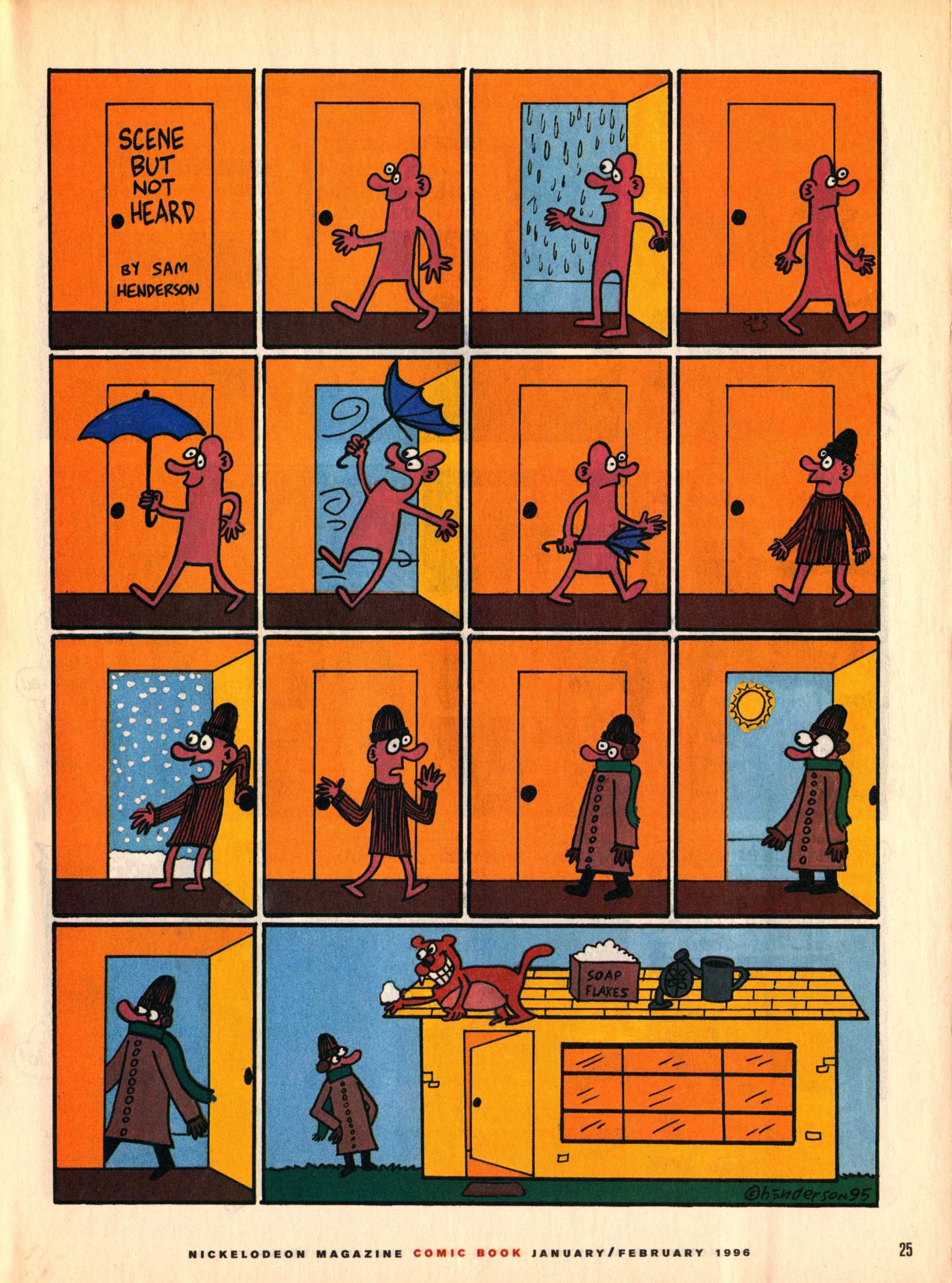
Scene But Not Heard

Back in the day, I used to subscribe to Nick Jr. Magazine for its ads (great expository text contexts) and visual content. This included a comics section with a series called "Scene But Not Heard" by comic artist Sam Henderson. The adventures of Pink Guy and Bear are humorous, exaggerated, and related without words. Like wordless picture books, wordless videos and comics are helpful materials for students to work on interpreting nonverbal cues, "thinking with the eyes," and constructing narrative language and the microstructure (vocab, verbs, complex sentences) within it. In those days I used to collect the series and use laminated versions in classrooms for push-in services along with graphic organizers from Story Grammar Marker®. The content is engaging for mid-elementary through high school students.


Nick Jr. is no more, but I recently discovered that much of "Scene But Not Heard" is available digitally. Just Google it and then click Images, and you have a treasure trove. This feature about the series also contains a gallery. In either case you can:

-save the comic materials to your device (tap and hold on full size image on iPad, or ctrl/right click on a laptop).
-make a collection- you can use Adobe Acrobat Reader, Mac Preview, tap the share button on your iPad and then save as PDF to iBooks, or simply make a folder in your laptop or Google Drive.
-Use the zooming features contained by these technologies to zoom in on the action and limit the visual array (I like to use these to teach students to verbally mediate and "talk out" the nonverbal content).
-Consider integrating with Google Docs- insert a comic into a Doc and have students write a summary.

Tuesday, August 9, 2016

What does an image lead to...?

I've always been a firm believer that all students benefit from visual supports--but providing images or other visuals provides a path to language. That's the V--Visual--in the FIVES Criteria.

An image leads to:

...understanding of a vocabulary word or concept.

...associations.

...expansion of categories.

...description.

...connections and narrative.

...causal, conditional, or other structural language forms.

...engagement!!!

(among others).

The above reasons are why I am constantly endorsing the use of the free, versatile and multiple-platform Pic Collage. This app hit a bump this past fall. The Web Search, which allows you to add photos to a thematic, contextual collage very quickly and in a co-creative process with students, lost its connection to Google (Web Search allows you to search for photos and add them from the app). The developers were communicative about it and made efforts to develop their own search tool, which gradually improved over the following months, but it was a tougher sell.

A few months ago, however, Pic Collage struck a partnership with Microsoft's search engine BING! So the results are back to being as good as they ever were.

Additionally, Web Search has JUST added "suggestions" which might help you in your in-the-moment creations with students. The suggestions are specific items within the category you would be searching for, or associations related to your search. How wonderfully language-enhancing!


Results and suggestions for "trees" and "national parks" depicted above. Tap on the suggestion to point your search in a specific direction and bring up new possible images to add to the collage (tap images, then the check mark in the upper right to add images to a collage).

This past year I was involved with a productive assistive technology and language consultation regarding a student who LOVED to be in all of his classes. He just needed support to participate verbally. My advice was focused on taking some of the language "out of the air" and giving the student more visual support as conversations and topics unfolded, Pic Collage being a key tool we discussed. For example, as his consumer education class discussed forms of payment, Pic Collage could be easily used to visualize cash, a credit and debit card, check, and cell phone.

For some of my previous posts on Pic Collage, look here, here and here.

Tuesday, June 21, 2016

Video Tutorial: Using Sketching Apps and Comic Creators for Comic Strip Conversations

In my recent column for ASHA Leader, Apps that Help Teach Social Perspective, I discussed the engagement and sharing factors of creating Comic Strip Conversations via iPad. First, on what Comic Strip Conversations are:

Another approach that expands clients’ narratives, if/then thinking and perspective-taking is Comic Strip Conversations, developed by Carol Gray. Comic Strip Conversations visualize social situations with simple sketches involving stick figures, situational elements, word and thought balloons, and color coding for different emotions and verbal behaviors. A comic strip can be developed to exemplify a five-point scale or for reviewing or previewing a relevant social situation.

And the tech tie-ins:

The sketching involved with Comic Strip Conversations is made at once easier, more engaging and colorful (no array of markers needed!), and sharable with apps such as Doodle Buddy (free for iOS) or Drawing Desk (free for Android). To make a conversation stretching across several pages, check out Paper (free for iOS), a sketching journal that also incorporates subtle effects to make your sketches look neater. All these apps allow you to add text for captioning, scripting and illuminating perspectives, as well as photos for additional context. For example, you can sketch over photo of an important location in your client’s daily life.

In this new video tutorial I demonstrate a quick how-to with Paper by 53 and the text-friendly Comics Head. You might choose one or the other based on what your context is!


Saturday, March 12, 2016

Read Works Provides Access to Handy Text Passages

Expository text passages are handy for language intervention. There's a lot you can teach with a passage as a context!

I attended (well, watched from an "overflow theater") a great presentation at ASHA Convention in Denver, Practical Strategies for Middle School and High School Language Learning Disorders (Wallach, Bartholomew & Charlton), that covered a number of strategies that can be practiced in the context of expository (or narrative) text:
-Recognizing and interpreting subordinate clauses
-Sentence Combining (see the work and resources of Killagon)
-Teaching Self-Monitoring and Metacognition (I've recently been putting the TWA Strategy on a Bookmark for students:


-Within the above, supporting comprehension and expression (summarizing) is analysis of text structure and use of graphic organizers; Mindwing's Thememaker® and the Thinking Maps programs are both approaches to understanding expository text structure.

So, where to get the contexts? I recently discovered ReadWorks- this website provides free access to reading passages and much more, with skill and strategy units on many topics in comprehension. The passages are searchable or organized by various categories--they are also Lexile-leveled. The website recently released a collection geared toward expository text structures as mentioned above.

Check out Readworks and sign up for a free account. The website is iPad-friendly, so you can activate Speak Screen while using a passage to have it read aloud, or download and "Open In..." an app such as Adobe Acrobat Reader in order to use highlighting and other annotation tools. 


Saturday, January 9, 2016

Target conversational behaviors and scripts with Plotagon

Some technology tools that can provide an engaging model of conversational "moves" and skills have disappeared of late. The web tool xtranormal, which allowed you to type out dialogues that onscreen characters would speak, was wonderful for this, but is disappeared and is only reemerging as a complicated-looking software for Windows only. Likewise, Go Animate! was once school-friendly but has ported to a befuddling business-targeting subscription model. Toontastic of course is an excellent resource for making animations of social interactions, but an extra person or an affinity for making different voices really helps.

Enter Plotagon. This free app for iOS is simple to use and allows you to:
-sign in with Facebook or via an email account
-create (tap the Create tab, then characters) a base set of characters. I'd avoid the randomize button as it results in some folks with hair and clothing combos that would be a bit too distracting for your students- just tap the arrow and you'll be able to adjust face shape, skin color, accessories and such, and save and name your character.

Plotagon's character creator- you'll need to create at least two characters before you make an animated conversation

-create (tap the Create tab, then plots) an animation in a simple way. The plot creator works easily- just add a scene, tap to choose your location (a generous portion of free downloadable settings/places are available), and type in dialogue:


Note that all elements in the "script" interface on the left are editable. For example, tap the word "neutral" and you'll be able to give your character a different reaction or expression. It took me a bit to figure out that to delete a line of dialogue, you need to tap and sweep it to the left.

Once complete, you can view your movie as a preview by hitting the play button or viewing it full screen. Any work you do is saved in your account as a "draft," but you can finalize your creation by tapping Publish and Share and saving it to the Plotagon website. There is currently no way to download the video to your Photos app (so don't use students' real names in videos that are saved to the website), but once "published," you can share to others as a link.

Some ideas on using Plotagon in therapy and language interventions:
-I love using tools like this in conjunction with an internalizable strategy. In one group, we created a 5 Point Scale around Topic Management:

5-Off topic and Uncomfortable
4-Whopping Topic Change (a Social Thinking® Term)
3-Connected but confusing
2-Bridged Topic
1-Connected Comment

I created plot videos (see links above in the scale) to serve as examples- endlessly amusing to my students- and we discussed how they corresponded with the scale and character perspectives. We then worked to create other examples, particularly of 2s and 1s.

-Plotagon can serve as a context to model other strategies such as Story Grammar Marker's® 6 Second Story and Social Thinking's "Wondering Question" and "Add-A-Thought" expected behaviors in conversation.

-The app can also be used in conjunction with the Superflex® Curriculum by Social Thinking to model examples of Unthinkable and Thinkable moments.

-For students with more significant challenges, the app can be used to create and model scripts for various situations.

-Plotagon is also just a fun way to practice writing or create projects related to curriculum topics.

Tuesday, June 30, 2015

Lists for Writers is also useful for SLPs

Lists for Writers ($2.99 for iOS/Android) is a resource of exactly that--lists of narrative elements that writers can use to jumpstart ideas. However, the same lists are useful as jumping off points for all kinds of language and social cognition lessons, or for exploring within a session themselves. I recently had fun with two budding writer clients (they are all over deviantart.com) exploring a list of phobias and how they could serve as a "kickoff" for a story, leading to much narrative and conversational practice within the session.


Some ideas for quick language lessons:
-Use the list of Modern Occupations and generate a list of equipment and actions relevant to a variety of occupations (think of Sarah Ward and Kristen Jacobsen's model of Situational Awareness as Space-Time-Objects-People).
-The list of Modern Locations provides fodder for constructing setting maps.
-Sort the list of Dialog verbs into positive and negative behavior categories, or align with the list of Emotions.
-Apply Personality lists to material students are tackling in ELA or Social Studies to build descriptive skills and comprehension.

I am sure you can think of many more- let us know what you think of in the comments!

I will be presenting in the Washington, DC area in September for the Center for Communication and Learning, LLC- hope to see some of you there! Click here for details.

Thursday, February 12, 2015

Jeopardy Labs

As we wander down this road of technology integration, it's nice to see the development of web-based educational tools that are mobile-friendly. Historically, due to iPads not supporting Flash, many great resources could not be used in your Safari web browser on iPad. Jeopardy Labs (navigate to https://jeopardylabs.com in Safari on your iPad or any web browser on your computer) stands as a step forward as a web tool that works anywhere!

Electronic versions of Jeopardy have been around for some years, but previously involved use of a rather complicated Power Point Template. Make one mistake--or download a template that has an error--and it could derail your whole activity.

In addition to being accessible from multiple devices, thankfully Jeopardy Labs is simple to use--and free! Create a game centering around:
-classroom vocabulary
-conjunctions- "make a sentence using..."
-morphological awareness aspects such as prefixes and suffixes
-social concepts, scripts or strategies


Your game will be saved under a password and you (or collaborating teachers, or students) will be able to access the game from any device. Consider also having students create the game with you--or for each other--which taps definition construction and other skills.


Friday, June 13, 2014

World's Worst Pet-Vocabulary

I am often asked about apps that build vocabulary and am at a loss for an easy answer. Are you looking for apps for basic or more advanced vocabulary? Do you mean semantics instead? There are many terrific apps that can be used to build semantic networks, categorization and description (take Bag Game, Naming TherAppy and Describe it to Me as a few examples), and though these skills provide the foundation for expanding vocabulary, this is sometimes not what the person was asking for.

What I often try to do is guide people toward context and repeated exposure, two principles of vocabulary development espoused in the terrific Bringing Words To Life by Isabel Beck (more on this in a minute), and again my answers aren't so straightforward:
-Read books and use Kidspiration or Inspiration to map or categorize vocabulary in context
-Keep a vocabulary journal in Evernote
-etc.

While the above approach aligns with my philosophy about apps, i.e. that they are tools to be used as part of a bigger context, process, sequence of pre-/post- activities etc, it was really nice to find an app that can be used to develop vocabulary by providing content and context within an engaging package. I'm speaking of World's Worst Pet-Vocabulary (FREE!) from the folks at Curriculum Associates, which was designed specifically to develop Tier 2 Vocabulary (another concept discussed in Beck's book)- those high-frequency words used by "mature" speakers.

World's Worst Pet contains tons of content that can be worked with across 5 grade levels (grades 4-8 are suggested but with scaffolding, this can be used with younger grades in the same way kindergarteners learn Tier 2 words using Beck's approach). The concept is that Snargg, the world's worst pet, keeps bolting and you need to interact with vocabulary to "chase" him through a particular setting (e.g. a bakery) and retrieve him. You move vocabulary words to complete tasks such as matching words to the main idea of "book" titles, finding synonyms or antonyms, responding to questions/categorizing around the vocab words, or identifying examples/nonexamples. Your choices guide Snargg via steps, catapult, rocket, etc in engaging ways, and the app follows a commonly-enjoyed structure of encouraging accurate completion of each level by earning "pupcakes."


My favorite part of the app is that the sets of 10 vocabulary words are contextual, related, relevant to real life, and supported by student-friendly definitions (more Beck). The sets include topics such as words about performing (audience, popular, melody, public), words about going places (journey, roam, guide, proceed), and words about the mall (merchandise, extravagant, desire, vendor).


The levels and sets give you a place to start for students with weak vocabulary and a structure that might serve you (and them) over several years of instruction. You can challenge the students to complete each set perfectly, and the pace of the game will give you a lot of "air time" to discuss each word and provide additional models. Each level can be a doorway to activities over several weeks, including a suggested writing activity, and can be a topic of consultation with teachers so that there are multiple exposures to the words (as building vocabulary only in the "speech room" can have limited efficacy). EVEN BETTER, you can flip this model and use this app as the context for in-class programming, thereby facilitating vocabulary development in the classroom. Beck's book will give you many more ideas for wordplay activities to provide students with multiple exposure to words!

Let me know what you think of this app-it's one of my favorite finds this year. Thank you to Richard Byrne of iPad Apps for School for pointing it out.

Tuesday, March 18, 2014

My World for iPad

Many of you know I have a thing about maps! Maps are fascinating to examine, but from an SLP perspective can be used to target all kinds of skills: categories (i.e. continents, states, cities, capitals), spatial concepts, and clearly intersection with classroom curriculum.

Technology has made maps more interactive and therefore a more engaging context. My World for iPad ($.99) is a nice little tool to have if you would like to use geography as a way to build language skills. Specifically, you can zoom in to any location by pinching, or use the location functions of the device to identify where you are on the map (doable with many maps apps). The hook of My World is that it allows you to create a line and find out a) the distance of the path between places and b) the amount of time it would take to travel by plane or car. In both cases, students are engaged with a personal connection (their location, as measured in relation to locations relevant to classroom topics) and can be asked to apply language around distance or, more importantly for many of our students, time.

Using My World would benefit from some structure imposed on your part, for example the creation of a scavenger hunt/challenge to find distances and times and record them on a graphic organizer.


.