Edmorrow's First Five is a great free resource that comes to your mailbox each school day and provides a set of resources (primary and secondary versions available) related to social and emotional learning. These include, among other activities, a meme (often animated) that can prompt narrative responses, conversational questions for connection, a quick connect debate question, and a contextual self-regulation rating scale. Previous days are archived, so you can use any you choose, and the site also provides a great daily brain game using Wordwall that targets sorting of topics like US States to crops and Star Wars characters to light or dark side. These resources would be great for both individual and group therapy, so check out this site from these professionals focusing on restorative practice and counseling.
...is something my husband or I says to the other at some point every day since the spring. At that time, the New York Times added a daily puzzle that I thought was uniquely designed for SLPs and our love of categories as a foundation of semantics.
Connections is free daily via the web on whatever device, and also now is in the NYT Games app (I do subscribe as I have gotten in the habit of doing at least Sunday to Wednesday's Crossword). They explain it best:
And today's puzzle:
With Connections be careful of what we call in quizzer parlance "Pavlovs"- you are conditioned to jump at them. It can be tricky as one item may seem to go well with one group but actually a different category can be constructed.
This can be a great activity for older clients or students as you can encourage forethought- eg let's think of at least two sets of 4 items before submitting any. You can also provide a growing schema that builds metalinguistics -Straightforward semantic category -Figurative language or idioms -Words that are part of a phrase e.g another word goes before or after them all -Group that works best if you say it aloud (hint for above)
It can be a good idea to do it yourself on one device and then show it to the client on another, where it is reset, so you know how to cue. There are a variety of daily posts that provide hints, such as Mashable's.
And most importantly...you can also make your own! Think of targeting reviewed vocabulary or concepts! Check out this one I made last Friday when a certain album came out, and click Create to make your own.
This summer I became addicted to the New York Times' new Connections puzzle. I enjoyed each morning tackling this often-tricky categorization activity and comparing results (or sometimes providing or receiving hints) with my husband. I've always thought of categorization as one of the most important skills--it's how we organize information, and much expository text takes on a list structure--and our literature backs this up. Approaches like the EET also use Green-Group to target describing by category, among other attributes. We can be explicit with our students (see Ukrainetz' helpful RISE acronym) and teach that categories are important ways to organize and describe words and information.
ABCYa provides a wealth of categories through its activities- you just have to look for them.
You can practice contextualized language intervention by locating a narrative picture book about weather, dogs and weather, or weather and clothing and target another skill within the same topic.
Here's five more categories you can target with ABCYa:
Proceeding from some ideas about the role of music in speech-language therapy (and social coaching), back in the spring I did some activities with MusicLM. This tool is available from Google's AI Test Kitchen, which is free, though you currently have to sign in with a personal Google account and may have to wait a short while to be approved. With Music LM you "Describe a musical idea and hear it come to life." More specifically, type an activity, setting, situation, style, mood, or specific musical instruments, and it will create several examples for you.
The language and/or social interaction can come in through providing schema with the above italicized connections to music, using this as a conversational "add a thought" type activity, and allowing flexibility- as maybe your clients will think of possibilities that fall out of these categories. You can also be more structured and gear a lesson around, say, emotional vocabulary.
I have been doing clinical supervision at BU for a few semesters now. It's such a rewarding experience to work with the graduate students in their first clinical in-house experiences. I have a student who is working on a lot of semantics and language-based literacy activities with her client, including teaching story grammar as an organizational structure. We have been talking about building activities in context with pre-book and post-book activities, and her client is interested in planes and aviation. I suggested to her this book and this activity: what 10 words do you think ChatGPT will come up with that go with ___ (in this case, airport). The process of asking them to predict what the AI may say is an associative activity, and then the results will likely bring about new concepts and vocabulary.
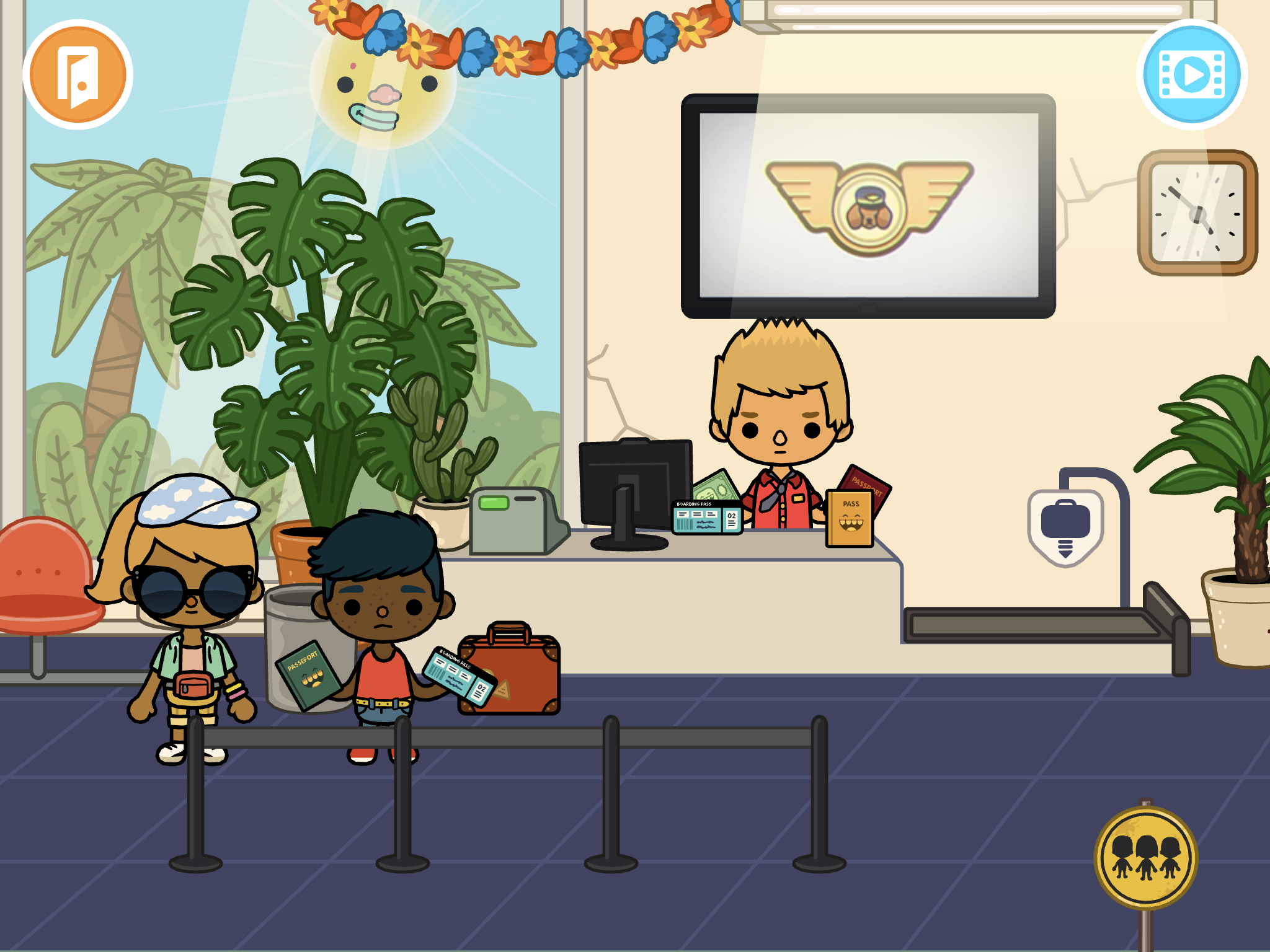
Continuing here to post some companion pieces to my session this week at the SLP Summit (available in its recorded form with others until August 15, register here). One of the app resources I discussed were those available through Toca Boca's Toca Life apps. These are available individually, for example, Toca Life: Vacation which I will discuss here, or the Toca Life: World (also playable on newer Macs w M1 chips) has a way of pulling together your previously purchased apps.
The Toca Life apps are just filled with real-world contexts and therefore can be used to model, co-create, and play out stories in very structured ways or loosely. Make a scene, involve lots of movement onscreen, or record whatever you do as a story through the screen recording feature. This can be done individually or with a group taking turns, or as explicitly or implicitly as you see fit (e.g. with story grammar cues or not). See my recent post on Mindwing's blog about models of learning and instruction.
Taking Toca Life: Vacation, let's consider how the context can lead us to scaffold a bunch of different stories with students.
Airport: Besides the process of arriving, checking in, going through security, waiting at the gate, and taking off in the plane, what if...
1. You need to buy a ticket (use the ATM etc)?
2. Your flight is not listed on the board of funny-sounding destinations and you need to ask for help?
3. You left something at home (if you have Vacation and City added in Toca World, you can move characters in and out of the panel at the bottom and change locations)?
4. A parent surprises you at school with a vacation (same, start at School and move the characters to the airport in Vacation)?
5. Your flight is delayed (good vocab word)?
6. A dog flies the plane and you don't end up where you planned?
This or other parts of the app could be used in conjunction with Google Earth to "fly" to a location and see some landmarks in 3D!
Hotel: Besides checking in, taking the elevator to your room and doing hotel stuff (bathing, sleeping, changing from your luggage, etc), what if...
7. You win a shopping spree at the gift shop?
8. You eat EVERYTHING at the buffet?
9. You make a mess of your room and need help or equipment from housekeeping?
Beach: Besides all sorts of watersports and maybe a wedding (?), what if...
10. Someone gets trapped on the island?
11. The fish get silly and decide to live on land?
And don't miss the treasure chest out on the island...
As I mentioned in the session, check out short videos like this that can show you lots of potential stories you wouldn't even know were there!
Tiny Tap was previously described here as a good mobile app resource for both making interactive activities and finding visual content for lessons. I recently noticed TinyTap has ported content online, so this would be playable on your laptop or in a classroom with projector or interactive whiteboard. This format for Tiny Tap makes it also a nice resource for telepractice. Sign in at TinyTap (click Connect) and you can favorite activities to create a resource list. The activities are geared toward language basics and topic exploration, many taking the form of an interactive book, and therefore are particularly good for developing vocabulary, categories, or foundational descriptive skills. This Desert-themed activity provides a good example, but see what else you can find on the site! I was able to access many activities for free, but TinyTap provides an educator sign-in.
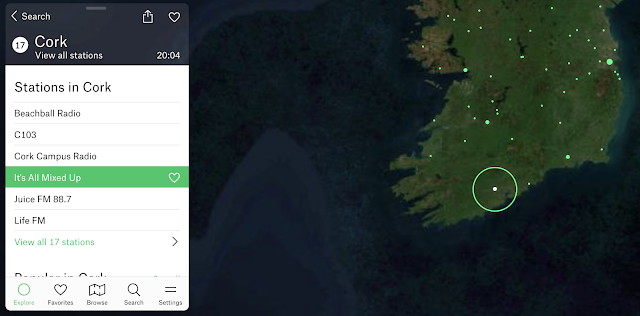
Flowing a bit from my last post (context is your friend), Google Experiment Radio Garden is worth a therapeutic visit. Your students will think it's just a chill moment, but secretly it can be a great way to practice having them call out:
-Continents and then countries -Responses (conversation/comments) to what they hear -Characterization of the language (nonverbal aspects such as tone etc) and type of music you may hear. Music genres are a category and can connect us with peers!
Why not pair this with looking up a current event from the country you "visit" for narrative/expository comprehension?
Now more than ever, it's important to foster global awareness.
Oh, and Happy St. Patrick's Day, here's my homeland:
The V in the FIVES criteria is for Visual! Visual supports are a simple Evidence Based Practice- give students something to explore with their eyes and you can tap:
-description/main idea -vocabulary -narrative language and complex sentence formulation -social/situational awareness -their interests/humor!
Classtools.net is an oldie but goodie, and has been around forever. In addition to its classroom tools such as Random Name Picker, a simple Soundboard and such, there are many visual activities you can use to create an "opener" or have students create something themselves. This may be particularly useful for older students.
Consider These:
Twister: create a "tweet" from any character, tap main idea, perspective taking, sentence formulation
Image Labelling Tool: upload an image and create text "hotspots" for part/whole thinking, abstract or advanced categories, description
I've always observed an overlap between tech literacy/digital citizenship and safety with language and social skills-- probably why I have pursued the instructional tech and SLP sides of my work. I recall materials like Google's Search Education existing at the dawn of its search engine (I also recall AltaVista), and am happy to see them again.
Search essentially involves central coherence/main idea thinking, vocabulary selection and question formation, among other skills, and that's just the first part. What follows involves text comprehension and determining what is the best result to pursue, not to mention evaluating sources! All good language and social cognition work.
At Google's page above you can check out leveled lesson plans with wonderfully broken-down Google Slides visuals- perfect for teletherapy but also in-person learning, and also of course, modifyable- just make a copy, shorten or add and pick your path through these lessons.
A Google A Day is available as a stand-alone activity with daily challenges but also from selectable categorical challenges on the above page. Great engaging activity for the end of sessions, perhaps.
i-Spy is a rich, simple interactive website that's like a Where's Waldo of New Zealand. You can play 5 different scenes and locate hidden animals, objects or people. I'd recommend the free play mode as the challenge mode is timed. A search icon will bring you to the general vicinity of the target with a visual cue.
Activities like these are visually packed and not for all students, but for many can serve as "thinking with the eyes" collaborative "group plan" activities (both Social Thinking® terms) and also connect well to narrative elements of setting and action sequences. Consider researching or Google Earth-traveling to the places beforehand and filling out a setting map/graphic organizer.
National Geographic Kids has a great page of personality quizzes i.e. what ____ are you? (ice cream flavor, planet, dinosaur). Each has just a few questions and provides an opportunity for expressing opinions, describing oneself, thinking figuratively, interpreting photo scenes, and developing vocabulary.
Great for group work! I'll be adding National Geographic Kids to the Teletherapy Resource List. Thank you to my colleague Danielle Stalen for this cool idea.
Myvocabulary.com is a great source of contextual vocabulary lists. I found it recently when looking for lists like those contained in the terrific WWP-Vocabulary app. Working with vocabulary is a great way to aim for contextual therapy. From MyVocabulary, I have been using an A-Z list related to travel, an area of interest for my student. Go to the general interest area on this page to find similar thematic lists.
Research suggests that vocabulary depth, or ability to make connections between words and concepts in context, can be targeted with multiple exposures, providing explicit meanings, practice forming categories/taxonomies, as well as book reading and “playful” activities (Hadley, Dickinson, Hirsch-Pasek, & Golinkoff, 2018). Bringing Words To Life breaks these techniques down with many engaging activities that are great for verbal exchanges in teletherapy. These can include:
-Word Associations: which word goes with far? Abroad or Aquatic? Why?
-Have you ever? Describe a time when you went somewhere aquatic.
-Applause, Applause! How much would you like to have an adventure? To stay in lodging that has atmosphere?
Which would…?/Examples: Which would be abroad: Disney World or Spain?
Making Choices: If any of the things I say might be examples of affordable, say “affordable”- if not, don’t say anything
Relating words in sentences: How does a host show hospitality?
It's very easy to support these activities visually as-you-go with Google Slides (Insert-Image-From the Web).
GoReact is an activity (originally an app) from Museum of Science and Industry, Chicago that I originally wrote about for ASHA Leader. I was reminded of it recently when a HS student I work with had a chem project I needed to assist with.
GoReact can be used to explore the periodic table of elements and associate elements with practical, relatable objects they are used to make. Just click on any element.
Then, there is a Featured Reactions tab- this gives directions to assemble elements in different categories, e.g. health and beauty aids. It's a great interactive website to build categories, comprehension of direction, narrative about experience of products, and describing by function.
Chateau Meddybemps is a rich site with many activities you might consider in teletherapy, particularly for young students and for those you are experimenting with incorporation of interactive websites. Activities on this site might be ones you screen share and have the student observe the visuals and verbalize choices, or offer many opportunities for remote cursor control. For students who need buildup of skills in using the mouse in therapy, there are simple mouse skills activities. Also, there are a number of PDF based printable "activity centers" that you may be able to use for play on both sides if you've got willing parents.
Check out the Super Menu for activities like this one in which students can organize a zoo, thereby targeting naming, animal sounds, describing and using causals.
I have long been a fan of the TinyBop interactive apps for iPad. These smartly designed visualizations of "systems" are fun to use, linked to important curriculum topics, and language-neutral, so lots of talk can come out of them. They have ported them to web form as TinyBop Schools and made them free for the next several months, so I would highly recommend checking them out. In teletherapy these would provide for great interactions especially if you are sharing cursor (remote) control
Each model comes with a handbook. These are important to explore because the TinyBop models are so language-neutral that sometimes you don't know what they can do! The models also have journal and graphic organizer activities that are ideal for language therapy.
Sketches to promote narrative, expository language or social understanding are well-documented tools in speech-language pathology, and don't have to be pretty:
In a telepractice session you can use the platform's whiteboard if it has it (I can't figure out how to make the Zoom one come up and may have inadvertently shut it off), or find any number of web-based boards (this no-sign-in Explain Everything board has an educational bent).
Whiteboards can be used to:
-Illustrate narrative (related to strategies of visualization/Social Thinking® sharing imagination). This past week I had the boys follow a "group plan"/gratitude moment of describing a high of the week which included my use of the park stairs for exercise, keeping in touch with classmates, video games, time in nature, and turkey burgers.
-Work on appropriate level of detail, or show a clock to promote pace (executive function).
-Design something collaboratively. Make a collaborative drawing.
-Play Pictionary for general words/main idea or vocabulary sets.
-Play a "Backseat Drawing" style game where one describes/one draws "make a small circle at the end of that line."
This past week I noticed that I started this website 10 years ago (2/24/10). Time flies! I am grateful to all who have read it over the years, and for the opportunities it has provided me: opening doors to many friendships, presenting around the country (and Canada), many trips to ASHA Conventions, and publications there and elsewhere. Thanks everyone!
Of that decade, by far the simple but eminently useful app Pic Collage (free for iOS, Android, Windows) has been my favorite. I recall the day the awesome Sarah Ward showed it to me. It is a great resource for SLPs to make quick visual supports and to co-create with students. Here are 10 things you can do with Pic Collage:
Make a vocabulary board. Note that the Web Image Search makes this a very quick process to do with students (they can choose pictures associated well with vocab words (BING Search is nicely restricted)
Play! Play is about adding thoughts and ideas (see Social Thinking®'s We Thinkers). Here we decorated a treasure chest. Hands-on is great too but sometimes you may be lacking in materials or time. Note that any picture added by Web Image can then be double tapped to "Cutout."
More related to We Thinkers and Story Grammar Marker®- explore what different characters think about, you are therefore relating story events.
Make "Colorforms" from photos to retell/act out a story with dramatic play. In this case Gilbert Goldfish Wants a Pet.
Visualize to scaffold students' personal narrative. In this case we talked about how setting linked to actions and events.
Set the stage for cooperative play with yet another cooperative activity. These students created a sign before playing Lemonade Stand on the Echo Dot.
Target emotional vocabulary based on the 6 universal feelings (happy, sad, mad, scared, disgusted, suprprised). These high school students passed Pic Collage and added to kinds of angry (relate to Zones of Regulation®) after watching a Star Wars clip.
Create any kind of story. Here, setting, initiating event and reaction are visualized.
Use dual-focus vocabulary strategies (semantic and structural per Diane German).
Make curriculum language and categories more salient and visual. In this case a consumer science class was covering "ways to pay."
Make comics showing triggers/initiating events and use of tools and strategies such as self-talk.
Show circular sequences. Think of doing the same for Numeroff's If you Give... series.
OK, that's 12 instead of 10 but I couldn't decide which to share!
Wheel of What is the kind of simple app that any clinician would benefit from having on an iPad. A spinner is useful in many situations, and with a digital one you won't have to dig one out! Plus an engagement factor of offering a digital version is always handy. With Wheel of What, a bonus is that you can create customized spinners in seconds.
One activity I like to do in social groups (even up to high school) is to make up our own games or "same but different" versions of other games. That vocabulary as well as the STOP strategy (Space, Time, Objects, People-- Ward & Jacobsen 2014) provides a guide to making this type of activity clinically focused. Recently, our group made up our own version of The Floor is Lava and had to consider Space (Where to Play), Time (how much time we had, also the order of events in the game and the if/thens), Objects (e.g. construction paper tiles and the spinner, also furniture), and People (cooperative or competitive roles, how would we Think of Others during the game to keep it positive).
Hope you find this free tool useful! What might you use it for? Let us know in the comments.
Merriam-Webster is known for documenting the changing words of our language. Their Time Traveler website (accessible in any browser) will allow you to look up any recent year and see a list of words that had their "First Known Use" in that year.
Click on any site to see a definition; you may have to provide "kid-friendly" definitions. This site would be great if you want to incorporate engaging material or current events content, which often has many contexts for teaching narrative and expository text.
Many of the words featured are nouns. For a strategic focus you can teach semantic structures with a tool such as the Expanding Expression Tool.
Example:
Escape Room (2012)
Green/Group: A recreational place
Blue/Do: It simulates a locked room according to a theme, you have to get out
?/What does it look like?: Room or series of rooms
What is it made of/Parts: Puzzles, codes, hints, themes
White/Where: Often in a mall or amusement center
What else do I know? I once did one that was a fallout shelter
Buy one, or the kit, but did you know you could make a template for classroom instruction, or use mine at this link? (please DO NOT request access, rather, you can click File> Make a Copy to copy to your Drive).
SpeechTechie is my take on simple and interactive technologies you can use in language lessons and interventions. Enjoy!
Interested in learning more? I am available to conduct professional development sessions, including via webinar. If you'd like to work with me to design a presentation or consultation for your school or organization, please check out the "Work with Sean" page on this website.
Sean is a MedBridge instructor for several courses (avail. Feb 2018). Click to join MedBridge at a discounted rate for high-quality online PD and CEUs. A wide variety of courses are available for SLPs.
Visit and "Like" our Facebook Page
Follow SpeechTechie on Twitter for updates!
Thanks, Guys!
Click on the badge to explore a ton of great blogs!