Showing posts with label discourse. Show all posts

Friday, June 10, 2022

SLAM Card resources for narrative language assessment

While supervising this semester at Boston University, I was informed about the resources available through the Leaders Project at Columbia University for narrative language sampling. The School Age Language Assessment Measures (SLAM) materials are a series of story cards and questions with rubrics that are all FREE. We used them for baseline assessments and I recently used them in an evaluation, and found they gathered helpful data in all cases. The page linked above provides links to all sets (in some cases just a 1-card resource) and guidelines for use. 

A few tech-related spins:

-Also linked above are BOOM! cards for each set which can be used in teletherapy or perhaps in person. 

-I have at times modified visual assessments such as these for a tech format, either for teletherapy or to reduce the amount of materials I am toting around. For example, I screenshot the Lost Cellphone cards and placed them onto a Keynote (can do the same with PowerPoint or Google Slides) slide to have a student click-drag to sequence and interact with the cards.

Tuesday, June 23, 2020

GIFs- simple animations

In a terrific recent PD I watched, Rachel Madel made a great point: why use static photos or drawings to demonstrate verbs, when we have GIFs. GIFs (arguably pronounced with a soft "g" or like the peanut butter) are a format that shows photos or cartoons as a short looping video. Like this:


The weather today in Boston got me like...

As Rachel said, GIFs can be great for verbs but also:
-emotions
-basic narratives
-sentence formulation
-connection to curriculum
-concepts
-figurative language
-are simple stimuli that don't require much sustained attention
-and not least of all, are cool.

GIFs live best in Google Slides, which would give you a place to put them in a flow of context, and you can place them next to typeable space for formulating and visually supporting language.

GIPHY is a great place to get GIFs. To put one in Slides, search for what you would like, select it and click through to it. Click Copy Link and copy the FULL link. Back in Google Slides Insert>Image> By URL. Click to select the image and click INSERT.

Tuesday, April 28, 2020

Kickoffs, and a free webinar!

Ok, I may be veering a little too much from the "here's this useful tech" message lately by talking about feelings and stuff. But this post does have some purposes as well.

Many of you know I am a huge fan of narrative as a functional, multi-point language target, and of Story Grammar Marker® in particular (also see StoryChamps (Peterson), SKILL (Gillam), EmPOWER/BrainFrames by the brilliant Bonnie Singer and Anthony Bashir, Thinking Maps, for a range of discourse development tools. Story Grammar Marker works through a sequence(s) of linked icons, my favorite of which is the Kickoff, representing the initiating event of a narrative. A kickoff is what starts a story (good analogy from football/soccer), like a lightning storm, or a Zoom lunch bunch with classmates. It's represented by this icon:


I love the clever and memorable aspect of the Kickoff, but it's also a representation of many of our students' Zone of Proximal Development-- language they have to learn to formulate whether they are in grade 2 or grade 10. Zooming in on a Kickoff helps us understand what has actually happened, in real life or in literature or a video. It's may be a problem or just "a development," and links to understanding of characters, perspective taking, setting, and Theory of Mind/perspective taking elements like feeling, thoughts, and plan.

So, to go "out there"- through this crisis I have just somehow sensed signs from my grandmother Nomie Murphy, passed away many years ago. These have included a summer plant (Dusty Miller) favorite of hers, which I don't usually plant but did last year, and which lived through the winter in my back porch plant box, though they aren't supposed to. A few other things have made me feel her presence like she's saying, "Hey, it'll be ok." I'm not particularly religious, but I'm pretty spiritual.

SGM's icons, while awesome, aren't the kind of visuals you see just everywhere. So you can imagine my surprise, while on a VERY RAINY walk yesterday on a customary path of late, I walked by this on the sidewalk and had to do a double-back:


Right near the supermarket I frequently accompanied my grandmother to, Stop & Shop, right near where I also thought she might be a Forsythia bush that "spoke to me." What can I say, it's a time.

I'm still a little shook.


What does it mean? Is it acknowledging, "Yeah, you're in a Kickoff," saying more are to come, or what? Anyway.

So, this post does have a useful point from Planet Earth. Show YOUR Kickoffs, even meta-ones like the kickoff that's a kickoff, as therapy activities supported visually. In this visual I conducted a conversation with a SGM-familiar client who asked, "Did you drop it there?" We focused on use of the feeling icon (confused) and thinking bubble (random! Good vocab word/idiom. I didn't want to get into the whole sign-from-grandmother thing). The story/picture made for a good scaffolded retell, as well.

On a Google Slide, natch. The SGM icons are available digitally on the Mindwing website ($7.95)


And if you've come this far with me (don't blame you if not), my second useful point is that I will be co-presenting a FREE webinar-- Technology Tools to Engage Children in Science & Social Studies During Distance Learning Sessions-- with Maryellen Rooney Moreau on Thursday at 2:30, click here to register, replay available later.

Phew, that was a lot to unload. Stay safe, sane and healthy folks.

Disclosure: Sean receives a consulting fee for blog writing and presentations here and there from Mindwing Concepts, whose methodology and products he values among the best in the field. He does not receive any royalties from product purchases,

Thursday, April 23, 2020

Videos and Discussion Webs

(sorry email subscribers for that last incomplete email, I hit Publish too soon)

Discussion webs are described in one of my favorite articles, The Magic of Once Upon A Time: Narrative Teaching Strategies (Hoggan & Strong, 1994). How nerdy that I have favorite journal articles, but anyway it was very influential for me and helped me see all of the activities that could spring from (any) context.

Copy and pas- I mean, quoting the article liberally: The discussion web (Alverman, 1991; Duthie, 1986) is a graphic aid that is used to support ideas during conversation about the story. Through its use, speech-language pathologists can guide students to discuss more complex ideas and concepts. The speech-language pathologist begins the discussion by asking an inferential or abstract question—for example, “Does the elephant deserve to be kicked out of the jungle?” The students then discuss, either as a whole group or with a partner, the reasons the elephant should or should not be kicked out (Appendix E).

Using the discussion web, the students can discuss their own reasons and react to opposing views. The language used during the exchange of reasons provides meaningful oral language practice. The discussion web does not have to focus on an issue found in the story. The speech-language pathologist can center the web around a related topic, giving students an opportunity to discuss issues of personal relevance. Discussion-web practice often begins with students working in pairs; one student then acts as a spokesperson and presents responses to a larger group, eventually leading to a whole-class discussion. When each pair is allowed to present only one reason to the larger group, students learn to prioritize and prepare for the final discussion.

Appendix E:

This was a tough week. The outbreak is still surging in Boston. It was a vacation week for us, but that of course didn't happen. The marathon didn't happen. Tuesday, it was announced that school is canceled for the remainder of the school year (expected, but still a gut punch, and we cried). Among other things. But we are healthy and working here, and have a lot to be grateful for. 

I was inspired by a video released by the Boston Globe on Monday and shared by a friend on Facebook: Here's the link.


We discussed this video in my groups as it prompts a lot of inferential and main idea thinking, and also is essentially Bostonian self-talk that serves as an Inner Coach Green Zone tool.

This would be an example of a discussion web you could use to provide a visual support for questions and responses- often writing down language and ideas helps students revise themselves and add on to what others have said as well. In Google Slides, shapes are your typable friend.


As always with Google shares, please don't request editing access. You can grab this slide for yourself by going to File>Make a Copy or File>Download as PPT

As an additional challenge/conversation prompt, I asked my group members to show the video to someone in their family and talk about it, and notified families about this in a follow-up email.

I hope this serves as helpful in its content, in its potential for use as-is over the coming week, and as an example of discussion webbing in response to a video.

Wednesday, April 8, 2020

Take them on a ride

Years ago the amazing Sarah Ward came to our department of SLPs and talked about schema. Common features define different topics e.g. animals all have habitats, feeding behaviors, adaptations, appearance etc. Ask yourself "What do all ___ have in common?" and you have a semantic map for describing any topic. I have done that lesson over and over and over.

Engagement is important at this time, and it's great to keep it fun and light. Why not take your groups to an amusement park? Virtually I mean, of course. Whether synched or asynched (watch video live together or put in Google Classroom), you can YouTube search POV rides and focus on Universal, Disney, whatever. Ask questions that prompt observation, description of the ride, links to the topic, comparisons to other rides. Since rides have topical schema you can link to other materials with the same context, e.g. this Expedition Everest Ride with something from this collection.


As always, review any video you plan to use fully. Rides are also a context for swear words.

Thursday, April 2, 2020

Simple Idea: Uses for online whiteboards

Sketches to promote narrative, expository language or social understanding are well-documented tools in speech-language pathology, and don't have to be pretty:

Carol Gray's Comic Strip Conversations approach

Stickwriting Stories (Ukrainetz)

Sketch and Speak (Ukrainetz)

In a telepractice session you can use the platform's whiteboard if it has it (I can't figure out how to make the Zoom one come up and may have inadvertently shut it off), or find any number of web-based boards (this no-sign-in Explain Everything board has an educational bent).

Whiteboards can be used to:

-Illustrate narrative (related to strategies of visualization/Social Thinking® sharing imagination). This past week I had the boys follow a "group plan"/gratitude moment of describing a high of the week which included my use of the park stairs for exercise, keeping in touch with classmates, video games, time in nature, and turkey burgers.


-Work on appropriate level of detail, or show a clock to promote pace (executive function).

-Design something collaboratively. Make a collaborative drawing.

-Play Pictionary for general words/main idea or vocabulary sets.

-Play a "Backseat Drawing" style game where one describes/one draws "make a small circle at the end of that line."

Friday, March 20, 2020

What to: Using Google Slides for simple session agendas and visuals in telepractice

Today I did my first telepractice session with a social group of four middle school boys (emerging telepratictioner here) and am thrilled with how it went! As I've said I am making efforts here to share resources and ideas helpful for those looking to make a rapid transition to telepractice in these crazy times.

In yesterday's post I demonstrated the screen sharing feature of telepractice platforms and used this during this session. My graduate student WY Lo created these visuals with me, and they served as a support during the session targeting concepts such as The Group Plan (see Social Thinking®), conversational skills using the 6 Second Story (Based on Mindwing Concepts' work) and a brief discussion of the concepts of Body in the Group (Social Thinking® again) vs Social Distancing when in the community for safety. On that slide (5) the stick figures are movable if you are not in Present mode, and you make a copy (see below)

6 Second Stories along with the expectation and elicitation of comments and questions are a great activity for any session and worked well in this telepractice environment (Gallery View toggled w Screen Share are probably best, I realized). These "moves" in conversation also align with the PEERS® Curriculum.

Here is the link to the presentation. As usual please do not ask for permission to this presentation; you can click File>Make a Copy and it will be editable to you in your Google Drive


Notice how this presentation is "no big deal" nor would it be a lot of SLP talking head. That's the point: keep it simple and visually supportive. Hope you all are doing well and thanks for the response on the posts.

Saturday, February 29, 2020

10 years and 10 uses of my favorite app

This past week I noticed that I started this website 10 years ago (2/24/10). Time flies! I am grateful to all who have read it over the years, and for the opportunities it has provided me: opening doors to many friendships, presenting around the country (and Canada), many trips to ASHA Conventions, and publications there and elsewhere. Thanks everyone!


Of that decade, by far the simple but eminently useful app Pic Collage (free for iOS, Android, Windows) has been my favorite. I recall the day the awesome Sarah Ward showed it to me. It is a great resource for SLPs to make quick visual supports and to co-create with students. Here are 10 things you can do with Pic Collage:


Make a vocabulary board. Note that the Web Image Search makes this a very quick process to do with students (they can choose pictures associated well with vocab words (BING Search is nicely restricted)


Play! Play is about adding thoughts and ideas (see Social Thinking®'s We Thinkers). Here we decorated a treasure chest. Hands-on is great too but sometimes you may be lacking in materials or time. Note that any picture added by Web Image can then be double tapped to "Cutout."


More related to We Thinkers and Story Grammar Marker®- explore what different characters think about, you are therefore relating story events.


Make "Colorforms" from photos to retell/act out a story with dramatic play. In this case Gilbert Goldfish Wants a Pet.


Visualize to scaffold students' personal narrative. In this case we talked about how setting linked to actions and events.


Set the stage for cooperative play with yet another cooperative activity. These students created a sign before playing Lemonade Stand on the Echo Dot.


Target emotional vocabulary based on the 6 universal feelings (happy, sad, mad, scared, disgusted, suprprised). These high school students passed Pic Collage and added to kinds of angry (relate to Zones of Regulation®) after watching a Star Wars clip.


Create any kind of story. Here, setting, initiating event and reaction are visualized.


Use dual-focus vocabulary strategies (semantic and structural per Diane German).


Make curriculum language and categories more salient and visual. In this case a consumer science class was covering "ways to pay."


Make comics showing triggers/initiating events and use of tools and strategies such as self-talk.


Show circular sequences. Think of doing the same for Numeroff's If you Give... series.

OK, that's 12 instead of 10 but I couldn't decide which to share!

Friday, December 6, 2019

Check your public library...

Recently I was trying to get a copy of a book, Sally Gets A Job, that would align with a vocabulary set from one of my favorite apps, WWP-Vocabulary. The set featured good Tier-2 words such as skill, operate, career, successful, earn. Sally, dog hero of one of my favorite series, seemed a great match.

A quick search on Boston Public Library's website revealed that the book was right at my fingertips, free, via their connection to Hoopla, an electronic media service. Hoopla allows you to view books on a laptop or your iPad after signing in through your public library, if this service is offered to you locally.


So, this is just a suggestion to check out your library website's resources for picture book therapy materials. They may vary, of course (mine has connections to lots of picture and other books through Overdrive, but not Tumblebooks, which you may have), but probably offer you some great options of free materials!

Also, don't forget, EPIC! Books for Kids has scads of picture books, free for educators.

Thursday, October 17, 2019

A Little Interaction Makes a Fun Vocab Lesson

Merriam-Webster is known for documenting the changing words of our language. Their Time Traveler website (accessible in any browser) will allow you to look up any recent year and see a list of words that had their "First Known Use" in that year.


Click on any site to see a definition; you may have to provide "kid-friendly" definitions. This site would be great if you want to incorporate engaging material or current events content, which often has many contexts for teaching narrative and expository text.

Many of the words featured are nouns. For a strategic focus you can teach semantic structures with a tool such as the Expanding Expression Tool. 

Example: 
Escape Room (2012)
Green/Group: A recreational place
Blue/Do: It simulates a locked room according to a theme, you have to get out
?/What does it look like?: Room or series of rooms
What is it made of/Parts: Puzzles, codes, hints, themes
White/Where: Often in a mall or amusement center
What else do I know? I once did one that was a fallout shelter

Buy one, or the kit, but did you know you could make a template for classroom instruction, or use mine at this link? (please DO NOT request access, rather, you can click File> Make a Copy to copy to your Drive).

Monday, August 19, 2019

Summer Study Series on Mindwing

As you may know, I continue to blog monthly on the website of Mindwing Concepts Inc, creators of some of my favorite tools, Story Grammar Marker® and Thememaker. This summer I wrote four posts summarizing recent research and published articles. The goal of these is to provide summer "food for thought," each post with a little tech tie-in. In case you missed them, here they are:

An evidence-based inference and narrative curriculum (free) for you.

What is "rhetorical competence" and how does it connect to comprehending language in school?

Using science topics and curriculum as a context for developing expository language and use of causals at the sentence level.

Summarizing Lynne Hewitt's great tutorial on narrative language and ASD.

photo by LocusResearch on flickr

Note: author is paid consultant for Mindwing Concepts, Inc for provision of blog content and presentation material, but receives no compensation should you visit their website or purchase products.

Wednesday, June 26, 2019

View and Describe a Landscape

WWF Free Rivers app (free, in another sense, for iOS and also Android devices) provides a cool, "immersive" experience where students can view a river and its effects on the landscape, weather, animals and people around it. The app uses augmented reality technology, overlaying a riverscape and also a world map over your teaching space (e.g. a floor or table). It is extremely easy to navigate and provides student-friendly language (and audio) about the water cycle, where you can make it rain and view above and below the clouds, the cause-effect of damming a river, and other material presented in a storytelling format. The app would be great for providing visual support and engagement in language such as:

-geographic features and landforms/continents (language/categories of social studies)
-weather processes (language/sequences of science)
-expository text structures such as cause-effect
-simpler observative social processes such as "thinking with the eyes" and "making a smart guess" (see work of social thinking)

See video demonstration here or below.

 Be sure to install this free app on your iPad for the upcoming school year- you'll surely find a context to use it in syncing with classroom curriculum!

Considering your professional development schedule next year? Check out Sean's offerings for training sessions.

Thursday, June 20, 2019

Make a Top 10 List!

I've said it before and I will say it again, visual supports are key for scaffolding understanding, supporting thinking and even eliciting language. I'm amazed that one format, creating Google Slides presentations with students, is as enthralling as it is. Apple TV (you can use an interactive whiteboard or just a projector in a classroom) helps for sure, but you'll be surprised how much students attend and generate language as you type into a slide and create something interactively.

A student of mine (entering 5th) has shown a lot of interest in comedy and SNL. It occurred to me that introducing the group to David Letterman's Top 10 Lists might be of interest, as well as a way to frame a review of a key idea we worked on all semester. You'll have to use your judgment and look around YouTube, but I found one that was not too risqué (#1 can be explained in different ways) regarding the lackluster accommodations at the Sochi Olympics, which gave us:
-narrative opportunities: what was the story here?
-many attempts to "get" figurative language, multiple meaning and humor


Following this activity we scaffolded our own Top Ten list around concepts and skills we had been focusing on for a few months: moderating talk time. This came pretty organically from items the kids suggested as well as some models of "what's going unexpectedly in what we are playing out right now" (e.g. I launched into a complete plot retelling of "E.T."). In this I was thrilled that the boys remembered a created acronym of mine ("LLLL=Long Lists Lose Listeners®," JK on the ®) and the 5 Point Scale of Talk Time we worked with as a group (view below). When complete, they asked me to review the whole thing David-Letterman-Style! Essentially the activity created a social narrative and was great to share with parents afterward.

Link to presentation (please do not request permission for me to share it with your account, but if you like you can go to the File Menu and Make a Copy, which will save to your account).


Considering your professional development schedule next year? Check out Sean's offerings for training sessions.

Friday, June 7, 2019

"Fails" as Narrative Instruction

The Internet loves a "Fail," which Urban Dictionary defines as [noun, in this case] "a glorious lack of success." From a narrative standpoint, however, a fail is an initiating event, a critical story element to work with in our students' language. Graphic organizers reduce cognitive load and help students identify and internalize narrative structure, which assists with comprehension and production of narrative language. One level I like to work with my students around is the Reaction Sequence, which looks like:

Character
Setting
Initiating Event
Reaction (what the person DOES in response to the IE, note that this is not a Response or Feeling, which is part of the next level of narrative development, often called the Abbreviated Episode)


The Reaction Sequence is sometimes represented as Somebody Wanted But So. You can use SWBS, Story Grammar Marker®, Story Champs, or other approaches such as the Gillams' SKILL for your graphic organizers, or make your own. Good idea to have some sort of consistency in the icons or GOs you use, however.

So, the tech part: humor is great in therapy, but be careful about where you get your fails. I like America's Funniest Home Videos (AFV) as it is super family-friendly. Take this video compliation:


It provides a great 15-30 min activity in having students formulate the narrative of what they see. Of course, use the pause button, and a few other ideas
-Zoom in on character, some students have a difficult time reading nonverbal signals around age and relationship between people (a skill measured in assessments like the Social Thinking® Dynamic Assessment Protocol). Scaffold statements like "a brother and sister" or "a kid who is probably like, 8 years old."
-NOTE that with the above you are working on microstructure such as noun phrases and use of conjunctions (also linking between the story elements: "A group of kids is surfing at a beach WHEN a huge wave comes.")
-Zoom in on setting, many of my students would just say "outside"- scaffold specificity such as a beach, a lake, a hiking trail, and so on.
-Consider adding a pragmatic element with an ersatz barrier task- one student can watch and narrate, then show the video to the group.

May your summer be free of Fails!

Considering your professional development schedule next year? Check out Sean's offerings for training sessions.

Tuesday, August 21, 2018

Building Context through Technology

In my last post, I discussed how some Star Wars conversation led a group of mine to some engaging self-regulation activities incorporating movement. I always like extending themes, and observe that both watching short videos and, for some reason, watching me type into a presentation slide both get kids talking! I found a Star Wars template easily and we used this "blank space" to map out some social narratives related to play, thinking, self-talk and regulation, and social cognition after reviewing some short videos.

In this video Obi-Wan uses a Jedi Mind Trick. It was a great context to analyze the narrative, in our case with Story Grammar Marker®, but also could be approached with other strategies.
 

I feigned some blanks in my knowledge and together we summarized that:
Character: Obi Wan
Setting: Tattoine
Initiating Event: The Rebels have put plans for the Death Star, which show how to destroy it, on R2-D2. The stormtroopers stop the group and want identification
Response: Calm
Plan: Get past the stormtroopers
Action: Uses a Jedi Mind Trick to get past
Conclusion: They continue on their mission

The narrative could also be flipped and analyzed from Luke's perspective, who at this point is mystified by Obi Wan's powers.

In addition to talking through the narrative elements, focusing on cause-effect relationships, we also talked about the theme of Jedi Mind Tricks as a way to talk about changing thoughts of ourselves and others (awareness of self-talk) in both pretend and real ways (see above re: simple uses of PowerPoint, Google Slides or Keynote for visual support):


We also role-played JMTs just for fun and playfulness.


Follow-ups! Contexts that get kids talking and thinking about concepts, skills and strategies are always worth repeating, so see also:

-Rey ineffectively using her skills, then succeeding after regulating herself better.
-Yoda's statement of "There is no try" prompted a great conversation and narratives in my group about times they had effectively tried, and the role of failure in learning.
-In a fun followup contextual activity, my students worked in small groups to make a "same but different" version of this activity using the free Scratch Jr. app, instead of a car in the city driving a Star Wars vehicle across space or the desert.
-The book Darth Vader and Son (Jeffrey Brown) is filled with comics building mini-narratives incorporating perspective taking and inference.

May the Force be with YOU this school year!


Friday, August 17, 2018

Incorporating Movement in Sessions

A theme of my agendas for sessions last year included engaging my students more in movement. Movement at the beginning of or during sessions promotes self-regulation (it can be a Green Zone of Regulation® "tool") and following a Group Plan (via Social Thinking®) but also can be a way to practice the language of giving and following directions. Anytime we get our regulation-challenged kids up from a table also gives us a lot of teachable moments. With one group last year I did short movement activities we framed as "Jedi Training" as they were all interested in Star Wars. I noted they liked doing activities like planks in unison or one at a time, providing opportunities to "think with their eyes."

Check out Sworkit Kids (free for iOS and Android) which has short "workouts" with exercises shown via video models (also touching on an EBP). It's simple, and you can skip exercises and do what you want within a 5 minute "activity." A lot of these have kids on the floor so you may want to get some mats of some kind. I'm going to try these this year with a few different groups as part of "Jedi" or other themed "training."


Tuesday, July 17, 2018

On obvious signs and "hidden rules..."

Presenting a video can be a simple use of tech that can establish context, provide visual support, engage students in discussion, and open the door to a related post-activity addressing language skills. A good example is this video which features about 100 unnecessary signs such as:


The video moves quickly, but pause as many times as you want! You can also screenshot to pick and choose signs you'd like to explore (perhaps a good move to work on functional reading). Some ideas on using the video:
-Metalinguistics: what makes the message obvious and unnecessary?
-Social Cognition: the video can be used to have students practice "thinking with their eyes" for the greater context of what makes the sign silly, as well as engaging in humor. Using signs in therapy activities is also a good way to introduce the related Social Thinking® concept of "Hidden Rules" (related to Dr. Brenda Smith Myles' Hidden Curriculum); there are many (more complex than shown here) rules that we need to learn through observation and experience in order to be successful socially.
-Narrative Language: Have students discuss or sketch stories depicting why someone thought these particular signs were necessary. This context would also allow for working on complex language and conjunctions like if, because, and so.

Thursday, May 17, 2018

Video Tips from Students, Part 2

In my last post I discussed how sometimes a tip from a student about what might engage him or a group may lead to a great activity. Another example came from a student who offhandedly mentioned that he likes to watch EvanTube, which he said had fun "how-to" videos. I checked it out, and EvanTube is a "family-friendly" channel full of challenge videos, among other things. I discovered a number of them could be done with minimal or simple materials, and thought that the process of figuring out what is needed, the sequence and overall plan would be a good language, social and executive function activity. The two activities I did with my group turned out to be some of the most fun ones I had this year.

The 3 Marker Challenge turned out to align very well with our social goals as a group and Ward/Jacobsen's Get Ready/Do/Done (GRDD) model. We watched the video:


And interactively completed a GRDD graphic organizer that when complete would look like this (note that the numbers next to the do-steps are estimates of time in minutes, and we used a clock to map these out):


You can access this Google Drawings file here and if you like, make a copy for yourself (File>Make a Copy if signed into Google Drive) to use as a template. It was a very fun activity and we practiced a lot of different skills.

The following week, we tried another! First, we quickly did the Yanny/Laurel experiment (which, incidentally now has its own EvanTube vid), which is a good social activity that underscores that people have different perceptions and perspectives (but pssst. It's Laurel). Related to this is the channel's Backwards Word Challenge:


Great again for goals of executive function, social, and humor but also phonology and just listening! Similarly, we did a GRDD activity- I try not to gather materials for students but ask them to do it, and this included finding an app to do the task. You'll find a free one easily! The results were hilarious and all had a great time again practicing some important skills.

Thursday, March 22, 2018

Scratch's updated Getting Started page and Coding as a Language Activity

As I have mentioned here and here, coding is a naturalistic language activity in which we can engage students to build a number of skills: following directions, collaborating with peers, and expository language. This can extend to using if/then sentence constructions or explaining how they constructed a program. These activities need not take any programming expertise on your part, or extended amounts of activity time; simple, discrete activities can be conducted using the web-based (Flash in fact, so you'll need your laptop or a Chromebook) Scratch and their Getting Started page. Call it building "games" and your students will be hooked.

To get started with Scratch, you'll want to sign up for a free account. The Getting Started page has selected activities, but I would recommend downloading the entire set of "cards" and printing them on a color printer (you can also buy the whole set for $18.50)- the colors are helpful for students to find. You can also download the card set, send it to your iPad and have the visual be displayed from iBooks as the students use a laptop or Chromebook.

Here's a simple sample activity. You can't imagine the joy I saw on two 2nd graders' faces as they were successful in creating a program where you click a trackpad and a letter changes color:

In the process, they needed to practice: 
-stating the "big picture" of the activity (using when or if/then)
-following written directions
-"thinking with their eyes"
-navigating categories (of scripts- Events and Looks)

Thursday, March 1, 2018

Book Creator in Chrome

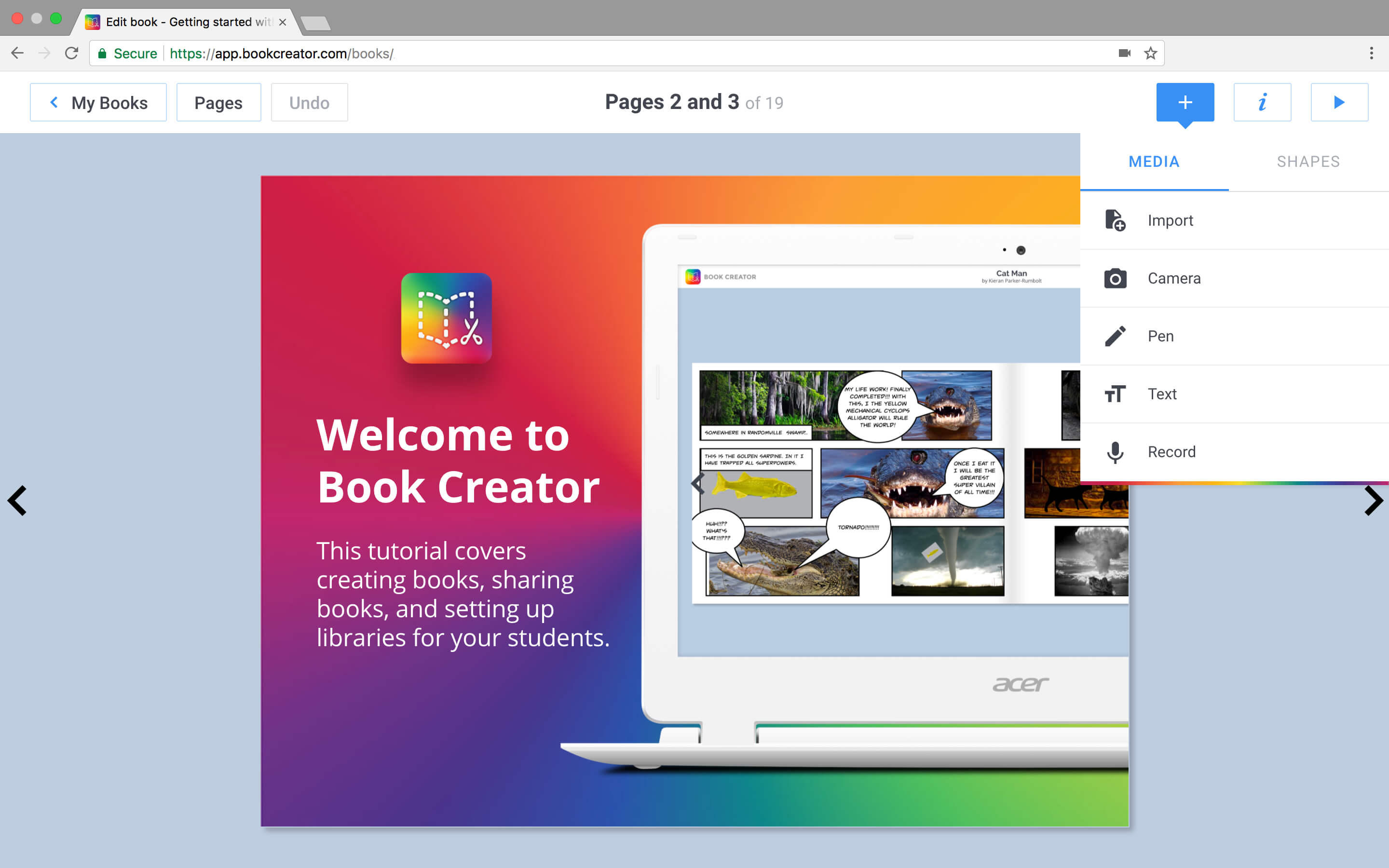
I've long sung the praises of the Book Creator app. It's definitely the best way to create an e-book due to it's elegant simplicity, ability to add any kind of content (text, photos, drawings, audio, video) and share in both PDF and ePub format. In our work, creating books can be used for narrative and expository language development, social cognitive strategies, metacognitive language strategies, speech practice, repetitive line books to develop microstructure, and so much more.


I recently had the opportunity to get to know Book Creator in Chrome (so, usable on Chromebooks or in any device running the Chrome browser (on iPad, still use the terrific app). It's a lovely port and works exactly the same as the app. One improvement, in the Chrome version you can search for images on Google, which is handy for quick co-creations with students. Sign up as a teacher and you can create 40 books for free (this account also allows you to delete books in your library). Learn about Book Creator here and sign up for your account here. If you are in a Google Apps (G-Suite) environment you can create books FOR your students and have them join your library (where they can read or create).

In my next post I'll talk about one of my favorite recent uses of Book Creator. Check out this great resource giving 50 ways to use Book Creator.
 
.