Showing posts with label naming. Show all posts

Thursday, October 17, 2019

A Little Interaction Makes a Fun Vocab Lesson

Merriam-Webster is known for documenting the changing words of our language. Their Time Traveler website (accessible in any browser) will allow you to look up any recent year and see a list of words that had their "First Known Use" in that year.


Click on any site to see a definition; you may have to provide "kid-friendly" definitions. This site would be great if you want to incorporate engaging material or current events content, which often has many contexts for teaching narrative and expository text.

Many of the words featured are nouns. For a strategic focus you can teach semantic structures with a tool such as the Expanding Expression Tool. 

Example: 
Escape Room (2012)
Green/Group: A recreational place
Blue/Do: It simulates a locked room according to a theme, you have to get out
?/What does it look like?: Room or series of rooms
What is it made of/Parts: Puzzles, codes, hints, themes
White/Where: Often in a mall or amusement center
What else do I know? I once did one that was a fallout shelter

Buy one, or the kit, but did you know you could make a template for classroom instruction, or use mine at this link? (please DO NOT request access, rather, you can click File> Make a Copy to copy to your Drive).

Saturday, January 14, 2017

Annotating Photos in iOS 10

Annotating a photo, or marking it up with text, highlights or shapes has many uses in language, social and executive function therapy. I have previously written about this topic with regard to Skitch. So, Skitch is no more, and though its functions were incorporated in Evernote, getting to them is almost too complicated to talk about here. The good news is that you can now annotate photos without a specialized app, because these features have been added to the Photos app for iPad and iPhone.

But first, some bad news. These features are part of iOS 10, which came out this past fall and was where Apple finally drew the line on the iPad 2. The iPad 2, now a 5 year-old line, cannot be updated to the latest version of the operating system. So...if you want to continue to be able to ride the tech train and you have an iPad 2, you might want to consider an upgrade. Not only for features available on the newest operating system, but also because as your operating system falls behind, so will your apps, and you'll soon find yourself not being able to install certain apps as they come out. I recommend the Gazelle service, which provides you with cash for trade-ins of old devices. The iPad Air 2 is a good model for clinicians to consider.

How to find out what model iPad you have.

How to find out what operating system version you are running.

How to update your iPad operating system.

Once you are up to date with iOS 10, you'll be able to annotate photos right in the Photos app. This will apply to photos you take with the camera or photos you save from Safari. Searching and saving photos from Safari brings you endless contexts for therapy, including finding images that scaffold language about curriculum topics.

Once you take or find an image you would like to add words or annotation to, you might first want to duplicate it. This would allow you to save the original and annotate a duplicate--especially useful if you may want to complete the same activity with multiple groups.

To Duplicate a photo, view it in the Photos app and tap the "Share Square."


Then tap Duplicate.


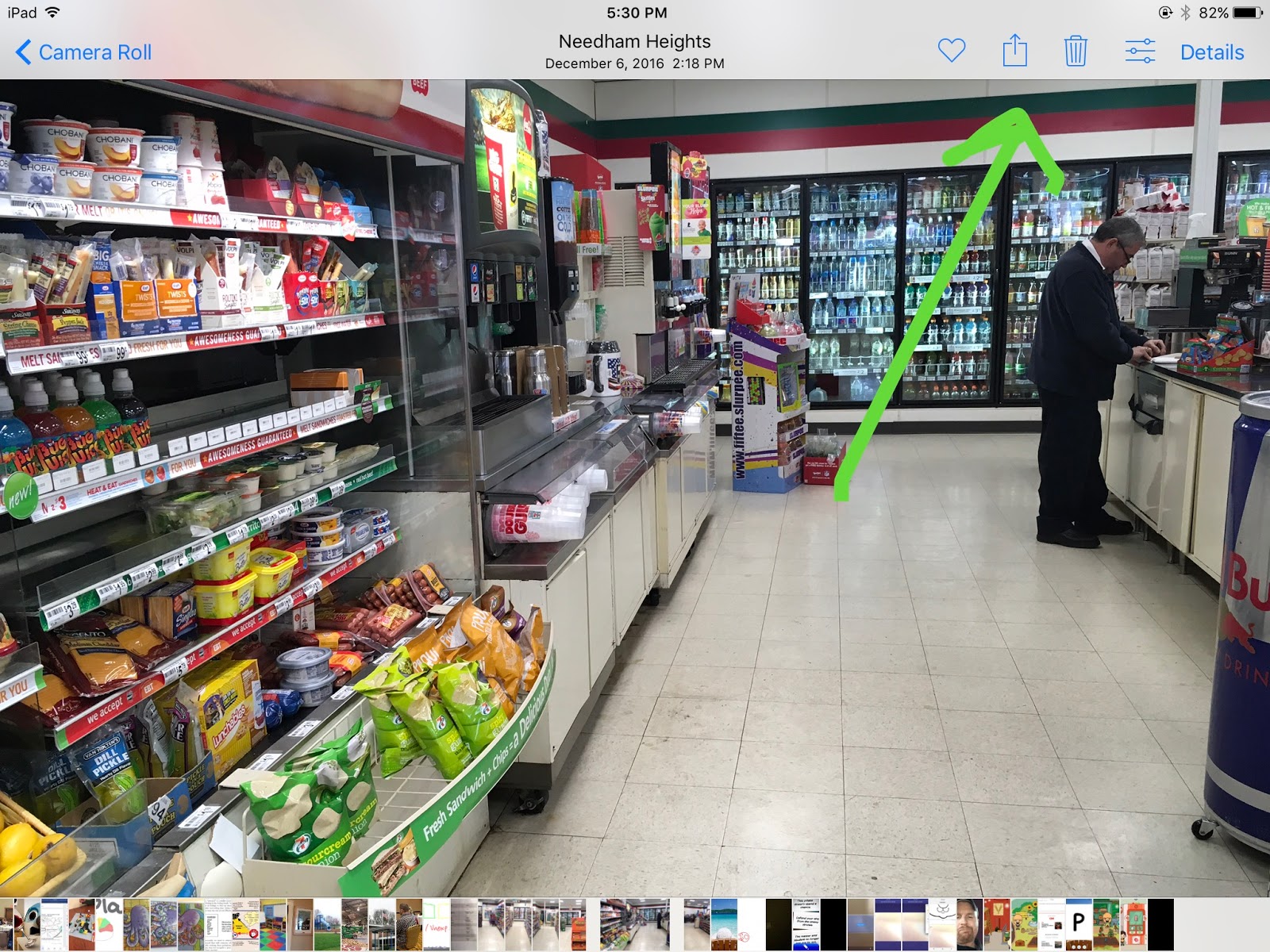
Now you will have two versions of the image, one of which you can annotate. To get started marking up the image, tap the "sliders" Edit icon in the upper right corner (next to Details). At the bottom of the menu on the left, tap the "..." icon, then Markup.


From there it is pretty self explanatory--you can familiarize yourself with the bottom menu, and how to add pen marks, change color and line thickness, add text and change its color, size and font.


In this case I was using this feature to make a visual activity with students before we took a community trip to 7-11 to get a snack. The activity aligned with Sarah Ward and Kristen Jacobsen's situational awareness "STOP" acronym-- Space, Time, Objects and People.

For more ideas on annotating photos, you can check out my linked article in the first paragraph of this post. Those ideas pertained to Skitch, but you can now do them right in the Photos app with iOS 10.

Friday, May 6, 2016

MarcoPolo Arctic

I have been meaning to write about this app for some time, but it is free today (5/6/16) and fairly priced at $2.99 anyway, so pick it up! Thank you to Smart Apps for Kids for always being a great resource. Do you follow their Friday posts detailing app sales and freebies? There is a "Free App Alert" you can subscribe to on the site. The website is also a wealth of information on interactive apps, with many features on apps from an educational and therapeutic point of view-- very FIVES Criteria-friendly!

MarcoPolo's apps, such as their previous wonderful Weather entry, are "sandbox" apps encouraging interactive exploration and play within a context, specifically geared toward STEM education. However, being quite language-neutral, the visuals provide a great avenue for talk, description of items and actions, and causal and conditional language. Overall the apps can be used for developing descriptive schema (perhaps with the use of the Expanding Expression Tool) or expository text structures as well (e.g. list, sequence, cause-effect, compare-contrast) as post-activities.

Arctic (please click through to download from Smart Apps for Kids and support them) provides an interactive land-sea environment allowing you to insert and name species in different categories and interact with them (e.g. feeding). Students can also observe their behaviors as they are placed in the arctic habitat. The app also features puzzles that provide brief auditory narrations (ask wh-questions or prompt students to summarize) focusing on categories such as land animals or birds, describe body parts and functions. The app can also be paired with many books as a post-book activity (e.g. Winston of Churchill or The Emperor's Egg).


Monday, December 7, 2015

Tiny Tap adds Tap N' Type

Please excuse my brevity and non-productivity, website-wise, but I have been doing a lot of local presentations while at the same time recovering from a pretty bad shoulder injury! At least I can see the humor in a fall up the stairs and shoulder dislocation, which, after the pain, has kept me busy with doctor and PT appointments. I should mention that the Calm app provided me with a little cognitive relief in the emergency room- you can picture me staring at my phone and groaning. Anyway, I am on the mend.

I wrote about the Tiny Tap app some months ago as an example of an app to author interactive activities, with virtually limitless contexts. That (free!) app became even more useful with a recent update allowing for addition of text fields- think labeling of items and categories and pictures, among other things. Check out their demo video for some ideas, and my original post as well.


.