Friday, May 13, 2011

Clay Yourself

Clay Yourself is supposed to be a big, playful ad for Hotels.com, but like many avatar creators, has good potential to develop descriptive language.

Use the very customizable creation tool to make a figure and work on schema around describing a person (face, hair, accessories, etc). You can always use the "Randomize" button and see what happens.  I think I accidentally created Snooki from Jersey Shore:


Once you mark your character as Finished, you can use two other fun aspects of the site.  The Stage Name Generator lets you pick a type of vacation for your character (perhaps first brainstorm what would be associated with each vacation).  The Generator will suggest names, providing a context for discussing why, say, "Sebastian Trekman" would go on a "Fun and Adventure" Vacay.  Oops, I should have marked Snooki as female, but you get the idea.


Finally, you can use the Script Creator, a sort of Mad Libs activity where you get to write an adventure story for your character.


Sadly, I found that the "Record the Script" feature did not work on my computer. I think the hotels.com web developers rely way too much on Flash, and don't keep their creations up to date, because they had an earlier winner that no longer functions.  Recording the story would not be a bad idea, though, so maybe you could find a substitute means. Overall this is a very fun, kid-friendly site and SLPs and anyone working on descriptive writing could find creative uses for it.  It also could be used to align with curriuclum around USA and other geography topics.

Popplet Day!

Welcome to Popplet Day on SpeechTechie and TherapyApp411!

What is Popplet, you might ask?  No, it is not something that is served with dinner rolls or...anything else.  Popplet is a collaborative "mind-mapping" tool with both web-based and iPad app versions.

Why a day to focus on this resource? Well, I figured I could use SpeechTechie to feature the web side, and over on TherapyApp411 today, there's a post describing the iPad version.  They differ in some key ways, with the web version offering more features.

Mind-mapping apps and sites are SLP-friendly in that they provide a way for us to create graphic organizers with our students in an interactive manner, linking ideas and pictures together in ways that break down and stimulate language.  Graphic organizers support students by illuminating text structures, providing visuals for abstract or unfamiliar concepts and vocabulary, and developing a palette for combining sentences, all research-based practices.

So what can you do with Popplet?  Check out their preview video to examine the possibilities.


Isn't that cool? How does it work? It's really user-friendly. Head on over to Popplet and set up a FREE account (that gets you 5 "boards" and I am a little confused about what happens after that, but let's go with it).

Think of a topic you'd like to visualize- got one your kids are working on? I created this one with students using eNature as a research tool.


When making your first Popplet, the site shows you this helpful animated tutorial (click the ? icon onscreen to see the tutorial again at any time).

The cog menu allows you to do all kinds of other things, such as align popples in various ways, add content from YouTube, flickr, Facebook or Google Maps (that's cool!), print or shift into presentation mode.

Presentation mode is very nifty, like PowerPoint on zoomy steroids.  This mode is similar to what you can do with Prezi, but a lot simpler to use (IMHO). 


Setting up and clicking through your Popplet in Presentation Mode is a great way to review information with students or substitute for PowerPoint in your next presentation.  Finally, Popplets can be embedded in blogs or other sites so you can easily share with others (parents, perhaps?) the content or strategies you have been covering in speech-language sessions.


I hope you enjoyed Popplet day and will click on over to TherapyApp411 for its other component, a video review and demonstration of the Popplet app on iPad!

Wednesday, May 11, 2011

Guest Post by Diana Richardson: Interactive Art Site for Use with Adults

Diana Richardson, a graduate student in Speech-Language Pathology at the Massachusetts General Hospital Institute of Health Professions here in Boston, emailed me with this great site.  I encouraged her to write about it as a guest post and she agreed to do so (thanks, Diana!).  Diana brings the important perspective of working with adult clients that I don't often write about here, because I don't currently work with this population.  If you are an SLP working with adult clients and have resources you'd like to write up as a guest post, please let me know.  Additionally, Diana was mentioning that she finds that many of the resources I mention here are adaptable for her adult population, as long as the site or app isn't too childish- looking.  It occurred to me that I should label posts by age-range and I have started to do so, though this is a long-term project.  Thanks again, Diana!

As a graduate student working in my school's Aphasia Center, I am often looking for ways to engage adults in spontaneous conversation and elicit speech. I love using interactive websites as a tool, but often find it difficult to find activities that are appealing to adults. I recently found a great extension to the National Gallery of Art site: NGAkids Art Zone, which offers a wide array of interactive art activities suitable for both kids and adults.

This type of activity works best for eliciting language if the clinician controls the mouse and asks the client to communicate (using any combination of modalities) what he or she wants to add to the picture. The Faces and Places Landscape activity allows for dynamic creation of a landscape art project, allowing the user to add people, backgrounds, animals, trees, plants, and buildings. (HINT: to remove the George Washington figure on the default screen, click on his head and drag off the canvas). Click Random to make some giggly things happen and see how your client responds!


Each object is manipulable in terms of size and color, and the "people" in the image can even be animated to run, walk, jump, shake, fall, or stand - good for eliciting S-V-O sentences! This activity is also great for targeting circumlocution (I would often ask the client to describe what he wanted to add to the image, and together we would find an object that matched his description), directives, and categorization. Additionally, this activity allows for working on executive functioning skills as the client determines the best size and placement for various objects.


The final product is a work of art that looks more adult-like than some of the other interactive art features on the web. It can also be saved and printed, which makes for a nice extension activity at home (I would often tell a client to show his family the picture and describe it for them to encourage spontaneous conversation.) The other features on the site - Still Life, Portraits, Dutch House, Jungle, and Collage - are also excellent resources to use with adults. The site uses Adobe Shockwave Player, but once it's downloaded, the features work rather smoothly! Enjoy utilizing technology with your adult clients - they are often excited by the vast resources on the Internet!

Monday, May 9, 2011

Reflections on Edcamp Boston 2011

This past Saturday I attended Edcamp Boston, an "unconference" set in the wonderful Microsoft NERD center overlooking the Charles River in Cambridge. Edcamps take place all over the country and the model involves participants creating their own agenda across the day, with session leaders acting as facilitators rather than traditional "presenters." Another way to say this is that teachers themselves create their sessions based on what they want to learn for the day!

Several days prior, the organizers put up a brainstorming "wall" online for potential session topics. Upon arrival at Edcamp, these are organized into session spaces and times; I popped up a small session:


Then, you just GO.  Edcamp embraces "the rule of two feet-" if a session is not working for you, or you wanted to check out 2 sessions in one slot, you can just move on.  Since it's not a traditional "sage on the stage" model but rather a discussion-based one, this seems really natural. You can get a good sense of what Edcamp is about through this video:

Ed Camp from True Life Media on Vimeo.

I attended sessions on blogging (facilitated by none other than Richard Byrne, one of my faves), what's working/not working for iPad, a spirited interactive "Things That Suck" (and Rock-we got to express our feelings on topics such as grades, traditional school schedule, and seniority by moving to a corresponding side of the room) facilitated by Dan Callahan, Meg Wilson's great session on Mobile Learning, and a Web 2.0 "Smackdown" sharing session.  I learned a lot from all the conversations and my brain stretched.

Other highlights of the day included meeting and getting to know Meg, a special education teacher whom I have admired from afarand from here too, as well as Beth Lloyd, a fellow blogger OT who shares a mutual friend with me and is now apparently the #SLPeeps' resident Occupational Therapist (and has already been asked questions about sensory integration and bras). And it's always awesome to have time to converse with Super-Assistive-Technologist Karen Janowski, whom I am blessed to have in my district.

And by the way, the event was free.

A big thanks to the session organizers- check them out on Twitter:

Dan Callahan

Greg Kulowiec

Karen Janowski

Larry Fliegelman

Laura D'Elia

Liz Davis

Steve Guditus

Most of all it made me want to attend another Edcamp (click here to see where some are being planned) and other unconferences, and made me wonder... As much as I appreciate the ASHA conventions I have been to, and know that type of traditional PD and research-sharing is important for SLPs, I think this model could definitely have a place for us too.  What would an unconference look like for SLPs: SLPcamp? Spuncon? Wouldn't it be great to spend a day meeting like this and sharing ideas, particularly evaluation and therapy ideas? How could we do that?  Hmmmm....

Ideas? Let me know in the comments.

Friday, May 6, 2011

My Path

Some of my Twitter #SLPeeps saw my news that I am leaving my Instructional Technology Specialist position as of the end of this year and returning to the full-time (mostly) Speech-Language Pathology fold.  I am going to be taking over for the SLP who was originally my mentor when I came to my district, as she is retiring.  When I heard of this opportunity, it just seemed elementally right for me, and it was also really important to me to stay in my district. I didn't really want to completely start over.

Still, it was a real struggle to make this decision.  I have felt really torn in this past year between my position as an ITS and my feeling that, at heart, I am really a special educator and SLP.  It feels like a clear calling, though it was tough to decide to leave the ITS position that I worked really hard to obtain and establish for myself.  My supervisor, who is wonderful and has been very supportive of what I have been doing here with this blog, was very understanding and instantly ran to photocopy for me one of her favorite quotes;

You must always keep in mind that a path is only a path. Each path is only one of a million paths. If you feel that you must now follow it, you need not stay with it under any circumstances. Any path is only a path. There is no affront to yourself or others in dropping a path if that is what your heart tells you to do. ...ask yourself and yourself alone this one question. Does this path have a heart? All paths are the same. They lead nowhere. They are paths going through the brush or into the brush or under the brush of the Universe. The only question is: Does this path have a heart? If it does, then it is a good path. If it doesn’t, then it is of no use.
-Carlos Casteneda


This was an enormous consolation to me, and really framed where I'm at. I feel my heart is in the field of Speech-Language Pathology, and it's not enough for me to follow that path in a very-part-time, "on-the-side" manner as I have been doing for 2 years.

As readers of SpeechTechie, you should know that your support of my little endeavor here played no small part in this decision. I will definitely be continuing to blog about technology, language, and helping all learners. In fact, I think that by being back in a school-based SLP position I will be more grounded and experiential in my writing here and elsewhere. I also will be immediately returning to supervision of Boston University SLP grad students, a role I have really missed.

In addition, this position, which is not completely full-time, will allow at least a day weekly for consultation work around technology integration in Speech-Language and other disciplines serving diverse learners.  If you are at all interested in working with me for your organization or district, please check out my new SpeechTechie Services page!

Thursday, May 5, 2011

More on Better Hearing and Speech Month- Brain Injury Prevention

Another role that SLPs can take on during Better Hearing and Speech Month / May Month is in educating students on the importance of safety precautions when on a bike or on the road in order to prevent head injury.  Here are a few resources that can help:

BMW Education has a site that has been around quite awhile, and it has some great lessons and interactive drag-and-drop/click activities that reinforce concepts around safety.  They are also very visual and a great way to elicit discourse, sequencing and category-based language from our students.  The "Tips" section contains short presentations on topics, and the "Activities" menu has the interactives such as the one below.


Also, consider using Google Body Browser to explore neuroanatomy with students in an engaging and interactive way, describing the functions of the brain and what can happen after TBI.

Wednesday, May 4, 2011

Guest Post by Meghan Gallahan Graham: Evernote to the Rescue

This guest post was graciously prepared by Meghan Gallahan Graham, a colleague and fellow Boston University alum who is an SLP at Children's Therapy Associates in Natick, MA.  Thanks so much, Meghan!!  As an organizationally challenged individual I know I will be checking out Evernote.
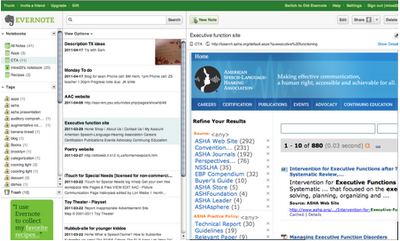

As someone who is constantly trying to stay organized in a world that seems increasingly unorganized, Evernote has been my answer. As a clinician who is always inspired by various materials in the “real world,” I have struggled with how to find ideas, save ideas, and oh yeah…remember them later. I’m sure you’re constantly wondering…What was that website I read about literacy? Or, What was the name of that book that had that great “kickoff”? Who was I supposed to call between 12 and 1 (while I’m inhaling my lunch and planning treatment for the rest of the afternoon)? Evernote is your answer. The best part is that it’s available across devices. I use it on my Android phone, my iPad, and my laptop. I “sync” anything I do, and it’s available at my fingertips.

Here are the main ways that I use Evernote as an SLP:
1. To do lists:


I can easily create to do lists on my laptop or even on my phone, anytime.

2. Saving websites for treatment or to read later when I have some downtime:
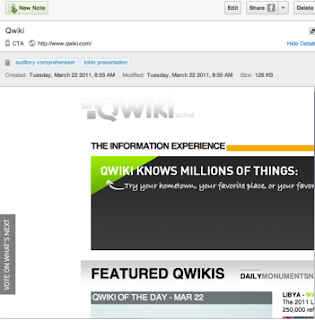

Above is a website I saved that Sean had referenced a few weeks ago on his site that I thought would be great for a couple students on my caseload, as well as for a presentation I was doing. Evernote has a webclipping function on its desktop version (you can do this on the iPad as well in a slightly different way) that allows me to clip the entire site, or just parts of it that I highlight to save. The tag function allows me to enter text to help me find it later. I added “auditory comprehension” and “tobin presentation” as the tags. Additionally, I placed it in a specific notebook “CTA” my “work” label to differentiate it from my personal notebook where I put recipes, books I want to read, quotes, memories, restaurants to try, etc. Evernote also allows the share function. I can email this note (or even entire notebooks) to others, as well as even make it public. I could email this note to a fellow SLP or teacher who I think may benefit from this website, or even to a parent for a home programming suggestion. I use this webclipping function constantly to save articles from Sean’s site, ASHA, and other sites I visit regularly, and then read them during some downtime. I even will tag it- “downtime” again just to help me find it later.

3. Organizing inspiration for treatment:


Above on the left, after observing another clinician in a treatment session working on description, I jotted down a couple activities I thought would be a good idea to try with one of my students. I took a quick picture with my phone, and “shared” the picture to Evernote (an option with the app on my phone). Evernote can search handwritten text too. Later if I type in “description” or even “book” in my search, this note will come up, along with anything else that has these words anywhere in the text. I also can email this to my graduate student to give her some ideas for planning treatment with this child.

Above to the right is a book that was recommended to me that a friend was reading. I took a quick shot of this on my phone, and sent to my Evernote account. Again, Evernote can search the text in the picture, so I can easily find this later. I could search by “book” (I wrote book in the text of note), “play” or even the author. Anything in the text would allow me to find this later.

Language Lens:
I think Evernote could be a great innovative tool for older students. My current caseload doesn’t have appropriate students, however, www.evernote.com in addition to YouTube has testimonial after testimonial of how Evernote has been helpful in the classroom. Teachers are showing students how to use to write research papers, take notes, brainstorm, etc. Students with executive functioning difficulties would clearly benefit from this multimodal organization system. Its flexibility across devices would certainly be functional for our students on the go. We all know the power of technology with these students. Evernote would be an easy “sell.”

Other ideas:
• Taking pictures, and/or recording to save student work to “mark” progress, share with their families, and/or their educational team
• Save quotes from students- either through typing or even audio recordings. We all know kids say the darndest things…. Evernote can serve as a place for your therapy “memories.”
• Collaborate with other professionals on a project through the “share” function
• Take notes during meetings, phone calls, etc.
• Evernote allows you to “attach” pictures, and PDFs as well allowing access to these documents everywhere you are if necessary

Cautions:
It functions differently on the iPad and phone obviously, so there is some getting used to for the differences. I have found YouTube videos to be really helpful in understanding. I recommend re-organizing and labeling notes on the desktop/laptop for ease. Overall a minor challenge for the overall benefits of this software.

I’ve only skimmed the surface with the capabilities of Evernote. Please visit their website for step by step instructions. I promise you’ll be inspired to get organized and test this out.

Tuesday, May 3, 2011

Hearing Loss Prevention Infographic

May is Better Speech and Hearing Month here in the USA, and MayMonth in Canada!  It's a good time to visit classrooms and conduct a lesson on hearing conservation (and if you have a graduate student, a great time for them to rack up a few of those elusive Aural Rehab hours).  An infographic is an interesting way to present information, combining pictures, icons and text (and often display information according to text structures such as categorical lists, sequences and cause-effect relationships); I found this great one on Cool Infographics:

Click through to the site to see the full infographic and view it in larger scale.
This infographic would be great to display on an interactive whiteboard or with an LCD projector and discuss with the class.

This site IS iPad-friendly and using multitouch gestures (e.g. pinch to zoom in and out) works really nicely on an infographic.


Monday, May 2, 2011

Things to Point out on the Web

Hi Folks-

Just had a few links I wanted to point out to you.

First of all, I wanted to correct myself; I had previously mentioned the CASLPA Spring Newsletter but had thought that the link would not work for non-members.  Actually, CASLPA generously makes this interactive and beautiful magazine open to all, and you should check it out. This edition focuses on technology and features some great articles by some of my favorite #slpeeps.  I again am very grateful to CASLPA for including me and highlighting SpeechTechie in this magazine.

Anyone watch the Royal Wedding?  It didn't really strike me that this could be a language development context until I saw Kevin Cummins' Slideshare on the topic.  Kevin uses Slideshare to present links and and guide students through language-enhancing lessons.  In this case, the lesson links students to an interactive audio-animated version of Cinderella and online coverage of the recent event.  It then prompts them to (and tells how to) make a Venn Diagram comparing and contrasting the events.  Such an activity generates great descriptive and story-based language, as well as promoting awareness of world events.  Check out Kevin's other Slideshare lessons here. Thanks to EdGalaxy for pointing this resource out.

Larry Ferlazzo describes an excellent lesson- "Back to the Screen"- that would be wonderful and motivating, especially for older students.  Larry (if you don't follow his blog, I recommend it) is an EPIC online presence and ESL/ELL teacher, and his approaches and contexts therefore have a lot of overlap with SLPs.  "Back to the Screen" is basically a barrier task in which one student watches and describes an action-packed movie clip as the other faces away from the screen.  The two then switch roles and, later, work to piece together a summary of the entire scene.  Larry even provides video clips that you can use for this narrative-enhancing activity!  I could see using this lesson again and again with different clips, and perhaps a consistent story map, to build students' pragmatic and storytelling skills.

Finally, I just wanted to point out two links of mine that are posts published elsewhere.  Over at ADVANCE I have moved on from describing SLP applications of Google Tools to focusing on Literature-Based Therapy in a series I am calling "Book It!" Here you can see posts on Lane Smith's wonderful It's a Book as well as a Robert Munch author study. Also, over on the Mindwing Blog, we wrapped up Autism Awareness Month with a post on one of my favorite tools, The Incredible 5-Point Scale, with gibes perfectly with narrative intervention strategies.

Have a wonderful week!

More Buffet!

This review also appears on TherapyApp411.

App Name/Publisher: More Buffet!/Maverick Software

Description: Maverick continues their series of interactive plate-building apps with an international twist in More Buffet (Maverick previously released fun food preparation apps such as More Grillin!). This app allows you to choose a country and fill a plate with culturally specific foods. Additional interactive aspects involve “rolling” sushi, constructing burgers and creating a pasta dish. The app initially let us experience American, Mexican, German, English, Italian, Chinese and Japanese cuisine, and a recent update added Indian and Australian food. When your plate is complete, you can “eat” it by tapping it away or email your dish to a friend or parent!


Therapy Use: More Buffet! is a great context for building descriptive, categorical, spatial and sequential language. Additionally, it aligns with school-based curriculum around continents and countries. More Buffet! is a good opportunity to play “waiter and diner” within group settings, with one student “ordering” a plate from another, thus working on specific language and listening skills.

App Benefits/Likes: Visual and hugely fun, with the promise of growth as additional countries are added.

Cautions: Slightly less interactive than previous apps in the series such as More Grillin! (which allows you to actually “cook” and flip the food on the grill).

App Summary

Skill(s) Targeted
Aphasia
Articulation & Phonology
Expressive & Receptive Language
Literacy
Social Skills/Pragmatics

Age/Grade Levels Targeted
Kindergarten
Early Elementary (Grades 1 – 3)
Upper Elementary (Grades 3- 6)
Middle School/Junior High (Grades 7-9)
High School (Grades 10 – 12)
Adult

How to Activate
Hold and drag

Type of Device
iPhone, iPod Touch, iPad

Cost
$.99 US (Currently)

Would you recommend this app?
Yes

Hyperlink

Reviewed by
Sean J. Sweeney

Review Date
April 18, 2011
 
.

