
I tried out Loom to show you some recent books I have used in teletherapy and a simple game that can be used for social and language targets in multiple teleconference platforms (i.e. through screen share or through remote cursor control). Email subscribers click through to see the post or see the video here.
Monday, April 13, 2020
A Loom Video Tour of Some Epic Books and a Simple Game- Little Alchemy 2
I tried out Loom to show you some recent books I have used in teletherapy and a simple game that can be used for social and language targets in multiple teleconference platforms (i.e. through screen share or through remote cursor control). Email subscribers click through to see the post or see the video here.


Friday, April 10, 2020
A Peek at Part of an Update Email and an Important Book to Read to Your Clients
Hi folks-
Online sessions continue to go well!
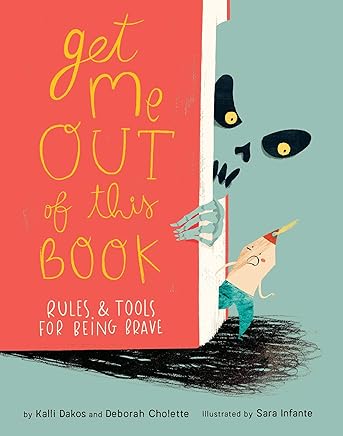
-Managing fear/anxiety: We read and discussed a fun, engaging book - Get Me Out of This Book: Rules and Tools for Being Brave.
Here's the vid if you want to review with your child and fam- we went page by page with me reading on EPIC! Books for kids: watch the video
We first talked about how we have learned about tools through Zones of Regulation®-
-A Blue Zone tool perks us up if we are bored, sad, sick
-A Green Zone tool keeps us in the green zone, feeling calm, happy, ok
-A Yellow or Red zone tool calms if we are anxious or very afraid
-And a tool can be an object, action or thought
In the book a Bookmark (a wacky character like this is fun) gets anxious because of scary content in books, like pages with snakes or sharks.
He learns three strategies:
-breathe
-make a plan
-think a good thought
I discussed with the boys that learning that you can change your thinking is a lifelong lesson. I have had to use these strategies constantly and I talked about how I had to coach my own mom (in her 70s now) when she sent me some worried texts recently. The boys understood why this discussion was important currently. The book makes clear in a note at the end that these three strategies are ones learned by Navy SEALs!...
Some notes:
-An almost middle-schooler in this group is often overly concerned/critical of materials being babyish when they are not, and appeared to enjoy the book thoroughly.
-Reading books interactively is a great activity for teletherapy
-If you don't already know about EPIC! it is a free (for educators, always) e-reading library. The book in question is here.
-This book could make a great story grammar map. It is also an example of metalinguistics, talking about elements of stories, and a kind of metanarrative (a story being aware that it's a story).
Online sessions continue to go well!
-Managing fear/anxiety: We read and discussed a fun, engaging book - Get Me Out of This Book: Rules and Tools for Being Brave.
Here's the vid if you want to review with your child and fam- we went page by page with me reading on EPIC! Books for kids: watch the video
We first talked about how we have learned about tools through Zones of Regulation®-
-A Blue Zone tool perks us up if we are bored, sad, sick
-A Green Zone tool keeps us in the green zone, feeling calm, happy, ok
-A Yellow or Red zone tool calms if we are anxious or very afraid
-And a tool can be an object, action or thought
In the book a Bookmark (a wacky character like this is fun) gets anxious because of scary content in books, like pages with snakes or sharks.
He learns three strategies:
-breathe
-make a plan
-think a good thought
I discussed with the boys that learning that you can change your thinking is a lifelong lesson. I have had to use these strategies constantly and I talked about how I had to coach my own mom (in her 70s now) when she sent me some worried texts recently. The boys understood why this discussion was important currently. The book makes clear in a note at the end that these three strategies are ones learned by Navy SEALs!...
Some notes:
-An almost middle-schooler in this group is often overly concerned/critical of materials being babyish when they are not, and appeared to enjoy the book thoroughly.
-Reading books interactively is a great activity for teletherapy
-If you don't already know about EPIC! it is a free (for educators, always) e-reading library. The book in question is here.
-This book could make a great story grammar map. It is also an example of metalinguistics, talking about elements of stories, and a kind of metanarrative (a story being aware that it's a story).
Thursday, April 9, 2020
Look for Language Underpinnings for Any Web Activity- ABCya
Sites like ABCya are filled with possibilities when we stop and consider what makes them potentially "Speechie" (see FIVES criteria). Ask yourself:
-Is there an inherent language process in this activity (e.g. categories, cause effect).
-What kind of conversations can I have with students that are NOT prompted by the screen (e.g. a description, commenting)
Take, for example, Bandemonium:

We've got categories, naming, the potential to make sounds corresponding to each instrument, later possibly finding songs where particular instruments are prominent and discussing them, looking at the language of lyrics, considering the narrative of songs, I could go on...
This site would be useful regardless of whether your could give remote (cursor) control by having students verbalize choices as you screen share.
Here are some other examples from this site:
The Calendar Game: categories of activities, temporal concepts, following directions, executive function
ABCYa Paint: Create a story, follow directions, draw vocabulary words
Input/Output Devices: Describe by function and have awareness of how equipment is being used in the telepractice process
Latitude/Longitude Treasure Hunt: Sync with curriculum concepts and spatial reasoning.
Make a Treehouse and any other "Make a" game on skills pages: Describing, integrating parts into a whole, pair with a book like in this case If You Give a Pig A Pancake which involves a treehouse, also see Create a Car paired with If I Built A Car (lots of opportunities for complex IF sentences)
This is just a sampling from the "Skills" page. I hope you'll continue looking at this and other sites through this kind of language lens for telepractice opportunities- I didn't even mention the specifically targeted word games available by grade.
Note: there are ads on this site unless you go premium but I encountered only one pre-activity ad while writing this post and it seemed one I would use for discussion (a cool toy).
-Is there an inherent language process in this activity (e.g. categories, cause effect).
-What kind of conversations can I have with students that are NOT prompted by the screen (e.g. a description, commenting)
Take, for example, Bandemonium:

We've got categories, naming, the potential to make sounds corresponding to each instrument, later possibly finding songs where particular instruments are prominent and discussing them, looking at the language of lyrics, considering the narrative of songs, I could go on...
This site would be useful regardless of whether your could give remote (cursor) control by having students verbalize choices as you screen share.
Here are some other examples from this site:
The Calendar Game: categories of activities, temporal concepts, following directions, executive function
ABCYa Paint: Create a story, follow directions, draw vocabulary words
Input/Output Devices: Describe by function and have awareness of how equipment is being used in the telepractice process
Latitude/Longitude Treasure Hunt: Sync with curriculum concepts and spatial reasoning.
Make a Treehouse and any other "Make a" game on skills pages: Describing, integrating parts into a whole, pair with a book like in this case If You Give a Pig A Pancake which involves a treehouse, also see Create a Car paired with If I Built A Car (lots of opportunities for complex IF sentences)
This is just a sampling from the "Skills" page. I hope you'll continue looking at this and other sites through this kind of language lens for telepractice opportunities- I didn't even mention the specifically targeted word games available by grade.
Note: there are ads on this site unless you go premium but I encountered only one pre-activity ad while writing this post and it seemed one I would use for discussion (a cool toy).
Wednesday, April 8, 2020
Take them on a ride
Years ago the amazing Sarah Ward came to our department of SLPs and talked about schema. Common features define different topics e.g. animals all have habitats, feeding behaviors, adaptations, appearance etc. Ask yourself "What do all ___ have in common?" and you have a semantic map for describing any topic. I have done that lesson over and over and over.
Engagement is important at this time, and it's great to keep it fun and light. Why not take your groups to an amusement park? Virtually I mean, of course. Whether synched or asynched (watch video live together or put in Google Classroom), you can YouTube search POV rides and focus on Universal, Disney, whatever. Ask questions that prompt observation, description of the ride, links to the topic, comparisons to other rides. Since rides have topical schema you can link to other materials with the same context, e.g. this Expedition Everest Ride with something from this collection.
As always, review any video you plan to use fully. Rides are also a context for swear words.
Engagement is important at this time, and it's great to keep it fun and light. Why not take your groups to an amusement park? Virtually I mean, of course. Whether synched or asynched (watch video live together or put in Google Classroom), you can YouTube search POV rides and focus on Universal, Disney, whatever. Ask questions that prompt observation, description of the ride, links to the topic, comparisons to other rides. Since rides have topical schema you can link to other materials with the same context, e.g. this Expedition Everest Ride with something from this collection.
As always, review any video you plan to use fully. Rides are also a context for swear words.
Tuesday, April 7, 2020
4 Types of Activities to consider using in Google Classroom
Some of you are connecting synchronously with students through platforms such as Zoom or Google Hangouts Meet (could we make the title of that tool more awkward please? No), some of you are engaged in more asynchronous work (post activities to be done during a period of time), or some are doing both.
If you are working in a district that is using Google Apps (G-Suite), Google Classroom is an option. I am doing all synchronous directly, but consulting with some school staff around asynchronous options.
I first want to point out that Richard Byrne is a tremendous resource on all things Google in Education. See his post and video on several ways to share in Google Classroom, pieces modeled below also.
I wanted to present a sort of taxonomy, by no means comprehensive, of the kinds of activities you might post in Google Classroom for asynchronous "work" for your students, whatever the expectations of you are at this time. Here are 4 (Click on any of the images below to see larger):
1. Write about a picture.
Create an assignment (adjust timeframes and points- maybe "ungraded" to avoid confusion- for all assignments) and within it create a Doc. From another tab find an interesting picture with elements to describe from social or other targets. Insert into Doc with a prompt.


If you are working in a district that is using Google Apps (G-Suite), Google Classroom is an option. I am doing all synchronous directly, but consulting with some school staff around asynchronous options.
I first want to point out that Richard Byrne is a tremendous resource on all things Google in Education. See his post and video on several ways to share in Google Classroom, pieces modeled below also.
I wanted to present a sort of taxonomy, by no means comprehensive, of the kinds of activities you might post in Google Classroom for asynchronous "work" for your students, whatever the expectations of you are at this time. Here are 4 (Click on any of the images below to see larger):
1. Write about a picture.
Create an assignment (adjust timeframes and points- maybe "ungraded" to avoid confusion- for all assignments) and within it create a Doc. From another tab find an interesting picture with elements to describe from social or other targets. Insert into Doc with a prompt.

Here's an example. You can use this doc if you would like (file>make a copy, please do not request permission)

If you look at Richard's post above, he shows a student view as well. They complete the activity and Turn In.
2. Ask a Question/Conversational Prompt
Promote conversational skills on and offline by posting a question and moderating the discussion.

3. Post a video to prompt discussion.

The video example for this is here. Use your imagination, you can find all kinds of videos to prompt narrative and social language. Again, Anna Vagin is the authority on this- see her YouTube, Twitter, and books.
4. Post a Drawing Prompt.
This may engage students in descriptive language or Comic Strip Conversations for social cognition.


You can use this drawing if you would like (file>make a copy, please do not request permission).
If you want to know more about using Google Classroom, there are many more tutorials on YouTube.
Monday, April 6, 2020
Demo of Alexa Skills Useful in Telepractice
In this video I provide a casual (hey, it's a Thursday night during a national emergency) demonstration of using the Echo Dot for "skills"/games useful in telepractice for language therapy or social groups. You can also experiment with using Reverb or Alexa within the Amazon app. The app I mention with lists of Alexa skills is called Skills for Amazon Alexa App and is free.
Sunday, April 5, 2020
Self-Regulation Sunday
In these extremely difficult times, we need all the tools to keep ourselves Calm. Calm (available also as apps for everything including Apple TV, as you see below) has free visual "scenes" with environmental audio. Try it and zone out for a few minutes. Calm also could be a nice regulating entry to any telepractice session, or a narrative activity, if you screen-share a scene from the website (log in, click on scenes, choose a scene, turn audio on, click home, click on screen to make menu go away).


Friday, April 3, 2020
Repost in Tele-Context: Cookies Crumby Pictures Address Self-Regulation
Originally posted 3/14/19.
I'm reposting this now because people could use ideas for videos that set contexts in telepractice sessions. These are all great social cog/self-regulation videos and could also be used for language lessons- for example story grammar or sentence formulation, or compare-contrast to the inspiration stories for the videos.
For a self-regulation curriculum in addition to Zones of Regulation, very reviewable in teletherapy, see also Hanna Bogen and Carrie Lindemuth's Brain Talk.
Sesame Street has been on a self-regulation initiative for the last several years. A series of skits called Cookie's Crumby Pictures parody popular movies and model strategies for listening, recalling directions, waiting one's turn and self-control. Children would not get the references to Karate Kid or When Harry Met Sally, but find the videos entertaining nevertheless. You can even sell them to older kids with a little effort. As always, a video that covers a social-emotional concept in the context of a story offers both a social cognition and narrative teaching opportunity. Check out this full playlist here, and a few sample videos are embedded below (email subscribers, click through to the full post).
Whole Body Listening:
"Thinking with the Eyes" (see Social Thinking®) and Problem Solving:
Considering your professional development schedule next year? Check out Sean's offerings for training sessions.
I'm reposting this now because people could use ideas for videos that set contexts in telepractice sessions. These are all great social cog/self-regulation videos and could also be used for language lessons- for example story grammar or sentence formulation, or compare-contrast to the inspiration stories for the videos.
For a self-regulation curriculum in addition to Zones of Regulation, very reviewable in teletherapy, see also Hanna Bogen and Carrie Lindemuth's Brain Talk.
Sesame Street has been on a self-regulation initiative for the last several years. A series of skits called Cookie's Crumby Pictures parody popular movies and model strategies for listening, recalling directions, waiting one's turn and self-control. Children would not get the references to Karate Kid or When Harry Met Sally, but find the videos entertaining nevertheless. You can even sell them to older kids with a little effort. As always, a video that covers a social-emotional concept in the context of a story offers both a social cognition and narrative teaching opportunity. Check out this full playlist here, and a few sample videos are embedded below (email subscribers, click through to the full post).
Whole Body Listening:
"Thinking with the Eyes" (see Social Thinking®) and Problem Solving:
Considering your professional development schedule next year? Check out Sean's offerings for training sessions.
Thursday, April 2, 2020
Simple Idea: Uses for online whiteboards
Sketches to promote narrative, expository language or social understanding are well-documented tools in speech-language pathology, and don't have to be pretty:
Carol Gray's Comic Strip Conversations approach
Stickwriting Stories (Ukrainetz)
Sketch and Speak (Ukrainetz)
In a telepractice session you can use the platform's whiteboard if it has it (I can't figure out how to make the Zoom one come up and may have inadvertently shut it off), or find any number of web-based boards (this no-sign-in Explain Everything board has an educational bent).
Whiteboards can be used to:
-Illustrate narrative (related to strategies of visualization/Social Thinking® sharing imagination). This past week I had the boys follow a "group plan"/gratitude moment of describing a high of the week which included my use of the park stairs for exercise, keeping in touch with classmates, video games, time in nature, and turkey burgers.

-Work on appropriate level of detail, or show a clock to promote pace (executive function).
-Design something collaboratively. Make a collaborative drawing.
-Play Pictionary for general words/main idea or vocabulary sets.
-Play a "Backseat Drawing" style game where one describes/one draws "make a small circle at the end of that line."
Carol Gray's Comic Strip Conversations approach
Stickwriting Stories (Ukrainetz)
Sketch and Speak (Ukrainetz)
In a telepractice session you can use the platform's whiteboard if it has it (I can't figure out how to make the Zoom one come up and may have inadvertently shut it off), or find any number of web-based boards (this no-sign-in Explain Everything board has an educational bent).
Whiteboards can be used to:
-Illustrate narrative (related to strategies of visualization/Social Thinking® sharing imagination). This past week I had the boys follow a "group plan"/gratitude moment of describing a high of the week which included my use of the park stairs for exercise, keeping in touch with classmates, video games, time in nature, and turkey burgers.

-Work on appropriate level of detail, or show a clock to promote pace (executive function).
-Design something collaboratively. Make a collaborative drawing.
-Play Pictionary for general words/main idea or vocabulary sets.
-Play a "Backseat Drawing" style game where one describes/one draws "make a small circle at the end of that line."
Wednesday, April 1, 2020
Virtual backdrops spark conversation, inference, strategic talk
Using Zoom for teletherapy, my students and I have enjoyed the virtual background feature. If you have a new enough computer, you don't need a green screen, but I bought one and a stand at Amazon for relatively short money.
Besides the "how did you do that?" conversation with students, you can have a "where am I? " activity and target concepts like thinking with the eyes (Social Thinking®) and the STOP strategy of Space, Time, Objects, People (Ward/Jacobsen), or just provide personal narrative models to spark questions and comments.
You can find images just by a Google Image Search and Preview or Adobe Reader will allow you to type on them as I did here, to scaffold a discussion of how supermarkets are the "same but different" in terms of space, time, objects and people currently:


Besides the "how did you do that?" conversation with students, you can have a "where am I? " activity and target concepts like thinking with the eyes (Social Thinking®) and the STOP strategy of Space, Time, Objects, People (Ward/Jacobsen), or just provide personal narrative models to spark questions and comments.
You can find images just by a Google Image Search and Preview or Adobe Reader will allow you to type on them as I did here, to scaffold a discussion of how supermarkets are the "same but different" in terms of space, time, objects and people currently:

Marty the annoying Stop and Shop robot behind me there also generated a lot of conversation and personal narrative from the kids.

Me at the Supercuts led us to discuss how they knew it was Supercuts (besides the big signs saying SUPERCUTS) and to a narrative model of how I cut my own hair for the first time on Sunday.
Virtual Backdrops if available to you are just an interesting way of putting yourself in an interesting setting. Another way to do this, though not a dynamic backdrop, would be to take/trim a photo of yourself over a background in Pic Collage and use that image in a session.
Subscribe to:
Posts (Atom)





