Showing posts with label auditory comprehension. Show all posts

Friday, April 5, 2024

Tailoring and Modifying ChatGPT Results to Create Quick Content

Last month, ASHA Leader featured a helpful article, Using ChatGPT to Create Treatment Materials (Price, Lubniewski, Du) providing great examples of prompts to ChatGPT for creation of sound-loaded paragraphs. Key to the article is the idea that what is returned will need to be filtered through your clinical expertise to create a usable material.

I have found that this process is still "quick." Recently I have been using a student's interest, in this case, cooking shows, to work through comprehension of paragraphs. We use strategies such as noticing and breaking down elaborated noun and verb phrases and also visualizing, with light application of the Visualizing and Verbalizing methods (structure words and digital squares in place of the "felts"). Though Lindamood-Bell provides quite a bit in terms of content with visual imagery for free, I have wanted to cater the content more to his interests and use subjects like Ina Garten.


Here you can see that the original return contained too much complex vocabulary, so you can use the chat aspect of the tool to continue refining. After simplifying the vocab, I asked it to detail a specific recipe like lemon chicken, then needed to ask it to simplify again, and ultimately did some editing when I pasted it into a Google Slide for a more usable experience.

You can see the full progress of my chat with ChatGPT here.

Thursday, March 9, 2023

DALL-E, an AI image creation tool

Having been certified in Visualizing and Verbalizing® years ago, I've always found it an essential tool in my toolkit. Scaffolding students toward creating a mental image gestalt, guided by a schema of structure words that aid in descriptive details, is a process that has been useful across reading comprehension to conversation and even executive function (i.e picturing oneself performing a task).

These skills will continue to be important, but imagine if you have a tool that can combine a few elements and create an image you can see. That's a powerful bridge to this process! Also, I recently learned of aphantasia, which affects the ability to form mental imagery. Supporting other means of learning through visuals affirms this element of neurodiversity.

Check out DALL-E, another tool from Open AI, which allows you to enter a descriptive term to generate a range of corresponding images. DALL-E provides many examples which favor modes of art, for example, line drawings, digital art or watercolor, but you can also use fairly specific descriptors and vocabulary. A client for whom I identify vocabulary targets from his Pokemon interests, for example, is perfect for this kind of search using the words dual and region:


I'm sure SLPs can think of many more creative ways to use DALL-E, such as a series of images demonstrating basic concept words. If you have one, please let us know in the comments.

Thursday, November 17, 2022

You Are The Historian- First Thanksgiving

Museums appealing to children are often a great source of interactive websites. I liked this website years ago (see the blast from the past) and the now Plimoth-Pawtuxet Museum has redesigned it with a modern look and perspective. Pre-and a little post-Thanksgiving, you could bring some groups through this "adventure," the conceit being you are a teenage reporter investigating some Wampanoag and Pilgrim sites. I might be biased as a Massachusetts guy, but it's a nice site for students to practice discussing what they see in pictures, processing information, and there are some sequencing and word-fill interactives. There is a lot of content here and seemingly no way to save progress, but you could just visit a few of the sites or keep tabs open if you want to continue. 


Thursday, May 28, 2020

Some metaliguistics for you

I went to grammar school. I mean it was intense diagramming-sentences kind of grammar back then. I learned what the subjunctive mood was. Actually my mother taught my eighth grade ELA class, but that's another trauma to not talk about for now.

Anyway, for this reason as an SLP I've always had a lens on syntax, at least in its functional capactity of comprehending and producing complex sentences. This involves building some syntactic awareness of parts of speech and the functions of words. There is evidence that knowledge of parts of speech and how they go together impacts language and reading comprehension. Approaches like sentence combining are research supported and require this kind of awareness in students.

For these reasons, interactives around parts of speech can be considered on-point in our therapy. Check out Sheppard Software (overall) and their specific ELA interactives. Their Parts of Speech tutorial is adorbs and a fun visual way to explore the functions of nouns, adjectives, and verbs (note also that adjective+noun equals elaborated noun phrase which we can be measuring as microstructure in narrative).


The sparkly cloud


The sparkly cloud is hiding

Finding an interactive website of this type is helpful as you can follow the activities in a sequence, which helps with session flow. I have added this website to the Teletherapy Resources List.

As a child of this era also I loved Schoolhouse Rock and have used their engaging grammar videos in therapy to build awareness of parts of speech.

Monday, May 18, 2020

Use science to build categories and following directions

GoReact is an activity (originally an app) from Museum of Science and Industry, Chicago that I originally wrote about for ASHA Leader. I was reminded of it recently when a HS student I work with had a chem project I needed to assist with.

GoReact can be used to explore the periodic table of elements and associate elements with practical, relatable objects they are used to make. Just click on any element.

Then, there is a Featured Reactions tab- this gives directions to assemble elements in different categories, e.g. health and beauty aids. It's a great interactive website to build categories, comprehension of direction, narrative about experience of products, and describing by function.


This website is a good pairing with the fun book 11 Experiments that Failed and maybe some simple experiments using household items

Monday, April 27, 2020

Chateau Meddybemps

Chateau Meddybemps is a rich site with many activities you might consider in teletherapy, particularly for young students and for those you are experimenting with incorporation of interactive websites. Activities on this site might be ones you screen share and have the student observe the visuals and verbalize choices, or offer many opportunities for remote cursor control. For students who need buildup of skills in using the mouse in therapy, there are simple mouse skills activities. Also, there are a number of PDF based printable "activity centers" that you may be able to use for play on both sides if you've got willing parents.

Check out the Super Menu for activities like this one in which students can organize a zoo, thereby targeting naming, animal sounds, describing and using causals.


Friday, April 3, 2020

Repost in Tele-Context: Cookies Crumby Pictures Address Self-Regulation

Originally posted 3/14/19.

I'm reposting this now because people could use ideas for videos that set contexts in telepractice sessions. These are all great social cog/self-regulation videos and could also be used for language lessons- for example story grammar or sentence formulation, or compare-contrast to the inspiration stories for the videos.

For a self-regulation curriculum in addition to Zones of Regulation, very reviewable in teletherapy, see also Hanna Bogen and Carrie Lindemuth's Brain Talk.


Sesame Street has been on a self-regulation initiative for the last several years. A series of skits called Cookie's Crumby Pictures parody popular movies and model strategies for listening, recalling directions, waiting one's turn and self-control. Children would not get the references to Karate Kid or When Harry Met Sally, but find the videos entertaining nevertheless. You can even sell them to older kids with a little effort. As always, a video that covers a social-emotional concept in the context of a story offers both a social cognition and narrative teaching opportunity. Check out this full playlist here, and a few sample videos are embedded below (email subscribers, click through to the full post).

Whole Body Listening:


"Thinking with the Eyes" (see Social Thinking®) and Problem Solving:


Considering your professional development schedule next year? Check out Sean's offerings for training sessions.

Thursday, April 2, 2020

Simple Idea: Uses for online whiteboards

Sketches to promote narrative, expository language or social understanding are well-documented tools in speech-language pathology, and don't have to be pretty:

Carol Gray's Comic Strip Conversations approach

Stickwriting Stories (Ukrainetz)

Sketch and Speak (Ukrainetz)

In a telepractice session you can use the platform's whiteboard if it has it (I can't figure out how to make the Zoom one come up and may have inadvertently shut it off), or find any number of web-based boards (this no-sign-in Explain Everything board has an educational bent).

Whiteboards can be used to:

-Illustrate narrative (related to strategies of visualization/Social Thinking® sharing imagination). This past week I had the boys follow a "group plan"/gratitude moment of describing a high of the week which included my use of the park stairs for exercise, keeping in touch with classmates, video games, time in nature, and turkey burgers.


-Work on appropriate level of detail, or show a clock to promote pace (executive function).

-Design something collaboratively. Make a collaborative drawing.

-Play Pictionary for general words/main idea or vocabulary sets.

-Play a "Backseat Drawing" style game where one describes/one draws "make a small circle at the end of that line."

Friday, March 27, 2020

Approaching "Whole Body Listening" is an important tool in teletherapy

After a week and a half doing telepractice with my groups, I notice one of the biggest lessons everyone is learning is regulating their body within the "group" meaning the Zoom Speaker View or Gallery View.

An anecdote on this is that I have a HS group with a client who has a lot of verbal stereotopy that is of course very difficult for him to control. As his first tele group was starting, this occured, and I was so proud of another client in the group who has really grown in his understanding of this peer. He said, "We can all just switch to Gallery View so that the camera doesn't pull to whose speaking as obviously." Just a great moment without shame. We then discussed as a group how to do this toggle and I made sure everyone could do it.

But Whole Body Listening is still "a tool, not a rule" as Suzanne Truesdale and Elizabeth Sautter have put it. We can gently encourage these behaviors while avoiding ableism or insisting that all make eye contact with the camera, or stay "still." There is, however, a difference between self-regulatory movements and behaviors and being disruptive on purpose or to seek attention, so we can walk that line. You can read about WBL in its original clinical conception by Truesdale here.

A visual I have used to target this concept is attached below, it was created/modified from an image by Lydia McDaniel, our grad student intern from Nova Southeastern.


For younger students, Howard B. Wigglebottom Learns to Listen in this free digital form may be useful.

Some related concepts/tools are the 5 Point Scale, which I have used in many iterations with my groups, in this case emphasizing that balancing our talk time with others is one way to listen with our mouths and brain. 

In sessions I have also incorporated Social Thinking® concepts like Following the Group Plan vs Your Own Plan, Body in the Group, and Hidden Rules/Expected Behaviors. With a teen group, this article about annoying behaviors on Zoom spurred some good discussion and laughter and also involved main idea thinking/inferencing (i.e. read the heading of the described behavior and see if students can infer the gist of the paragraph)

Tuesday, March 24, 2020

A Tidbit and another learning opportunity for you

Years ago, some months after I started this blog, Michael Towey of Waldo County General Hospital contacted me to discuss web-based resources that could be used in tele, as their program was becoming an important telepractice training center. I am forever grateful to him as this conversation turned into one of my first paid speaking gigs.

Michael is offering a 1-hour course Let’s Get Tele-Practical: Speech Telepractice Strategies for Success through XceptionalED. Please check it out if you are looking for training in this area, as many are right now. Michael is one of the pioneers of telepractice and I am sure you'll gain much valuable information from the session. If you want to see one of his articles (ahem, featuring the FIVES criteria for evaluating tech resources by, I don't know, some dude) you can do so here.


So, Tidbit: I mentioned this site a few weeks ago, but it is more relevant now. Like Into the Book/Into the Map mentioned yesterday, it's great to find sites that have enough content to keep you on a roll. Randall's ESL Cyber Listening Lab, designed for a different purpose but useful for SLPs, has audio messages very useful for working on auditory comprehension. These range from easy to harder and each have a quiz with them (so, consider screen sharing and transferring cursor control for the quiz to add engagement). Each activity has a photo, pre-discussion, targets such as idioms, the file to listen to, and the quiz.


Sunday, March 22, 2020

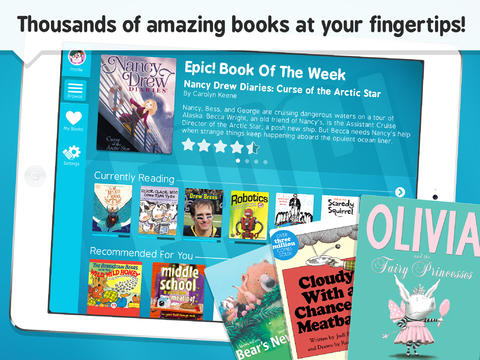
Repost: EPIC! Books free and very useful in context of telepractice

This is a repost from 5 years ago (I will do this here and there to point out resources useful in telepractice). EPIC! offers free educator accounts so you can read/discuss/question/paraphrase/focused language stimulate/recast when using a book synchronously (meaning over a telepractice portal) and currently free remote student access (meaning you can provide students with books to read asynchronously, also a mode of telepractice, assigning work/activities to be done when you are not there).


One of my favorite topics is using picture books and apps in contextual conjunction in language intervention, and in this post I want to let you know about an app that IS picture books (chapter books too).

Check out Epic!- Books for Kids (FREE), an eBook library of picture and chapter books that can be used to present language-enhancing books in interactions with your students. Epic! offers thousands of narrative and expository books from major publishers such as HarperCollins, Scholastic and National Geographic. The app/website offers features facilitating an engaging presentation of a book to a group of students via an iPad, including zoom in/out to page and "read to me" audio available for some books.


Be sure to register for an educator account, which you can do through the website (there is also an app but in tele you would want to use the site for simplicity)

Epic! features a number of books I have used for language development over the years, and I have been finding other great options through the app. For example, the books Scaredy Squirrel and Scaredy Squirrel Makes a Friend by Melanie Watt offer the following "Speechie" book features:
-A narrative structure featuring problem, reaction (or attempts to solve) and conclusion
-Many expository elements presented in an engaging, fun way, e.g. animals Squirrel is afraid will bite him, sequences and connections between items and their functions.
-Text features such as diagrams and flowcharts that are helpful for scaffolding understanding (and seen in textbooks that students must grapple with in their classrooms)
-Contexts to explore social cognition strategies such as Zones of Regulation and the CBT paradigm of risk vs. opportunity (i.e. reframing anxiety-producing situations as opportunities to learn).
-Potential to screen-shot illustrations and pair with Strip Designer to make comic strip conversations about the character's thoughts and perspectives.

In my presentations on this topic I often include this reference that is very on point regarding the utility of this app:

The act of reading books aloud interactively and using scaffolding to support children’s use of more advanced syntax, vocabulary and critical thinking is itself an activity which addresses language development (Beed, Hawkins, & Roller, 1991).

So, for a source of books "at your fingertips," give Epic! a try. For tips on interactive reading aloud, see here or here, as well as Jim Trelease's Read Aloud Handbook and Jane Gebers' Books are for Talking, Too!

Beed, P.L., Hawkins, E.M., & Roller, C.M. (1991). Moving learners toward independence: The power of scaffolded instruction. The Reading Teacher, 44(9), 648-655.

Thursday, September 5, 2019

Get on a Roll this Year (Part 2)

In the last post, I talked about how context can be your friend, not only in planning activities and engaging students, but also clinically. Incorporating curriculum topics is a key strategy for clinicians, but we need not be arbitrary about it. Please take these examples of contextual work as exactly that- examples. You can find out from teachers what they are working on and perhaps offer students a choice of topics to "roll with," especially if you are working on social objectives.

One tool I use frequently when making decisions as a group is the Levels of Like chart, a strategy I learned about from SLP Jenny Sojat. You can make one of these on a board to explore sample topics; it's also a good way to use Pic Collage:


Use Text tool to add the levels. Use the Web Image tool to search for images related to options being discussed. Poll students on their "thoughts" (good entry to perspective taking) and where each option lies. Try not to decide on something that anyone has below the OK level.

Let's say you explore pets as a topic. Pets are a nice entry point to curriculum as they relate to social studies (human interaction with environment, etc) and a number of science topics such as describing animal features, habitats etc. Some examples if you settle on, say, cats. Cats are cool!

Memes: A meme is, in internet parlance, something that is shared, often for humor. Memes are essentially narratives and often take on a "same but different" theme with different versions of a meme. But animal memes are usually a story, so think narrative language. Be careful where you get your memes; you can save images from icanhazcheeseburger, find cute groups related to animals on Facebook, or search for kid-friendly memes. You can organize them for presentation in a Google Slides format like I did below:


Note that each one is a (partial) story involving observation and prediction.
Character: owner and cat
Setting: bathtub
Initiating event: The owner is taking a bath WHEN the cat comes to visit and perch on the faucet
Sequential events/reactions: you guess
Also a good figurative language term in slide 1.

Books: Pets feature in a ton of narrative/expository picture books. Try Creature Features or It's all about ME-ow, which have science and social extensions.

Apps: Lots of apps revolve around pets. Many are not great! But check out Toca Life: Pets to tell stories and play (also great for categories/following directions), and apps like How to Draw a Cat Step By Step are good contexts for following directions.


Videos: Phrasal Verbs Friends is a series of fun cat vids teaching about Phrasal Verbs (basically figurative language). Thanks FreeTech4Teachers for that suggestion. Also see the Simon's Cat series for wordless narratives.

More Academic: see what BrainPop, NewsELA or EPIC! Books have for material on cats and teach expository text structures and strategies.


I'll sign off with a meow, then!


Tuesday, August 27, 2019

Get on a roll this year!

Context helps us achieve flow in our work, both in our own and students' enjoyment of it, as well as ease of planning. A study by Gillam, Gillam and Reece (2012) also found context linked to EBP, with improvements in sentence and discourse formulation measures when "clinicians treated multiple linguistic targets using meaningful activities with high levels of topic continuity." What contexts you pick are up to you, but I have one suggestion to start: the playground and recess. A couple ideas in this flow:

Scratch Jr.
This free resource from MIT Media Lab is available as an iPad app or on Chromebooks. Coding is basically language teaching, a context for us to help students follow directions, work with characters and settings, and describe movements that result. It is also a big causal (because/so) and conditional (if/then) context. Scratch Jr. provides mini-curriculums including one allowing you to simulate playground games! The teaching guides here can be modified by taking a screenshot of the key directions, like so:


Tells you what to do...


Shows your students what to do
Not so complicated, and very fun!

Practice Playground Games
Make visual supports via Comic Strip Conversations (with marker and whiteboard or Doodle Buddy/Book Creator) and practice playing active games. This will give your students many language opportunities and also be skill-building activities for actual recess.

Pair with Picture Books about Recess
Try The Recess Queen (O'Neill) or Do Not Bring Your Dragon to Recess (Gassman), both providing context for social and narrative teaching opportunities.  Psst: find read-aloud video versions on YouTube.

Playground Physics
For upper elementary students, try this free app from the series of "Noticing Tools" from the New York Hall of Science. You can video students running or doing playground actions and measure speed and various scientific measures. Lots of narrative and expository language can ensue, as well as being a social context of moving to an outdoor space together and observing ("body in the group").


Also consider that a good chunk of the fun and instructive Zones of Regulation: Exploring Emotions app plays out in a playground setting, exploring how daily events change our zones and prompt us to use tools to regulate ourselves.

I'm sure you can think of many other activities going with this context, tech-related or not! Please let us know in the comments if you do.

Considering your professional development schedule this year? Check out Sean's offerings for training sessions.

Thursday, June 20, 2019

Make a Top 10 List!

I've said it before and I will say it again, visual supports are key for scaffolding understanding, supporting thinking and even eliciting language. I'm amazed that one format, creating Google Slides presentations with students, is as enthralling as it is. Apple TV (you can use an interactive whiteboard or just a projector in a classroom) helps for sure, but you'll be surprised how much students attend and generate language as you type into a slide and create something interactively.

A student of mine (entering 5th) has shown a lot of interest in comedy and SNL. It occurred to me that introducing the group to David Letterman's Top 10 Lists might be of interest, as well as a way to frame a review of a key idea we worked on all semester. You'll have to use your judgment and look around YouTube, but I found one that was not too risqué (#1 can be explained in different ways) regarding the lackluster accommodations at the Sochi Olympics, which gave us:
-narrative opportunities: what was the story here?
-many attempts to "get" figurative language, multiple meaning and humor


Following this activity we scaffolded our own Top Ten list around concepts and skills we had been focusing on for a few months: moderating talk time. This came pretty organically from items the kids suggested as well as some models of "what's going unexpectedly in what we are playing out right now" (e.g. I launched into a complete plot retelling of "E.T."). In this I was thrilled that the boys remembered a created acronym of mine ("LLLL=Long Lists Lose Listeners®," JK on the ®) and the 5 Point Scale of Talk Time we worked with as a group (view below). When complete, they asked me to review the whole thing David-Letterman-Style! Essentially the activity created a social narrative and was great to share with parents afterward.

Link to presentation (please do not request permission for me to share it with your account, but if you like you can go to the File Menu and Make a Copy, which will save to your account).


Considering your professional development schedule next year? Check out Sean's offerings for training sessions.

Tuesday, May 7, 2019

Voice Headliner- A Fun way to Play with Sentences

Voice Headliner is a simple webtool you can use on any device. Choose a celebrity (these include Taylor Swift, Beyonce, Ellen, and others) and type a sentence up to 300 characters, and the site will speak what you wrote in an approximation of the celebrity's voice. This provides a motivating and silly way to work with sentence composition, vocabulary, or giving directions. The tool creates sharable videos as well.


Considering your professional development schedule next year? Check out Sean's offerings for training sessions.

Thursday, March 14, 2019

Cookie's Crumby Pictures Address Self-Regulation

Sesame Street has been on a self-regulation initiative for the last several years. A series of skits called Cookie's Crumby Pictures parody popular movies and model strategies for listening, recalling directions, waiting one's turn and self-control. Children would not get the references to Karate Kid or When Harry Met Sally, but find the videos entertaining nevertheless. You can even sell them to older kids with a little effort. As always, a video that covers a social-emotional concept in the context of a story offers both a social cognition and narrative teaching opportunity. Check out this full playlist here, and a few sample videos are embedded below (email subscribers, click through to the full post).

Whole Body Listening:


"Thinking with the Eyes" (see Social Thinking®) and Problem Solving:


Considering your professional development schedule next year? Check out Sean's offerings for training sessions.

Thursday, March 7, 2019

Minecraft (and many other) activities at Code.org

I have previously mentioned here and here that coding activities, though designed for computer science and educational initiatives such as Hour of Code, have a lot of language underpinnings. They are engaging contexts to have students practice following directions, learn vocabulary, and use causal and conditional language in their verbal (or written) interactions. These activities are also great for "Group Plan" work (see Social Thinking®).

Additionally, I wrote about the idea of "flirting" with contexts that you really don't want to get deeply into. Minecraft is one example; kids find it very engaging but playing the actual game is something I don't have time to figure out, and may be hard to structure for efficient use of therapy time. In these cases I might use something defined that is related to the context, such as a video clip that might prompt narrative language.

As in the other coding resources I have highlighted, Code.org provides an easy to use, non technical interface. Intro videos set the context and provide directions, as well as a context for students to practice stating main ideas and the overall plan. Check out the Minecraft activity page- the Voyage Aquatic and Adventurer activities are great places to start, asking students to assemble series of blocks to move and perform simple actions. Code.org can be used without sign-in, but if you create a free account, it will save your progress. The website works on full web browsers (Mac/PC/Chromebook) or in the iPad Safari browser. You can also explore their activities from other contexts, such as "dance parties" incorporating music and app creators.


Friday, November 30, 2018

Tech-based sources of clinical information and research

As I just finished writing a presentation for PaTTAN that has a ton of EBP references, I wanted to give a round-up of some of my favorite sources of information. We live in a time of great access to research digitally, and it's important for us to keep in the loop!

First I want to give a shout out to The Informed SLP. I subscribed earlier this year and find it a terrific resource. Each month, Informed SLP produces a friendly and accessibly written digest of clinically relevant research, with a variety of reasonably priced membership options. They also have a free area with great information. Follow them on Facebook or other socmed channels for informative blurbs too. I appreciate Informed SLPs recent messaging about the importance of the other two sides of evidence-based practice: clinical expertise and client values.


I'm not ashamed to admit how much I nerdily visit ASHAwire. This is the launch page for all the ASHA publications. Its search algorithms can be a little hinky but it is always a good place to start, or just to skim recent issues of journals such as Language, Speech and Hearing Services in Schools. I also find a lot of value from the ASHA's Perspectives journal, which has practical clinical information throughout the year. Join one Special Interest Group ($40) and you have access to all the publications from all the interest groups. Click PDF on any article now and the website loads up ReadCube (you'll need to click add to library and open a free account), which allows you to save articles to your library and annotate them as well!


By the way, the above newly-published article, as a complete Teresa Ukrainetz fan (Ukrainiac?), made me more gleeful than attending Taylor Swift's Reputation Stadium Tour this summer. Which I did. I'm 45. It was my birthday present.

I have found ASHA's Evidence Maps website very useful. This is organized by disorder/intervention area and emphasizes higher levels of evidence such as meta-analyses and systematic reviews.

Finally, I'd encourage all of you who supervise graduate students to use or advocate for access to their university libraries online. Boston University provides this benefit to supervisors, among other schools. It is cost-prohibitive for any clinician to subscribe to other journals besides ASHA's, and it behooves any university to help keep its supervisors informed so that their students receive the best experience possible in their clinical placements.

Friday, August 17, 2018

Incorporating Movement in Sessions

A theme of my agendas for sessions last year included engaging my students more in movement. Movement at the beginning of or during sessions promotes self-regulation (it can be a Green Zone of Regulation® "tool") and following a Group Plan (via Social Thinking®) but also can be a way to practice the language of giving and following directions. Anytime we get our regulation-challenged kids up from a table also gives us a lot of teachable moments. With one group last year I did short movement activities we framed as "Jedi Training" as they were all interested in Star Wars. I noted they liked doing activities like planks in unison or one at a time, providing opportunities to "think with their eyes."

Check out Sworkit Kids (free for iOS and Android) which has short "workouts" with exercises shown via video models (also touching on an EBP). It's simple, and you can skip exercises and do what you want within a 5 minute "activity." A lot of these have kids on the floor so you may want to get some mats of some kind. I'm going to try these this year with a few different groups as part of "Jedi" or other themed "training."


Wednesday, August 8, 2018

Still summer...so want some lemonade?

They say August is one long Sunday. Here in Massachusetts we still have about a month left until school even starts, so its difficult to see posts from friends across the country who have already started, as well as the ubiquitous "back to school" and "summer's almost over, so..." ads. It pulls you out of it a bit, you know? I've spent my summer working on getting fit, hiking and doing some traveling, so it's been great. But HOT!

So consider some Lemonade! Remember the old Lemonade Stand game? You are given weather information and need to decide several things: how many cups of lemonade to make, how much to charge for it, and how many signs to make to advertise your stand. In the process, we can engage students in a number of language and social competencies:
-"listening with the brain*" and language comprehension
-using visual supports, however we provide them
-applying functional math and problem solving
-causal and conditional language ("It's going to be hot, SO let's make more cups...")
-following a "group plan,*" i.e. making logical rather than silly decisions to sell as much as possible

*language from the Social Thinking® methodology

Here are two ways to play it.
-Classic Lemonade Stand is a free app for iOS that uses the 'ol Apple IIe text interface, but is still fun
-Toward the end of the school year, I played the Alexa version on Echo Dot (enable the skill by saying "Alexa, launch Lemonade Stand"). This free skill provided a few extra elements that I found helpful: more opportunity for auditory comprehension and listening work, turn taking in speaking, using visual supports, and processing the humor and figurative language offered in this particular skill.


I always like pairing activities for further context, and our students before playing worked together to make a lemonade stand "sign." This engaged them in pretend play and lots of conversation. This could be done with poster materials or with the free app Pic Collage as we did below (You could also do this with Google Drawings on a laptop):


.