Showing posts with label seasons. Show all posts

Friday, October 9, 2020

Therapeutic Gaming Can Be Messy...

 ...and that's ok. Particularly in social intervention contexts, it's important to facilitate natural situations. That includes trying and failing with games- either because the group doesn't like the game and wants to try something else, the game itself sucks, or for other reasons. Isn't that what friends do when they get together-- evolve "group plans" and move on when something doesn't work for the group (see Social Thinking® Group Plan concept)? I like to use games within intervention sessions as a seeming reward near the end, but in themselves they have working teachable moments and lots of opportunities for my students to practice self-regulating. In teletherapy, with or without cursor control (have the students tell you what to click on), you can try a flash game like this (seasonal!) corn maze. Flash games come in a wide range of quality but this one is not bad at all!

While accepting that games like this might not go perfectly in a group, we can prepare to facilitate success. Notice that button that says "walkthrough?" In this case it leads to a video that shows you a sped-up view of game moves. For most other games, you can find a walkthrough with a Google. This arms you with information so you can provide cues like "Oh, what do you think that quarter will be for? What might you buy in a corn maze? Oh, nice smart guess!"

Monday, June 27, 2016

Providing Summer Services? Try the FREE Fireworks Lab app for the 4th!

Interactive apps have long been one of my favorite topics because they replicate world schema, and every schema has language that goes with it. As the 4th approaches (or other holidays in the future), you may have fireworks on your mind.

An Aside: before you get me in any way wrong, I think fireworks are dangerous and should only be operated (? Is that the word? Whatever.) by professionals. One of my toughest cases early in my career as an SLP was working with a patient who had facial burns because of a fireworks accident. So, yes, firmly I believe we should enjoy the town- and city-sponsored fireworks displays, and leave it at that. I live across from a busy city park and though I enjoy the evening of the Fourth, I stop enjoying it after midnight when fireworks are still going off there and I fear that our house will burn down. Like your parents said, nothing good happens after midnight.

BUT, apps give us a window to simulate removed events, so along with your messages about safety that are delivered diplomatically so that you don't get called by parents, you might be interested in Fireworks Lab. This free app allows students to organize and operate a fireworks display. The app is gloriously language-neutral, so students can be encouraged to label their choices in elaborated noun phrases (e.g. "green sparkly rocket") and then set them off.


A few supplemental ideas:
-The app is perfect for pairing with a written language or reading activity. Write or sequence cards with the different attributes of the fireworks and use these as a "plan" for the display.
-The app does not multitask, so if you leave it to play a music app, it starts you from scratch. But students could make a music selection via a phone or other device to sync with their display, giving you more vocabulary to work on as well as causal constructions about their music choices.
-Have students research fireworks displays in your town, or for older students, pair with the story of this famous fireworks fail for a narrative activity. The article is safe to use with kids and has some good figurative language too!

Have a happy (and SAFE) 4th of July--and to my Canadian friends, Happy Canada Day!

Friday, January 30, 2015

Talking about the Weather

Having just dealt with a tremendous blizzard, I am going to be a stereotypical New Englander and talk about the weather. Again. Weather is a topic that naturally lends itself to eliciting language in our students as well. Not only does this topic pop up repeatedly in science curricula across the grade levels, making it relevant to the Educationally Relevant "E" in The FIVES Criteria, but discussing it requires a number of language skills:

Sequencing-seasons, processes
Categorization-seasons, months, precipitation
Schematizing/"Main idea and details"-describing a particular day's weather involves attention to features such as temperature, wind, cloud cover, and precipitation
Stating Cause-Effect- within weather processes and explaining why certain clothing would be worn in certain weather conditions.

A great context for eliciting and working with language around weather was released recently in MarcoPolo Weather (Free). MarcoPolo Weather is a "sandbox" app allowing open-ended play by bringing characters, setting elements, clothing and weather conditions together and observing the effects. MarcoPolo has here continued their commitment to developing apps that address Science, Technology, Math and Engineering (STEM) skills (also found in the MarcoPolo Ocean app), including, according to the app description:

-Observe and describe different weather conditions including temperature, cloud cover, and precipitation
-Identify ways in which weather affects daily routines, such as dress and activities
-Determine how weather affects the natural landscape
-Learn about the water cycle and how clouds are formed

Check out the video below to see how MarcoPolo Weather works. It's a ton of fun!


MarcoPolo Weather would facilitate a natural language connection to
-a concept map or graphic organizer about weather conditions
-sentence strips or other print contexts to construct causal sentences about observations in the app
-picture books dealing with the weather
-creating a weather journal with Evernote by stepping outside, snapping pictures, and consulting the Weather app for data

Saturday, October 13, 2012

Appy-Picking Month: Tizzy Seasons

Any app that targets understanding of time appeals to me as a clinician, because so many kids struggle with this area. Tizzy Seasons HD Lite provides you with 4 mini activities, one for each season.  These include feeding birds in the spring, blowing and popping bubbles in the summer, organizing a leaf collection in the fall, and dressing for the cold winter weather.  Each activity can be used to model various structures such as sequential words, verbs or cause-effect for early learners.  If you like what you see in the Lite version, the full version for $1.99 features four additional activities per season for a seasonstravaganza!


Thanks to Giggle Apps for pointing out this app to me.

Monday, October 1, 2012

October is Appy-Picking Month! (and LeafSnap)

Before I go any further, I must acknowledge that I stole the phrase "Appy-Picking" from the terrific EdCeptional podcast...imitation is the sincerest form of flattery.  Have you listened to EdCeptional lately?

I must confess that I am not a big fan of the fall. Many of us seasonal affective disorder (SAD) sufferers view haybales, pumpkins and mums as harbingers of death.  However, I don't want to snow on anyone's fall festival, and figured I should get with the autumnal spirit.

Therefore, I am declaring October "Appy-Picking Month" here on SpeechTechie, and will be featuring 31 (I hope) bite-size posts about apps you can use in your therapy or clinical work, with maybe a more rambly analytical post here and there (consider those the roads between apple fields)!

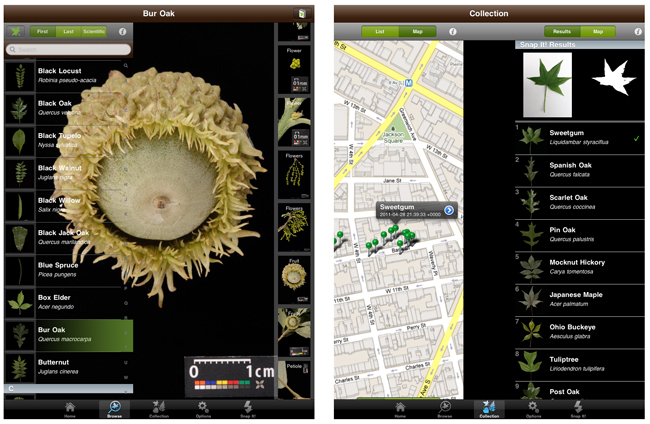
To start, let's look at Leafsnap, an innovative app developed by a number of educational giants such as Columbia University and the Smithsonian. Leafsnap is an "electronic field guide" to trees that is easily tied to curriculum around plants and seasons. I actually always use this one as an example of a curriculum-related interactive app, which I think are still few and far between. This free app uses technology similar to face recognition techniques to recognize and catalog plant species.  You can actually use this app to scan a leaf you pick up on a "walk" with your students, and the app will attempt to identify it! Leafsnap contains a lot of data about the Northeast U.S., and the plan is to expand that; I'd recommend you try out the app first before using it with students if you are not in the Northeast.

Image via FastCompany

Language Lens:
-Leafsnap can facilitate discussion of sequential differences between seasons, description, comparing/contrasting of leaves, and parts of trees (high-res pictures can be viewed for each species including individual parts- leaves, fruit, bark, etc), and the mapping interface can elicit all kinds of spatial language and relevant connections to students' own neighborhoods.

Common Core Connection:
CCSS.ELA-Literacy.SL.3.3 Ask and answer questions about information from a speaker, offering appropriate elaboration and detail.

Tuesday, January 24, 2012

Fakebook

There have been a number of "Facebook emulators" that allowed you to create profile pages and posts for a fictional or historical person, but ClassTools.net's Fakebook, seems to be the easiest to use, and I am also glad to see that it has stuck around (some of these have been a bit ethereal). Kids are obviously "into" Facebook, and even elementary students would be excited to create a fake profile, having seen siblings and parents use the site.  What you create with Fakebook, to be clear, is a static page with text, images and links- it is not a page that others can post on and interact with, i.e. not a real social networking profile.  So don't be scared.  Take Fakebook for what it is:

-An opportunity to use an exciting, motivating, and 21st century communication context to target language skills.
-A place to sequence/describe the events of a character's life and associate image and video links.
-A context to explore character perspectives (and multiple perspectives, as you can have other characters' respond).

You could use Fakebook to make a profile for a book character or figure from classroom content (maybe even an inanimate object such as a tree?) It's really quite easy to use (especially if you know your way around Facebook), and there is a video tutorial here!  The site has a save/edit function, so that you can return to your fake profile later and continue to work on it (you enter in a password when you save, and the site gives you a special URL where the profile is located).

I made this mini-profile of the Pigeon in just a few minutes:


Friday, January 13, 2012

Painting With Time

Painting with Time is a terrific FREE iPad (only) app that allows you to interact with a pre-loaded series of images in order to show the effects of time.  For example, Spring Comes to Boston, one of the available "time sequences" can be "painted" with the finger to reveal the changes that take place over the Spring months, at 3, 5, and 7 weeks.  You can also "slice" pictures in various ways to reveal changes at different points in time.

The center of this picture of Boston Common and Public Garden is "painted" with the 7 weeks paint, while the perimeter shows the scene at the beginning of Spring.  As a picture description activity, Painting with Time also gives you the opportunity to develop vocabulary and conceptual language.
The sequences in the gallery vary over different levels of time, from seasons to months, weeks, minutes and even a "beginning/middle/end" sequence with a mural and ice sculpture. I especially like the Messy Room sequence, showing the stages of cleaning up a teen's room at Start/15 minutes/30 minutes.  Kids with language and executive functioning difficulties have trouble with time concepts, and Painting with Time is a nice, no risk tool for you to use to target these skills. Additionally, causals and past/future tenses can be elicited when you discuss the scenes with students and make predictions about what it will look like after they paint. Painting with Time is essentially a picture description activity with a really fun twist!

Thursday, April 28, 2011

Sensory Garden

Sensory Garden is one of those great resources you can return to for many thematic lessons, with countless opportunities to model and elicit a skill.  This interactive website presents you with a garden scene that changes across all 4 seasons, with each season providing different activities.  In the "Activities," um, activity, students are tasked to find all the actions one can do in the garden.  When they do so, they are shown an animation of the action:


The garden also has My Garden and Explore modes where students can build the garden with items from different categories and view the sensory (5 senses-related) experiences in the garden, respectively. 

Language Lens:
  • The Activities mode is a great context to model verbs, temporals and causal constructions: "The lawn needs mowing BECAUSE the grass is long!"
  • By building their own garden, students will practice using categories and descriptive skills, and perhaps explaining why they made certain choices.
  • The site is an engaging way to reinforce abstract curriculum around months, seasons, and the 5 Senses.
This site IS NOT iPad-friendly as it is flash-based.

Thank you to Teaching Students with Learning Difficulties for highlighting this resource.

Wednesday, April 27, 2011

My Garden

My Garden is a great springtime activity that is part of the incredibly rich Busytown Mysteries site, based on Richard Scarry's books. I think this site would be great to explore further and implement as part of programming for K-1 or developmentally equivalent students. When you arrive in Busytown, to get to this activity, pick Countryside, then the Barn! You'll then be able to follow a sequence of instructions to plant and grow flowers, and use such interactive features as the "camera" to photograph your results. This site begs to be explored more!


Language Lens:
The My Garden activity can be used as part of a spring/gardening theme and align with classroom curriculum around seasons and plant life.  The auditory directions provided give the opportunity to work on goals regarding language comprehension and temporal concepts: "You must dig a hole before you plant a seed." The arrangement of the garden is a context for prepositions and spatial concepts, and this is a natural sequencing task.

This site IS NOT iPad-friendly as it is flash-based.

Thursday, January 20, 2011

Dunkin Donuts (Part 1) and Dynamic Detours

Here in the Northeast, we do love us some Dunkin' Donuts. I am saying this post is Part 1 of 2 about some community trips I recently made with some social skills groups to Dunkin's, but that's a little deceptive because I have written about Dunkin' Donuts before. Let's call it DD for the rest of the post so I don't have to keep typing that, and this post is not really about that wonderful pink and orange place anyway.

In our semesters at my private practice, we try as much as possible to schedule a few community trips with our clients, young or old, for a few reasons: 1) they are fun, 2) they allow skills to be transferred to another setting and 3) they provide a lot of teachable moments about social behaviors in the setting itself. Unfortunately we are located in an industrialish block, which limits choices, but there is a Star Market, Brugger's Bagel's, Dunkin's, and an ice cream and sub shop all within walking distance (walking and talking is a whole different story than sitting around a table, no?). So mid-December found my groups and I trekking to the little Dunkin' Donuts- more on the whole agenda of each session tomorrow, but suffice it to say it involves walking, ordering, eating, talking, a game on iPad (for backup) and walking back.

With one particular group of three 2nd-3rd graders, after coaching them through their order and getting them settled, I casually picked up one of the free DD calendars on the counter. We always have one of these at home as the coupons can be handy. Instead of just being something I carried home for that reason only, to my surprise the calendar turned out to be a great context for a 15-minute group activity. One of the kids said, "What's that?" and we started all looking through the calendar together. Now I have to say that 2011's more thematic and visual calendar provided a much better language stimulus than last year's, where every page was just hash browns or something. Here's some of the things we talked about as a group while looking through the calendar:
  • Our winter break and when groups would start again (the passage of time is never easy for these kids)!
  • The seasons, what months they encompass and when each officially starts.
  • The graphics accompanying each month and why they might have been chosen (association/schema/background knowledge).
Why are there weights on this page? What are adults thinking and planning in January?
  • When everyone's birthday falls.
  • Holidays and School vacation times and what each person pictured themselves doing at those times.
  • How to look at the calendar together: Please wait until people are done talking about the month before turning the page- you'll know that the topic of that month is done when there's a pause (and what exactly is a pause).
  • Why DD might insert some "fake" holidays in there like National Donut Day- What's DD's plan?
  • Which coupons the kids were interested in and which their parents would like better (perspective-taking).
  • The plays on words and figurative language in the calendar (In February: Donut-cha know you're my one and only? In June: Splash into Summer!)
I was pleasantly amazed that one of the kiddos knew that the birds' conversation had to do with Twitter!
At the end of the session, the kids each picked up a calendar and delivered it to their parents, showing that they were "thinking about" them! It was a great ending to our community trip.

I share all of this not because a DD calendar is all that important in the scheme of things, but because it advances one of my main points of this blog. That point is that oftentimes, materials not designed specifically for speech and language can provide the best contextual, engaging, and goal-related activities for our kids. Language is EVERYWHERE, and we can use so many contexts to apply the strategies and skills we teach. Another point is that we should always be flexible in the way our sessions run, especially in these naturalistic social groups. Sometimes, following the kids' interests and allowing a Dynamic Detour, like the one that this session took, can make things turn out so much better than your original plan!

What are your favorite community trips? What surprising Dynamic Detours have you enjoyed in your therapy?

On Saturday: how we prepped for our community sessions using technology.

Disclosure: The author was NOT compensated by Dunkin' Donuts for the content of this post. Sadly.

Wednesday, November 3, 2010

Forest Life

UPM Forest Life is a gorgeous interactive website created by an international forestry company.  UPM is a paper producer but takes efforts to do so in a sustainable manner; I think this website is a nice effort to raise awareness about sustainability.

The site allows you to explore a number of beautifully photographed forest scenes through clickable hotspots that bring up further images or video, along with text about forest sites.

This video is brought on screen by clicking on a telescope to "see" the cranes.
Language Lens:

  • The information gleaned through exploring Forest Life's interactive interface would be great for upper-elementary or higher students learning categorization (plants, animals, activities, habitats) and sequencing strategies.
  • This site is a great one for the Fall season, when many students are studying tree growth and cycling.

Saturday, March 20, 2010

BMW and the seasons

Happy 1st day of Spring! Cute gems like Be Safe All Year Round are sometimes found in unexpected places, such as BMW's educational site. In this interactive, driving hazards are sorted by season, shedding light (no pun intended) on seasonal characteristics.


Language Lens:
  • Use of this activity targets sorting and categorization skills, in an especially challenging and abstract topic for our students: the 4 seasons.
  • Temporal sentence structures will abound as kids discuss what can happen when it is Spring, after it gets cold, etc.

Thursday, March 18, 2010

My Secret Garden

I was so happy today to finally see some spring flowers poking up in Massachusetts.  Were you? Check out My Secret Garden, an activity for younger or developmentally younger students in which you can choose a number of garden elements and watch them grow!  I used this as a cooperative activity with three 1st and 2nd grade students today and they were more than happy to take turns and make suggestions to each other, then asked for the link so they could use it at home!


Language Lens:
  • Just a few of the concepts and categories targeted contextually in My Secret Garden: animals, seasons, color, right/left, short/tall, front/back, before/after, near/far...as well as comparing and contrasting the different kinds of gardens the site allows you to make. Have kids describe or write about their garden after it is created!

Friday, March 12, 2010

Spring Interactives

These great interactives from Sheppard Software will let you welcome in Spring with your students! The site features "Paint and Makes," matching games and "Seek and Finds," all with cool animations.

Language Lens
  • These simple activities address a whole host of language-based concepts and skills: schema around seasons, weather, animals, colors, and any spatial concepts you need to target.

Sunday, February 28, 2010

Snow Days- Make a language-based snowflake!

Snow Days is a simple and elegant interactive from Popular Front, a web-based media company. Although 362 days of the year, I want nothing to do with snow, kids sure like it. This site provides a user-friendly way to make a snowflake, and you don't have to sweep up afterward. The click-and-drag interface lets you make a geometric or irregular design, add a "message," then let the snow fly! You can use your snowflake's number or other features to find it later. In the course of my inspection, a lot of users had not added a message, and all who did kept it clean.


Try it out while it's timely. Maybe this would be a good change-of-seasons activity.

Language Lens:
  • The design process and snowflake showcase lend itself to using mathematical language and concepts, such as shape names, counting or more complex ideas such as center/perimeter.
  • The message is a great little web publication opportunity (very motivating) and could be used for a language target. "When winter is over I will..." or "I will miss the snow because..."
  • Locating peers' snowflakes provide a pragmatic context for commenting/complimenting, etc.
 
.