Showing posts with label schema. Show all posts

Thursday, August 17, 2023

Music LM

Proceeding from some ideas about the role of music in speech-language therapy (and social coaching), back in the spring I did some activities with MusicLM. This tool is available from Google's AI Test Kitchen, which is free, though you currently have to sign in with a personal Google account and may have to wait a short while to be approved. With Music LM you "Describe a musical idea and hear it come to life." More specifically, type an activity, setting, situation, style, mood, or specific musical instruments, and it will create several examples for you.


The language and/or social interaction can come in through providing schema with the above italicized connections to music, using this as a conversational "add a thought" type activity, and allowing flexibility- as maybe your clients will think of possibilities that fall out of these categories. You can also be more structured and gear a lesson around, say, emotional vocabulary.

Wednesday, April 8, 2020

Take them on a ride

Years ago the amazing Sarah Ward came to our department of SLPs and talked about schema. Common features define different topics e.g. animals all have habitats, feeding behaviors, adaptations, appearance etc. Ask yourself "What do all ___ have in common?" and you have a semantic map for describing any topic. I have done that lesson over and over and over.

Engagement is important at this time, and it's great to keep it fun and light. Why not take your groups to an amusement park? Virtually I mean, of course. Whether synched or asynched (watch video live together or put in Google Classroom), you can YouTube search POV rides and focus on Universal, Disney, whatever. Ask questions that prompt observation, description of the ride, links to the topic, comparisons to other rides. Since rides have topical schema you can link to other materials with the same context, e.g. this Expedition Everest Ride with something from this collection.


As always, review any video you plan to use fully. Rides are also a context for swear words.

Thursday, October 17, 2019

A Little Interaction Makes a Fun Vocab Lesson

Merriam-Webster is known for documenting the changing words of our language. Their Time Traveler website (accessible in any browser) will allow you to look up any recent year and see a list of words that had their "First Known Use" in that year.


Click on any site to see a definition; you may have to provide "kid-friendly" definitions. This site would be great if you want to incorporate engaging material or current events content, which often has many contexts for teaching narrative and expository text.

Many of the words featured are nouns. For a strategic focus you can teach semantic structures with a tool such as the Expanding Expression Tool. 

Example: 
Escape Room (2012)
Green/Group: A recreational place
Blue/Do: It simulates a locked room according to a theme, you have to get out
?/What does it look like?: Room or series of rooms
What is it made of/Parts: Puzzles, codes, hints, themes
White/Where: Often in a mall or amusement center
What else do I know? I once did one that was a fallout shelter

Buy one, or the kit, but did you know you could make a template for classroom instruction, or use mine at this link? (please DO NOT request access, rather, you can click File> Make a Copy to copy to your Drive).

Tuesday, August 2, 2016

Use the Summer Olympics as a Language Context with Fiete Sports


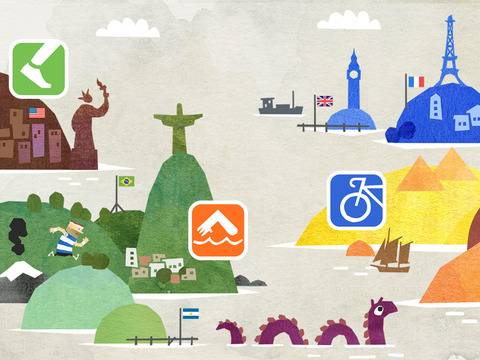
The apps featuring Fiete, a fun little German sailor, are simple but elegant, and just this week I discovered Fiete Sports, which was featured in Apple's Best New Apps (also take a look at Fiete Farm, which has an interesting interface promoting temporal concepts around farming activities). Fiete Sports (Free!) is a nice engaging activity to pair with current events news around the Rio Olympics (hopefully the press will turn a bit more positive) or picture books about sports or sportsmanship (Mia Hamm's Winner's Never Quit is a favorite of mine, see the book or YouTube reading). This app again features a visual, conversation-spurring interface as sporting events can be selected from an opening map filled with locations and international flags. The sporting events themselves are short, sweet, and simple, such as a swimming competition that is completed by tapping one's finger on the screen. The short nature of each activity will allow you to elicit language following each turn and allow others in the group to take a turn (a good example of how pacing within an app can be important).

Edit: I had previously discussed here whether four events were enough as I mistakenly reported the app was $2.99 (for me, it was enough), but the developer asked me to correct that (Thank you, Ahoiii!). They also informed me that they had added the shot put to the existing four events: cycling, running, hurdling, swimming. Do check out the app for its simple interactions with a rich context (ripe with concepts, verbs, comparatives, causals). Enjoy the opening ceremonies this week!


Use the Summer Olympics as a Language Context with Fiete Sports


The apps featuring Fiete, a fun little German sailor, are simple but elegant, and just this week I discovered Fiete Sports, which was featured in Apple's Best New Apps (also take a look at Fiete Farm, which has an interesting interface promoting temporal concepts around farming activities). Fiete Sports (Free!) is a nice engaging activity to pair with current events news around the Rio Olympics (hopefully the press will turn a bit more positive) or picture books about sports or sportsmanship (Mia Hamm's Winner's Never Quit is a favorite of mine, see the book or YouTube reading). This app again features a visual, conversation-spurring interface as sporting events can be selected from an opening map filled with locations and international flags. The sporting events themselves are short, sweet, and simple, such as a swimming competition that is completed by tapping one's finger on the screen. The short nature of each activity will allow you to elicit language following each turn and allow others in the group to take a turn (a good example of how pacing within an app can be important).

Edit: I had previously discussed here whether four events were enough as I mistakenly reported the app was $2.99 (for me, it was enough), but the developer asked me to correct that (Thank you, Ahoiii!). They also informed me that they had added the shot put to the existing four events: cycling, running, hurdling, swimming. Do check out the app for its simple interactions with a rich context (ripe with concepts, verbs, comparatives, causals). Enjoy the opening ceremonies this week!


Monday, June 27, 2016

Providing Summer Services? Try the FREE Fireworks Lab app for the 4th!

Interactive apps have long been one of my favorite topics because they replicate world schema, and every schema has language that goes with it. As the 4th approaches (or other holidays in the future), you may have fireworks on your mind.

An Aside: before you get me in any way wrong, I think fireworks are dangerous and should only be operated (? Is that the word? Whatever.) by professionals. One of my toughest cases early in my career as an SLP was working with a patient who had facial burns because of a fireworks accident. So, yes, firmly I believe we should enjoy the town- and city-sponsored fireworks displays, and leave it at that. I live across from a busy city park and though I enjoy the evening of the Fourth, I stop enjoying it after midnight when fireworks are still going off there and I fear that our house will burn down. Like your parents said, nothing good happens after midnight.

BUT, apps give us a window to simulate removed events, so along with your messages about safety that are delivered diplomatically so that you don't get called by parents, you might be interested in Fireworks Lab. This free app allows students to organize and operate a fireworks display. The app is gloriously language-neutral, so students can be encouraged to label their choices in elaborated noun phrases (e.g. "green sparkly rocket") and then set them off.


A few supplemental ideas:
-The app is perfect for pairing with a written language or reading activity. Write or sequence cards with the different attributes of the fireworks and use these as a "plan" for the display.
-The app does not multitask, so if you leave it to play a music app, it starts you from scratch. But students could make a music selection via a phone or other device to sync with their display, giving you more vocabulary to work on as well as causal constructions about their music choices.
-Have students research fireworks displays in your town, or for older students, pair with the story of this famous fireworks fail for a narrative activity. The article is safe to use with kids and has some good figurative language too!

Have a happy (and SAFE) 4th of July--and to my Canadian friends, Happy Canada Day!

Tuesday, June 21, 2016

Video Tutorial: Using Sketching Apps and Comic Creators for Comic Strip Conversations

In my recent column for ASHA Leader, Apps that Help Teach Social Perspective, I discussed the engagement and sharing factors of creating Comic Strip Conversations via iPad. First, on what Comic Strip Conversations are:

Another approach that expands clients’ narratives, if/then thinking and perspective-taking is Comic Strip Conversations, developed by Carol Gray. Comic Strip Conversations visualize social situations with simple sketches involving stick figures, situational elements, word and thought balloons, and color coding for different emotions and verbal behaviors. A comic strip can be developed to exemplify a five-point scale or for reviewing or previewing a relevant social situation.

And the tech tie-ins:

The sketching involved with Comic Strip Conversations is made at once easier, more engaging and colorful (no array of markers needed!), and sharable with apps such as Doodle Buddy (free for iOS) or Drawing Desk (free for Android). To make a conversation stretching across several pages, check out Paper (free for iOS), a sketching journal that also incorporates subtle effects to make your sketches look neater. All these apps allow you to add text for captioning, scripting and illuminating perspectives, as well as photos for additional context. For example, you can sketch over photo of an important location in your client’s daily life.

In this new video tutorial I demonstrate a quick how-to with Paper by 53 and the text-friendly Comics Head. You might choose one or the other based on what your context is!


Wednesday, February 18, 2015

SpeechTechie is Five Years Old...Looking Back!

Next week marks my 5th Blogoversary! This is always a great time to look back at how this blog has affected my life- putting me in touch with all you great people via these posts, and sometimes in person! Thanks for reading!

Again looking back, I often like to compare analogue or even "retro" tools to the tools that are available to us today. "Sticker book" apps- those that let us make a simple visual scene- provide a good example. I always ask groups, "Remember Colorforms?" I certainly do- those low-tech (and Farily Priced) visual scene sets were often given to me as a reward for enduring some kind of epic shopping trip as a kid. Apps that let you assemble characters and objects within a scene are often FIVES-Friendly- Fairly Priced, Interactive as a creation tool, Visually representative of language, Educationally Relevant to Curriculum Contexts, and useful towards speech and language objectives, or "Speechie"

I have pointed people in the direction of the Buildo or ClickySticky apps for these purposes but was recently pleased to stumble across the free, simple, but context-rich Colorforms Revolution app.


Check out the app and consider the following "Speechie" activities:
-Create scenes with visual contexts for language targets (pronouns, verbs, elaborated phrases, causals). 
-Structure action sequences within a setting or add an initiating event or "Kickoff" in Story Grammar Marker® parlance (perhaps an absurd element from another set, as these are accessible in the app) to develop narrative skills. 
-Analyze the scenes and objects for articulation targets.
-Screenshot your scene and then use the image (App-smashing) with an app that allows you to add text (Pic Collage) or audio (Book Creator, Screenchomp). 

Friday, January 30, 2015

Talking about the Weather

Having just dealt with a tremendous blizzard, I am going to be a stereotypical New Englander and talk about the weather. Again. Weather is a topic that naturally lends itself to eliciting language in our students as well. Not only does this topic pop up repeatedly in science curricula across the grade levels, making it relevant to the Educationally Relevant "E" in The FIVES Criteria, but discussing it requires a number of language skills:

Sequencing-seasons, processes
Categorization-seasons, months, precipitation
Schematizing/"Main idea and details"-describing a particular day's weather involves attention to features such as temperature, wind, cloud cover, and precipitation
Stating Cause-Effect- within weather processes and explaining why certain clothing would be worn in certain weather conditions.

A great context for eliciting and working with language around weather was released recently in MarcoPolo Weather (Free). MarcoPolo Weather is a "sandbox" app allowing open-ended play by bringing characters, setting elements, clothing and weather conditions together and observing the effects. MarcoPolo has here continued their commitment to developing apps that address Science, Technology, Math and Engineering (STEM) skills (also found in the MarcoPolo Ocean app), including, according to the app description:

-Observe and describe different weather conditions including temperature, cloud cover, and precipitation
-Identify ways in which weather affects daily routines, such as dress and activities
-Determine how weather affects the natural landscape
-Learn about the water cycle and how clouds are formed

Check out the video below to see how MarcoPolo Weather works. It's a ton of fun!


MarcoPolo Weather would facilitate a natural language connection to
-a concept map or graphic organizer about weather conditions
-sentence strips or other print contexts to construct causal sentences about observations in the app
-picture books dealing with the weather
-creating a weather journal with Evernote by stepping outside, snapping pictures, and consulting the Weather app for data

Thursday, September 18, 2014

Welcome to Social Studies: Barefoot World Atlas

As a companion to my column for the ASHA Leader App-Titude series, "Welcome to Science Class," this series explores how technology can serve as a context for teaching "language underpinnings" related to the social studies curriculum.

Continents, countries, and cities provide a great context for developing language skills. The sequential/hierarchical nature of these arbitrary (well, except continents) regions can confuse many of our students and therefore provides good ground for concept development. Additionally, the spacial and semantic aspects are rich, with so many places to be explored. At many points in our students' academic careers they are confronted by these topics--my 2nd graders were expected to learn not only the continents and oceans but the content on units regarding China, Mexico, and Ghana--marking a key entry point to educational relevance.

Back in my early days dabbling with technology integration, I sorely lamented the lack of interactive materials regarding continents and countries. While taking an educational web design class, I actually completed my project by creating web pages (the hard way) with some interactive elements such as FANCY images that changed when you rolled over them with your mouse! Wow! *sarcasm*

How I would have loved to have Barefoot World Atlas ($4.99), a "magical, interactive 3D globe" featuring small animations that can be used to build schema about world countries and much more. Barefoot World Atlas can be explored with the fingers or via multiple directories (e.g. Regions, Countries, alphabetical elements).


Each animation can be viewed closely along with a kid-friendly text explanation. Tap the speaker icon and it can be read aloud, and a real image is also provided for each!


Regions and Countries also have text/audio content, schematically presented in a language-based manner corresponding with the "Five Themes of Geography"


The app is a great example of F- Fair Pricing (compare to the price of a book!), is clearly I-Interactive, provides great V-Visuals, and is E-Educationally Relevant as described above... So is it S- Speechie/Specific to your objectives, resulting in true FIVES-friendliness? Depends on how you use it!

-Construct a small (or large) "Scavenger Hunt" with language clues about where the different elements can be found.
-Identify elements that are the "same but different" from those in your city/community and have kids describe the similarities and differences.
-Use the audio for listening activities and to give kids a break from listening to you for a few minutes!
-The content is filled with expository text structures such as lists, sequences, and cause-effect relationships. For these, and all of the above, consider using this app in conjunction with graphic organizers to build connections in language. Don't miss the potential alignment with these Common Core Standards in Literacy in History/Social Studies:

CCSS.ELA-LITERACY.RH.6-8.3 Identify key steps in a text's description of a process related to history/social studies (e.g., how a bill becomes law, how interest rates are raised or lowered).
CCSS.ELA-LITERACY.RH.6-8.4 Determine the meaning of words and phrases as they are used in a text, including vocabulary specific to domains related to history/social studies.
CCSS.ELA-LITERACY.RH.6-8.5 Describe how a text presents information (e.g., sequentially, comparatively, causally).

Barefoot World Atlas is complete on its own but does have some nice expansion packs such as "Major Cities" and puzzle tasks, generally available for $.99.

Wednesday, August 13, 2014

MarcoPolo Ocean

MarcoPolo Ocean (free for iPad and iPhone/iPod) is a well-designed app designed as a "sandbox" exploratory and interactive experience. The app targets science, technology, engineering and design (STEM) concepts around biodiversity, earth science and landscapes, construction and function of various ocean vehicles, and related vocabulary.

The app has six core activities that function as exploratory puzzles, with the additional features of zooming to other areas of the screen for additional exploration, as well as audio labeling and narration of actions or functions of the depicted elements.

Construction of an underwater reef is completed by dragging different elements to their highlighted spots

The boat construction activity includes many elements that can be described as well as compartment names such as hold, galley and bridge.


Language Lens:
-This app could be used to have children interact with scenes and vocabulary related to ocean or habitat units and practice labeling and vocabulary in those contexts.
-The construction activities (a boat and submarine) particularly focus on the parts and functions of these two vehicles, and so could be used to practice these semantic skills.
-The habitat building and exploration activities would lend themselves to pairing with Social Thinking®'s Incredible Flexible You curriculum for early learners, particularly the "Body in the Group" Volume, which centers around an ocean theme and narrative. In addition to the theme elements, the scenes show ocean creatures swimming in groups and out of groups, which can serve as a visual to apply the skill of identifying physical proximity as a social concept.

Friday, May 2, 2014

Stick Around: The Spectrum of Repurposing

Much of my efforts in writing and conducting trainings is geared toward helping SLPs and other educators see the potential use of apps and tools they might not have recognized initially as language-based. That has been the focus of this blog since its inception- "looking through a language lens"- even back when we were talking about interactive flash-based websites and webtools, way before apps.

I found great validation of my advocacy for "repurposing" in an article by Jessica Gosnell in the ASHA Leader in 2011, and consistently use this quote in sessions:

“A search focused only on a specific profile of dedicated apps (speech production, targeted language goals, augmentative communication) could miss many well-designed apps that offer motivating and fun learning opportunities. Using creativity, clinicians can reach beyond an app's intended target audience and purpose and adapt it to support interventions.”
-Jessica Gosnell (Children’s Hospital, Boston), “Apps, an Emerging Tool for SLPs,” ASHA Leader Online, October, 2011

I think as we progress in incorporating technology into our work thoughtfully, we are getting better at seeing these connections and potential uses of a wider variety of apps. Recently, I was presenting on apps for pediatric populations at the ASHA Healthcare and Business Institute and included a great recent release called Stick Around. This educational app allows the creation of puzzles featuring "stickers" that can be dragged on top of an image or array in order to develop labeling, sequencing, or describing in just about any context. As I was showing it with other apps that could be repurposed for language therapy, a participant asked, "Is this really even a repurposed app? It seems like language heaven!"

I replied, "Good point!" But the fact is, many in our field might not think to look past the icon and description (or even stumble upon it in the education category of the App Store), and it wasn't designed specifically for speech and language pathologists. So, while on the spectrum of repurposing, it's not such a stretch as using Bobbleshop- Bobble Head Avatar Maker for developing descriptive language, we all could use a push to see what a valuable app Stick Around could be.

Tony Vincent, an amazing resource on technology integration and the author of Stick Around (in partnership with Explain Everything creators Morris Cooke), definitely sees these connections between language and learning, and has presented for our peeps at conferences such as those held by the Center for Autism and Related Disabilities in Florida. He designed Stick Around ($2.99, very Fairly Priced and meeting all other points of the FIVES Criteria) to be a blank slate where educators--and students--could create these self-checking puzzles for learning in all contexts. So let's take a look at it.

Stick Around may first look a bit daunting, but this is just because its interface allows for such a large array of options and customization. I figured the process out in about 10 min, but there are also great video tutorials available should you get stuck. Though it might seem strangely dairy-specific, in the shots below I am showing how to set up a puzzle that could be used for life skills and executive functioning ("feature teaching" ala Sarah Ward). You could think up all sorts of other contexts for puzzles (In Las Vegas, I modeled a puzzle labeling the casinos on the Vegas Strip from a screenshot using Google Earth- you need Stick Around on your iPad to access this file)!


Start with deciding the image you would like to use as a puzzle (the app also has templates such as Venn Diagrams and sequencing frames). In this case, on a community trip to the supermarket, we snapped this image of the dairy section. You can also save an image, but just be aware of copyright should you plan to share your puzzle (see my next post).


Using the Stick Around app (see above the array of sample projects to spur your imagination- try not to be intimidated by how beautiful their graphics look), begin a new project.


I created a blank project so that I could use a photo background. Tap the + to add this from your Photo Library or other source.


Your next step is the stickers. These can take various formats (Text, Image, or Drawing Sticker). Double tap the sticker to write the label, and you can also add a description via text or audio (a great feature for SLPs). Arrows can be added as well.


Create your Answer Key by drawing each of the "regions" where the sticker, if placed or pointed, will result in a correct answer when the puzzle is played. Make sure your regions don't overlap. While creating the Answer Key, you will want to place the sticker or its arrow head in the correct region to link the sticker and its region, as seen above.


Finally, you can tap Play and try out your project in puzzle form. As a great example of continuous improvement in apps, Stick Around recently added the faces indicating correct or incorrect answers when you tap "Check."

When you are done with your project, save it (when navigating back to My Projects, you will be prompted to give it a name and save, or you can give it a name in the Info tab). The Export button (arrow into box) allows you to send the project to the Puzzles section of the app (from Projects) so that it can be played but not edited.

One of the best features of Stick Around is that puzzles you create can be shared with others who have the app. From My Projects I simply exported this one to Dropbox, and if on an iPad with Stick Around installed, you can click this link to add it to your Projects and play it!

So, what are your thoughts? What can you imagine creating with Stick Around?

As always, Happy Repurposing!

Thursday, March 6, 2014

AR Flashcards Space

Last mARch I focused on applications of augmented reality (AR) in education. Augmented reality is the technological process of accessing digital information in our analog world. Location or device orientation information, printed "markers" or other data are used, often in conjunction with a mobile device camera, to display relevant information. AR has a major "cool" factor and is very engaging for students to use- often they have not ever experienced anything quite like it!

AR can be quite simple to use as well, as is the case with apps such as AR Flashcards-Animal Alphabet, which I wrote about last year and also just won the 2013 Best Mobile App in Education Edublog Award. The folks who created this app have targeted another topic- the Solar System- in their new app AR Flashcards- Space ($.99)!

This app would be a fun tool to incorporate for students studying space, the solar system or an earth/sun/moon unit. After you print a set of colored flashcards (available here if you would like to preview them), launch the app and point your rear-facing camera at a card. The planet depicted will appear in dynamic 3-D. Tap the planet to hear its name (SLPs, let's acknowledge that the articulation of the students who recorded the planet names, well, has some errors) and another button will play a paragraph-length audio description of the planet.


Langauge Lens:
-The images that appear are great stimuli for descriptive language skills- what do you notice about the planets?
-The information played auditorily for each planet is schematic (focusing on category, e.g. gas planet, temperature and other features) so could be used for auditory comprehension activities or also perhaps to fill out a planetary scavenger hunt graphic organizer of facts about each planet.
-This app could also be paired with Aurasma to create your own content about the planets or another topic.

AR Flashcards-Space is well worth it for $.99!

Thursday, December 26, 2013

Dr. Panda's Bus Driver

The Dr. Panda series continues to produce fun apps with educational possibilities. Specifically, the series of apps (and I need to write about the others) provides a context for exploring different settings and situations in the real world. Though made of "mini games," the apps are slow-paced and provide plenty of moments for breaking away from the screen and discussing what is going on. The slow pace also lends itself to taking turns and use with groups. Like other play-based apps, they also can serve as a context to rehearse a play scheme and then act it out with real toys, practicing play and language skills in the process. Think of the language and executive functioning skills involved with planning a real "bus route" with a play bus, people, and whatever you want to use to mark the route.

Dr. Panda's Bus Driver ($2.99) allows you to drive a bus through a randomly-generated (and beautifully rendered) world of winding roads through a mountainside community. You can't crash, so don't worry. The main action of the game involves picking up and dropping up passengers, controlling your speed over speed bumps, and engaging in mini games such as washing or painting your bus. As the game proceeds, you also have choices about which turns to take.

Language Lens:

-Passengers are "picked up" from different community spots, providing an option to slow down or stop and discuss the actions associated with the locations.

-Road signs prominent throughout the play are a good context to develop spatial concepts, also targeted in the maneuvering of the bus and other apparatus and selection of seats for the passengers.

-Consider pairing this app with Google Earth, as the Street View function can make for a fun "ride" through your students' own community with all the language involved.


Tuesday, September 3, 2013

Develop Descriptive Schema with Trading Cards

ReadWriteThink, a longtime online presence developed with the participation of the International Reading Association, has amassed an impressive amount of interactives (flash-based, so not accessible on iPad) that can be used to build language skills. My issue with the more complex ones that could be used with older students was that your work could not be saved, and you had to finish your work in one sitting.  This problem has been addressed both on their site, which I am glad to see that they have continued to develop, and with their Trading Cards (Free!) app.

Trading Cards has for years existed as a great activity on the ReadWriteThink site, and came out as an app last year. With this app, you can create a descriptive "trading card" about any of the following:


Each type of card has a different schema to it, and it actually would be a good pre-activity to have students predict what attributes would be on a card about a Real Place vs. say, an Object.

The website has a few extra choices of the type of card you can create, and also lets you create your own schema.

The app allows you to set up user profiles so that collections of cards are stored in the app. When creating a card, you can add a picture saved to the camera roll, access guiding questions and type text (limited to certain defined lengths), flip the card and finish your work, and save/print/email your card. As this is a task that may take several sessions, it's great that you can return to the app and continue work. On the Trading Cards activity on ReadWriteThink's website, you can download a partially completed card and re-open it later for continued work. 


Trading Cards would be a great way to develop more advanced descriptive language while working with geography, books that students are reading or that you have chosen for the session, the Social Thinking® concept of people files, or other contexts.

Thursday, May 30, 2013

What can we do over the summer?

As the school year winds down, activities for carryover and maintenance are a frequent request of   parents to their child's SLPs and special educators. For parents of younger ones, PBS has provided a great answer with their free app, PBS Parents Play & Learn HD (also for Android, especially nice since not all families have iOS devices, and bilingual in English/Spanish, as not all families speak English!). This app is part interactive resource, part guide to increasing linguistic interactions between parent and child in natural contexts.

This app provides a wide variety of contexts (the park, in the car, bathtime, kitchen, supermarket, etc) that kids experience with their parents each day, along with a minigame and verbal activities for each place. Minigames are interactives played on screen targeting skills like counting, association and categorization in engaging ways. The activities, scaled from baby to toddler and preschooler, but likely appropriate for primary students with language difficulty as well, are suggested verbal interactions that parents can use in context of these locations. For example, the app suggests that at the supermarket, parents have children name all the items as they go on the conveyer belt as parents model/discuss/elicit how they will be used. This is a simple idea that parents perhaps might not recognize as a "teachable moment."

The app also provides an open-ended scene creation activity, great for narrative and skills such as recognizing and talking about absurdity:


Thank you, PBS, for offering this unique and free resource.


Thursday, May 16, 2013

Explore Nature with Pepi Tree

Pepi Tree (free Lite version available, full version $1.99) is a fun little app presenting "mini-games" at different levels of a tree, all illustrating in some way the life and "work" of animals in the forest. Mini-games are an interesting concept for therapy, as they can be used as different contexts for concepts, language structure and vocabulary development within the same app. For example, within this app, the caterpillar mini-game can be used to target sequential words (the caterpillar eats a leaf, then goes into a cocoon, and finally becomes a butterfly) as well as some/all (he needs to eat all of the leaf before going into the cocoon). There is also a fox-feeding activity that can be used to address negative words (the foxes don't like all the food) and one emphasizing the curriculum concepts around what plants need to grow. It's definitely worth grabbing the Lite version for your young students and deciding if you'd like all the games in the full version.


Monday, April 29, 2013

Skitch it up!

Skitch has long been a favorite of mine from the Evernote suite of tools. A super-easy, cross-platform, free and powerful photo annotation tool, it was originally developed by the makers of Comic Life, and you'll see why this makes sense.

So much of language involves breaking a whole into its parts, labeling, or describing, and Skitch gives you an engaging and beautiful way to do this with students. Skitch allows you to build a diagram or graphic organizer from scratch (its tools include arrows, shapes, text, highlights or drawn lines) or apply all of these annotations to a snapped or saved photo.


Skitch also allows you to annotate a snap of a website or map, as I have done above, and recently added the ability to annotate PDFs, though this is a premium feature.
For another example, see how a client of mine (in his own way) analyzed a confusing-to-navigate Brugger's Bagel location using Sarah Ward's executive functioning concept of "zones" (as part of the Space/Time/Objects/People "STOP" strategy, and not to be confused with Leah Kuyper's equally awesome Zones of Regulation).


"Grabbage" being the self-serve area.
Skitch naturally integrates with Evernote to save your work, but you can use the app without an account and save to the Camera Roll, you just won't be able to edit it later.

Think of Skitch as a context for:
-Describing facial expressions on snapped pictures within a group or with role-play.
-Integrating with picture books and creating a diagram from concept-rich pages that you snapshot with the Camera.
-Saving and describing images related to the curriculum.
What else? Share your ideas in the comments!

Saturday, February 16, 2013

Travels, Design and Gestures

February has been busy.  I traveled to the Illinois Speech-Language Hearing Association convention in Chicago last week, which was a great experience (nice meeting Jenna Rayburn!), except for the fact that I got stuck there because of the blizzard in Boston.  The ISHA staff were extremely helpful; I found out that my flight was canceled about 45 min before my Saturday presentation, and got on the phone immediately to start the rebooking process. Well, 45 min later, the airline was still working on it, and I had to hand my phone over to the organizers to finish the call so I could do my talk! About 90 min after that, we had confirmed my only option- to fly directly to Dallas where I was scheduled to present at the Social Thinking Provider's Conference on Tuesday. This turn of events was a little crappy, but at least I got some good steaks in Chicago while I killed time, and it was also excellent to be at the STPC, where Sarah Ward, Maryellen Moreau and of course Michelle Garcia Winner also presented!

So, I need to give this blog some love after being tired and on the road....after I get back from a vacation in LA, where I am headed right now! The wonders of slow Internet in the air!

But to share an idea for today, I recently wrapped up a series of posts on Google-based apps for iOS. In addition to providing access on iOS devices to Google's terrific tools for Search, Calendar, Mail, Documents and Maps, this series was partially about app design.  Google is doing a really nice job at designing minimalist, clean-looking apps that function smartly with gestures- a sweep here does this, a pinch here does that. It's a contrast to the tack Apple has taken in recent years with their apps, a design practice known as skeuomorphism. There's a vocab word for you! Skeuomorphism is basically the translation of analog (real) objects into a digital interface. In Apple's iOS apps, this is seen in the Camera app's display of a shutter on screen when you snap a photo, the leather bindings and torn pages of Calendar, the gears that actually have a turning animation when you update your OS in Settings, iMovie's theater front interface, page-turning animations in iBooks, etc. There was a big shakeup at Apple in the fall that was partially about skeuomorphism, and some bigwigs got fired.

Skeuomorphism in the Contacts App

In my recent column for ASHA Leader about app trends, I didn't get into this topic and the trend of more gesture-based design in apps. I am not saying I am against skeuomorphism. It's comforting to have something digital look like something we already understand. Many speech and language apps use skeuomorphism, with apps that look like books or board games or something else. Skeuomorphism is also a way to ground an app in a context or theme, which is helpful for learners. Kids dig this too. However, we should be aware of, comfortable with, and perhaps appreciative of other kinds of design.

Let's consider it "gesture literacy." It's important for us to be able to figure out what to do when there isn't a big button that says "Tap Here," and it's arguably important for us to be teaching kids how to navigate these digital spaces. And, in the process of feature-matching, we can avoid using apps that involve a lot of gestures when working with students who have fine or more significant motor difficulties.

Let's look at a couple more examples of this trend towards minimalist design, both of which are currently iPhone-only but will run on your big screen, and also relate to skills and concepts that can be targeted in language therapy.


Clear ($1.99) is an acclaimed to-do list app. You could consider trying it out if you are consulting with students who could benefit from this kind of color-coded reminders app. It also would be a fun way to work on sequencing, planning of tasks, or even connecting to curriculum and literature (make a to-do list for your favorite character). In using this app you'd also be teaching your students about the different kinds of gestures that can be used to interact with technology.


Solar ($1.99), also a recipient of rave reviews, is a gesture-based weather app. I have written frequently about how weather as a curriculum topic has a ton of language underpinnings for us to target: categories, description, temporal concepts such as seasons. This app's gestures also let you interact with time- and location-based information.

Just food for thought! Gesture on!


Tuesday, January 15, 2013

Google on Apple: Search is Language

Google is pretty much synonymous with search.  Though in the earlier days of the web, people went different places like Lycos, Yahoo, and Altavista, it's second nature for most of us to turn to Google nowadays when we have a question or need a resource. BING? Sorry, no.

The thing about web search, when you think of it...it's language. We ask a question and get an answer. The results can be a list, a description, a fact, a picture to describe.

Often, a search can be very helpful when we discover those pesky gaps in our students' world knowledge or vocabulary.

Most of us, including myself, probably turn most readily to the little Google field in the upper right corner of the Safari iPad app, which indeed does the job pretty handily. However, Google has been steadily improving its free (of course) Google Search app, and it now includes speech-to-text (Voice Search), regardless of the version of the iPad you are using.  Additionally, depending on the type of search you are making, the app will read aloud the results (so, text-to-speech), a feature related to what Google calls its Knowledge Graph, which helps zoom in on the most important facts about real-world items. Google gives us some ideas for the types of questions that work well with Voice Search.

To see how the Google Search app can be useful in your interventions, check out this terrific contextual demo centering around one of my favorite places: Cape Cod. I need to go to there right now. *Sigh* I hate January.

 
.