For me, planning + situational information = self-regulation + productivity + life is good.
When planning travel, I always TripIt. As you make any reservations and receive your confirmation emails about them, once you have opened a free TripIt account, you can forward them to plans@tripit.com. What results is a sequenced itinerary with flights, hotels, rental cars and other pieces you may have arranged. Simply a lifesaver. TripIt also generally lets you check into flights from your itinerary. You can access it via web or available mobile apps.
Another indispensable tool is FlightAware. Use FlightAware (via the website, which works perfectly well on mobile, but apps are also available for free) to track not only the status of your flight, but if you are super anxious like me, also the status of the INCOMING PLANE (click on Where is my plane now?) Often this information is just not provided to you by airlines, so it is very reassuring. Or sometimes not.
Hope you have a great trip if you are going, and I'd love to see you at sessions 1048, 1338, and or 1836!
Considering your professional development schedule this year? Check out Sean's offerings for training sessions.
Showing posts with label life skills. Show all posts
Friday, November 15, 2019
Tuesday, July 17, 2018
On obvious signs and "hidden rules..."
Presenting a video can be a simple use of tech that can establish context, provide visual support, engage students in discussion, and open the door to a related post-activity addressing language skills. A good example is this video which features about 100 unnecessary signs such as:
The video moves quickly, but pause as many times as you want! You can also screenshot to pick and choose signs you'd like to explore (perhaps a good move to work on functional reading). Some ideas on using the video:
-Metalinguistics: what makes the message obvious and unnecessary?
-Social Cognition: the video can be used to have students practice "thinking with their eyes" for the greater context of what makes the sign silly, as well as engaging in humor. Using signs in therapy activities is also a good way to introduce the related Social Thinking® concept of "Hidden Rules" (related to Dr. Brenda Smith Myles' Hidden Curriculum); there are many (more complex than shown here) rules that we need to learn through observation and experience in order to be successful socially.
-Narrative Language: Have students discuss or sketch stories depicting why someone thought these particular signs were necessary. This context would also allow for working on complex language and conjunctions like if, because, and so.
The video moves quickly, but pause as many times as you want! You can also screenshot to pick and choose signs you'd like to explore (perhaps a good move to work on functional reading). Some ideas on using the video:
-Metalinguistics: what makes the message obvious and unnecessary?
-Social Cognition: the video can be used to have students practice "thinking with their eyes" for the greater context of what makes the sign silly, as well as engaging in humor. Using signs in therapy activities is also a good way to introduce the related Social Thinking® concept of "Hidden Rules" (related to Dr. Brenda Smith Myles' Hidden Curriculum); there are many (more complex than shown here) rules that we need to learn through observation and experience in order to be successful socially.
-Narrative Language: Have students discuss or sketch stories depicting why someone thought these particular signs were necessary. This context would also allow for working on complex language and conjunctions like if, because, and so.
Thursday, January 11, 2018
Teaching in Social Media Contexts
Social Media is part of life--and a good context for targeting social cognition and narrative language. In general, social media is now one context for us all to be sharing our stories through words and pictures, and also is a way we send messages about ourselves and interact around them. Of course this should be self-monitored; I've shared with my students that I set an intention of at least 2 hours daily in which I don't look at Facebook or Instagram (if you have a goal, you need a measurable action plan). Don't always make it, but I'm trying.
A few contexts in which I have used social media in the last several months:
GCF Learn Free has great simple tutorials on social media outlets. These are good if you are working with individuals who want to begin to use social media as an interactive outlet (learning more about others and making connections).
Related to this, I have been working with a wonderful SLP who uses Instagram photos (mine and many others) to help students "get the story" (situational awareness) implied by a photo, make inferences about relationships depicted in photos, etc. Identifying a few resources you can use with students (screenshot, perhaps, instead of showing them your feed) make for great lessons. These students have also stepped into sharing on Instagram with parental guidance.
There are a number of good resources you can use to make mock text conversations, Twitter, Facebook, Instagram and Snapchat posts. These can be great for presenting narratives and exploring expected and unexpected social media behaviors. Just google and you'll find ones like Status Clone- they produce an image of a fake interaction that you can use in an activity. ClassTools.net also has student-friendly versions of these for you to use for co-creation (see their FakeBook, Twister and SMS Generator).
A few contexts in which I have used social media in the last several months:
GCF Learn Free has great simple tutorials on social media outlets. These are good if you are working with individuals who want to begin to use social media as an interactive outlet (learning more about others and making connections).
Related to this, I have been working with a wonderful SLP who uses Instagram photos (mine and many others) to help students "get the story" (situational awareness) implied by a photo, make inferences about relationships depicted in photos, etc. Identifying a few resources you can use with students (screenshot, perhaps, instead of showing them your feed) make for great lessons. These students have also stepped into sharing on Instagram with parental guidance.
There are a number of good resources you can use to make mock text conversations, Twitter, Facebook, Instagram and Snapchat posts. These can be great for presenting narratives and exploring expected and unexpected social media behaviors. Just google and you'll find ones like Status Clone- they produce an image of a fake interaction that you can use in an activity. ClassTools.net also has student-friendly versions of these for you to use for co-creation (see their FakeBook, Twister and SMS Generator).
Here's an example (note: that's not an actual spoiler).
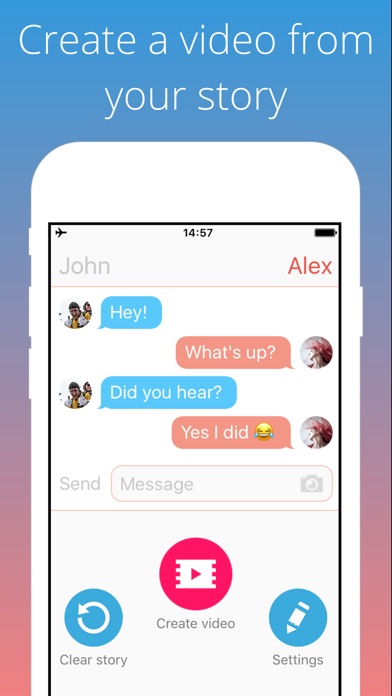
On iPad, I haven't always found similar tools. Social Dummy performs similar functions but I would never use it in front of students because of its horrible name (Dummy meaning fake, not in the way it might be interpreted)! You can use this app to make teaching images saved to your photos app, however. A recent free tool is Texting Story Chat Maker, which allows you to make a dynamic video of a text conversation unfolding. These are additionally good contexts in which to explore the use of emoji, which are easily accessible on mobile devices.
Wednesday, July 6, 2016
Enter Vacation Mode with Toca Life: Vacation!
Toca Boca's "Life" series aims to reproduce real-world settings as a context for play with characters and the objects they encounter in indoor and outdoor places. As a result, the series provides a visual play space for us to work with students as they tell stories, make connections, and enact everyday sequences. The latest, Toca Life: Vacation, is another wonderful, visually rich, and highly interactive app you can use to take students on imaginary trips to this beach-y location.
The app contains a number of settings including an airport, hotel, beach, and boardwalk, the many spaces within each setting and interactive objects providing great opportunities to role-play, propose problems and solutions, and consider if-then scenarios (important for executive functioning!). The trailer is below:
Language Lens:
-Consider recommending Toca Life: Vacation to parents as an interactive way to preview an upcoming vacation, complete with the travails of navigating airport security, riding on a plane, checking into a hotel, and sharing a bed with a sibling.
-For your part, the record feature of this app lends potential planning and role-playing a bit more of a purpose: let's make a vacation movie together!
-I am just beginning to absorb the huge amount of ideas and resources for developing language and social interaction through play provided in Social Thinking®'s new We Thinkers: Volume 2 Social Problem Solvers Kit. The manual details a model for scaffolding play with fading adult involvement, and the "GPS- Group Collaboration, Play, and Problem Solving" framework can apply to the use of these open-ended sandbox apps as well as offline play. For example, the program's "Group Play Plan" form could be used for the adult to choose a scene and assign roles to form a story (Level 3) or for kids to collaborate in this process (Level 4). One good strategy is to screenshot a scene or two within Toca Life: Vacation to use as a visual support as you make a "Group Plan" for play.
I hope you have fun going on real or pretend vacations this summer. I'm going to take off for a few weeks myself, heading to Cape Cod and, later, Acadia National Park in Maine! See you in August!
The app contains a number of settings including an airport, hotel, beach, and boardwalk, the many spaces within each setting and interactive objects providing great opportunities to role-play, propose problems and solutions, and consider if-then scenarios (important for executive functioning!). The trailer is below:
Language Lens:
-Consider recommending Toca Life: Vacation to parents as an interactive way to preview an upcoming vacation, complete with the travails of navigating airport security, riding on a plane, checking into a hotel, and sharing a bed with a sibling.
-For your part, the record feature of this app lends potential planning and role-playing a bit more of a purpose: let's make a vacation movie together!
-I am just beginning to absorb the huge amount of ideas and resources for developing language and social interaction through play provided in Social Thinking®'s new We Thinkers: Volume 2 Social Problem Solvers Kit. The manual details a model for scaffolding play with fading adult involvement, and the "GPS- Group Collaboration, Play, and Problem Solving" framework can apply to the use of these open-ended sandbox apps as well as offline play. For example, the program's "Group Play Plan" form could be used for the adult to choose a scene and assign roles to form a story (Level 3) or for kids to collaborate in this process (Level 4). One good strategy is to screenshot a scene or two within Toca Life: Vacation to use as a visual support as you make a "Group Plan" for play.
I hope you have fun going on real or pretend vacations this summer. I'm going to take off for a few weeks myself, heading to Cape Cod and, later, Acadia National Park in Maine! See you in August!
Wednesday, August 5, 2015
O*Net Online- Help Students to Look Forward
O*Net Online is a resource introduced to me by a vocational coach and I have found a number of uses of it since then. Sponsored by the U.S. Department of Labor, the site features career interest questionnaires and lists of skills, work activities, and equipment for different professions.
Skills needed for Video Game Designers:
The site is therefore a great tool for working with older students (MS, HS, young adult), for designing specific language activities that will facilitate buy-in, insight and development of their professional goals.
I recently shared with a colleague whose student was resisting "coming to speech" and she was able to discuss with him the communication skills needed to succeed in his desired occupation, which helped him build rationale around their work. She then included video clips from YouTube about the job, which provided further visual support and context to work on language.
The site is accessible at the link above and works nicely on computers and mobile devices.
I will be presenting in the Washington, DC area in September for the Center for Communication and Learning, LLC- hope to see some of you there! Click here for details.
Labels:
adults,
association,
behavior management,
categories,
cause-effect,
context,
executive function,
HS,
life skills,
MS,
planning
Tuesday, July 14, 2015
Research Tuesday- Video Modeling and iMovie (Part 1)
At my recent presentation at Nova Southeastern University, we reviewed research around video modeling and how this speaks to use of the app iMovie (free for devices after Oct, 2013/$4.99). For this reason, I am happy to discuss this material today as part of Research Tuesday.
In researching this topic, I was happy to find a recent meta-analysis (Bellini & Akullian, 2007) that looked at a range of published studies on video modeling (VM). Here are some details of that study:
For some practical ways to apply video modeling with pre-made videos in your work, see my recent post for Mindwing Concepts, where I particularly focused on strategies of using situational analysis and story grammar during and after viewing activities.
In next week's post, I'll be looking to back up what I said above about the relative ease of recording videos and editing out prompts (feedforward), in a discussion of iMovie.
In researching this topic, I was happy to find a recent meta-analysis (Bellini & Akullian, 2007) that looked at a range of published studies on video modeling (VM). Here are some details of that study:
- The authors emphasize the importance of evidence-based practices in treating autism and the sense of urgency around helping these clients and students to make progress. Single-subject research is defined as EBP when it involved defined practices (methodology and context) that are "implemented with fidelity," resulting in "the practice...functionally related to change in dependent measures," and that the results around the practice be replicated in at least 5 peer-reviewed journals. The study also emphasizes the importance of social validity, meaning that the practice have "social importance and acceptability" from the point of view of the client.
- The study describes video modeling as grounded in Bandura's social learning theory and defines it as "demonstration of desired behaviors through video representation of the behavior." The intervention around VM typically involves watching the video demonstration and then assisting the student in imitating the behavior in context. In video self-modeling (VSM), the student observes himself in video successfully performing a behavior, related to Bandura's concept of the motivation factors around "self-efficacy."
- The meta-analysis examined 29 studies involving VM and VSM applying selection factors (publication in peer-reviewed journal, participants with ASD, focus on VM and VSM for functional behavioral outcomes alone or in combination with other interventions, other factors) and identified 23 studies meeting their criteria. Examining these 23 studies found moderate intervention, maintenance and generalization effects for the methodologies (less generalization found with VSM). Statistical analysis involved application of PND (percent of non-overlapping data), a statistic often used for analysis of single subject designs, for the purpose of establishing these effect sizes. Use of video modeling was also noted as promoting learning factors such as attention and motivation.
- The researchers go on to give specifics about each study, as well as categorized studies according to focus on social or functional (life) skills. For example, in one study, students were supported with prompts to use the skill of requesting items during play, and these prompts were edited out for the video used for repeated viewing by the children. Editing out "hidden supports" is a subcategory of VSM known as video feedforward, according to the article. In this study the 4 participants were found to have a substantial increase in spontaneous requests for toys and items after the intervention. Many other examples are given in the meta-analysis.
For some practical ways to apply video modeling with pre-made videos in your work, see my recent post for Mindwing Concepts, where I particularly focused on strategies of using situational analysis and story grammar during and after viewing activities.
In next week's post, I'll be looking to back up what I said above about the relative ease of recording videos and editing out prompts (feedforward), in a discussion of iMovie.
Bellini, S, & Akullian, J. (2007). A meta-analysis of video modeling and video self-modeling interventions. Exceptional Children, 73 (3), pp. 264-287
I will be presenting in the Washington, DC area in September for the Center for Communication and Learning, LLC- hope to see some of you there! Click here for details.
Note: author is a paid consultant for Mindwing Concepts, Inc, for the provision of blog content as relates to the link above.
I will be presenting in the Washington, DC area in September for the Center for Communication and Learning, LLC- hope to see some of you there! Click here for details.
Note: author is a paid consultant for Mindwing Concepts, Inc, for the provision of blog content as relates to the link above.
Saturday, June 20, 2015
Storest!
Storest ($2.99 for iPad), a superlative app, is one I have been exploring in therapy with my students. The app, from the makers of the fun Foldify series, simulates a store in ways that make unique uses of the iPad as a tool. Check it out in the video below:
Storest from Pixle on Vimeo.
The app works in two modes: a traditional drag-and-drop interface allowing you to shop in the different departments and pay with virtual money, and an innovative activity that requires you to print out paper items and money to play via a virtual cash register. Each item used in the cash register activity has a QR Code attached so it can be scanned by the "register," a great engagement factor for kids.
Storest is a nice app to look at using the FIVES Criteria:
Fairly Priced: At $2.99 Storest brings you many of the features of a (generally much more expensive) play cash register, and more. It can be used flexibly in two different activities and with a wide variety of age ranges.
Interactive: The interesting interface of both activities allows students to make choices as they engage in scaffolded play, and I love apps that bring students beyond the screen to interactions in the real world. In this case, the register becomes "part of the table" and you can arrange the other aspects of the activity (departments and products) to promote interaction among students.
Visual: In the traditional mode, departments are arranged visually in categories so that students can name items and work on identifying their association. The register mode well-represents a register and visually represents the items as they are scanned.
Educationally Relevant: Consider the following classroom tie-ins and educational standards that can be addressed with the app:
-Math, obviously, with the cost of items and use of play money for counting. This great set of cards can be used for following directions and math tasks.
-The MA Curriculum Standards in Social Studies include the following:
Kindergarten
3. Use correctly the word because in the context of stories or personal experiences. (History)- I find that an interesting one as an SLP!
7. Use words relating to work, such as jobs, money, buying, and selling. (Economics)
8. Give examples of how family members, friends, or acquaintances use money directly or indirectly (e.g., credit card or check) to buy things they want. (Economics)
Speechie or Specific to clinical objectives:
-The app lends itself to working on categories and describing functions of items in a store, as well as reasons one would buy them and associations between them.
-Once printed, the "store" can be arranged in a space so that students work on Social Thinking® concepts such as managing one's body in a group, following a group plan and playing roles of shopper and cashier. I often note my students struggle with the sequence of events when visiting a store (e.g. when to pay) as well as the arrangement of the store itself.
-The arrangement of items can be paired with post-activities such as using pictures of real supermarket aisles and describing their arrangement. I take a cue from executive function specialist Sarah Ward and use such pictures to describe the features of each section; take the bread aisle, which can proceed from stuffing to store breads, flavored breads, rolls, english muffins, etc. EF can also be promoted by presenting real-life tasks such as buying items for a party, and monitoring time for shopping using a clock.
-Pair the app with a picture book for further context and narrative language development. A Chair For My Mother by Vera Williams is a good one, though I am sure you can find many others.
Enjoy shopping!
Storest from Pixle on Vimeo.
The app works in two modes: a traditional drag-and-drop interface allowing you to shop in the different departments and pay with virtual money, and an innovative activity that requires you to print out paper items and money to play via a virtual cash register. Each item used in the cash register activity has a QR Code attached so it can be scanned by the "register," a great engagement factor for kids.
Storest is a nice app to look at using the FIVES Criteria:
Fairly Priced: At $2.99 Storest brings you many of the features of a (generally much more expensive) play cash register, and more. It can be used flexibly in two different activities and with a wide variety of age ranges.
Interactive: The interesting interface of both activities allows students to make choices as they engage in scaffolded play, and I love apps that bring students beyond the screen to interactions in the real world. In this case, the register becomes "part of the table" and you can arrange the other aspects of the activity (departments and products) to promote interaction among students.
Visual: In the traditional mode, departments are arranged visually in categories so that students can name items and work on identifying their association. The register mode well-represents a register and visually represents the items as they are scanned.
Educationally Relevant: Consider the following classroom tie-ins and educational standards that can be addressed with the app:
-Math, obviously, with the cost of items and use of play money for counting. This great set of cards can be used for following directions and math tasks.
-The MA Curriculum Standards in Social Studies include the following:
Kindergarten
3. Use correctly the word because in the context of stories or personal experiences. (History)- I find that an interesting one as an SLP!
7. Use words relating to work, such as jobs, money, buying, and selling. (Economics)
8. Give examples of how family members, friends, or acquaintances use money directly or indirectly (e.g., credit card or check) to buy things they want. (Economics)
| My students loved scanning the items- note the clock and "shopping baskets" used |
-The app lends itself to working on categories and describing functions of items in a store, as well as reasons one would buy them and associations between them.
-Once printed, the "store" can be arranged in a space so that students work on Social Thinking® concepts such as managing one's body in a group, following a group plan and playing roles of shopper and cashier. I often note my students struggle with the sequence of events when visiting a store (e.g. when to pay) as well as the arrangement of the store itself.
-The arrangement of items can be paired with post-activities such as using pictures of real supermarket aisles and describing their arrangement. I take a cue from executive function specialist Sarah Ward and use such pictures to describe the features of each section; take the bread aisle, which can proceed from stuffing to store breads, flavored breads, rolls, english muffins, etc. EF can also be promoted by presenting real-life tasks such as buying items for a party, and monitoring time for shopping using a clock.
-Pair the app with a picture book for further context and narrative language development. A Chair For My Mother by Vera Williams is a good one, though I am sure you can find many others.
Enjoy shopping!
Friday, May 2, 2014
Stick Around: The Spectrum of Repurposing
Much of my efforts in writing and conducting trainings is geared toward helping SLPs and other educators see the potential use of apps and tools they might not have recognized initially as language-based. That has been the focus of this blog since its inception- "looking through a language lens"- even back when we were talking about interactive flash-based websites and webtools, way before apps.
I found great validation of my advocacy for "repurposing" in an article by Jessica Gosnell in the ASHA Leader in 2011, and consistently use this quote in sessions:
“A search focused only on a specific profile of dedicated apps (speech production, targeted language goals, augmentative communication) could miss many well-designed apps that offer motivating and fun learning opportunities. Using creativity, clinicians can reach beyond an app's intended target audience and purpose and adapt it to support interventions.”
-Jessica Gosnell (Children’s Hospital, Boston), “Apps, an Emerging Tool for SLPs,” ASHA Leader Online, October, 2011
I think as we progress in incorporating technology into our work thoughtfully, we are getting better at seeing these connections and potential uses of a wider variety of apps. Recently, I was presenting on apps for pediatric populations at the ASHA Healthcare and Business Institute and included a great recent release called Stick Around. This educational app allows the creation of puzzles featuring "stickers" that can be dragged on top of an image or array in order to develop labeling, sequencing, or describing in just about any context. As I was showing it with other apps that could be repurposed for language therapy, a participant asked, "Is this really even a repurposed app? It seems like language heaven!"
I replied, "Good point!" But the fact is, many in our field might not think to look past the icon and description (or even stumble upon it in the education category of the App Store), and it wasn't designed specifically for speech and language pathologists. So, while on the spectrum of repurposing, it's not such a stretch as using Bobbleshop- Bobble Head Avatar Maker for developing descriptive language, we all could use a push to see what a valuable app Stick Around could be.
Tony Vincent, an amazing resource on technology integration and the author of Stick Around (in partnership with Explain Everything creators Morris Cooke), definitely sees these connections between language and learning, and has presented for our peeps at conferences such as those held by the Center for Autism and Related Disabilities in Florida. He designed Stick Around ($2.99, very Fairly Priced and meeting all other points of the FIVES Criteria) to be a blank slate where educators--and students--could create these self-checking puzzles for learning in all contexts. So let's take a look at it.
Stick Around may first look a bit daunting, but this is just because its interface allows for such a large array of options and customization. I figured the process out in about 10 min, but there are also great video tutorials available should you get stuck. Though it might seem strangely dairy-specific, in the shots below I am showing how to set up a puzzle that could be used for life skills and executive functioning ("feature teaching" ala Sarah Ward). You could think up all sorts of other contexts for puzzles (In Las Vegas, I modeled a puzzle labeling the casinos on the Vegas Strip from a screenshot using Google Earth- you need Stick Around on your iPad to access this file)!
Start with deciding the image you would like to use as a puzzle (the app also has templates such as Venn Diagrams and sequencing frames). In this case, on a community trip to the supermarket, we snapped this image of the dairy section. You can also save an image, but just be aware of copyright should you plan to share your puzzle (see my next post).
As always, Happy Repurposing!
I found great validation of my advocacy for "repurposing" in an article by Jessica Gosnell in the ASHA Leader in 2011, and consistently use this quote in sessions:
“A search focused only on a specific profile of dedicated apps (speech production, targeted language goals, augmentative communication) could miss many well-designed apps that offer motivating and fun learning opportunities. Using creativity, clinicians can reach beyond an app's intended target audience and purpose and adapt it to support interventions.”
-Jessica Gosnell (Children’s Hospital, Boston), “Apps, an Emerging Tool for SLPs,” ASHA Leader Online, October, 2011
I think as we progress in incorporating technology into our work thoughtfully, we are getting better at seeing these connections and potential uses of a wider variety of apps. Recently, I was presenting on apps for pediatric populations at the ASHA Healthcare and Business Institute and included a great recent release called Stick Around. This educational app allows the creation of puzzles featuring "stickers" that can be dragged on top of an image or array in order to develop labeling, sequencing, or describing in just about any context. As I was showing it with other apps that could be repurposed for language therapy, a participant asked, "Is this really even a repurposed app? It seems like language heaven!"
I replied, "Good point!" But the fact is, many in our field might not think to look past the icon and description (or even stumble upon it in the education category of the App Store), and it wasn't designed specifically for speech and language pathologists. So, while on the spectrum of repurposing, it's not such a stretch as using Bobbleshop- Bobble Head Avatar Maker for developing descriptive language, we all could use a push to see what a valuable app Stick Around could be.
Tony Vincent, an amazing resource on technology integration and the author of Stick Around (in partnership with Explain Everything creators Morris Cooke), definitely sees these connections between language and learning, and has presented for our peeps at conferences such as those held by the Center for Autism and Related Disabilities in Florida. He designed Stick Around ($2.99, very Fairly Priced and meeting all other points of the FIVES Criteria) to be a blank slate where educators--and students--could create these self-checking puzzles for learning in all contexts. So let's take a look at it.
Stick Around may first look a bit daunting, but this is just because its interface allows for such a large array of options and customization. I figured the process out in about 10 min, but there are also great video tutorials available should you get stuck. Though it might seem strangely dairy-specific, in the shots below I am showing how to set up a puzzle that could be used for life skills and executive functioning ("feature teaching" ala Sarah Ward). You could think up all sorts of other contexts for puzzles (In Las Vegas, I modeled a puzzle labeling the casinos on the Vegas Strip from a screenshot using Google Earth- you need Stick Around on your iPad to access this file)!
Start with deciding the image you would like to use as a puzzle (the app also has templates such as Venn Diagrams and sequencing frames). In this case, on a community trip to the supermarket, we snapped this image of the dairy section. You can also save an image, but just be aware of copyright should you plan to share your puzzle (see my next post).
Using the Stick Around app (see above the array of sample projects to spur your imagination- try not to be intimidated by how beautiful their graphics look), begin a new project.
I created a blank project so that I could use a photo background. Tap the + to add this from your Photo Library or other source.
Your next step is the stickers. These can take various formats (Text, Image, or Drawing Sticker). Double tap the sticker to write the label, and you can also add a description via text or audio (a great feature for SLPs). Arrows can be added as well.
Create your Answer Key by drawing each of the "regions" where the sticker, if placed or pointed, will result in a correct answer when the puzzle is played. Make sure your regions don't overlap. While creating the Answer Key, you will want to place the sticker or its arrow head in the correct region to link the sticker and its region, as seen above.
Finally, you can tap Play and try out your project in puzzle form. As a great example of continuous improvement in apps, Stick Around recently added the faces indicating correct or incorrect answers when you tap "Check."
When you are done with your project, save it (when navigating back to My Projects, you will be prompted to give it a name and save, or you can give it a name in the Info tab). The Export button (arrow into box) allows you to send the project to the Puzzles section of the app (from Projects) so that it can be played but not edited.
One of the best features of Stick Around is that puzzles you create can be shared with others who have the app. From My Projects I simply exported this one to Dropbox, and if on an iPad with Stick Around installed, you can click this link to add it to your Projects and play it!
So, what are your thoughts? What can you imagine creating with Stick Around?
As always, Happy Repurposing!
Thursday, January 23, 2014
30/30
30/30 is a free app that I have used in lessons specific to teaching kids about executive functioning, but it can be used with many contextual tasks (e.g. a game, project, or assignment) to help students build planning, time estimation and self-monitoring, including social behaviors that contribute to effective task completion. The app is basically a timer, but it allows you to break down tasks into their component parts and guesstimate time for each. 30/30 also allows you to color code task elements, which works well if you are using strategies such as Sarah Ward's "Get Ready-Do-Done" approach.
For any task, you can give it a label at the top of the screen (main idea), then double tap each task element to edit its description and time interval, as well as color. The app is VERY gesture-based, but provides a tutorial when you first open it- my recommendation is to screen shot this or write the information down so you can remember what the different gestures do. Also be aware of the settings (tap the cogs)- you can turn off notifications and sounds, especially for those who get nervous with timers, and this area also allows you to email the complete list of tasks onscreen, which is great for collaboration with other educators or parents working with the student. You can also upload task lists to iCloud for use with different students or groups. This is a nice app to use in conjunction with an interactive whiteboard to keep ALL students on task.
Have you tried 30/30? Let us know in the comments what you think of it!
Thursday, June 27, 2013
Summer Watching: Body Language and Life Outcomes
It is rare that I watch a TED talk that it doesn't change my thinking in some way, at least temporarily. Isn't that what learning is about? I often intend to watch more of these talks and don't succeed, but I recently noticed that TED is available on Netflix. Not that it was hard to access the resources from the multidisciplinary Technology, Entertainment, Design (and much more) conferences, given the great (free) website and iPad app, but streaming it on my TV is even better.
Check out this talk from Amy Cuddy on body language and its consequences for communication and even "life outcomes" such as getting a job or making a date. There is some interesting science here and definitely some clinical implications for working with our students. Amy discusses the simple strategy of the "power pose" and how it shapes our thinking and behavior, and therefore consequences in our own life and our own feelings about ourselves. Sound familiar? There's a good connection here to Social Thinking's Social Behavior Mapping technique.
See Amy Cuddy's TED Talk here.
Check out this talk from Amy Cuddy on body language and its consequences for communication and even "life outcomes" such as getting a job or making a date. There is some interesting science here and definitely some clinical implications for working with our students. Amy discusses the simple strategy of the "power pose" and how it shapes our thinking and behavior, and therefore consequences in our own life and our own feelings about ourselves. Sound familiar? There's a good connection here to Social Thinking's Social Behavior Mapping technique.
See Amy Cuddy's TED Talk here.
Labels:
life skills,
nonverbals,
social pragmatics,
social thinking,
video
Tuesday, May 14, 2013
Enjoy Warmer Weather with Ice Cream Truck
Apps that go beyond a simple screen and involve people around a play space have great potential for interactivity and "speechieness," or using language in the context of the app. Ice Cream Truck ($1.99) is one of those apps- it's somewhat in the vein of Toca Store but it has additional contexts. With Ice Cream Truck, your young students can "drive" the iPad around a space (incorporating augmented reality through the camera) and decide where to park for their customers, using the horn and music to signal it's time to buy ice cream!
There are several modes that interact with each other, almost like spaces within the truck- stack ice cream scoops on one screen, mix yogurt on another, and bring it all to the cash register screen. Overall, a great context for descriptive language, requesting, and all sorts of language structures, as well as building play skills.
Common Core Connection:
CCSS.ELA-Literacy.SL.K.4 Describe familiar people, places, things, and events and, with prompting and support, provide additional detail.
Labels:
apps,
Common Core,
concepts,
description,
early elementary,
life skills,
math,
play skills,
sequencing
Monday, March 25, 2013
mARch: Create Rooms with SnapShop
SnapShop Showroom (free) is a fun little app that allows you to create and save rooms using furniture from many well-known realtors such as IKEA and CB2. You can use their limited background library, a saved picture from the web (as I did below) or a picture from your camera- the fact that you can snap your current surroundings and then put furniture in it is what makes this app augmented reality:
This video shows an earlier version of the app in action. The above shot shows it works great on iPad as well.
Language Lens:
This would be a nice app to use with older students or adults as well as young ones. The category of furniture can first of all be developed with this app, as well as descriptive attributes such as size, shape, color and function. Additionally, as the app is essentially for shopping (don't worry, you won't accidentally purchase a sofa during a therapy session) pricing information is provided, which would be a great context for a life skills activity around budgeting.
This video shows an earlier version of the app in action. The above shot shows it works great on iPad as well.
Language Lens:
This would be a nice app to use with older students or adults as well as young ones. The category of furniture can first of all be developed with this app, as well as descriptive attributes such as size, shape, color and function. Additionally, as the app is essentially for shopping (don't worry, you won't accidentally purchase a sofa during a therapy session) pricing information is provided, which would be a great context for a life skills activity around budgeting.
Labels:
adults,
apps,
augmented reality,
categories,
cognitive impairment,
description,
life skills
Thursday, March 15, 2012
Announcing Fun & Functional (v. 1.1)
One of my first clinical experiences in graduate school involved planning and implementing classroom-based lessons in the school setting. It really shaped my thinking for the years to come, as I learned how important semantics was to students' functioning in the classroom. We would do book-themed lessons and many activities in which students would describe items related to the activity. It seemed strange to me at the time when my awesome supervisor, Joan Hargrave, who I think reads this blog from China (Hi, Joan!), emphasized how important it was that we were teaching the kids to describe by function. You know how you don't learn much about language therapy until you do it? In the years to come, I would see the importance of function as an attribute in so many places- just try administering the Word Test or CELF-4 Expressive Vocabulary and looking at the scoring standards, let alone the "functional" curriculum-based applications of describing by function. Aside from category, it is probably the most salient descriptive attribute.
It was very exciting, then, when my first project with Smarty Ears Apps involved working with prolific author Rosie Simms on an app that targets identifying and describing items by function! Fun & Functional was a great learning experience and it hit the app store about a month ago. I sort of haven't had a chance to write about it until now! Please check out the video tutorial below, and I hope you find the app helpful:
Fun & Functional 1.1 from Sean Sweeney on Vimeo.
Disclosure: Author has a contractual relationship with Smarty Ears Apps and receives a portion of the profit of the sales of this app.
It was very exciting, then, when my first project with Smarty Ears Apps involved working with prolific author Rosie Simms on an app that targets identifying and describing items by function! Fun & Functional was a great learning experience and it hit the app store about a month ago. I sort of haven't had a chance to write about it until now! Please check out the video tutorial below, and I hope you find the app helpful:
Disclosure: Author has a contractual relationship with Smarty Ears Apps and receives a portion of the profit of the sales of this app.
Labels:
apps,
categories,
description,
early elementary,
life skills,
preschool
Monday, August 22, 2011
Planet Orange
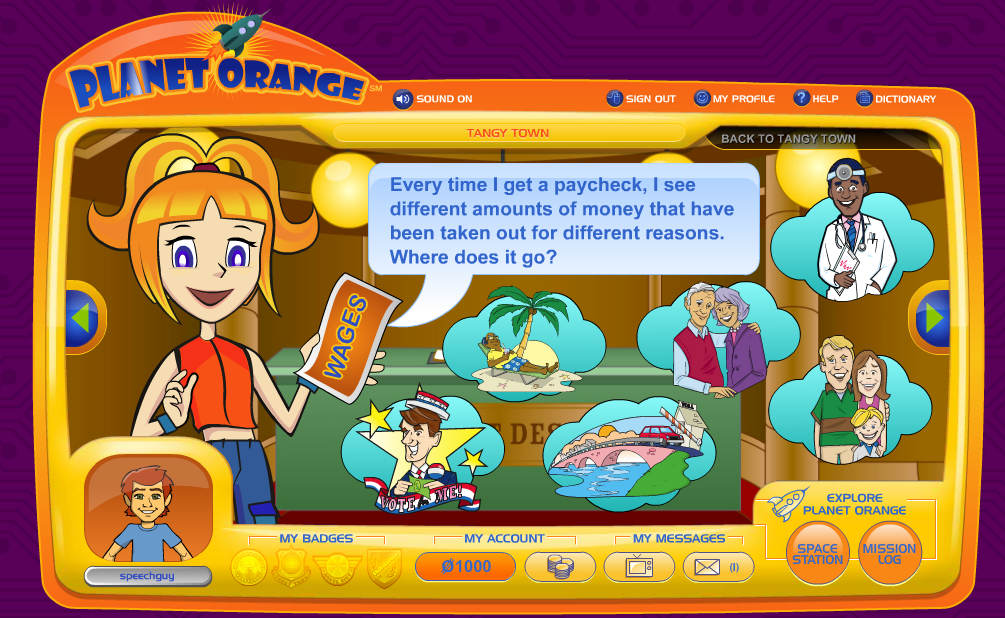
Planet Orange is a robust interactive site from ING investing company that teaches kids about money. After a quick free registration, you can guide kids to complete missions on 4 different "continents" in order to earn "OBucks." Because you have registered, you can save your progress within a group session and return to continue the activities. The site is fun, simple, and practical, and besides all of that, I really like orange.
Language Lens:
![]() |
| Planet Orange offers highly visual stopping points and audio narration. |
![]() |
| What could be more practical and real-world than teaching kids to budget? |
-The site would align well with math and social studies units around money and economics (perhaps those economics standards that teachers never have the time to really get to?) and help kids develop world knowledge.
-The categorical and sequential nature of the missions provides much opportunity to develop semantic and organizational skills, and causality and conditional forms could be emphasized throughout each activity.
-As an extension, you could devise missions of your own around the school to earn further Obucks and practice communication skills in a fun context.
Thank you to Free Tech for Teachers for featuring this site.
Labels:
audio,
categories,
executive function,
HS,
life skills,
math,
MS,
schema,
sentence formulation,
sequencing,
social studies,
upper elementary
Monday, February 7, 2011
Run a Valentine's Day Store!
Games such as the classic Lemonade Stand involve a lot of language and executive functioning: planning, ability to modify a plan, etc. My Money Valentine is a version of this game, but involves running a Valentine-themed store, where you sell candy, cards, teddy bears, etc. Students will need to purchase inventory and set prices while working according to a budget. Customers give feedback and you may need to adjust some aspects of the store.
![]() |
| Add individual items to inventory or multiples for speed, by clicking Purchase All |
![]() |
| Track Results and Feedback |
Language Lens
This site is a great way to explore categories (brainstorm Valentine's gifts before using the site), cause-effect, and curriculum concepts related to economics. Even elementary students are supposed to understand concepts such as debt, goods/services, wages, and profit. The site would also be a good opportunity to use a graphic organizer or table to track profits, etc and develop organizational strategies.
Thursday, February 3, 2011
Scratch!
I recently received a great email from Jen, a reader, that can serve as a post all on its own. I asked her if it was OK for me to post it as such, and she said yes, so here it is!
Hi Sean,
I'm a new follower of your blog (on Facebook too!) and I thought I'd send you a quick e-mail about a neat use for Scratch (which you probably already know about - from the MIT Media Lab - a programming language for kids that allows them to make interactive projects). I'm an SLP at a public middle school in Massachusetts.
I have a young man on my caseload who presents with characteristics of both Asperger's and Oppositional Defiant Disorder. As you probably know or can imagine, it's very difficult to motivate a kid like this to participate in Social Thinking™ (love MGW) programming. He absolutely hates it. I have been able to get the concepts of expected/unexpected behaviors, red/weird thoughts, and calm/blue thoughts (among other concepts) into him. I was getting stuck when it came to finding an appropriate activity that we could do together that would: 1) motivate him to work with me and 2) offer me ample opportunities to give him feedback on his expected/unexpected behaviors.
Then I discovered Scratch! It's been a life saver because he's a smart kid, he loves creating projects, he did a little bit of the Scratch programming in his 6th grade computer class, and was excited to see the program again. Scratch itself requires lots of problem solving and critical thinking (which is great) but the process of the two of us creating a Scratch project together requires a lot of social negotations and perspective-taking. For example, how long does he get to have control of the mouse or what is an "expected" animation for him to make in school with me (especially when I've verbalized that I feel uncomfortable when he makes the Scratch cat bleed - oh yes, working with him is a challenge!) There are so many opportunities for him to think about what I'm thinking/feeling in those situations and modify his behavior/choices (with my feedback) to keep me thinking about him what he wants me to be thinking about him. It's true that no matter what we're doing, there are social thinking opportunities but we have to be doing SOMETHING (i.e. he has to be participating/talking to me) in order to accomplish anything and Scratch has proven to be very motivating for him.
So anyway, I just thought I'd share this unconventional but super helpful use of Scratch.
Hope you're having a good day. :)
-Jen
p.s. The King's Speech was AWESOME.
Thanks again SO MUCH to Jen for being in touch about this resource in her thoughtful and thorough email. If you have questions about her use of Scratch, Jen has offered her email at jwcc@verizon.net
Hi Sean,
I'm a new follower of your blog (on Facebook too!) and I thought I'd send you a quick e-mail about a neat use for Scratch (which you probably already know about - from the MIT Media Lab - a programming language for kids that allows them to make interactive projects). I'm an SLP at a public middle school in Massachusetts.
I have a young man on my caseload who presents with characteristics of both Asperger's and Oppositional Defiant Disorder. As you probably know or can imagine, it's very difficult to motivate a kid like this to participate in Social Thinking™ (love MGW) programming. He absolutely hates it. I have been able to get the concepts of expected/unexpected behaviors, red/weird thoughts, and calm/blue thoughts (among other concepts) into him. I was getting stuck when it came to finding an appropriate activity that we could do together that would: 1) motivate him to work with me and 2) offer me ample opportunities to give him feedback on his expected/unexpected behaviors.
Then I discovered Scratch! It's been a life saver because he's a smart kid, he loves creating projects, he did a little bit of the Scratch programming in his 6th grade computer class, and was excited to see the program again. Scratch itself requires lots of problem solving and critical thinking (which is great) but the process of the two of us creating a Scratch project together requires a lot of social negotations and perspective-taking. For example, how long does he get to have control of the mouse or what is an "expected" animation for him to make in school with me (especially when I've verbalized that I feel uncomfortable when he makes the Scratch cat bleed - oh yes, working with him is a challenge!) There are so many opportunities for him to think about what I'm thinking/feeling in those situations and modify his behavior/choices (with my feedback) to keep me thinking about him what he wants me to be thinking about him. It's true that no matter what we're doing, there are social thinking opportunities but we have to be doing SOMETHING (i.e. he has to be participating/talking to me) in order to accomplish anything and Scratch has proven to be very motivating for him.
So anyway, I just thought I'd share this unconventional but super helpful use of Scratch.
Hope you're having a good day. :)
-Jen
p.s. The King's Speech was AWESOME.
Jen is correct to state that this is an "unconventional" use of Scratch, but that's what we are all about here! Resources not designed for speech and language therapy can provide a great context; like Jen did, it's YOU that makes it therapy. Some kids are, as she said, already so therapized or averse to "pragmaticsy" (I have actually had clients who used that word to me, with distaste) instruction that even excellent curricula like MGW's are not going to fly if presented as direct lessons. Instead, we have to sneak these concepts in through other, more naturalistic contexts. Jen is also absolutely right that Scratch is considered a good preparation for later work in programming, to which many of our students are very well-suited. This post is really meant to whet your appetite about Scratch, as there's quite a lot to it, and I'd like to revisit it later. It's easy enough to get started, though! You will first need to download the program, then, in addition to viewing the intro video below, I'd recommend the Scratch Video Tutorials and Scratch Cards, which are quick ways to learn how to program in Scratch and can serve as lesson plans in following directions!
Saturday, January 22, 2011
Saturday Screencast: Dunkin Donuts (Part 2) and Sketchup for previewing a trip!

In Thursday's post, I talked about how a community trip to Dunkin' Donuts was enhanced by following the kids' interest in a simple and free calendar offered at the store. In today's Saturday Screencast, I'll show how Google Sketchup was used as a visual tool to preview the trip with the kids and construct the model above. We traditionally always take some time to preview a community trip- it's essential to talk about the agenda and the expected and unexpected behaviors (see Michelle Garcia Winner's work) of the place and role play where possible. Sarah Ward's excellent presentation on executive function strategies at ASHA 2010 introduced a terrific strategy- teaching situational awareness through the acronym STOP: Space, Time, Objects, People. By modeling the "Space" aspect of the DD we were visiting, we were able to use a more visual (not just a verbal discussion) map of the place to preview where we would stand until we were ready to order (a key point as the kids, left to their own devices, often just go up to the counter and say "ummmmmmmmm..."), how we would wait in line, where we would sit, etc. In that way, we also were previewing the Time aspect of the trip, because we talked about the sequence of events. The kids really enjoyed making suggestions and watching the scene be built in front of them, and the 2D picture you can save (in Sketchup, that's File-Export-2D Image) was great to share with parents. I also found that kids' managed the trip better after this visual preview than I had seen in the past (and kids who were absent for the preview, not as much).
If you're interested, check out Google's great tutorials that will get you more comfy with Sketchup. To blow your mind a little, there have been quite a few developments in what is called Augmented Reality (AR)- basically laying computerized data or imagery over what we see with our eyes. There is an AR plugin for Sketchup that allows you to use your webcam and a marker (a piece of paper with a graphic trigger) to actually appear to be holding and manipulating the Sketchup model. I can't say the steps to installing the plugin are easy, but if you want a challenge, here's where to start. And here I am holding a whole Dunkin' Donuts, so to speak, in my hands!
Labels:
context,
executive function,
life skills,
sequencing,
visualization
Subscribe to:
Posts (Atom)