Showing posts with label problem solving. Show all posts

Tuesday, May 27, 2025

Lifetoon for story creation

Lifetoon is a fun entry in the range of generative AI tools being offered to us-- it creates a comic from your text/image of a character(s) and description of a story. It does require an image for character creation but you can just use a Googled image based on a character description. You can use yourself of course, but I would avoid uploading images of students into an AI.

I very frequently use this very 70s personal narrative as a model for teaching a complete episode with Story Grammar Marker®. Yes, it's true- I once fell out of a moving car and my mom, driving, failed to notice. I ran this through Lifetoon and it did a fairly good job of rendering it as a comic! 


Lifetoon is a good tool to experiment with! Comics such as these could be useful for visualizing the plot of a chapter book or a historical event, curriculum concepts, social scripts and social or executive functioning problem solving situations.

Friday, September 29, 2023

Using ChatGPT for Lesson Planning Ideas

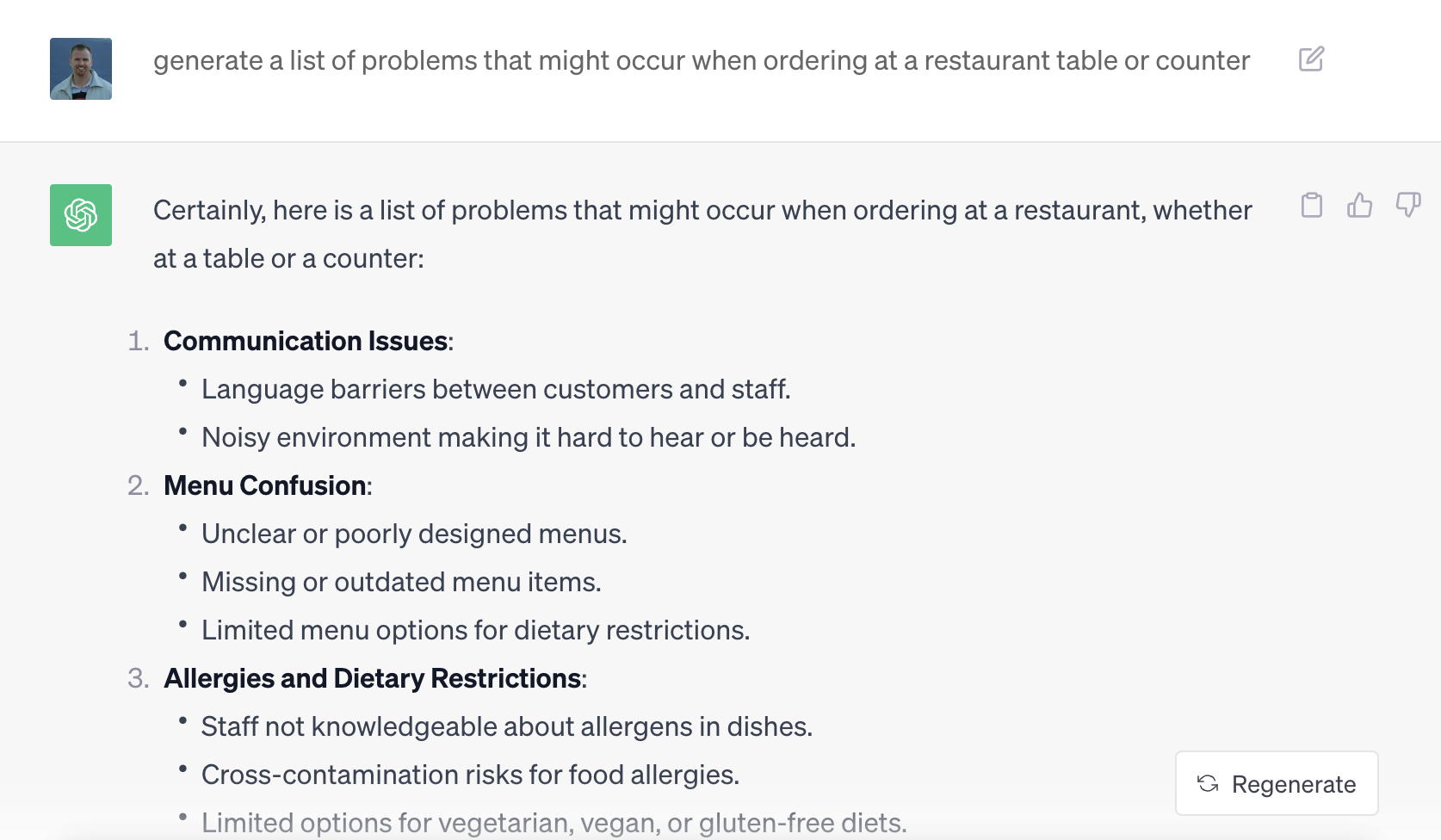
I have posted here recently on the therapeutic uses of Generative AI for language activities, and have recently been impressed by the results of using it to obtain modifiable content useful in sessions. ChatGPT is great at coming up with elaborated lists. I am working with a student on self-advocacy in the community, an an example prompt to ChatGPT is as follows:


Not necessarily usable as a read-through with a student, but certainly a place to start in thinking about role-playing situations. 

With another student, the need for intervention in social problem solving has been recently highlighted. The student benefits from a hook, and is very into the pop/rap artist Lil Nas X. While the artist's racy content would never be a good context for our work, the student is allowed to listen to some songs at home, and the artist could certainly be useful as a kind of shell of a story.  An activity I am conducting is teaching the basics of problem solving using language structures such as OR, i.e. "we could do this OR this." See the books on problem solving by Shure

Searching on Chat GPT, I originally obtained a list of too-mature problems e.g. Nas is harrassed on social media because of his identity as a queer artist. Modifying the prompt with "kid friendly," I received a delightful set of problem solving scenarios. 


Again, these are usable with some creative modification. The outfits scenario, for example, could be solved with a drawing activity of creating several outfits. My student is not so into drawing, so we are using Pic Collage's new online web editor (pick blank canvas) along with a separate tab search-copy-paste for Google Image PNGs (no background as in the rainbow skirt) and the "remove background" feature. 


We are doing a similar activity for a client I supervise who has a big interest in Sonic the Hedgehog!


Friday, September 18, 2020

WindowSwap

 Sharing simple visual materials in teletherapy serves a number of purposes:

-Providing a context for conversation building

-Building descriptive skills

-Practicing observational skills necessary for situational awareness and social functioning

-Tying in with curriculum (in this case, geography)

WindowSwap is a website I stumbled across because a friend shared it on Facebook. It's very "of the now" and the idea that it is safer to be at home, and provides glimpses of shared windows by people around the world. The entries are dynamic videos and very engaging, also somewhat relaxing for self-regulation purposes. Simply share your screen and help the conversation flow within a group. I also used the tactic of placing a shrunken new browser window over the geographic location so that students needed to make "smart guesses" about the location of the window. Sound is also optional so students can track environmental sounds.

Tuesday, July 28, 2020

Another example of pairing picture books and apps in teletherapy

I have previously mentioned I am a big fan of the Scaredy Squirrel (Melanie Watt) series that is helpfully available on EPIC! Books. Over a number of weeks I had my students in one group come to a decision on the order of reviewing and discussing the books in the series, which was good practice in expressing opinions and compromise. They find the books hilarious, so they are motivating (see the above link for some social cognitive analysis as well). I wanted to share a post-activity we conducted with the original book. Hoggan and Strong describe how narrative teaching activities can include "art" activities, which was what this was in essence. 

In the book, Squirrel is described as having constructed an emergency kit for all the unlikely things he is afraid of. So, as a group we created and shared emergency kits.

Here are the steps I followed:
1. Create a Google Slides presentation (and blank slide)

2. Use Insert>Image>Search the web to locate a "bag" for the kit, position and enlarge on slide.

3. Duplicate that slide for all in group (secondary click/right click on slide and select Duplicate). I put a text initial on each slide for each group member. Also click Share and make the presentation editable for anyone with the link.

4. Create a model (always), with same steps but using PNG in the search term which gives you transparent images (will look like they are over the bag, but this step is not necessary).

5. Present the activity and model and strong causals: I need iced coffee in the kit because I get Blue Zone in the afternoon. Also model how to insert an image or PNG (This provides good opportunity for following directions)


6. Copy the link and provide to group members in chat for the session (Zoom or Meet). Again, following directions. 

Here was one of the students' productions:


7. Have all work independently while chatting and then share. This is a good opportunity to use a clock, Sarah Ward/Kristen Jacobsen style, for time management.

Overall the activity provides great self-description opportunities, building of "people files" (Social Thinking®) and conversation.


Wednesday, May 20, 2020

Demonstration of Pixton EDU- simple comic creation in teletherapy

Comics are motivating therapy tools that can be used to develop a narrative, work on physical description, emotional vocabulary, interpretation of nonverbals, or social behaviors and conversational moves. Pixton EDU provides much for free currently and as a webtool is very applicable to teletherapy. You can see some of my previous posts on Pixton here and here but in the video below I demo the current upgraded Pixton EDU. Email subscribers can click here for the video.
 

Friday, April 3, 2020

Repost in Tele-Context: Cookies Crumby Pictures Address Self-Regulation

Originally posted 3/14/19.

I'm reposting this now because people could use ideas for videos that set contexts in telepractice sessions. These are all great social cog/self-regulation videos and could also be used for language lessons- for example story grammar or sentence formulation, or compare-contrast to the inspiration stories for the videos.

For a self-regulation curriculum in addition to Zones of Regulation, very reviewable in teletherapy, see also Hanna Bogen and Carrie Lindemuth's Brain Talk.


Sesame Street has been on a self-regulation initiative for the last several years. A series of skits called Cookie's Crumby Pictures parody popular movies and model strategies for listening, recalling directions, waiting one's turn and self-control. Children would not get the references to Karate Kid or When Harry Met Sally, but find the videos entertaining nevertheless. You can even sell them to older kids with a little effort. As always, a video that covers a social-emotional concept in the context of a story offers both a social cognition and narrative teaching opportunity. Check out this full playlist here, and a few sample videos are embedded below (email subscribers, click through to the full post).

Whole Body Listening:


"Thinking with the Eyes" (see Social Thinking®) and Problem Solving:


Considering your professional development schedule next year? Check out Sean's offerings for training sessions.

Thursday, January 16, 2020

Making Posters (and Puzzles)

Did you know you can take any PDF you have and print it poster-size? And in associated news, anything you make in say, Google Slides, Keynote or PowerPoint can be saved as a PDF, so therefore you can design your own posters about language topics and strategies.

One way I used this recently was to do a post-book activity related to Social Thinking®'s We Thinkers Vol 2 book Size of the Problem. The We Thinkers curriculum volumes target 10 core concepts to think about social interaction in fun and engaging ways that in my experience all students can benefit from. In this book, the characters Evan, Ellie, Jessie and Molly host a birthday party and invite their dinosaur friends. The dinosaurs of small, medium, and big size cause problems corresponding to their size. The book describes how to think about problems according to factors such as how much time they take to solve and if you need help.

The poster creation activity was a natural followup. Using the PDFs that come with the We Thinkers Manual, I printed out the scale in poster size, along with pictures of the problems from the book. These served as attention-keeping manipulatives (in a crinkle-free class) handed out to the kids and then we "assembled the poster." Providing a class with a large visual support gives them ownership of the concept/strategy and reminds their teacher and them to use it!

To turn any PDF into a poster, you'll first want to open it in the free Adobe Reader software on a laptop or desktop. You can follow these directions or the screenshot below to print as a poster. Note that changing the percentage/size will give you a bigger poster or more "pieces." Once it prints, you will have to trim some white to make it all fit together.


Hope you like this strategy!

Considering your professional development schedule? Check out Sean's offerings for training sessions.

Thursday, January 2, 2020

A good app to take self-data

Streaks is an award-winning app (Apple Design Awards) that allows you to keep track of up to 12 good habits/intentions and simply mark on the calendar when you have completed the task (e.g. read for 15 min). The app is designed for the "don't break the chain" concept, but you can indicate how often you intend the habit to be completed so that you still construct a streak.


This type of app would be helpful for us as clinicians who need to practice self-care routines in the New Year (decade). It also would be a tool for use with older clients who may need to practice speech exercises or positive social/language activities.

The same principles could be enacted using Google Calendar as a (free) data-taking tool; the benefits here would include the ability to add more text/data for tracking.


Happy New Year!

Considering your professional development schedule? Check out Sean's offerings for training sessions.

Saturday, December 14, 2019

Wheel of What

Wheel of What is the kind of simple app that any clinician would benefit from having on an iPad. A spinner is useful in many situations, and with a digital one you won't have to dig one out! Plus an engagement factor of offering a digital version is always handy. With Wheel of What, a bonus is that you can create customized spinners in seconds.


One activity I like to do in social groups (even up to high school) is to make up our own games or "same but different" versions of other games. That vocabulary as well as the STOP strategy (Space, Time, Objects, People-- Ward & Jacobsen 2014) provides a guide to making this type of activity clinically focused. Recently, our group made up our own version of The Floor is Lava and had to consider Space (Where to Play), Time (how much time we had, also the order of events in the game and the if/thens), Objects (e.g. construction paper tiles and the spinner, also furniture), and People (cooperative or competitive roles, how would we Think of Others during the game to keep it positive).

Hope you find this free tool useful! What might you use it for? Let us know in the comments.

Considering your professional development schedule? Check out Sean's offerings for training sessions.

Thursday, April 11, 2019

Social Media is Filled With Stories

Exploring situations related to social media is right up our alley as social communication specialists. A client of mine recently started using some supervised group chatting and was making a few minor mistakes. Discussing social media is prime territory for understanding:
-metalinguistics: how text and photo-based communication may not carry the intended message due to lack of inflection, etc
-narrative language: what is the story of this communication? Could it comprise an initiating event that changes someone's thoughts/feelings
-hidden rules/curriculum: what are the overall unwritten guidelines about engaging in texting and other forms of social media?

I found the great visual resource from the Excuse My Speech Teacher's Pay Teachers' Store "To Text Or Not To Text" to be very useful and engaging for my student. The packet contains screen-looking visuals and interactions to determine "expected vs unexpected" (based on the acknowledged work of Social Thinking®) and how to respond, among other visuals. I actually reviewed these with groups onscreen/AppleTV.

The CyberSmart Curriculum (now updated, still FREE, and associated with Common Sense Education) provides great lesson plans for different grade levels and topics, including videos and interactive activities.


Thursday, March 14, 2019

Cookie's Crumby Pictures Address Self-Regulation

Sesame Street has been on a self-regulation initiative for the last several years. A series of skits called Cookie's Crumby Pictures parody popular movies and model strategies for listening, recalling directions, waiting one's turn and self-control. Children would not get the references to Karate Kid or When Harry Met Sally, but find the videos entertaining nevertheless. You can even sell them to older kids with a little effort. As always, a video that covers a social-emotional concept in the context of a story offers both a social cognition and narrative teaching opportunity. Check out this full playlist here, and a few sample videos are embedded below (email subscribers, click through to the full post).

Whole Body Listening:


"Thinking with the Eyes" (see Social Thinking®) and Problem Solving:


Considering your professional development schedule next year? Check out Sean's offerings for training sessions.

Thursday, October 25, 2018

Lesson: 5 Point Scale of Halloween Problems

The Five Point Scale is one of my favorite tools. It is versatile to talk about many different kinds of social observations, norms, problems and nuances; it is also narrative in form and sparks discussion about perspective taking.

So I made you a lesson! Use this Google Slides, uh, slide as a template to have kids generate examples of problems that occur on Halloween. I like the framework contained in both this TpT packet by Speechie Musings and Social Thinking's® Size of the Problem book: problems become bigger with 1) time needed to solve 2) needing help 3) someone being physically or emotionally hurt and 4) affecting other people. So, a 3 might ruin your day (time) and cause light physical or bigger emotional hurt, and you may need to talk to someone about it.

You can use humor and lightness/darkness appropriate to your group in developing examples, so, a 5 for your HSers might be "your friend becomes a zombie" where with 2nd graders maybe "a ghost decides to live in your house."

To use this template, please do not request access. That results in my getting emails...thanks. Open a browser and sign into your Google account. Go to this link. From the file menu, choose Make a copy. Then it is yours. Consider duplicating the slide or the file itself to use for many groups. Also, Tools>Explore will let you search for images to add extra visual support (e.g. "throwing up," a 3). This activity is great for pairing with a book about Halloween.


Have a great Halloween!

Wednesday, August 8, 2018

Still summer...so want some lemonade?

They say August is one long Sunday. Here in Massachusetts we still have about a month left until school even starts, so its difficult to see posts from friends across the country who have already started, as well as the ubiquitous "back to school" and "summer's almost over, so..." ads. It pulls you out of it a bit, you know? I've spent my summer working on getting fit, hiking and doing some traveling, so it's been great. But HOT!

So consider some Lemonade! Remember the old Lemonade Stand game? You are given weather information and need to decide several things: how many cups of lemonade to make, how much to charge for it, and how many signs to make to advertise your stand. In the process, we can engage students in a number of language and social competencies:
-"listening with the brain*" and language comprehension
-using visual supports, however we provide them
-applying functional math and problem solving
-causal and conditional language ("It's going to be hot, SO let's make more cups...")
-following a "group plan,*" i.e. making logical rather than silly decisions to sell as much as possible

*language from the Social Thinking® methodology

Here are two ways to play it.
-Classic Lemonade Stand is a free app for iOS that uses the 'ol Apple IIe text interface, but is still fun
-Toward the end of the school year, I played the Alexa version on Echo Dot (enable the skill by saying "Alexa, launch Lemonade Stand"). This free skill provided a few extra elements that I found helpful: more opportunity for auditory comprehension and listening work, turn taking in speaking, using visual supports, and processing the humor and figurative language offered in this particular skill.


I always like pairing activities for further context, and our students before playing worked together to make a lemonade stand "sign." This engaged them in pretend play and lots of conversation. This could be done with poster materials or with the free app Pic Collage as we did below (You could also do this with Google Drawings on a laptop):


Thursday, May 17, 2018

Video Tips from Students, Part 2

In my last post I discussed how sometimes a tip from a student about what might engage him or a group may lead to a great activity. Another example came from a student who offhandedly mentioned that he likes to watch EvanTube, which he said had fun "how-to" videos. I checked it out, and EvanTube is a "family-friendly" channel full of challenge videos, among other things. I discovered a number of them could be done with minimal or simple materials, and thought that the process of figuring out what is needed, the sequence and overall plan would be a good language, social and executive function activity. The two activities I did with my group turned out to be some of the most fun ones I had this year.

The 3 Marker Challenge turned out to align very well with our social goals as a group and Ward/Jacobsen's Get Ready/Do/Done (GRDD) model. We watched the video:


And interactively completed a GRDD graphic organizer that when complete would look like this (note that the numbers next to the do-steps are estimates of time in minutes, and we used a clock to map these out):


You can access this Google Drawings file here and if you like, make a copy for yourself (File>Make a Copy if signed into Google Drive) to use as a template. It was a very fun activity and we practiced a lot of different skills.

The following week, we tried another! First, we quickly did the Yanny/Laurel experiment (which, incidentally now has its own EvanTube vid), which is a good social activity that underscores that people have different perceptions and perspectives (but pssst. It's Laurel). Related to this is the channel's Backwards Word Challenge:


Great again for goals of executive function, social, and humor but also phonology and just listening! Similarly, we did a GRDD activity- I try not to gather materials for students but ask them to do it, and this included finding an app to do the task. You'll find a free one easily! The results were hilarious and all had a great time again practicing some important skills.

Friday, April 6, 2018

Using Google Slides as a Visual Support and "Workbook"

With my older students, I appreciate the role of technology as a visual support. Having a screen involved-- not necessarily to be touching or interacting with-- can be engaging, regulating and motivating. I often say I am fascinated by how much my students will attend and converse with the topic when I am simply typing into a slide. We do have Apple TV present in our clinical rooms, which helps, but the same effect can be provided when connected to a projector or interactive whiteboard, or just with a laptop on the table (less ideal but it works).

With one of my groups I am working on problem solving and self-regulation. Westby and Noel (2014) created a great acronym (BEST PLANS) for problem solving steps you can read about here. In an activity I incorporated this as well as Ward/Jacobsen's STOP strategy for situational awareness, and the 5 Point Scale. I was pleased with the group's engagement as I presented a made-up problem (similar to what they would face and probably struggle with at home), and the tools within Google Slides let me mark up the visuals (boxes, making stuff bold or underline, typing into shapes) as we came to some decisions. The link to this file is here and you can feel free to make a copy (File>Make a Copy) to your own Drive and change it up.


SlidesCarnival is a free resource featuring many engaging-looking Google Slides templates you can use for this sort of work.

Friday, March 9, 2018

Book Creator as a consult and individual therapy tool

In my last post, I described the newly available Book Creator for Chrome. Now in Chrome or via the iPad app, you can consider one of my favorite uses for Book Creator- "journaling" with students. In my various modes of service delivery, including school-based consultation and some individual therapy sessions with students I also see in group, I have turned to Book Creator because it:

-is an engaging way to provide visual support for social-cognitive, language organization and executive function methodologies and concepts.
-can I say engaging again? My students love the opportunity to co-create journal pages and add to sketches or other visuals.
-reminds me and students of what we talked about the last meeting, and results in kind of a cumulative toolkit.
-results are sharable- screenshot any page or export or share the link to the whole book.

You can start by having your student design his own "front page" (I usually leave out names):


Book Creator is a great place to sketch out and modify methodologies such as the Zones of Regulation (created here with emojis in an interactive discussion with a student):


It's an easy place to create Incredible Five Point Scales due to the space and availability of colors:


Create story maps and problem solve (icons from Story Grammar Marker®) walking through the steps of making a goal and action plan.


Expand students' thinking about situations and relationships (or non-relationships) with peers. In this case we were discussing patterns of behavior that the student should recognize and decide to avoid a peer.


Create Comic Strip Conversations to provide visual support during a review of a situation. In this case we incorporated the Superflex 5-Step Power Plan in our discussion accompanying the visual.


I'd love to hear if you are using Book Creator in this way, along with some of your "tricks!"

Saturday, February 3, 2018

A Cat in Therapy

Some years ago at the ASHA Convention, I saw in the program a poster entitled "A Cat In Therapy: Cute, but Effective?" I thought this title intriguing and at the same time, funny, and I was sad to have not been able to locate the poster. Fiete Cats AR ($1.99) gives you the opportunity to test this proposition out. AR--Augmented Reality-- is technology that overlays digital content over our world, often through the camera. In this case, the app makes a cat appear in any room, including your treatment space, and offers a number of interactions:

-Name up to 3 cats
-Observe the cat's needs (think with your eyes)
-Pet and play with the cat
-Feed it when it gets dirty (from playing in paint)
-Provide him food and drink when hungry/thirsty
-Put him to bed
-Record your interactions to make a short movie (saves to Photos app)


My kitty using his litter box ON MY RUG! Oh, NO!

Effective? Well, for sure the app is engaging, and provides a context for social observation, labeling actions, and using cause-effect and conditional structures.

This app is also a great pairing with picture books (narrative or expository) about cats. Consider making your own "picture book" with Book Creator, which would allow you to import screenshots or the videos recorded within the app. Students can write about their interactions with the cat, a context for any number of objectives.

Friday, January 27, 2017

Practice Following Directions with Scratch Jr.

I've mentioned before that following directions (written or oral) is an oft-needed but not so engaging goal to address. Scratch Jr. is a free app that, like its senior (mentioned here and here) was created to teach coding and programming to youngsters. These applications use object-oriented codes that are simple to put together and work a lot like LEGOs.

A great way to start with Scratch Jr., and one in which you'll instantly see the potential for working on following directions and sequencing, is to use the intro activities. For example, students need to follow a few steps to make a car drive across the screen--a surprisingly thrilling activity for the class in which I conducted this lesson. The developers give you a great quick guide if you want to learn your way around the app first.

This simple program makes the car drive across the screen.

After using Scratch Jr., you'll likely find all sorts of contexts for it. A first grade teacher I worked with had her students program how baby polar bears "trail" their mothers, thus integrating work in following directions, coding, and science concepts. The variety of backgrounds and characters suggests potential for storytelling work as well, and these can be drawn, leading to limitless contexts. Students can also be encouraged to use strategies such as re-verbalizing directions and visualizing as I discussed in this post.

You can also create direction sheets of your own with or without text by screenshotting steps and then assembling them in Pic Collage, as I did below. In making a math "game," I encouraged the students to verbally mediate the pictured steps as is important when approaching picture sequencing tasks.


Working on skills in this context, you'll also know you are helping to address technology standards and perhaps starting to prepare your students for a career in programming!

Friday, May 27, 2016

Video Tutorial: Using Keynote for 5-Point Scales

In my recent ASHA Leader column, Apps that Help Teach Social Perspective, I discussed The Incredible 5-Point Scale by Kari Dunn Buron and how easy it is to create these tools with apps such as Keynote. Here's a video tutorial on how to do that!


Tuesday, April 26, 2016

Monkey Spot

Scavenger hunts make for great speech and language activities as they require students to work with categories, use descriptive language, problem solve (and therefore use critical language forms such as because, so, if/then) and work together. Monkey Spot is a unique app, using the iOS camera as the means to capture a number of items on themed lists (note that for now this is an iPhone app only, but it can be installed on iPads, so use the link or change your app store search filter to look for iPhone apps). The app contains 7 free hunts that include several that could be done in a school setting (additional hunts such as "Look in a Book" are worth purchasing for $.99 each). Each item on the list prompts the taking of a photo, and descriptive text can also be added. Once complete, the "hunt" is saved as a slideshow in the app. For a simpler spin on this type of activity, see Alien Assignment.


Monkey Spot provides a great structure for building language in a scavenger hunt context, but you can't make your own hunts in the app as of yet. Consider Google Slides for building your own hunts. Though Google Slides is meant for presentations, you also can basically make digital workbooks with the app, and now that inserting photos is possible, you can make the same type of activity as Monkey Spot offers. Just set up a series of slides with text indicating the items to be photographed (good for working on observational skills for students with social learning challenges) and you're all set. Be sure to make a copy of your Slides file before using it with students so you will still have a blank one for your next group. Having the completed work within your Google Apps for Education account opens possibilities for sharing with students and teachers or perhaps continuing a writing project.


Take a look at Monkey Spot and then see what you can create on your own!


.