Edmorrow's First Five is a great free resource that comes to your mailbox each school day and provides a set of resources (primary and secondary versions available) related to social and emotional learning. These include, among other activities, a meme (often animated) that can prompt narrative responses, conversational questions for connection, a quick connect debate question, and a contextual self-regulation rating scale. Previous days are archived, so you can use any you choose, and the site also provides a great daily brain game using Wordwall that targets sorting of topics like US States to crops and Star Wars characters to light or dark side. These resources would be great for both individual and group therapy, so check out this site from these professionals focusing on restorative practice and counseling.
Thursday, May 22, 2025
Friday, March 8, 2024
Goblin Tools
Working with teens and young adults and interested in showing them how to use an AI tool that helps them be more independent? As this free (and committed to remaining free) site proclaims, "goblin.tools is a collection of small, simple, single-task tools, mostly designed to help neurodivergent people with tasks they find overwhelming or difficult." The site is powered by generative AI, specifically OpenAI's large language models, which basically means it can understand and produce prompts written in natural language. It currently features:
Magic To-Do: enter a task and tap the magic wand to have it broken down into smaller, manageable steps, along with the option to estimate time for each step and the task as a whole.
Formalizer: enter casual language to get a suggestion of more formal language (or a wide variety of "tones" in a drop down) e.g. for writing an email.
Judge: receive feedback on the tone of inputted text
Estimator: stand-alone tool providing estimate of time for a task
Compiler: "compile my brain dump into a list of tasks"
Chef:
Here's an example of a task I put into the Magic To-Do (please don't ask why I have to do this task):
I hope you find this tool useful for your students, clients, maybe associates, partners or spouses, or yourself!
Friday, January 19, 2024
What's the Hoopla?
Within sessions I strive to achieve what we might call media balance, using a variety of materials including hands-on, paper, and digital. If I feel the plan involves too much tech, I try to adjust. This has been a helpful model in supervising graduate students too. At the start of each semester, I encourage each of them to make sure they get a library card and visit the local library to practice identifying actual books they can use in therapy sessions. A library card is also essential for the resource I want to highlight here: hoopla!
hoopla is an extension of public libraries' digital resources (note: I speak as a Boston Public Library patron and this may not be available to all who read this- check with your library or their website!). Of course, Overdrive/Libby are great for digital books that sync to your Kindle app (I use on iPad or Mac), but I rediscovered hoopla entries recently when looking for books on my library's website. hoopla has a wide range of picture books, many on SEL topics from authors such as Julia Cook or Bryan Smith:
Tuesday, July 25, 2023
Gartic Phone
Over the spring semester, in several of my social learning groups, we were experimenting with games that allowed for association, storytelling and humor (essentially the same skills used in improv games, which I also like to use non-digitally). It was helpful to use some free versions of games as opposed to the excellent games offered by Jackbox because a) I could hand over the reins to graduate students practicing independence and b) the students could perhaps use the games at home with family or friends at no charge and c) the varied ways the students needed to "join" the game allowed for practice in situational awareness and self-regulation.
I found many great examples (and yes, some less-great) from this post on The Gamer, but I wanted to highlight Gartic Phone here. Gartic Phone is a "telephone" type game in which players label drawings successively in increasingly silly ways that become removed from the original meaning. There are a variety of ways to play including creating a story, such that it is worth revisiting over multiple sessions, and it is easily playable in 10 minutes once kids get the hang of joining. I often use bit.ly to shorten the URL for joining for games like these. Remember that these games can be worth spending time with pre-loading game-play "moves" that will help everyone to feel successful and/or revisiting results (I often screenshot to remind them of what went well).
Friday, April 14, 2023
A Quick Activity with Chat GPT
I have been doing clinical supervision at BU for a few semesters now. It's such a rewarding experience to work with the graduate students in their first clinical in-house experiences. I have a student who is working on a lot of semantics and language-based literacy activities with her client, including teaching story grammar as an organizational structure. We have been talking about building activities in context with pre-book and post-book activities, and her client is interested in planes and aviation. I suggested to her this book and this activity: what 10 words do you think ChatGPT will come up with that go with ___ (in this case, airport). The process of asking them to predict what the AI may say is an associative activity, and then the results will likely bring about new concepts and vocabulary.
See one of my favorite articles, The Magic of "Once Upon a Time": Narrative Teaching Strategies for more on pre-, during-, post-book (or other context-based) activities.
Saturday, January 21, 2023
More on using music in therapy
Music is motivating, self-regulating and full of language. Recently I have used songs with individuals and groups in a couple of specific ways.
For an individual client I see, I have been working to incorporate many of his interests as part of a neurodiversity-affirming approach. When he mentioned liking the Beatles, I instantly knew this could be a great path to engagement. We started with "Here Comes the Sun" and using Wikipedia to look up some details about the song brought some great conversation. In addition, the famous album cover of "Abbey Road" brought some Visualizing and Verbalizing-style picture description into the session. Songs with lyrics are available on YouTube and through this we discussed figurative language with this song and "Yesterday."
Friday, November 11, 2022
Book Creator Templates (including Thanksgiving!)
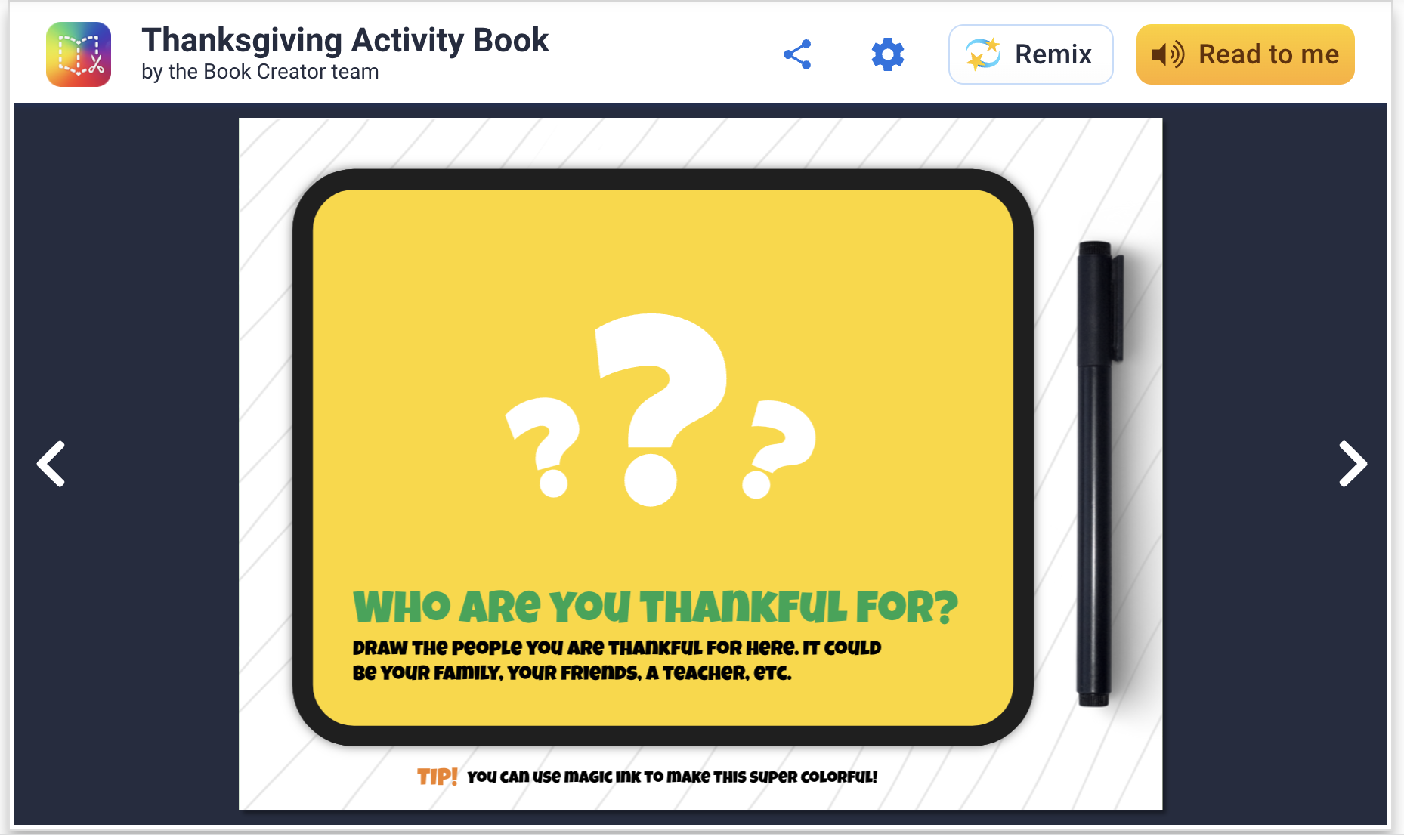
Book Creator has long been a stellar app/webtool and recently I discovered that they have templates to "remix." You can add templates to your app and do a collaborative work on your iPad among students, or if in a Chromebook environment your free account will allow you to share with students' Google accounts easily. This is an attractive option because, well, they are attractive and you don't have to design the book yourself. Richard Byrne describes the magic ink and autodraw features here.
These "activity books" are filled with language underpinnings like storytelling opportunities, semantic knowledge and vocabulary. You can easily copy and modify any page to cater to your students before starting the activity. For example, on this page below, you can zoom in on a map and have kids in the group find out where others live (generally) for spatial/academic/biographical knowledge of others. Additionally, with this template, gratitude is literally good for your brain to practice all year long.
Friday, October 28, 2022
Monday Halloween?
Looking for an engaging activity this Monday? Check out this fun one from Control-Alt-Achieve (also a great resource in general). In this you use Google Docs as a visual creator to make a Halloween "Rebus" story. I have mentioned before the principal that typing into a white space is a visual support for language formulation and (many of) your students will be engaged by it- tech integration need not always be super interactive or fancy! This activity integrates the use of emoji and don't miss the way expanded context provided by going to what is now available as Insert>Emoji. How fun! I did this activity with several middle school groups this week and they were super-engaged. In addition to targeting some story grammar, complex sentences or vocabulary, I integrated the work described in this ASHA article to make this an improv game focusing on conversation building and flexibility. Note: I always accompany some encouragement of "yes, and" with neurodiversity- and human-affirming takes on "it's also ok to say no."
Friday, June 24, 2022
Getting started with Minecraft
I described in a recent post coming to find some good uses for Minecraft with interested clients and groups. This previous post was about using Education Edition which not all have access to, so I wanted to make sure I described some applications for regular Minecraft. I first of all recommend getting started with the iPad edition, previously called Pocket Edition (there is also an Android tablet edition, both around $7 but then giving you everything you need). There is a lot to Minecraft that I don't even yet fathom but when you think of it as a digital LEGO set, that is a great place to start. Additionally one might add that there is evidence that involving LEGO in therapy improves communication and play skills, and these ideas can translate to Minecraft (I like good old LEGOs too).
In this post I will briefly describe creating a world and getting started. This has been a great context in groups in the past weeks of simply deciding something to build, using visual supports to preview a "future picture" (see Sarah Ward/Kristen Jacobsen's work and just look up "make a simple ___ in Minecraft" on YouTube, e.g. a swimming pool). In the process group members work on fulfilling a group plan, adding thoughts and play moves in the app, and of course, flexibility and conversation. You can also use Minecraft in straightforward language stimulation activities as it could be used to foster description, concepts and following directions skills (you can even add signs in the world with text on them).
I keep it simple and do a play and pass situation with one iPad, but your kids could tell you there are ways to have people join a world from multiple devices. In our situation, mirroring the iPad to an Apple TV keeps everyone engaged when it isn't their turn.
To get started, open the app and tap Play, and in the Worlds tab tap Create New. Name the world and change the game mode to Creative. Your students may balk and ask for Survival but I don't want them killing each other or being killed in the game. I wouldn't worry about all the settings but definitely scroll down and turn on Always Day so the screen doesn't maddeningly dim on you when it becomes "night" in your world. I learned that one the hard way.
The arrows in the lower left allow you to move. Tap and drag your finger to "look around" and change your viewpoint. First step can be finding an open space to build something.
Thursday, March 3, 2022
Globle can become a cooperative group game
I have been a longtime fan of maps as therapy tools. They promote spacial description skills, situational awareness and (literal) world knowledge, and can be used to link to narrative and expository language.
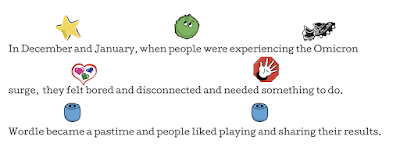
Let's start with Wordle though. A huge fad, one this Jeopadevotee has used to shore up his skills with the anagram category that didn't appear in his game...yeah, I am still in some kind of transitional phase. Anyway, I am not sure it is such a great therapy tool unless it is paired with a visual support such as searching for words with various forms (see same but different below), but it kind of has a story. Here related in Story Grammar Marker® icons:
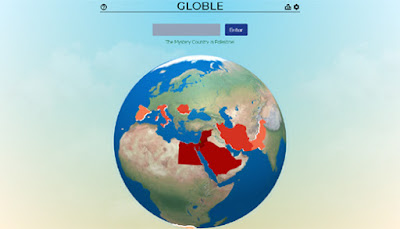
There have been many spin-offs of Wordle including one in IPA that SLPS would love, and Globle is one in which you guess the "country of the day." As mentioned above, for students working on building this knowledge, it's great to have a tab open for reference and research to help them make educated guesses. As I described to families of students I played with this week, "In a cooperative way we enjoyed an introduction to the game Globle, a variation on Wordle where we guess countries, get color coded clues back, and zero in on the day's target, therefore using thinking with the eyes, following the plan, and adding connected thoughts based on the info that we were receiving. The boys figured out Portugal quickly by building off each others' clues!"
Friday, December 10, 2021
My Self Care Toolkit
Another take-away from ASHA Convention 2021 is the importance of self-care. Presentations I attended focused on strategies for ourselves and also those we can promote within our students and supervisees. It seems a pretty obvious message in some ways after another tumultous (but hopeful) year, but I thought I would take a moment to recap some ways I am using (and not using) tech for self-care as we change our calendars soon. Many of these are works in progress and not always done religiously, but they help.
#1 Light
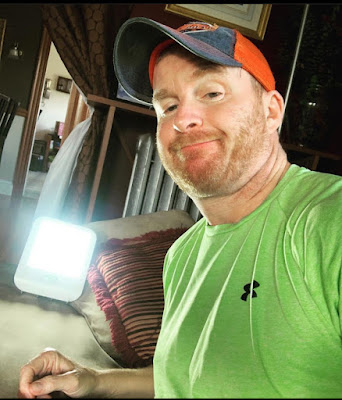
There are cuter models, but having seasonal affective disorder, and being on the eastern edge of a time zone, on top of pandemic anxiety, is aided by white light such as that provided by the Verilux Happy Light. It produces an instantaneous caffeine-like effect and helps with regulation of your melatonin and circadian rhythm. Highly recommend- could easily be purchased for school for a passive effect while you check emails in the AM.
#2 Breath
I highly recommend checking out the free (or paid) features of both Breathwk and CBT-oriented Aura (and the free-for-one-year Balance, or Sanvello which is paid for by some healthcare plans) for various kinds of mindfulness and self-regulation coaching. Breathwk is revolutionary in its varied content and provision of scientific rational for different breathing exercises, all of which you would be able to carry over to outside the app (e.g. when you wake up and can't sleep, before an IEP meeting).
#3 Distraction
Podcasts are a great distractor. They actually make me look forward to a ride here or there for work. Get lost in a conversation or narrative. I love Good Job Brain and Conan O'Brien Needs a Friend Maybe not True Crime, folks.
Overdrive via my public library card in addition to a Kindle, a real one, not the Kindle app that can walk you into social media less-great distraction on your phone, leads me to reading that brings me places and won't break the bank. Right now Keep Moving: Notes on Loss, Creativity, and Change by Maggie Smith (the poet, not the Dowager Countess) is helping me quite a bit. I also like to keep a semi boring nonfiction title on my Kindle at all times to aid in sleep. Avoid books about the End of the World like I didn't (below, also see A Children's Bible, Weather, and Good Morning, Midnight).
#5 Movement
I'm still a huge fan of exercise as a key component of self-care- In my case, my Apple Watch is my key motivational tool; closing my rings (except this week when I had a cold, then a booster shot!) is a daily thing.
#6 Presence
Above all, we can watch how much we are consuming news and social media. I have been practicing intentions and timed logouts of particularly Facebook. iPhone's latest operating system (there are 3rd party apps for this and Screen Time settings, previously released) has a Focus feature where you can limit notifications or app use of particular channels or contacts.
Take care!
Friday, November 12, 2021
Free Options for Group Games
I have previously written about the motivational and engagement value (thus promoting communication) of "room based" games. Now that we have transitioned back to in-person groups, we are incorporating some distanced card play, but this tech-mediated piece still serves a purpose (kids can use their own devices, stay far apart). Jackbox is a bit pricey and I wanted to share a few free options I have tried out.
VXN's Mutter Nonsense and Drawn Out offer good potential for building communication skills in a fun way (including joining in a paced manner, using humor, visualization, association). Here's a trailer for Mutter Nonsense (think Apples to Apples).
Friday, September 24, 2021
Consider This: Videos about Mindfulness
Mindfulness should be considered right in the SLP wheelhouse. It a) is evidence-based, b) promotes self-regulation which underlies executive function, academic performance, social communication and c) practicing and discussing mindfulness encompasses expository language and metacognition (talking about thinking).
Through the mandated teletherapy period and beyond, I have found videos about mindfulness to be particularly useful as they are visual, prompt practice, and serve for post activities.
Check out this example:
Friday, June 18, 2021
Lessons from COVID, Part 2: Get a Hobby
I swear this is the last post touching on my (much better) mental health, but it also has some tech tips within, so I thought it was worth sharing. At the beginning of the pandemic, there was much ado about "using this time for self-improvement" before that message had a backlash against it. Regardless, as an adult it can be difficult to feel justified trying new pastimes, though it sure helped me.
My husband and I were always karaoke people, so that piece wasn't new. We'd spend many Sunday nights singing down the "scaries" with one or two at a local place that had karaoke starting at 8pm. He's a real singer, gets paid for it at a CT church monthly; I just dabble and know some stuff to make myself sound better given the SLP training. When the shutdown happened, of course no karaoke. Singing was bad, COVID-wise. We started a habit of recording a weekly song and sharing it to friends and family via YouTube and Facebook. It was a good thing to spend time preparing for and looking forward to recording and releasing it. I learned a couple tech tricks along the way.
Karaoke Version is a great website that lets you purchase individual song tracks, and you can choose ones with no background vocals. This allowed us to turn many solo songs into duets. He taught me years ago how to change keys of songs, which greatly increases the options for any singer (e.g. I can sing a female song down one octave and up two steps to take me out of the basement, or lower a male pop song a couple steps). For this, two tools helped a lot. AirDrop (accessed on any Mac or Apple Device through the share icon) popped the song right over to my phone without need for syncing (takes forever) and into an app like AudioScrub Remix Edition ($2.99). This app allows you to change keys and even play with tempo of music, so is also good for playing with the key of original song tracks so you feel more confident singing them out there (if the place you go allows key changes, some don't). From there it was pretty easy to play any song in my car--I even drove sometimes-- and we'd set his iPhone up on a holder to record. There's truly an app for everything, and they sure can support your hobbies.
Thursday, June 10, 2021
Lessons from COVID, Part 1: or, An Anxious Extrovert SLP Faces a Pandemic
As we close out what was frankly an annus horribilis for everyone, naturally including anyone in education or health care, I'd like to do so as positively as possible and share some lessons learned. This might be two posts or one, or six or twelve, I am really not sure. It's a topic I thought of submitting for an ASHA presentation but really didn't have the energy (I submitted a different topic), so here goes.
The beginning of the pandemic was a fear-fueled spring into action: figuring out how to become an actual telepractioner instead of a tech-informed consultant, and then sharing that information in post after post and not a few presentations. Then we settled into the long day-to-day post-fall and that energy...lagged. The days got shorter and my SAD closed in, bringing with it a lot of irrational dread that was tinged with actual threat. My husband returned to teaching HS Math (mostly AP) in an impossibly hybrid fashion, working 12 hour days to figure this out for some engaged and many indifferent students, all of whom were probably doing their best to get through this. Meanwhile, I settled into continuing teletherapy, feeling trapped in our house and isolated, except for the blessed days I got to leave and go do some in-person work at schools. Nevertheless, we both carried UVC lamps to sanitize our computers and stripped our school clothes into a dedicated hamper in our back hallway.
Things got better. Vaccinations brought hope, mine coming undeservedly early in my case, due to my SLP license. I cheered on as my parents, my husband, family members, friend by friend (I kept track of who was on what shot mentally), then my students got their protection. Still, I languished through the late winter and spring and just now am REALLY able to see and enjoy the light, and I'm looking forward to the future.
![]() |
| Having started to experiment with coloring and drawing, I'm seeing the light- and am a work in progress. |
I didn't get COVID. My husband didn't get COVID. I think, anyway. I certainly got tested enough. The few people I know who did had mostly manageable cases. Lucky. I kept working, another blessing; I know it's a privilege to be able to work from home. Still. It sucked, didn't it?
I'm working to put the year behind me (self talk: let go and move on) but I know I can focus on the things I learned, and share them. So let's start with mental health. It's important, and something like this can break it a little, and you can piece it back together. Some tech tools that helped me:
1. Therapists need therapists. Get help if you need it. I had my own experience with telehealth re-upping with a therapist who had helped me in the past. Doxy.me works great! In all probability, help will be more available to all in the future given the doors opened and competencies developed during this tough time.
2. Tech-based fitness tracking facilitates exercise and mental health; the pulse goes up and so do the levels of good chemicals in your brain. Luckily, using exercise as a tool was always an inclination of mine. I enjoy it. Even without a gym to go to, I managed to keep that up, being creative about workouts and learning how to use exercise bands, which, now back to the gym regularly and comfortable maskless, I still use on some days as an alternative. I actually lost weight during COVID. I thank my Apple Watch, which I finally caved and ordered last August. The rings are a thing:
3. Tech-mediated mindfulness, breathing and coaching: Always a fan of tools like Calm, most recently I tried out Breethe, Aura and Breathwk. I ended up going with a yearly subscription to Aura because of the combination of high-quality meditations along with CBT and coaching tracks. The CBT pieces have even given me great ideas for lessons with my students, as these concepts relate so much to narrative language, social cognition and self-regulation.
ABCDE (Antecedent Event, Beliefs, Consequence, Dispute, Effect) pretty much mirrors story grammar models.
I also have found Sanvello useful- this app has instructional paths and meditation tracks among other features, and is available for free with some health insurance plans.
Further caving and getting AirPods has made me full-on Apple and has somehow made developing the habit of meditation more attractive. Having the voice in my head be music has also been a nice substitute at times. I should give a shout out to our network of Echo Dots about the house that has cut through the unsettling quiet, though I have listened to way too much SiriusXM The Blend (aka The Bland, aka Adele At All Times).
Breathwk is super cool and SLPs should definitely know about it, given our connection to respiration and a number of its uses (e.g. voice, fluency, self-regulation). The app presents different breathing techniques based in science, a training sequence, and all presented with great visuals and haptics (e.g. a vibration for inhalation). You can get a lot out of this app with its free options but I may spring for the annual as I am very curious to learn more.
The above have all been great tools in helping me step forward back into "normalcy," and I hope these tips help you and yours in some way!
Friday, May 28, 2021
Driving can be a language/EF intervention context!
Having started as an elementary SLP, it's been one of my journeys to learn that with older populations, we need to keep it relevant. That whole Client Values prong of EBP can come into sharp focus when you are trying to keep students attending and engaged.
I recently had several clients who were learning to drive. Very exciting. I recalled some hilarious blog posts I had read on Cracked some years back here and here about "Types of Drivers Nobody Complains About." The text itself is funny to read but not instructionally appropriate, but the images are great. Here's where the social cognitive concept of Hidden Curriculum and the Social Thinking® concepts of thinking with the eyes converge as a context for students to interpret these photos. This is also a good example of how Google Slides can be used to create a kind of workbook. I used this with my clients to have them interpret the photo and write (or I would write) a main idea interpretation. You could also use this to have budding drivers build self-awareness and make "notes to self" about what they can change in their own driving. You can obtain the resource here. As always with Google resources, please do not request permission for the document. To use it yourself, simply sign into your Google account and under the File menu, select Make a Copy. You can then make this an ersatz workbook by inserting a text box on any slide.
Friday, March 26, 2021
A Google A Day and Search Literacy Lessons
Thursday, January 7, 2021
Jamboard Icebreakers
Happy 2021! Not the happiest week, but I am still hopeful!
If you are like me, you may have students moving in and out of groups and introduction activities can be helpful in "breaking the ice" and helping them make connections. I tried one yesterday that was very successful and I wanted to share it with you.
This activity uses Jamboard which is part of Google Workspaces/Apps and all have access to it with a Google account (just go to your "waffle" in the upper right corner of any Google app and locate Jamboard). I created an image with shapes to use as a background for the "Jam." You could choose to label each space but I instead had the students think around an acronym I like to use for "people files" (credit Social Thinking® but the acronym is mine and feel free to use) with different aspects of our social memory/sharing about ourselves prompted by the letters in the word FILE:
FILE= F (Friends, Family, Pets, Where you live) I (Interests) L (Likes/Dislikes) E (Experiences, your stories, things you've done or would like to do).
The activity is located here. To use it:
1) Make a copy of the Jam in your Google account. Please do not request access, you can make a copy and it is yours to use. The background is not editable but you can make something similar in PowerPoint, save it as an image and Set as Background.
2) Use the top central frame viewer to duplicate the blank frames for a student group. You can see that mine is in there as a model (and can delete it).
3). I recommend making frames for the group members and placing their name someplace on the frame to avoid chaos.
4.) To use in a group, I like to model how to use the sketch (top tool), image search (use Google Image Search for quick completion), and text box features while making an "example."
5) You can have students join the Jam under Share by making it editable to anyone with the link, or sharing it within Google Classroom.
6) You can foster time management/executive function and "matching the pace" of the group by toggling what you are sharing (if teletherapy) with Online Stopwatch. I prefer to use the analog clock and mark it up with Page Marker extension to show a timeframe the group will be working in (start, middle and end points ala Sarah Ward).
6) Encouraging students to use images as much as possible will promote more verbal description (e.g. I used this picture because...) and conversation.
Have fun! I'd love to hear about your Jamboard activities in the comments!
Thursday, October 29, 2020
Mindfulness "fails" for narrative and "thinking talk"
Metacognition is all wrapped up in our language, social and executive functioning. To read a great explanation of how, see this article from Singer and Bashir (1999), two of my faves in the field.
Additionally, right now everyone, absolutely everyone, needs strategies for regulating ourselves. I have made it a focus in many of my sessions since March.
Recently Chris Hemsworth of Thor fame, so familiar to most of your students, put out a number of humorous videos showing that mindfulness failure is all part of the process (note that there are 6 videos in the series/playlist).
These vids are useful in a number of ways in speech and language sessions:
-mindfulness exercises are a great entryway to metacognitive talk: "during that I was thinking about..."
-you can pair these with actual exercises, see MyLife, Stop, Breathe & Think Kids, Calm, Zen Den, or MindUp's Curriculum
-each video is actually a narrative snippet: character, setting, initiating event, plan, actions/attempts, conclusion, so is good for mapping
-I actually used these in some lessons about humor for a student struggling with humor use, teaching about types of humor including play (Ward/Jacobsen's "same but different" concept is related to that type of humor and these videos)
Friday, September 18, 2020
WindowSwap
Sharing simple visual materials in teletherapy serves a number of purposes:
-Providing a context for conversation building
-Building descriptive skills
-Practicing observational skills necessary for situational awareness and social functioning
-Tying in with curriculum (in this case, geography)
WindowSwap is a website I stumbled across because a friend shared it on Facebook. It's very "of the now" and the idea that it is safer to be at home, and provides glimpses of shared windows by people around the world. The entries are dynamic videos and very engaging, also somewhat relaxing for self-regulation purposes. Simply share your screen and help the conversation flow within a group. I also used the tactic of placing a shrunken new browser window over the geographic location so that students needed to make "smart guesses" about the location of the window. Sound is also optional so students can track environmental sounds.