I do a lot of language sampling and analysis as part of evaluations- whether a more straightforward speech/language or social cognitive evaluation, it's an essential part of showing current functional strengths and weaknesses. And you know how much I dig narrative.
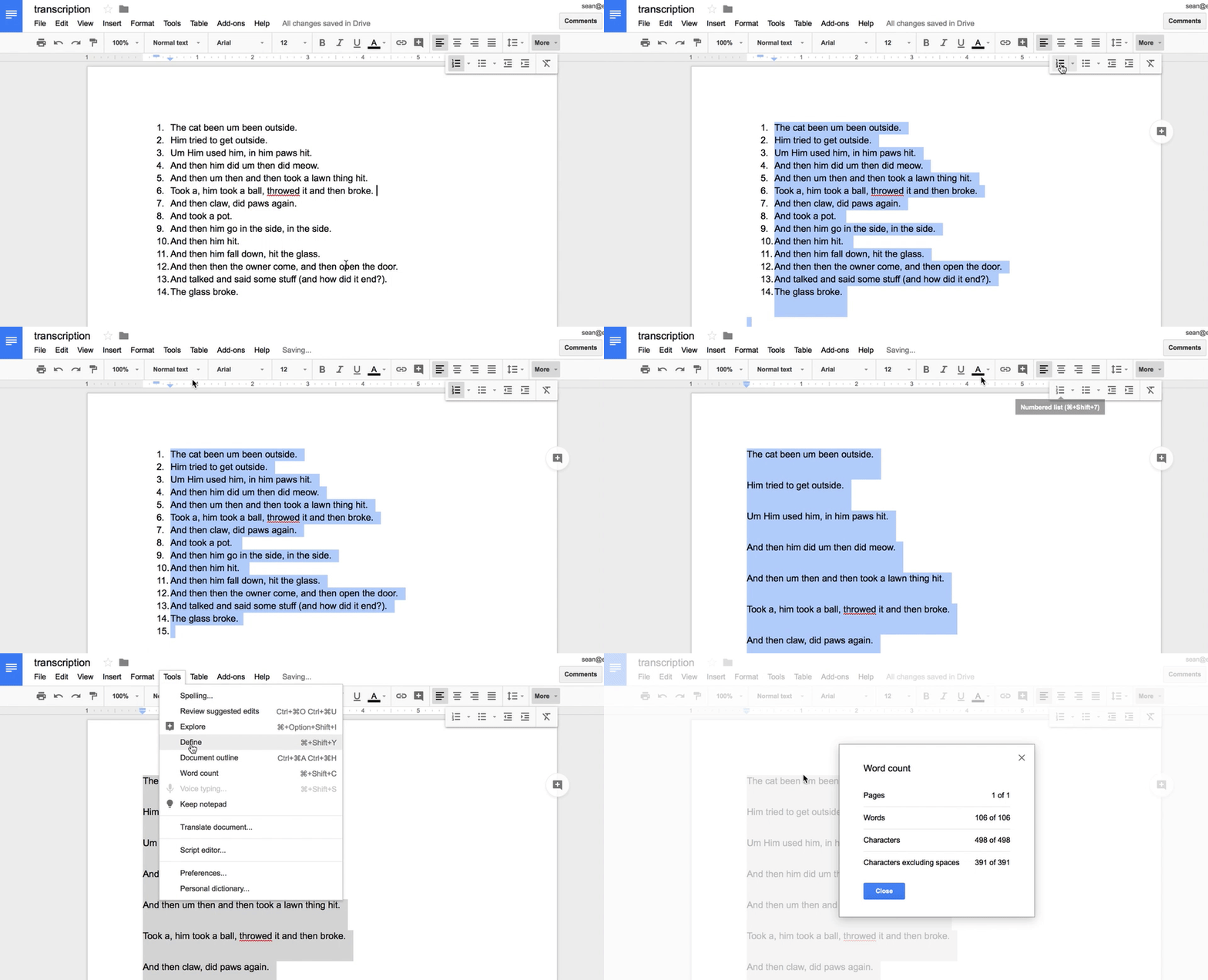
Periodically, I try to do some searching to see if there is anything tech-wise that can ease what can be some pain within this process. Speech-to-Text (STT) technology, in which a device or some kind of software is used to transcribe spoken language, continues to evolve. Best I know, we still can't play a recording into STT tools (such as those built into a Mac or Google Docs) and have it accurately transcribe. However, I found this idea recently and gave it a try, with nice results. Paraphrasing Leah Fessler of Quartz at Work (thanks for this post!), the steps are:
1. Find a quiet space.
2. Plug yourself in (you may benefit from using headphones with a mic).
3. Open a blank Google Doc (Note: only in Google Chrome)
4. Open the Voice Typing tool (Tools>Voice Typing)
5. Ensure the Voice Typing button appears.
6. Ensure your microphone is turned on and your language is set.
7. Listen to a small portion of your language sample recording (e.g. a sentence)
8. Click the microphone button, and repeat what your client/student said. Remember that you can say "comma" for commas and similar for other punctuation.
9. Turn Voice Typing off as you listen to the next part of your recording (whatever you can hold in your short term memory), then continue, repeating steps 7-9.
10. Watch along as you transcribe and make corrections and additions.
A few tips may be of help:
-I like the Voice Memos app for iPad. If using the app of the same name (this one native to the operating system, so free) on iPad or iPhone, make sure you turn your device Auto-Lock (in Settings>Display and Brightness) to something longer, like 5 min. I notice after auto-locking, my phone's Voice Memos app moves the recording back 20 seconds or so, which is annoying.
-You can use either app's 15 sec forward/back buttons liberally to re-listen or go forward.
-Finally, I think the above steps saved me time and boredom in the transcription process, but I used step 10 extensively. If you have a student with a lot of revisions or repetitions, you'll find you are better off doing a combination of typing and dictating (using dictation with the student's more fluent sentences).
Let me know if you try this and what you think, or if you have other strategies!
Showing posts with label evaluation. Show all posts
Saturday, February 1, 2020
Friday, March 30, 2018
News elsewhere...
Hi Folks,
An update on a few things I have had going on...
I am excited to be a featured speaker at ArSHA in Tucson in a few weeks! Hope to see some of you there.
SpeechTechie was named one of the Top Speech Pathology Blogs of 2018 by the website Speech Pathology Master's Programs. Many great resources are listed there. You can read the interview I provided for the website here.
I have written a number of columns for Mindwing Concepts and ASHA published over the past several months:
Tech Tuesday: La La Land, Part 1 (recapping resources provided at ASHA Convention)
Tech Tuesday: La La Land, Part 2 (recapping resources provided at ASHA Convention)
Tech Tuesday: Plotagon’s Emotions Connect to the 6 Universal Feelings
Apps that Ease Assessment of ASD and Social Learning (ASHA Leader)
Lastly, three courses I created for MedBridge are now available! You can join MedBridge to obtain CEUs through great courses; see my affiliate link for a discounted rate.
The courses are as follows:
Therapeutic Technology Use in Language Intervention For School-Age Clients
Tell Me a Story Part 1
Tell Me a Story Part 2
You can even see me in a tie! That is indeed a rare sight.
Disclosure: Author receives a consultation fee for providing blog content to Mindwing Concepts. Author has also contracted with MedBridge to provide three courses and is part of their affiliate partner program. He will receive a royalty when his courses are available and are completed by members. Additionally, he receives a commission for each membership purchased through his affiliate link.
An update on a few things I have had going on...
I am excited to be a featured speaker at ArSHA in Tucson in a few weeks! Hope to see some of you there.
SpeechTechie was named one of the Top Speech Pathology Blogs of 2018 by the website Speech Pathology Master's Programs. Many great resources are listed there. You can read the interview I provided for the website here.
I have written a number of columns for Mindwing Concepts and ASHA published over the past several months:
Tech Tuesday: La La Land, Part 1 (recapping resources provided at ASHA Convention)
Tech Tuesday: La La Land, Part 2 (recapping resources provided at ASHA Convention)
Tech Tuesday: Plotagon’s Emotions Connect to the 6 Universal Feelings
Apps that Ease Assessment of ASD and Social Learning (ASHA Leader)
Lastly, three courses I created for MedBridge are now available! You can join MedBridge to obtain CEUs through great courses; see my affiliate link for a discounted rate.
The courses are as follows:
Therapeutic Technology Use in Language Intervention For School-Age Clients
Tell Me a Story Part 1
Tell Me a Story Part 2
You can even see me in a tie! That is indeed a rare sight.
Disclosure: Author receives a consultation fee for providing blog content to Mindwing Concepts. Author has also contracted with MedBridge to provide three courses and is part of their affiliate partner program. He will receive a royalty when his courses are available and are completed by members. Additionally, he receives a commission for each membership purchased through his affiliate link.
Friday, November 24, 2017
Dispatches from ASHA, Part 3
A third session I attended at ASHA leads me to a tech-tie-in on this blog and was called Consider the Big Picture: Using Classroom Expectations to Guide Assessments and Develop Educationally Relevant Interventions (Chinen and Ireland). A take-away from this session was that diagnostic activities such as dynamic assessment and language sample analysis are essential to supplement testing components of evaluations.
Now, I'm a HUGE narrative person, so consider that bias (if a focus on functional communication can be considered a bias). But as I was hiking through a park in LA with some friends I hadn't seen in awhile, I got meta for a moment. I thought about how much of the welcome and meaningful experience of hanging out with them again consisted of narratives. Spoiler alert: all of it.
One resource recommended by Chinen and Ireland is called SUGAR (Sampling Utterances and Grammatical Analysis Revised), and a couple of keystrokes brought me to a brand new article from July, 2017 with updated research, language elicitation protocols and norms for ages 3-7;11.
You all know how to read a research article, so besides a few points I will just say: PLEASE READ IT. The article would also make a great study-and-apply activity with colleagues
Pavelko and Owens' aim is to make these vital assessment processes easier for busy clinicians, and they do:
-"LSA (Language Sample Analysis) may be 'the only assessment measure that captures a speaker's typical and functional language use.'"
-A recent survey of school-based SLPs revealed that only 2/3 had used LSA in the last year and of those, about half had only done so in no more than 10 cases.
-The authors recommend using digital recording tools rather than attempting to transcribe live, which is stressful, inaccurate, and probably hampers clinicians' ability to elicit in a functional context. I like the Voice Memos app on my iPhone or Voice Memos for iPad. Tip: try to "rewind" as little as possible. Transcribe and get what you can. Then re-listen and edit.
-Protocol and techniques are offered for eliciting (among others):
"Ask process questions
How did/do…
What happened…
Why did…
Use “Tell me…” or “I wonder…” statements.
Use Turnabouts
Comment + cue for child to talk
Use Narrative Elicitations
Build on what the child says or what you know.
Begin with 'Your mom says you… that sounds like fun. Tell me what happened.'
'I know that you… Tell me what happened.'
'Did you ever… Tell me what you did.'"
So, the tech tie-in. Pavelko and Owens demonstrate simple uses of word processors to help clinicians quickly calculate total number of words, mean length of utterance in morphemes, words per sentence and clauses per sentence, and provide normative data for all of these for ages 3-7;11. These involve using the numbering feature and word count of MS Word; I would also point out that the same features are available in Apple's Pages and Google Docs.
Clinicians might also benefit from the File>Duplicate option or Make a Copy in Google Docs when working with the sample and taking different measures, so as not to be confused by the required edits to the sample (e.g. using spaces to mark morphemes).
In Google Docs, some of the techniques suggested:
An important read. If working with older students I also recommend Hadley's Language Sampling Protocols for Eliciting Text-Level Discourse and Heilmann and Malone's Rules of the Game.
Now, I'm a HUGE narrative person, so consider that bias (if a focus on functional communication can be considered a bias). But as I was hiking through a park in LA with some friends I hadn't seen in awhile, I got meta for a moment. I thought about how much of the welcome and meaningful experience of hanging out with them again consisted of narratives. Spoiler alert: all of it.
One resource recommended by Chinen and Ireland is called SUGAR (Sampling Utterances and Grammatical Analysis Revised), and a couple of keystrokes brought me to a brand new article from July, 2017 with updated research, language elicitation protocols and norms for ages 3-7;11.
You all know how to read a research article, so besides a few points I will just say: PLEASE READ IT. The article would also make a great study-and-apply activity with colleagues
Pavelko and Owens' aim is to make these vital assessment processes easier for busy clinicians, and they do:
-"LSA (Language Sample Analysis) may be 'the only assessment measure that captures a speaker's typical and functional language use.'"
-A recent survey of school-based SLPs revealed that only 2/3 had used LSA in the last year and of those, about half had only done so in no more than 10 cases.
-The authors recommend using digital recording tools rather than attempting to transcribe live, which is stressful, inaccurate, and probably hampers clinicians' ability to elicit in a functional context. I like the Voice Memos app on my iPhone or Voice Memos for iPad. Tip: try to "rewind" as little as possible. Transcribe and get what you can. Then re-listen and edit.
-Protocol and techniques are offered for eliciting (among others):
"Ask process questions
How did/do…
What happened…
Why did…
Use “Tell me…” or “I wonder…” statements.
Use Turnabouts
Comment + cue for child to talk
Use Narrative Elicitations
Build on what the child says or what you know.
Begin with 'Your mom says you… that sounds like fun. Tell me what happened.'
'I know that you… Tell me what happened.'
'Did you ever… Tell me what you did.'"
So, the tech tie-in. Pavelko and Owens demonstrate simple uses of word processors to help clinicians quickly calculate total number of words, mean length of utterance in morphemes, words per sentence and clauses per sentence, and provide normative data for all of these for ages 3-7;11. These involve using the numbering feature and word count of MS Word; I would also point out that the same features are available in Apple's Pages and Google Docs.
Clinicians might also benefit from the File>Duplicate option or Make a Copy in Google Docs when working with the sample and taking different measures, so as not to be confused by the required edits to the sample (e.g. using spaces to mark morphemes).
In Google Docs, some of the techniques suggested:
An important read. If working with older students I also recommend Hadley's Language Sampling Protocols for Eliciting Text-Level Discourse and Heilmann and Malone's Rules of the Game.
Wednesday, April 2, 2014
iPad Essentials: Window Shopping in the App Store
While recently conducting a few "iPad 101"-style workshops for educators and clinicians, including a webinar for ASHA available on-demand, I have been talking a lot about finding and getting ideas about helpful apps. I discussed this in a post a bit back mentioning resources including Smart Apps for Kids, Yapp Guru and Apps Gone Free, but it's also worth noting the "window shopping" one can do in the App Store app itself.
Although the information the App Store provides is far from comprehensive (I always recommend looking at app demos on YouTube before purchasing) and reviews can be quite skewed or unhelpful, it gives you a good visual "first pass" to new ideas. The App Store has also recently improved in its organization, which primarily is what we'll focus on in this post.
I use the term "window shopping" because the App Store is essentially a storefront from Apple and an avenue to display things that look attractive together-- collections! Upon opening the App Store, the Featured tab is an area that is a good idea to check out about once a week, primarily because Apple's "App of the Week" is always free. If Apple has singled an app out in this way out of the zillions available, you can be assured it is pretty neat-o, and many of the Apps of the Week are kid- or education-related.
Although the information the App Store provides is far from comprehensive (I always recommend looking at app demos on YouTube before purchasing) and reviews can be quite skewed or unhelpful, it gives you a good visual "first pass" to new ideas. The App Store has also recently improved in its organization, which primarily is what we'll focus on in this post.
I use the term "window shopping" because the App Store is essentially a storefront from Apple and an avenue to display things that look attractive together-- collections! Upon opening the App Store, the Featured tab is an area that is a good idea to check out about once a week, primarily because Apple's "App of the Week" is always free. If Apple has singled an app out in this way out of the zillions available, you can be assured it is pretty neat-o, and many of the Apps of the Week are kid- or education-related.
Note also that the menu at the top of the App Store leads you to some relevant areas for SLPs and language interventionists. Tap Kids (and then an age range) and this will bring you to educational, creative, or game-based apps that may be repurposed for therapy and learning activities.
Under the More tab, there are several areas to explore. The Education area has great curriculum-based apps that can be used to provide visual and interactive experiences with content...
...and includes terrific Collections, among them the Apps for Every Grade Collections- especially helpful for those who struggle to find relevant apps for Middle and High Schoolers.
The More tab in the top menu also brings you to the Medical category, which has many apps relevant to clinical work.
Exploring the App Store will lead you down new avenues and provide a great opportunity to hone your evaluation skills: which apps seem to be FIVES-Friendly: Fairly Priced, Interactive, Visual, Educationally Relevant, and "Speechie" or Specific to intervention objectives?
Happy window shopping!! Let us know if you find something good...
Labels:
apps,
evaluation,
FIVES,
ipad essentials
Wednesday, October 17, 2012
Appy-Picking Month: Introducing ATEval2Go!
I am very excited about a recent release, an app I helped develop for Smarty Ears Apps- ATEval2Go! Author Chris Bugaj worked with us to design this app, which helps assistive technology professionals (a diverse group that tends to include SLPs like Chris) complete all aspects of an AT eval, including background information about the student or classroom, environmental observations and student goals, and recommended tools and strategies. The app produces a report that can be emailed or exported, or copied/pasted into a word processing program for further editing. I am proud of many of the innovative features of this app, including the ability to add images to a report or record audio or video, and also the ability for professionals using the app to draw from customizable banks of accommodations, goals and recommendations. I have said quite a bit on this blog this month so I will let our video trailer...
...and the full tutorial showing all features of the app...
and, finally Chris' A.T.TIPSCAST episode about the app, speak for themselves!
I hope you will share ATEval2Go with any of the AT Evaluators in your lives! Thanks...
Disclosure: Author has a contractual relationship with Smarty Ears Apps and receives a portion of the profits of this app.
...and the full tutorial showing all features of the app...
and, finally Chris' A.T.TIPSCAST episode about the app, speak for themselves!
I hope you will share ATEval2Go with any of the AT Evaluators in your lives! Thanks...
Disclosure: Author has a contractual relationship with Smarty Ears Apps and receives a portion of the profits of this app.
Labels:
apps,
assistive technology,
evaluation
Tuesday, January 17, 2012
Draw that Habitat!
I love resources that provide enough material to allow for repetition of activities- our kids benefit not only from trying things more than once but also from generalizing to other contexts. When a topic is real-life and relatable to curriculum, even better! Take the topic of animal habitats- how "Speechie" is it? Well, habitats can be described in detail, visualized, have different categories of animals living in them, experience cycles/sequences based on weather and climate, and of course the relationship between animals and habitats is linked to cause and effect and conditional language (if something changed in the habitat, then...)
Take a look at PBS Kids' Go's Draw that Habitat! This resource is linked to the PBS Kids Fetch series, which incidentally has an amazing free app that uses augmented reality to target counting and addition skills. Draw that Habitat! challenges kids to create a habitat for an imaginary animal for whom a few targeted characteristics are provided:
Draw that Habitat! has its own art pad (which is Flash-based, so non-iPad friendly) for kids to draw the picture and submit after you create an account. Submitting provides the extra rationale of "publishing" one's work, often powerfully motivating, but you will probably have to set realistic expectations about work being recognized by the site (I have no idea how many submissions they get).
The other aspect of Draw that Habitat that makes this a great Project-Based or Theme-Based Learning kind of site is that previous months' animals and habitats are featured on the Gallery page. This provides a great resource to set the context and provide examples for students. You can use the examples for picture description activities, read the rationales for why the examples were chosen for the animal, and even have the kids evaluate and "rate" the submitted drawings. So many language opportunities! You could also use previous animal descriptions (the "About this Animal") for additional practice in constructing habitats.
Although you cannot use the site's art pad and submit for previous months' animals, this is a good place to use traditional drawing materials or an app such as Doodle Buddy.
Monday, May 3, 2010
Using GarageBand to record your speech/language samples or narrative activities
Here is a screencast I created using Screencast-O-Matic, showing the steps to using GarageBand software to record and save audio for evaluation or therapy activities on a Mac. It's quite easy to use, just click and see! I will try to do another soon for Audacity, a similar program for PC.
Language Lens
Language Lens
- Kids love using programs such as GarageBand to record and listen to their voice, whether during an evaluation or activity such as narrative practice.
- Digitizing this process helps you organize and efficiently save and review your audio files (and not have to have a tape recorder handy to write your reports).
Subscribe to:
Posts (Atom)