Showing posts with label visualization. Show all posts

Friday, April 5, 2024

Tailoring and Modifying ChatGPT Results to Create Quick Content

Last month, ASHA Leader featured a helpful article, Using ChatGPT to Create Treatment Materials (Price, Lubniewski, Du) providing great examples of prompts to ChatGPT for creation of sound-loaded paragraphs. Key to the article is the idea that what is returned will need to be filtered through your clinical expertise to create a usable material.

I have found that this process is still "quick." Recently I have been using a student's interest, in this case, cooking shows, to work through comprehension of paragraphs. We use strategies such as noticing and breaking down elaborated noun and verb phrases and also visualizing, with light application of the Visualizing and Verbalizing methods (structure words and digital squares in place of the "felts"). Though Lindamood-Bell provides quite a bit in terms of content with visual imagery for free, I have wanted to cater the content more to his interests and use subjects like Ina Garten.


Here you can see that the original return contained too much complex vocabulary, so you can use the chat aspect of the tool to continue refining. After simplifying the vocab, I asked it to detail a specific recipe like lemon chicken, then needed to ask it to simplify again, and ultimately did some editing when I pasted it into a Google Slide for a more usable experience.

You can see the full progress of my chat with ChatGPT here.

Wednesday, June 3, 2020

Fallen London

If working with older students in language or social groups, Fallen London is one option of a very simple (technically) game you may find useful in teletherapy. This role playing game starts with creating a character and escaping a jail, and can be used for targets such as:
-visualization: the game runs more as a textual choose your own adventure, so you can encourage students to read and visualize, or visualize as you read.
-observation and commenting within the images provided.
-vocabulary and figurative language: the game starts with reference to a dirigible and all of my groups needed to google to figure out what that was, you also choose paths such as watchful, dangerous or shadowy so predicting what those might mean can be part of your discussion.
-agreeing on moves- we have just used one google login for a group and have them play as a single character.


You can read more about the background of the game here. I always follow the process, not product rule and am unsure how long my students will want to play. Abandoning group endeavors is OK, it's part of being in a group (and play).

Monday, April 6, 2020

Demo of Alexa Skills Useful in Telepractice

In this video I provide a casual (hey, it's a Thursday night during a national emergency) demonstration of using the Echo Dot for "skills"/games useful in telepractice for language therapy or social groups. You can also experiment with using Reverb or Alexa within the Amazon app. The app I mention with lists of Alexa skills is called Skills for Amazon Alexa App and is free.


Thursday, April 2, 2020

Simple Idea: Uses for online whiteboards

Sketches to promote narrative, expository language or social understanding are well-documented tools in speech-language pathology, and don't have to be pretty:

Carol Gray's Comic Strip Conversations approach

Stickwriting Stories (Ukrainetz)

Sketch and Speak (Ukrainetz)

In a telepractice session you can use the platform's whiteboard if it has it (I can't figure out how to make the Zoom one come up and may have inadvertently shut it off), or find any number of web-based boards (this no-sign-in Explain Everything board has an educational bent).

Whiteboards can be used to:

-Illustrate narrative (related to strategies of visualization/Social Thinking® sharing imagination). This past week I had the boys follow a "group plan"/gratitude moment of describing a high of the week which included my use of the park stairs for exercise, keeping in touch with classmates, video games, time in nature, and turkey burgers.


-Work on appropriate level of detail, or show a clock to promote pace (executive function).

-Design something collaboratively. Make a collaborative drawing.

-Play Pictionary for general words/main idea or vocabulary sets.

-Play a "Backseat Drawing" style game where one describes/one draws "make a small circle at the end of that line."

Saturday, October 13, 2018

Explain Everything in Chrome

Explain Everything has historically been a great "whiteboard"/"explanimation" app allowing us to create a series of slides so to speak, with recording capabilities making animations as we draw, move images and drawings around, and speak to record narration. However, I have found their rollouts and pricing very confusing; they have had a number of versions of their iPad app and it is currently $14.99, which I believe is overpriced for education markets (I'd accept $9.99 for an app this powerful).

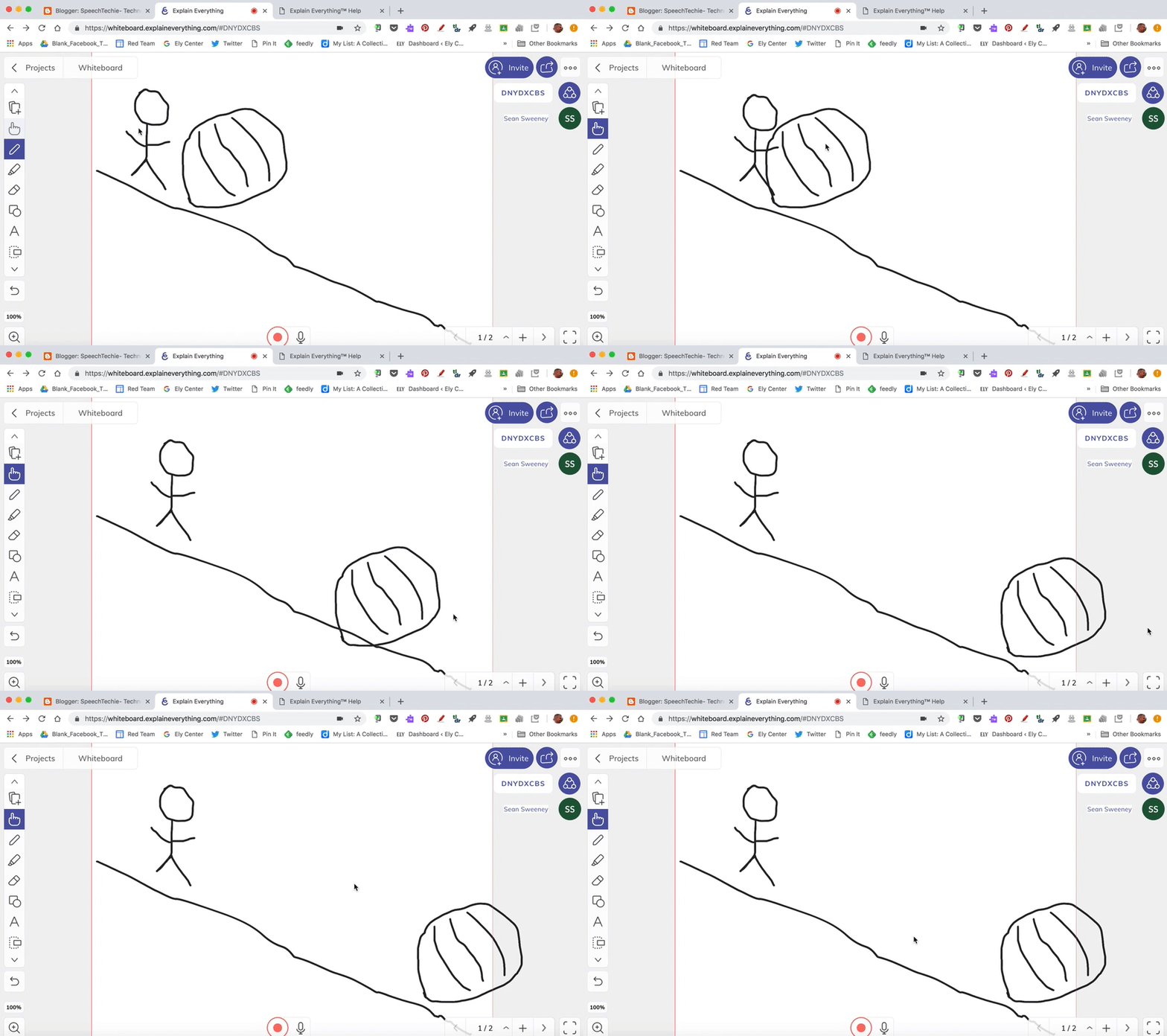
In any case, particularly in our school environments where Chromebooks are often available, you'll want to take a look at least at their free account now available through the Google Chrome browser. You can log in with a Google account and make 3 projects (delete-able and downloadable). Explain Everything is unique in allowing you to make stick figures and animate them- think a teched-up version of Comic Strip Conversations or Stickwriting (for social cognitive or narrative representation, respectively). One trick you need to know is to make drawings move independently, as shown below, go to the [i] inspector icon and select the items, then Ungroup.

There are many uses of a tool such as Explain Everything, and one is narrative retelling. I love books that unfold over one setting, such as The Runaway Pumpkin, in which a humongous pumpkin is pushed down a hill. Here you see an example of a recording you could make with students to retell this story:

Image from Gyazo

Tuesday, August 28, 2018

Stories of Summer

In working with students individually or in groups, I find that sharing our own stories can be a very effective elicitation technique. I'm a social interactionist at heart, and it's just pragmatically appropriate. Tell a story about yourself and you seem like a real person to the child. This interaction then becomes a context for all kinds of targets: listening skills, visualization for comprehension, use of comments and questions, and the students' own narrative language.

This was described as the "Conversational Map" by McCabe and Rollins (1994): "In spontaneous interactions you have to tell a story to get a story. Almost everyone has experienced awkward silences in social situations. No one can think of a thing to say. However, the minute one person launches into a tale about locking keys in his or her car or leaving lights on in a parking lot, virtually all others in the group share a similar incident that happened to them. The exact content of a story prompt is not important per se. What is important is that children are asked to talk about experiences that mean something to them. In general, children are likely to tell their best stories about being hurt or scared. These are experiences that almost all children have had but are significant enough to any particular child to be worth talking about."

One tech twist I have on this technique is that I like to present a photo if possible. Photos provide visual support and extend students' understanding of the situation you are describing. The photo you use may also support their commenting or questioning about relevant parts of your story, or constructing inferences based on the way you present the story. They say "the best camera is the one you have with you," and it's true that this is one good use of our smartphones. Keep in mind that small mundane stories that we experience (a spill or broken thing, whatever) can also be good opportunities to photograph and use in therapy.

Telling stories need not be completely free-form, but can be tied into specific strategies. I try to keep mine short enough to allow for conversational appropriateness and foster use of comments and questions (see Mindwing Concepts' 6 Second Story conversational scaffold). We can also progress from explicitly visual techniques like sketching to using Visualizing and Verbalizing®'s structure words to promote visualization, comprehension and responses.

Here are a few examples of photos (that I was just taking anyway, as a selfie enthusiast) that served as good therapy materials and summer stories, along with model narratives:

I bought a new car this summer, but left it at home when I went for a week down the Cape. I heard from my neighbor that a car parked right near it somehow went on fire! We don't know how, but everyone was OK. I was worried about the car but glad it didn't get damaged.


I went to see the Taylor Swift concert at the end of July at Gillette Stadium. They gave us all wristbands and I wasn't sure why. It turned out they lit up all around the stadium in synch with the music to make patterns. It was a cool surprise!


We went to Scarborough Beach in Maine in August. It turns out a foreign ship had docked nearby and brought a new seaweed with it, which was out of control. It stunk and made the water really gross. We found some areas on the beach to swim that didn't have the seaweed.


I went for a hike on the Welch and Dickey Loop in New Hampshire. It was beautiful but harder than expected. I'm afraid of open high spaces and it had a lot of those. This steep ledge was wet from rain the day before and I slipped and almost slid backwards down it. Thankfully I grabbed onto a tree and was safe!


Have fun telling your stories!

Friday, May 25, 2018

Price it Right

Price it Right is a free Amazon Alexa skill that provides for a terrific game-based activity. The skill allows you to have multiple players or play solo against another random user (you don't directly interact with that person). Through the game, items on Amazon are described (e.g. a humidifier or 12-pack of dog food) and you are asked to speak out a price estimate. Closest guess wins! The length is just right for a language activity, about 6 turns. I used this activity with several groups with some previewing to target:
-visualization: for comprehension it is helpful to visualize the spoken description of the item, perhaps you can even sketch it.
-smart guess/wacky guess (Social Thinking® concepts)
-world knowledge and perspective taking: students should develop a sense of what items cost. You can place this idea into narratives about asking parents for items, and the perspective taking aspects involved.


Friday, October 27, 2017

Haunted Listening Practice

Amazon's devices powered by Alexa provide great listening and social practice, as I mentioned in a previous post. This week I played the Haunted House skill* with a few groups, and though it wasn't perfect (some choices loop back to a conclusion you've already heard), it is free, engaged my students and helped us work on a few skills and strategies:

-The game is a choose-your-own-adventure style activity where a walkthrough of a "Haunted" House is narrated and you are provided with choices, thereby providing a narrative.
-We imposed a "round the table" rule for answering Alexa, in the process working on "group plan" and whole body listening.
-The auditory input gives you an opportunity to work on the skill of visualizing- consider using your Visualizing and Verbalizing® structure words or having the students sketch a collaborative "map" of the house and the events in different locations, Stickwriting Stories style (Incidentally, there's a good "Scary Visitor" story here to model).


*Alexa's skills are like apps, so to speak. To use these you will need an enabled device; The Echo Dot is a terrific and inexpensive device. You can enable skills via audio command as shown in the image, but there are several skills with this name. You might want to use the link in my second sentence or look it up in your Alexa app.

Thursday, March 24, 2016

Resources for Insight and Strategic Thinking

Much of our work is about teaching strategies- a key element in generalization into situations across the day. However, we work with kids who, for a variety of reasons, may not be that "meta." As a result they can struggle to explain why they are even "at speech," let alone their exact goals or strategies to achieve them.

I recently read a very interesting article on infusing video game principles into therapy, "Enhancing the Therapy Experience Using Principles of Video Game Design" (Folkins, Brackenbury, Krause, and Haviland, 2016). The authors' focus was not on including actual video games in therapy but rather incorporating features of games such as "risky challenges" and "generalization" into therapy activities. The article describes how risk-taking in video games is similar to the concept of the Zone of Proximal Development and immersing oneself in "pleasant frustration," and that generalization from therapy can be promoted, as it is in video games, by using learned skills in different contexts. This article can be found on the ASHA website.

These ideas were on my mind when working with a client who a) could use a dose of engagement and b) needs support around the idea of using strategies in the classroom. An area we are working on is comprehension, including that of discourse, but also in following directions. I encountered a review of research on this by Nicole Allison (great summary, Nicole!) particularly supporting the use of a combined rehearsal and visualization strategy for following directions (Gill, Klecan-Aker, Roberts, & Fredenburg, 2003) and have been using these strategies in therapy. The authors define rehearsal as repeating/paraphrasing key elements of the direction and visualization as ‘seeing it happen,’’ or ‘‘imagining the task finished.’’ The authors indicated this strategy use was demonstrated as students repeated directions and looked at relevant objects as directions about them were given, though the visualization principle can be applied in other ways.

I don't often feature "dedicated" speech and language apps on this website, as the theme of the blog is the diverse range of contextual technologies that can be looked at "through a language lens," but a unique dedicated resource I have found helpful is School of Multistep Directions. This app has leveled contexts for students to listen to directions of varied length and complexity (many which are challenging even for me) and "follow" directions through various interactions on the screen--tapping, underlining, highlighting, etc. I especially like the contextual "Chemistry" class, which requires stirring, shaking, and addition of items to containers.

For this particular client, I have sought to build engagement and insight by including the "risky challenge" principle; I simply ask him to guess how many trials he can do accurately (and am glad he generally exceeds his guess).

Regarding the strategy use, I had initially emphasized rehearsal but the study on following directions helped me to tweak this. Though I had used a sketch (word balloons, etc) to demonstrate how rehearsal is done, I wanted to make the visualization element more clear. Enter apps. Two features of apps that make strategy use more explicit--visualizing the meta, so to speak-- are app-smashing (see the work of Greg Kulowiec) or combining apps, and use of word and thought balloons, available in any comic-making app.

So, I made this visual to support my client, who had already started to show use of the particular strategies:


It's pretty easy to app-smash and show strategic thinking in this way:
1. I screenshot one example from the School of Following Directions app.
2. I opened Doodle Buddy and made the screenshot image the background, quickly sketched the circles and arrows that represented the "visualizing", and saved that image to the photo library.
3. Then in Comics Head, I created the comic. This app has characters you can add to a single or multiple frame comic, and also allows you to add photos (I had also saved an image of an iPad so the context of following a direction in the app was clear), pinch to resize photos, layer photos, and put photos, along with text, in word and thought balloons.

Later, I will be able to duplicate and edit this comic to promote generalization to other levels in the app as well as, of course, more importantly, classroom contexts.

Folkins, J. W., Brackenbury, T., Krause, M., & Haviland, A. (2016). Enhancing the therapy experience using principles of video game design. American Journal Of Speech-Language Pathology, 25(1), 111-121. doi:10.1044/2015_AJSLP-14-0059

Gill, C. B., Klecan-Aker, J., Roberts, T., & Fredenburg, K. A. (2003). Following directions: Rehearsal and visualization strategies for children with specific language impairment. Child Language Teaching & Therapy, 19(1), 85.

Monday, February 23, 2015

Sentopiary

Sentopiary ($4.99) is a new and very interesting app from one of the creators of Popplet (a favorite of mine) that has nice potential for use in targeting complex syntax. With Sentopiary, you can explore sentence building with students within two modes:
-The "create a sentence" mode lets you build leveled sentences (e.g. at level 1 with articles, nouns, pronouns and present-tense verbs whereas when you increase difficulty, tenses, adjectives, prepositional phrases and adverbs come into play)
-Similarly, the leveled "challenge" mode asks you to recreate a sentence using the above grammatical categories.


Check out this video to see how it works.


SENTOPIARY - Create - A Hungry Bull from eeiioo on Vimeo.

Sentopiary is fun and engaging, as well as aligning with research demonstrating the importance of phrase elaboration for development of literate language. Kahmi (2014) states "There are three basic ways to make sentences more complex: (a) noun phrase elaboration, (b) verb phrase elaboration, and (c) conjoined and embedded clauses." This app includes contexts for (a) and (b), but not (c)- so I wrote to the developer and requested that they consider this! They promised to do so for future updates.

Kahmi also writes "My general principle for targeting complex syntax in therapy is this: Target the meanings and/or functions conveyed by the syntactic structure rather than the structure itself"- i.e. to make the intervention pragmatically appropriate. This app would seem to contradict that principle with its emphasis on labeling the structures. However, the metalinguistic aspects do align with curriculum goals (e.g. identifying nouns and verbs) and clinicians can easily incorporate strategies to emphasize meaning as I often recommend "around the app" such as:
-incorporating sketching or visualization strategies about constructed sentences and at the same time increasing bombardment/elicitation of the structure.
-utilizing the app's potential for absurdity in constructing sentences.


So check out Sentopiary- looks like a great tool for a wide age range!

Wednesday, November 12, 2014

Calming, Part 3

Incorporation of mindfulness techniques, regardless of instructional discipline, is a strategy that has more than emerging evidence. A systematic review of studies of mindfulness training for students and adults with developmental disabilities found significant effects on a range of areas, documenting reduced aggression and anxiety and increased social skills and academic performance (Hwang & Kearney, 2012). Many programs such as Mindful Schools are being implemented school-wide, teachers are being encouraged to practice mindfulness and leading treatment practices incorporate activities such as Yoga classes.

For our students who struggle with managing their own thoughts, and so are led in tangential/oppositional/anxious/dysregulated directions impacting their communication, mindfulness can be incorporated in small ways. Books, videos and audio files focused on awareness of and strategies around thinking can be very engaging, and also serve as language activities by virtue of eliciting descriptive and metacognitive language.

I highly recommend the Cosmic Kids YouTube channel for a start for short meditation activities for your young students. The Zen Den series are short, beautifully produced, visual meditations focused on a variety of calming thinking strategies. I have field-tested these with a range of groups, with great responses from both girls and boys. The fact that the clips are on YouTube makes a great connection to home, as meditation is meant to be done regularly, even for short periods of time.

Even if that carryover is not achieved, clips such as Master the Monkey establish a concrete connection and vocabulary for an abstract concept: our mind can be like a hyperactive monkey and we can practice strategies to keep it present:


Movies in My Mind presents a fun visualization exercise for which you can conduct a language-based debriefing after the fact: "What did you see on the other side of that door?"


Getting Wanty discusses a specific situation of wanting something in a store, but can be applied to many other situations involving "JustMe" vs. Thinking of Others and social behavior (see the work of Social Thinking®).


See also the great Yoga Adventures videos that put yoga in the context of settings and "stories," again offering connections to language activities and themes.

Hwang, Y, & Kearney, P. (2012). A systematic review of mindfulness intervention for individuals with developmental disabilities: Long-term practice and long lasting effects. Research in Developmental Disabilities. 34, 314-326

Thursday, November 6, 2014

Calming, Part 2

Many of our students have difficulty regulating themselves around problem situations--or situations that are not even really a problem. These students benefit from strategies such as building causal language, using visual tools such as The Incredible Five Point Scale (my favorite being the Problem Scale from Disaster to Glitch), The Zones of Regulation, and self-talk. Lynne Hewitt recently wrote a great article on the connections between Cognitive Behavioral Therapy and Speech-Language Pathology, so do check that out as well.

Breathe, Think, Do with Sesame (Free) provides a fun context to explore these strategies with your young students (PS-grade 1). The app presents five episodes including frustration about getting dressed, separating from a parent at school, and a block tower that falls down. Interactive activities guide the student to help the "monster" use diaphragmatic breathing, visualize plans, and choose a plan to solve the problem.


In addition to the above resources, the app also aligns well with use of Braidy the Storybraid and The Incredible Flexible You Program (TIFY), the five episodes being individual Abbreviated Episodes containing character, setting, kickoff event, response, plan and conclusion, and relating to the social cognitive instruction in TIFY. See also Sarah Ward and Kristen Jacobson's terrific work on executive functioning and making a "future picture" to accomplish tasks.


Disclosure: Author is a contractor with Mindwing Concepts, Inc.  for provision of blog content and professional development.

Tuesday, February 25, 2014

Phrasal Verbs Machine

It's great to find an app that is focused on a particular skill, but also very contextual. Phrasal Verbs Machine (free) is a gorgeous example dedicated to building understanding of phrasal verbs- a verb paired with a preposition. These are known to be challenging to ESL/ELL populations but also are quite figurative in nature, and so are helpful to target metalinguistics for our more literal thinkers. The context of the app is "the circus world of The Amazing Phraso and his friends." Using the app, you can manipulate an old-fashioned "machine" to pair any of 100 phrasal verbs with prepositions.

In Phrasal Verbs View, you slide wheels to align verbs with paired prepositions, then tap view to see a terrific short animation of the phrase:


The animations play quite quickly but can be replayed. This activity is great for developing prediction and visualization skills by asking students what they think they will see in the machine for each combination.

In the "Exercise," the reverse situation is involved. An animation is played and you are asked to choose from a few choices to describe the animation, thus also working on main idea.


I hope you enjoy this unique and generously free app from Cambridge University Press- another example of a nicely designed app for older students!

Thanks to Richard Byrne at iPad Apps for School for pointing this app out.

Wednesday, August 29, 2012

Google Earth and Cracking Curriculum Content

It's exciting to have the continued opportunity to contribute to the ASHA Leader for a few of their APP-titudes columns.  It's a different kind of writing, and I have to go back to stuff I did not learn when completing my journalism degree at BU, and that Magazine Journalism class I never took (I never really liked asking people, you know, questions), but it seems to come out ok after editorial assistance.

In my piece that just came out this week, I discuss apps that clinicians can use to facilitate the daunting process of making your therapy educationally relevant, meaning that the context mirrors or parallels what is going on in the classroom setting.  This is a huge passion of mine, though I feel I must clarify two possible misconceptions.  First of all, I am not talking about SLPs being tutors of classroom subjects.  Rather, the classroom content can be used as a context or target to target goals and strategies: e.g. categorization, description, use of graphic organizers, visualization, and so on. Secondly, although this topic is important, I realized as I saw my column in an issue filled with information about Common Core, it wasn't really about Common Core, as (for now) those standards are only in Language Arts and Math.  But the information I shared can be about Common Core, and I decided where possible that I would include a Common Core Connection in my posts to link resources shared here to relevant Common Core standards, as I know many public school SLPs are struggling to integrate those.

In my column, I wrote, "In addition to the built-in maps app, Google Earth, available for iOS, Android, and any desktop or laptop machine, provides an extraordinary view of any geographic region. Google Earth allows clinicians to target spatial concepts, descriptive language, categories, and reading comprehension, all by zooming in on locations and viewing photos in the Panoramio layer. The stunning interactive 3D imagery available on the desktop version will soon be available on mobile devices as well."

These columns are written somewhat ahead of time, and I wanted to let you know (and see) that the free Google Earth app NOW has 3D imagery for select cities (with more to come): Boston (yay), Los Angeles, Seattle, Denver, San Francisco, Geneva, and Rome.

A 3D view of Boston you can interact with via touch.  The new Tour Guide feature makes Google Earth even more navigable with "playable" (and pausable) views of landmarks and key geographic features. Panoramio Photos provide you with countless visual stimuli to explore, describe and discuss with students.

The new version also comes with a super-handy tutorial that opens on launch (later it can be re-accessed anytime under the "wrench" icon) that can provide a nice lesson in following directions:


This visual/touch tutorial shows you how to navigate in Google Earth for iPad, and also gives you a good opportunity to target spatial concepts including cardinal directions. Again, bring it up anytime under the "wrench" icon.

I really hope you enjoy this great app.  The only caveats I can share are that the 3D imagery is not available on iPad 1, and that I sometimes get a message that "Google Earth is running low on memory" but the app continues to function.

Common Core Connection
This app can be used, with your verbal prompting and scaffolding, to target standards such as:
SL.3.3. Ask and answer questions about information from a speaker, offering appropriate elaboration and detail.


Wednesday, March 16, 2011

Use Flickr to find Visualizing and Verbalizing photos, or interesting stimulus pictures.

The early steps of Lindamood-Bell's Visualizing and Verbalizing program involve training students to describe a presented picture in detail, using "structure words" to help them organize and generate detail.  I have always found these techniques to make great, curriculum-relevant lessons (many kids are told to visualize what they read but do not really know how), even if you don't go exactly by the L-B book.

Rather than poring through magazines (I don't really have any) to find resources for this level of V/V, I really like Flickr's Interestingness Calendar.  On this page, Flickr features 6 photos per day, uploaded by users that are interesting in terms of content, color, and composition.  You would want to look ahead of time and bookmark the URLs of images you find appropriate for therapy.

I have found it helpful to combine V/V activities with Story Grammar Marker- after the picture is described in detail, it can serve as a story starter!


I need to emphasize that the Interestingness Calendar is something you can use to bookmark and/or save images you can use with students, but you should not go there and click around during a session.  Like all photography, some of the images are, well... provocative.  You can click through to an image and bookmark it in your browser or diigo.  You can save SOME Flickr images (some users do not allow you to download their pictures, understandably by selecting Actions above the full-size image, then View all Sizes, then click the size to download.  If this doesn't work, you can always bookmark and display the image on your laptop, iPad or iPod touch during a session.

Saturday, January 22, 2011

Saturday Screencast: Dunkin Donuts (Part 2) and Sketchup for previewing a trip!


In Thursday's post, I talked about how a community trip to Dunkin' Donuts was enhanced by following the kids' interest in a simple and free calendar offered at the store. In today's Saturday Screencast, I'll show how Google Sketchup was used as a visual tool to preview the trip with the kids and construct the model above. We traditionally always take some time to preview a community trip- it's essential to talk about the agenda and the expected and unexpected behaviors (see Michelle Garcia Winner's work) of the place and role play where possible. Sarah Ward's excellent presentation on executive function strategies at ASHA 2010 introduced a terrific strategy- teaching situational awareness through the acronym STOP: Space, Time, Objects, People. By modeling the "Space" aspect of the DD we were visiting, we were able to use a more visual (not just a verbal discussion) map of the place to preview where we would stand until we were ready to order (a key point as the kids, left to their own devices, often just go up to the counter and say "ummmmmmmmm..."), how we would wait in line, where we would sit, etc. In that way, we also were previewing the Time aspect of the trip, because we talked about the sequence of events. The kids really enjoyed making suggestions and watching the scene be built in front of them, and the 2D picture you can save (in Sketchup, that's File-Export-2D Image) was great to share with parents. I also found that kids' managed the trip better after this visual preview than I had seen in the past (and kids who were absent for the preview, not as much).


If you're interested, check out Google's great tutorials that will get you more comfy with Sketchup. To blow your mind a little, there have been quite a few developments in what is called Augmented Reality (AR)- basically laying computerized data or imagery over what we see with our eyes. There is an AR plugin for Sketchup that allows you to use your webcam and a marker (a piece of paper with a graphic trigger) to actually appear to be holding and manipulating the Sketchup model. I can't say the steps to installing the plugin are easy, but if you want a challenge, here's where to start. And here I am holding a whole Dunkin' Donuts, so to speak, in my hands!

Monday, May 17, 2010

Weboword- Nice Vocabulary Cartoons

Weboword-Vocabulary Visually looks like a great resource for SLPs. I am not at all a fan of SLPs selecting vocabulary to teach in an isolated manner. Where do you start? How are they supposed to learn these words within our limited service delivery models? Sometimes it's the best you can do, but I much favor the "Robust" and contextual vocabulary instruction advanced by Beck, McKeown, and Kucan in the book Bringing Words to Life, and subsequent commercial products such as Scholastic's Text Talk. Some years ago at my school, we implemented this approach thanks to a wonderfully supportive literacy specialist (Deana Lew, a SpeechTechie visitor) and principal. It was great for me, because I knew I had done something to build kids' vocabulary without trying to do so in a futile manner in my once- or twice-a-week sessions. I could then work with the body of vocabulary that was being taught in the classrooms, or the trade books used to introduce them contextually.

Thus ends my vocabulary rant. Back to Weboword. This website features terrific cartoons that illustrate specific vocab words. It would be a great model of visualization strategies for vocabulary studies, if one were to pick a few examples, then have students sketch the vocabulary words they are studying right now.


Again, if you haven't already, I strongly recommend reading Beck, et. al.-- these strategies are now widely embedded in balanced literacy programs. You can read a selection from the book at Google Books.

Tuesday, March 16, 2010

Limericks (Clean)

St. Paddy's Day and thereabouts would be a good time to explore limericks with your students. I always liked Edward Lear's nonsensical writings and drawings when I was a kid- I bet many kids still would. On the other hand, they may not find them funny at all. While I think his habit of "rhyming" a word with itself was sort of cheating, it's still clever stuff. You can access some of his limericks at The Edward Lear Home Page.


Language Lens
  • Explore the absurdity in Lear's poetry with your students, eliciting causal statements about what makes it "nonsense."
  • The drawings could be used as a model before reading his poems aloud without pictures, asking students to make their own sketches (thus practicing a visualization strategy). Kids would enjoy comparing and contrasting the results with Lear's!
  • Phonemic awareness could be targeted by identifying and generating alternate rhymes.

Thursday, February 25, 2010

Pre-Made Google Earth Tours

For my inaugural post, I want to highlight Google Earth as a great technology resource for students with language impairments. Google Earth provides a very visual and interactive interface for students to explore regions they are learning about in the classroom. Not only for social studies and geography, Google Earth can be used to illuminate integral literary settings such as Copenhagen in Number the Stars. A Google Earth tour consists of a series of "placemarks," pre-marked geographic viewpoints seen from a particular point of view. Placemarks can also contain descriptions of the location and their significance. In my experience, Google Earth is hugely motivating for students and can provide a great visual review of abstract concepts and language-based curriculum they are at risk to miss in the classroom setting. They especially love the zooming and 3D-Buildings aspects of Google Earth, which can be emphasized in a tour. I created United States regional tours based on my students' social studies series. Social Studies Alive: Regions of our Country. Each tour gives a visual representation of the landmarks highlighted in the text. I was really excited to have it be adopted district-wide; you can download them and view them in Google Earth (after you install the program). Don't miss the many "blue square" photos of the locations that provide further visual review, located in the "Panoramio" moderated layer under Geographic Web. Link to download GE regional tours

Language Lens:
  • Using the GE tours would provide students with a visual context to review and describe curriculum content.
  • Landmarks are categorized by region and would lend themselves to being reviewed in conjunction with listing or describing graphic organizers (such as those contained in MindWing's Thememaker).
  • Review of placemark text can provide a context for listening and comprehension strategies (visualization, connection, questioning, etc) and response to wh-questions.
 
.