
WWF Free Rivers app (free, in another sense, for iOS and also Android devices) provides a cool, "immersive" experience where students can view a river and its effects on the landscape, weather, animals and people around it. The app uses augmented reality technology, overlaying a riverscape and also a world map over your teaching space (e.g. a floor or table). It is extremely easy to navigate and provides student-friendly language (and audio) about the water cycle, where you can make it rain and view above and below the clouds, the cause-effect of damming a river, and other material presented in a storytelling format. The app would be great for providing visual support and engagement in language such as:
-geographic features and landforms/continents (language/categories of social studies)
-weather processes (language/sequences of science)
-expository text structures such as cause-effect
-simpler observative social processes such as "thinking with the eyes" and "making a smart guess" (see work of social thinking)
See video demonstration here or below.
Be sure to install this free app on your iPad for the upcoming school year- you'll surely find a context to use it in syncing with classroom curriculum!
Considering your professional development schedule next year? Check out Sean's offerings for training sessions.
Showing posts with label augmented reality. Show all posts
Showing posts with label augmented reality. Show all posts
Wednesday, June 26, 2019


Saturday, February 3, 2018
A Cat in Therapy
Some years ago at the ASHA Convention, I saw in the program a poster entitled "A Cat In Therapy: Cute, but Effective?" I thought this title intriguing and at the same time, funny, and I was sad to have not been able to locate the poster. Fiete Cats AR ($1.99) gives you the opportunity to test this proposition out. AR--Augmented Reality-- is technology that overlays digital content over our world, often through the camera. In this case, the app makes a cat appear in any room, including your treatment space, and offers a number of interactions:
-Name up to 3 cats
-Observe the cat's needs (think with your eyes)
-Pet and play with the cat
-Feed it when it gets dirty (from playing in paint)
-Provide him food and drink when hungry/thirsty
-Put him to bed
-Record your interactions to make a short movie (saves to Photos app)

Effective? Well, for sure the app is engaging, and provides a context for social observation, labeling actions, and using cause-effect and conditional structures.
This app is also a great pairing with picture books (narrative or expository) about cats. Consider making your own "picture book" with Book Creator, which would allow you to import screenshots or the videos recorded within the app. Students can write about their interactions with the cat, a context for any number of objectives.
-Name up to 3 cats
-Observe the cat's needs (think with your eyes)
-Pet and play with the cat
-Feed it when it gets dirty (from playing in paint)
-Provide him food and drink when hungry/thirsty
-Put him to bed
-Record your interactions to make a short movie (saves to Photos app)

My kitty using his litter box ON MY RUG! Oh, NO!
Effective? Well, for sure the app is engaging, and provides a context for social observation, labeling actions, and using cause-effect and conditional structures.
This app is also a great pairing with picture books (narrative or expository) about cats. Consider making your own "picture book" with Book Creator, which would allow you to import screenshots or the videos recorded within the app. Students can write about their interactions with the cat, a context for any number of objectives.
Thursday, March 6, 2014
AR Flashcards Space
Last mARch I focused on applications of augmented reality (AR) in education. Augmented reality is the technological process of accessing digital information in our analog world. Location or device orientation information, printed "markers" or other data are used, often in conjunction with a mobile device camera, to display relevant information. AR has a major "cool" factor and is very engaging for students to use- often they have not ever experienced anything quite like it!
AR can be quite simple to use as well, as is the case with apps such as AR Flashcards-Animal Alphabet, which I wrote about last year and also just won the 2013 Best Mobile App in Education Edublog Award. The folks who created this app have targeted another topic- the Solar System- in their new app AR Flashcards- Space ($.99)!
This app would be a fun tool to incorporate for students studying space, the solar system or an earth/sun/moon unit. After you print a set of colored flashcards (available here if you would like to preview them), launch the app and point your rear-facing camera at a card. The planet depicted will appear in dynamic 3-D. Tap the planet to hear its name (SLPs, let's acknowledge that the articulation of the students who recorded the planet names, well, has some errors) and another button will play a paragraph-length audio description of the planet.

Langauge Lens:
-The images that appear are great stimuli for descriptive language skills- what do you notice about the planets?
-The information played auditorily for each planet is schematic (focusing on category, e.g. gas planet, temperature and other features) so could be used for auditory comprehension activities or also perhaps to fill out a planetary scavenger hunt graphic organizer of facts about each planet.
-This app could also be paired with Aurasma to create your own content about the planets or another topic.
AR Flashcards-Space is well worth it for $.99!
AR can be quite simple to use as well, as is the case with apps such as AR Flashcards-Animal Alphabet, which I wrote about last year and also just won the 2013 Best Mobile App in Education Edublog Award. The folks who created this app have targeted another topic- the Solar System- in their new app AR Flashcards- Space ($.99)!
This app would be a fun tool to incorporate for students studying space, the solar system or an earth/sun/moon unit. After you print a set of colored flashcards (available here if you would like to preview them), launch the app and point your rear-facing camera at a card. The planet depicted will appear in dynamic 3-D. Tap the planet to hear its name (SLPs, let's acknowledge that the articulation of the students who recorded the planet names, well, has some errors) and another button will play a paragraph-length audio description of the planet.
Langauge Lens:
-The images that appear are great stimuli for descriptive language skills- what do you notice about the planets?
-The information played auditorily for each planet is schematic (focusing on category, e.g. gas planet, temperature and other features) so could be used for auditory comprehension activities or also perhaps to fill out a planetary scavenger hunt graphic organizer of facts about each planet.
-This app could also be paired with Aurasma to create your own content about the planets or another topic.
AR Flashcards-Space is well worth it for $.99!
Thursday, March 28, 2013
mARch: A Visit to the App Store and the Moon
mARch has been a lot of fun! Hopefully it has opened up an awareness of augmented reality and what's available through a handful of simple (or not quite entirely simple, in Aurasma's case), cheap apps.
A lesson I will share, however: searching the app store for augmented reality apps produced 100s of results, 90% of which were less than useful. Many of these apps are free but serve a singular purpose: marketing. An app that makes a Happy Meal box or poster at Walmart come alive is not such a great target for us, and is another example of why sometimes a free app is not worth it.
I wanted to point you also in the direction of fellow enthusiast Jeremy Legaspi, who at The Speech Guy covered some great AR apps such as The Amazing Spider Man AR, Zooburst, Kids Vehicles 1: Interactive Fire Truck, and had his own take on Aurasma.
My two last examples for the month take us into space! Spacecraft 3D (free) can harness kids' interest in space vehicles to target descriptive language. Using this app from NASA and a printed marker, you can view a wide variety of vehicles, including satellites, and their animations. This app is somewhat poignant as NASA's terrific efforts in producing educational technology have just been halted by the budget sequestration.

Great sequencing and storytelling possibilities with this one!

A lesson I will share, however: searching the app store for augmented reality apps produced 100s of results, 90% of which were less than useful. Many of these apps are free but serve a singular purpose: marketing. An app that makes a Happy Meal box or poster at Walmart come alive is not such a great target for us, and is another example of why sometimes a free app is not worth it.
I wanted to point you also in the direction of fellow enthusiast Jeremy Legaspi, who at The Speech Guy covered some great AR apps such as The Amazing Spider Man AR, Zooburst, Kids Vehicles 1: Interactive Fire Truck, and had his own take on Aurasma.
My two last examples for the month take us into space! Spacecraft 3D (free) can harness kids' interest in space vehicles to target descriptive language. Using this app from NASA and a printed marker, you can view a wide variety of vehicles, including satellites, and their animations. This app is somewhat poignant as NASA's terrific efforts in producing educational technology have just been halted by the budget sequestration.

Also check out MoonWalking ($.99). This app is "positional" AR, similar to TourWrist, except animations of the moon landing are embedded in the view. As the app description says:
You can walk around the Lunar Module as it lands. Step up to examine the flag. Take a picture of friends and family posing with Armstrong as he places his boot on the moon. At any moment, toggle between the augmented-reality view and the virtual moonscape.
Great sequencing and storytelling possibilities with this one!

Tuesday, March 26, 2013
mARch: Out of Bubbles? Try BubblesAR
Bubbles have long been a go-to speech and language therapy tool. They're great, I am not suggesting you stop using them to target /b/ and /p/ sounds, "wet," etc.
But, if you run out of bubbles, or want to try something new to engage kids in a joint attention activity, BubblesAR (free) is simple and cool. Tap the circle to blow a bubble in your "room" (the camera is activated). Tap longer and the bubble will be bigger. Whatever the circle is positioned over will be "reflected" in the bubble as it floats, giving you the opportunity to have the child name items in the room. Tap the bubble to "pop" it for a cool confetti effect. That's it!

But, if you run out of bubbles, or want to try something new to engage kids in a joint attention activity, BubblesAR (free) is simple and cool. Tap the circle to blow a bubble in your "room" (the camera is activated). Tap longer and the bubble will be bigger. Whatever the circle is positioned over will be "reflected" in the bubble as it floats, giving you the opportunity to have the child name items in the room. Tap the bubble to "pop" it for a cool confetti effect. That's it!

Monday, March 25, 2013
mARch: Create Rooms with SnapShop
SnapShop Showroom (free) is a fun little app that allows you to create and save rooms using furniture from many well-known realtors such as IKEA and CB2. You can use their limited background library, a saved picture from the web (as I did below) or a picture from your camera- the fact that you can snap your current surroundings and then put furniture in it is what makes this app augmented reality:
.PNG)
This video shows an earlier version of the app in action. The above shot shows it works great on iPad as well.
Language Lens:
This would be a nice app to use with older students or adults as well as young ones. The category of furniture can first of all be developed with this app, as well as descriptive attributes such as size, shape, color and function. Additionally, as the app is essentially for shopping (don't worry, you won't accidentally purchase a sofa during a therapy session) pricing information is provided, which would be a great context for a life skills activity around budgeting.
.PNG)
This video shows an earlier version of the app in action. The above shot shows it works great on iPad as well.
Language Lens:
This would be a nice app to use with older students or adults as well as young ones. The category of furniture can first of all be developed with this app, as well as descriptive attributes such as size, shape, color and function. Additionally, as the app is essentially for shopping (don't worry, you won't accidentally purchase a sofa during a therapy session) pricing information is provided, which would be a great context for a life skills activity around budgeting.
Tuesday, March 19, 2013
mARch: Build Categorization Skills with Adorable AR Animal Flashcards
AR Flashcards-Animal Alphabet ($.99, iPhone/iPad) is another marker-based fun AR visual. After downloading the app, navigate to the website provided to download the animal alphabet flashcards at no additional charge. When printed, they show a 3D animal when viewed within the app.
The animals provided here could be used to target letter-sound relationships or categories- sort by farm, pet, forest animal or whatever! As a followup, you can make other alphabet cards for other categories using Aurasma!
Common Core Connection:
CCSS.ELA-Literacy.L.1.5a Sort words into categories (e.g., colors, clothing) to gain a sense of the concepts the categories represent.
The animals provided here could be used to target letter-sound relationships or categories- sort by farm, pet, forest animal or whatever! As a followup, you can make other alphabet cards for other categories using Aurasma!
Common Core Connection:
CCSS.ELA-Literacy.L.1.5a Sort words into categories (e.g., colors, clothing) to gain a sense of the concepts the categories represent.
Monday, March 18, 2013
mARch: Play with Plants in Cactus AR
Cactus AR is a simple, free app for iPhone and iPad (camera required) that provides you with a context to engage students in "taking care of" an augmented reality plant. After downloading the free app, you can email yourself and print a "marker," a piece of paper that functions like a QR Code. Many AR technologies function this way, by scanning a marker that brings up an image- it's very cool and will give you a "wow!" factor with your students!
In addition to providing an animation (a funky-cute little cactus), Cactus AR is interactive! Each day you can check in on your cactus and give it a water mist and fertilizer- just don't overdo it! A meter shows you how much to provide:

Ultimately, Cactus AR is a simple use of augmented reality that replaces the messy process of having kids take care of real plants. In either case, they have an interactive and visual experience that reinforces the categorical (sun, plants, water), causal and quantitative concepts around plant life, a key aspect of the science curriculum. A good, though small example of FIVES- Fairly Priced, Interactive, Visual, Educationally Relevant, and Speechie.
Common Core Connection:
CCSS.ELA-Literacy.L.1.1g Use frequently occurring conjunctions (e.g., and, but, or, so, because).
In addition to providing an animation (a funky-cute little cactus), Cactus AR is interactive! Each day you can check in on your cactus and give it a water mist and fertilizer- just don't overdo it! A meter shows you how much to provide:

Ultimately, Cactus AR is a simple use of augmented reality that replaces the messy process of having kids take care of real plants. In either case, they have an interactive and visual experience that reinforces the categorical (sun, plants, water), causal and quantitative concepts around plant life, a key aspect of the science curriculum. A good, though small example of FIVES- Fairly Priced, Interactive, Visual, Educationally Relevant, and Speechie.
Common Core Connection:
CCSS.ELA-Literacy.L.1.1g Use frequently occurring conjunctions (e.g., and, but, or, so, because).
Wednesday, March 13, 2013
mARch: Take Virtual Field Trips with Tour Wrist
Moving into other applications of augmented reality (AR) in interventions, today I am going to talk about Tour Wrist (Free for iPhone, iPod, iPad). TourWrist is one of the most dazzling, yet simple to use AR apps, transporting you to geographic locations where professional photographers, businesses, and your average Joe have recorded and uploaded "tours." Once you access a tour, you interact with it by moving the iPad right, left, up and down, and turning around as your viewpoint changes, giving you in many cases a 360º view of a place. The tours are naturally still photos, and are not in real time (probably a good thing), but are nonetheless very cool kid-pleasers.
This is therefore a different use of AR than what we saw with Aurasma- instead of scanning a visual material or marker to view digital information, the gyroscope in the device layers a different viewpoint according to your position, making your reality "augmented." Note that this app does work on iPad 1, but that you have to tap/drag to change the position and viewpoint, so it's not quite AR on that device.
A tip about tours: as this is essentially a marketing app, there are views of less salient stuff such as the inside of hotels, etc. Use the menu to navigate to Points of Interest or Featured locations for better results. From the displayed map, you can also view the label of the tour, which gives you an idea of the content. Just hit the arrow button to access the tour.
Applying the Language Lens to this app:
-Take virtual field trips to a particular location and elicit descriptive language about the viewpoint.
-Use a setting map/graphic organizer to build knowledge of story grammar elements.
-Align with classroom curriculum by accessing tours that relate to content in the classroom (50 states, landmarks, etc)
-Take a screenshot and use as a stimulus for "I was there..." writing.
And the Common Core Connection (note, this is a great app for older students):
CCSS.ELA-Literacy.SL.9-10.5 Make strategic use of digital media (e.g., textual, graphical, audio, visual, and interactive elements) in presentations to enhance understanding of findings, reasoning, and evidence and to add interest.
This is therefore a different use of AR than what we saw with Aurasma- instead of scanning a visual material or marker to view digital information, the gyroscope in the device layers a different viewpoint according to your position, making your reality "augmented." Note that this app does work on iPad 1, but that you have to tap/drag to change the position and viewpoint, so it's not quite AR on that device.
A tip about tours: as this is essentially a marketing app, there are views of less salient stuff such as the inside of hotels, etc. Use the menu to navigate to Points of Interest or Featured locations for better results. From the displayed map, you can also view the label of the tour, which gives you an idea of the content. Just hit the arrow button to access the tour.
Applying the Language Lens to this app:
-Take virtual field trips to a particular location and elicit descriptive language about the viewpoint.
-Use a setting map/graphic organizer to build knowledge of story grammar elements.
-Align with classroom curriculum by accessing tours that relate to content in the classroom (50 states, landmarks, etc)
-Take a screenshot and use as a stimulus for "I was there..." writing.
And the Common Core Connection (note, this is a great app for older students):
CCSS.ELA-Literacy.SL.9-10.5 Make strategic use of digital media (e.g., textual, graphical, audio, visual, and interactive elements) in presentations to enhance understanding of findings, reasoning, and evidence and to add interest.
Tuesday, March 12, 2013
mARch: Augmenting with Aurasma, Part 3- Using Text and Sharing your Work.
The last several posts here focused on using the Aurasma app to "augment," or layer discoverable visual information, over an image, specifically a book page. These same steps can be used to augment other materials- flash cards, posters, bulletin boards, printed images or student-created art. Part one showed how to use Aurasma's library of images and animations, and part 2 gave steps for using your own images and video as "auras."
In my previous series, I showed how QR codes could be used to display text for language stimulation. This can be done with Aurasma, as well. However, while you can easily generate a QR code that displays text (I need to update this as I now think other QR generators are easier to use than Kaywa), Aurasma is image-based. So, you have to make your text into an image! This is easy enough, as you can use a drawing app to write text and save that as an image to the camera roll, or use another app and take a screenshot of the text.
Here's how you do it:


In my previous series, I showed how QR codes could be used to display text for language stimulation. This can be done with Aurasma, as well. However, while you can easily generate a QR code that displays text (I need to update this as I now think other QR generators are easier to use than Kaywa), Aurasma is image-based. So, you have to make your text into an image! This is easy enough, as you can use a drawing app to write text and save that as an image to the camera roll, or use another app and take a screenshot of the text.
Here's how you do it:

1. Use a drawing app such as Doodle Buddy to write single words to be displayed as images. For example, you can use a conjunction such as "after" to promote complex sentence formulation in context. You could also use vocabulary words. Doodle Buddy lets you save the image, but if you want to write longer text, you could just use an app such as Notes, and take a screenshot.

2. Follow the steps in previous posts to make the text an aura.
As stated in the opening posts, when you make an aura it is available in that version of Aurasma, on that device. Auras can be shared between devices by emailing them as a link, however. These steps are a little complicated and were made more so in the newer version of Aurasma, but I thought I would share them anyway:


You would want to keep auras private on your own password-protected device, rather than sharing, if they contain images and video of students.
That's it for Aurasma! I look forward to sharing a few other apps this month to show you how augmented reality can be useful in your practice, but first, a Common Core Connection related to this post:
CCSS.ELA-Literacy.SL.3.6 Speak in complete sentences when appropriate to task and situation in order to provide requested detail or clarification.
Thursday, March 7, 2013
mARch: Augmenting with Aurasma, Part 2- Making it Your Own!
In the last post, we looked at how to use Aurasma's own library of images, animations and 3D models to create an "aura"- an image overlay that appears when you scan a visual material (usually, another image).
Like any great "Speechie" app, Aurasma allows you to use your own images or even videos as auras. As always, this equals limitless contexts for applying the app!
In this post, we will look at how to use materials from your photos app (aka camera roll and photo album) in the context of augmenting a visual material such as a book. It will be important that you have read Part 1, as I am not going to go through each step. I will just be saying how it is different to create an aura from your own photos or videos.

If you are not sure how to do this step, see this post about Saving Images to iPad.


Note that, as stated, an extra step is involved when using your own images or video- you have to name the image/video file (the overlay), and the aura (I usually keep it the same name). Also, if using a photo or video of a child, keep the file private, not public, when you create the aura (see last post's step 6)

The rest of the steps work the same as in Part 1!
If you are creating a video aura of speaking about a book connection, as I modeled above, a Common Core Connection for you:
CCSS.ELA-Literacy.SL.4.4 Report on a topic or text, tell a story, or recount an experience in an organized manner, using appropriate facts and relevant, descriptive details to support main ideas or themes; speak clearly at an understandable pace.
Next post, in wrapping up this look at Aurasma, we'll be looking at how to add an aura that displays text (since auras are images, can you guess how?) and how to share auras to other devices.
Like any great "Speechie" app, Aurasma allows you to use your own images or even videos as auras. As always, this equals limitless contexts for applying the app!
In this post, we will look at how to use materials from your photos app (aka camera roll and photo album) in the context of augmenting a visual material such as a book. It will be important that you have read Part 1, as I am not going to go through each step. I will just be saying how it is different to create an aura from your own photos or videos.

If you are not sure how to do this step, see this post about Saving Images to iPad.

OR, another option is to create your own images or video using the camera. If you want to augment a material with kids' own drawing or writing, shoot a picture of it!


The rest of the steps work the same as in Part 1!
If you are creating a video aura of speaking about a book connection, as I modeled above, a Common Core Connection for you:
CCSS.ELA-Literacy.SL.4.4 Report on a topic or text, tell a story, or recount an experience in an organized manner, using appropriate facts and relevant, descriptive details to support main ideas or themes; speak clearly at an understandable pace.
Next post, in wrapping up this look at Aurasma, we'll be looking at how to add an aura that displays text (since auras are images, can you guess how?) and how to share auras to other devices.
Tuesday, March 5, 2013
mARch: Augmenting with Aurasma, Part 1.
In yesterday's post, I introduced the topic of augmented reality (AR), which can be used to add visuals such as animation, images, video and text to many contexts. We'll be looking at some stand-alone apps that do their specific AR thing, but I wanted to start with Aurasma, the app that was featured in yesterday's video. This video showed Aurasma applied in schools to give kids a way to link, say, a bulletin board to related images and video. Aurasma is actually pretty easy to use!
Note: Aurasma is available for free for iPhone, iPod and iPad 2 and above. This is because a camera is essential to the function of this app and many of the others this month. My apologies to readers with an iPad 1. This app is also available for Android, but I can't attest to how it works.
So, first, a context. Let's say you read a picture book with your kids, which I hope you do occasionally because there are so many skills you can build around picture books. What if you could then (after reading) make the picture book an interactive experience with the students, allowing them to scan the book to view, discuss, and respond to images, text, or video associated with the book? What if they could record videos and make these other visuals pop up themselves? They can.
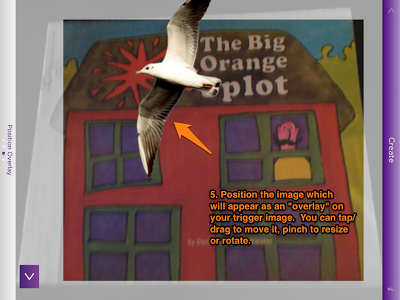
In this post, we are first going to see the steps of creating just one "aura" with the picture book The Big Orange Splot, by Daniel Manus Pinkwater. The steps flow really easily once you see how it works. The Big Orange Splot is a great story about individuality. A man lives on a "neat street" where everything is the same. One day, a seagull drops a can of orange paint on his roof. Instead of just cleaning it off, he allows it to inspire him to make all kinds of interesting changes to his house. His neighbors are at first outraged, then experience the same inspiration.
In this series of steps, you will see how to make an image aura from Aurasma's own library of images "float" above a book page when the page is scanned. Specifically, through these steps a seagull "aura" is accessed when the book's cover is scanned. What could you do with that? It sure is a fun way to prompt retelling and understanding of an initiating event in a narrative. You can think of doing the same type of thing for another visual material, such as a printed or drawn picture, a poster, a flashcard, etc...
When you open Aurasma the camera will be activated:




Note: Aurasma is available for free for iPhone, iPod and iPad 2 and above. This is because a camera is essential to the function of this app and many of the others this month. My apologies to readers with an iPad 1. This app is also available for Android, but I can't attest to how it works.
So, first, a context. Let's say you read a picture book with your kids, which I hope you do occasionally because there are so many skills you can build around picture books. What if you could then (after reading) make the picture book an interactive experience with the students, allowing them to scan the book to view, discuss, and respond to images, text, or video associated with the book? What if they could record videos and make these other visuals pop up themselves? They can.
In this post, we are first going to see the steps of creating just one "aura" with the picture book The Big Orange Splot, by Daniel Manus Pinkwater. The steps flow really easily once you see how it works. The Big Orange Splot is a great story about individuality. A man lives on a "neat street" where everything is the same. One day, a seagull drops a can of orange paint on his roof. Instead of just cleaning it off, he allows it to inspire him to make all kinds of interesting changes to his house. His neighbors are at first outraged, then experience the same inspiration.
In this series of steps, you will see how to make an image aura from Aurasma's own library of images "float" above a book page when the page is scanned. Specifically, through these steps a seagull "aura" is accessed when the book's cover is scanned. What could you do with that? It sure is a fun way to prompt retelling and understanding of an initiating event in a narrative. You can think of doing the same type of thing for another visual material, such as a printed or drawn picture, a poster, a flashcard, etc...
When you open Aurasma the camera will be activated:


Give it a try! These 8 steps seem like a lot at first, but you'll see they are a quick, logical series after practicing a few times.
See my other posts detailing other features of Aurasma:
Oh, and by the way, there's a Common Core Connection:
CCSS.ELA-Literacy.SL.2.2 Recount or describe key ideas or details from a text read aloud or information presented orally or through other media.
Monday, March 4, 2013
mARch- What is Augmented Reality (AR)?
I have been wanting for some time to dedicate some posts to augmented reality (AR) and its potential in speech-langauge and other interventions. As you can tell, I also wanted to wait until a month that had "AR" in it, and March is my last opportunity until next JanuARy, so here I go.
First of all, the phrase "augmented reality" is probably quite complicated-sounding and scary, so I will assure you that I will try to make it simple and relevant to your work. We may remember "Virtual Reality" as a similar-sounding technology, in which a person could navigate a digital space, often with the use of masks or other complex gear, like in this silly scene from Disclosure.
So, what we will be talking about is not that. Much simpler.
Essentially, augmented reality is any technology that displays digital information in our real world, usually through a laptop or smartphone camera and with the help of "tags" (i.e. the person walks to a place that has a location-marked geotag, and information is displayed) or markers, kind of like a QR code. QR and AR are quite related, so if you never saw my series on the usefulness of that technology, you might want to check it out, as it is likely to give you ideas about how to use AR as well.
AR has been in the news a lot recently because of Google's "Glass" project. Google Glass is a new mobile device being piloted that functions like a smartphone to give you all kinds of information through a set of glasses (email subscribers, be sure to click through to the post to see the 2 video examples):
Believe me, I am not rushing to embrace this, either. I feel like I have enough information in my daily life without flooding my vision with it. Others have mentioned the potential pitfalls of this technology. Plus, you look like a tool wearing those things.
And that is not what we are talking about either. Instead, this month will cover a few simple apps that you can use on the iPad in order to provide context, visual support, and engagement for our students. For a great example of what is really easily done with this technology in an educational (or clinical setting), I am going to share one other video. This one has to do with the free and easy-to-use Aurasma (for iPod, iPhone, iPad 2 and up, and Android) app that will be the focus of the next few posts.
So, it's food for thought, isn't it? What can kids do, with your support, with this extra "layer" of information in their environment? More coming soon in mARch.
First of all, the phrase "augmented reality" is probably quite complicated-sounding and scary, so I will assure you that I will try to make it simple and relevant to your work. We may remember "Virtual Reality" as a similar-sounding technology, in which a person could navigate a digital space, often with the use of masks or other complex gear, like in this silly scene from Disclosure.
So, what we will be talking about is not that. Much simpler.
Essentially, augmented reality is any technology that displays digital information in our real world, usually through a laptop or smartphone camera and with the help of "tags" (i.e. the person walks to a place that has a location-marked geotag, and information is displayed) or markers, kind of like a QR code. QR and AR are quite related, so if you never saw my series on the usefulness of that technology, you might want to check it out, as it is likely to give you ideas about how to use AR as well.
AR has been in the news a lot recently because of Google's "Glass" project. Google Glass is a new mobile device being piloted that functions like a smartphone to give you all kinds of information through a set of glasses (email subscribers, be sure to click through to the post to see the 2 video examples):
Believe me, I am not rushing to embrace this, either. I feel like I have enough information in my daily life without flooding my vision with it. Others have mentioned the potential pitfalls of this technology. Plus, you look like a tool wearing those things.
And that is not what we are talking about either. Instead, this month will cover a few simple apps that you can use on the iPad in order to provide context, visual support, and engagement for our students. For a great example of what is really easily done with this technology in an educational (or clinical setting), I am going to share one other video. This one has to do with the free and easy-to-use Aurasma (for iPod, iPhone, iPad 2 and up, and Android) app that will be the focus of the next few posts.
So, it's food for thought, isn't it? What can kids do, with your support, with this extra "layer" of information in their environment? More coming soon in mARch.
Friday, July 20, 2012
Headed to ASHA in Atlanta!
Hi Folks,
I am returning (gradually) from being on vacation for a couple of weeks, and one week pretty nicely disconnected, except for Facebook, which I can't seem to shake entirely. Through that time, however I was checking my personal gmail pretty regularly on my phone, because ASHA notifications typically come out the 2nd week of July. The surely hardworking committee finally came through this Tuesday, and I was really pleasantly surprised to see that both of my submissions were approved. More to come as we get closer, but I wanted to let you know what I will be up to come November 15. Besides these two sessions, I will be helping out at the Smarty Ears booth, so be sure to stop by and say hi in the Exhibit Hall.

Topic Area: Language and Learning in School Age Children and Adolescents (SLP)
Session Number: 1042
Title: Pairing Picture Books With Apps to Contextually Target Language Objectives
Session Format: Oral Session (Seminar 1-Hour)
Day/Time: Thursday, Nov 15 -- 01:30 PM - 02:30 PM
Abstract: SLPs can easily harness emerging trends in mobile technology to engage students in new ways while addressing clinical objectives. Free and low-cost apps for iPad allow clinicians to utilize technologies such as Augmented Reality, Animation and ePub creation tools to visually target language structures.
Topic Area: Language and Learning in School Age Children and Adolescents (SLP)
Session Number: 1084
Title: Applying Emerging Trends in iPad Apps in Speech-Language Interventions
Session Format: Oral Session (Seminar 1-Hour)
Day/Time: Thursday, Nov 15 -- 03:00 PM - 04:00 PM
Abstract: Using picture books in speech-language therapy is an established practice that we can combine with the recent integration of iPad apps in interventions. This presentation describes the contextual overlap between books and apps for various ages, and models the alignment of these "old” and “new" visual tools with language objectives.
I am excited to attend the convention in Atlanta! Hope to see you there!
I am returning (gradually) from being on vacation for a couple of weeks, and one week pretty nicely disconnected, except for Facebook, which I can't seem to shake entirely. Through that time, however I was checking my personal gmail pretty regularly on my phone, because ASHA notifications typically come out the 2nd week of July. The surely hardworking committee finally came through this Tuesday, and I was really pleasantly surprised to see that both of my submissions were approved. More to come as we get closer, but I wanted to let you know what I will be up to come November 15. Besides these two sessions, I will be helping out at the Smarty Ears booth, so be sure to stop by and say hi in the Exhibit Hall.

Topic Area: Language and Learning in School Age Children and Adolescents (SLP)
Session Number: 1042
Title: Pairing Picture Books With Apps to Contextually Target Language Objectives
Session Format: Oral Session (Seminar 1-Hour)
Day/Time: Thursday, Nov 15 -- 01:30 PM - 02:30 PM
Abstract: SLPs can easily harness emerging trends in mobile technology to engage students in new ways while addressing clinical objectives. Free and low-cost apps for iPad allow clinicians to utilize technologies such as Augmented Reality, Animation and ePub creation tools to visually target language structures.
Topic Area: Language and Learning in School Age Children and Adolescents (SLP)
Session Number: 1084
Title: Applying Emerging Trends in iPad Apps in Speech-Language Interventions
Session Format: Oral Session (Seminar 1-Hour)
Day/Time: Thursday, Nov 15 -- 03:00 PM - 04:00 PM
Abstract: Using picture books in speech-language therapy is an established practice that we can combine with the recent integration of iPad apps in interventions. This presentation describes the contextual overlap between books and apps for various ages, and models the alignment of these "old” and “new" visual tools with language objectives.
I am excited to attend the convention in Atlanta! Hope to see you there!
Tuesday, January 17, 2012
Draw that Habitat!
I love resources that provide enough material to allow for repetition of activities- our kids benefit not only from trying things more than once but also from generalizing to other contexts. When a topic is real-life and relatable to curriculum, even better! Take the topic of animal habitats- how "Speechie" is it? Well, habitats can be described in detail, visualized, have different categories of animals living in them, experience cycles/sequences based on weather and climate, and of course the relationship between animals and habitats is linked to cause and effect and conditional language (if something changed in the habitat, then...)
Take a look at PBS Kids' Go's Draw that Habitat! This resource is linked to the PBS Kids Fetch series, which incidentally has an amazing free app that uses augmented reality to target counting and addition skills. Draw that Habitat! challenges kids to create a habitat for an imaginary animal for whom a few targeted characteristics are provided:


Take a look at PBS Kids' Go's Draw that Habitat! This resource is linked to the PBS Kids Fetch series, which incidentally has an amazing free app that uses augmented reality to target counting and addition skills. Draw that Habitat! challenges kids to create a habitat for an imaginary animal for whom a few targeted characteristics are provided:

Draw that Habitat! has its own art pad (which is Flash-based, so non-iPad friendly) for kids to draw the picture and submit after you create an account. Submitting provides the extra rationale of "publishing" one's work, often powerfully motivating, but you will probably have to set realistic expectations about work being recognized by the site (I have no idea how many submissions they get).
The other aspect of Draw that Habitat that makes this a great Project-Based or Theme-Based Learning kind of site is that previous months' animals and habitats are featured on the Gallery page. This provides a great resource to set the context and provide examples for students. You can use the examples for picture description activities, read the rationales for why the examples were chosen for the animal, and even have the kids evaluate and "rate" the submitted drawings. So many language opportunities! You could also use previous animal descriptions (the "About this Animal") for additional practice in constructing habitats.

Although you cannot use the site's art pad and submit for previous months' animals, this is a good place to use traditional drawing materials or an app such as Doodle Buddy.
Friday, July 29, 2011
Building Learning Communities (BLC11)- Day 2!
Another great day of sharing and learning at BLC11! One thing (that I love) about going to a conference geared more towards general educators than SLPs or even special education teachers is that you constantly are reframing everything you are hearing so that it applies to our specific population. I try to do that as much as possible in these tweets and am hoping that you are finding them helpful. The day started off with an absolutely INSPIRING keynote by Marco Torres, who actually wasn't supposed to deliver a keynote at all and was a last-minute sub! I hope to link to his full keynote when it is available- I strongly recommend giving it a look. If you like TED talks, it is in that vein and at that level of amazingness. One more day! Looking forward to it, but sheesh, I am tired.
As always, I know that tweets are telegraphic, so if you don't know what the heck I am talking about and want more info about a tweet or two, please leave a comment.
As always, I know that tweets are telegraphic, so if you don't know what the heck I am talking about and want more info about a tweet or two, please leave a comment.
Subscribe to:
Posts (Atom)





