Showing posts with label play skills. Show all posts

Tuesday, August 2, 2022

Another example: Pic Collage for Mobility, Ease and Versatility

In my session on creating "stories" for SLP Summit last week (recording available free until August 15, Register here), I focused on thinking about features of resources that might make a clinician pick one over another. You may pick Pic Collage if you like using your iPad, doing a pass-and-add playlike activity (I learned from the authors of We Thinkers that add-a-thought=play=conversation), or want the versatility of being able to quickly cut around any image. You may have seen in my recent post on Google Slides/Jamboard that this is not always QUITE as easy there. So always be thinking FEATURES.

Pic Collage, free, available for iPad, Android, and runnable on new Macs (M1 chip) allows for the creation of a visual as-you-go, so that student contributions to the context can be instantly reinforceable, and it is easy enough for them to use themselves. The menu allows you to add photos from your library, search the web for photos (a school-clean version of BING), and also add text or doodles (powerful because you can sketch things that may be hard to find photos of, or sketch over a photo)

As I showed in the session, you can start with a setting (story element teaching) and add elements of the setting (descriptive sequence level of narration) or introduce an initiating event, such as the bear! Double tap on any picture you add to be able to "trim" around it.

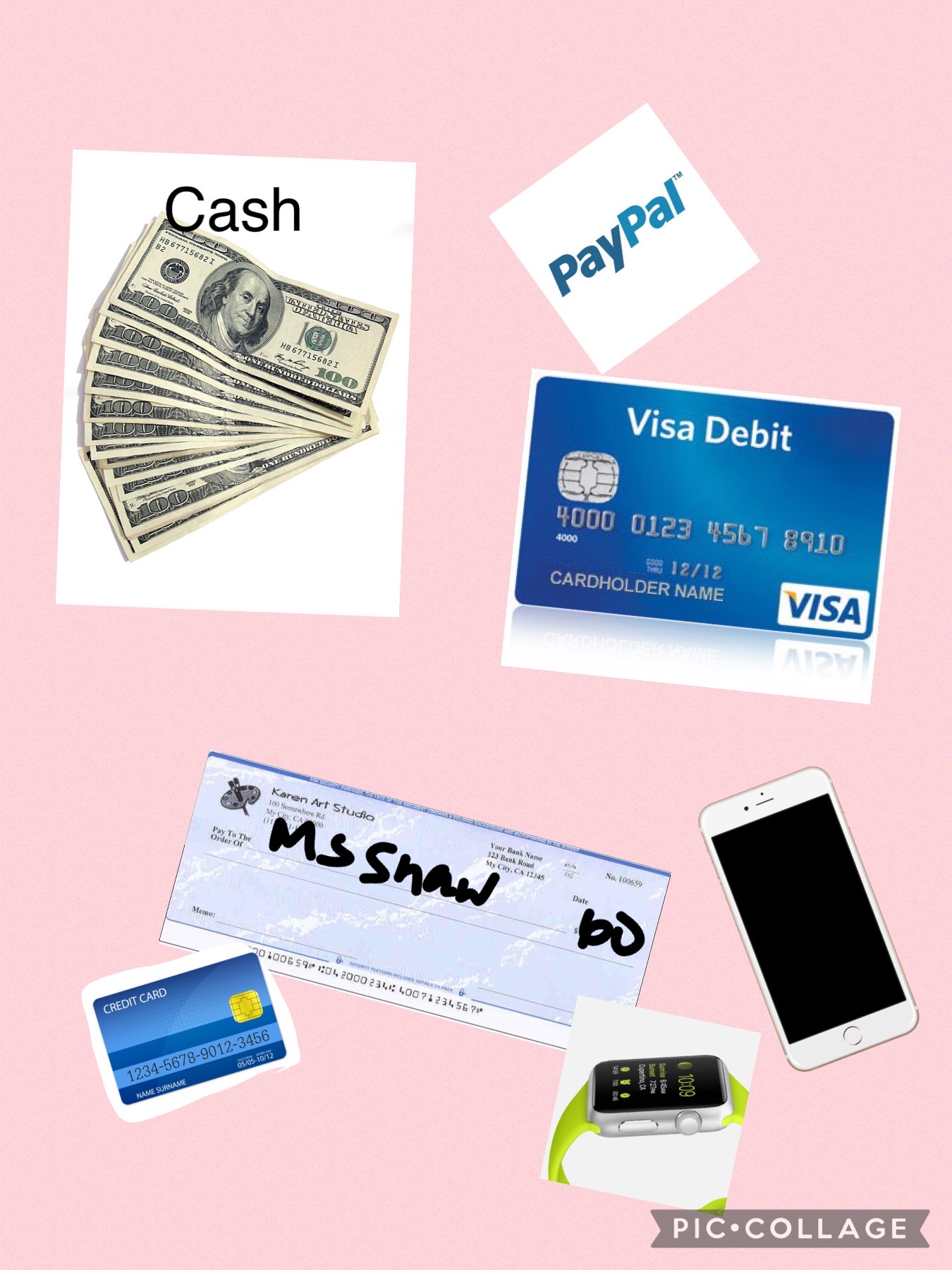
We also talked briefly about expository vs. story language (a good resource is here) and adding to LISTs-one key informational macrostructure- can also be a playful or academically important task. This was made with Pic Collage with/for a student who was learning about the topic/list of "different ways to pay" during a consumer science class. 


Thursday, July 28, 2022

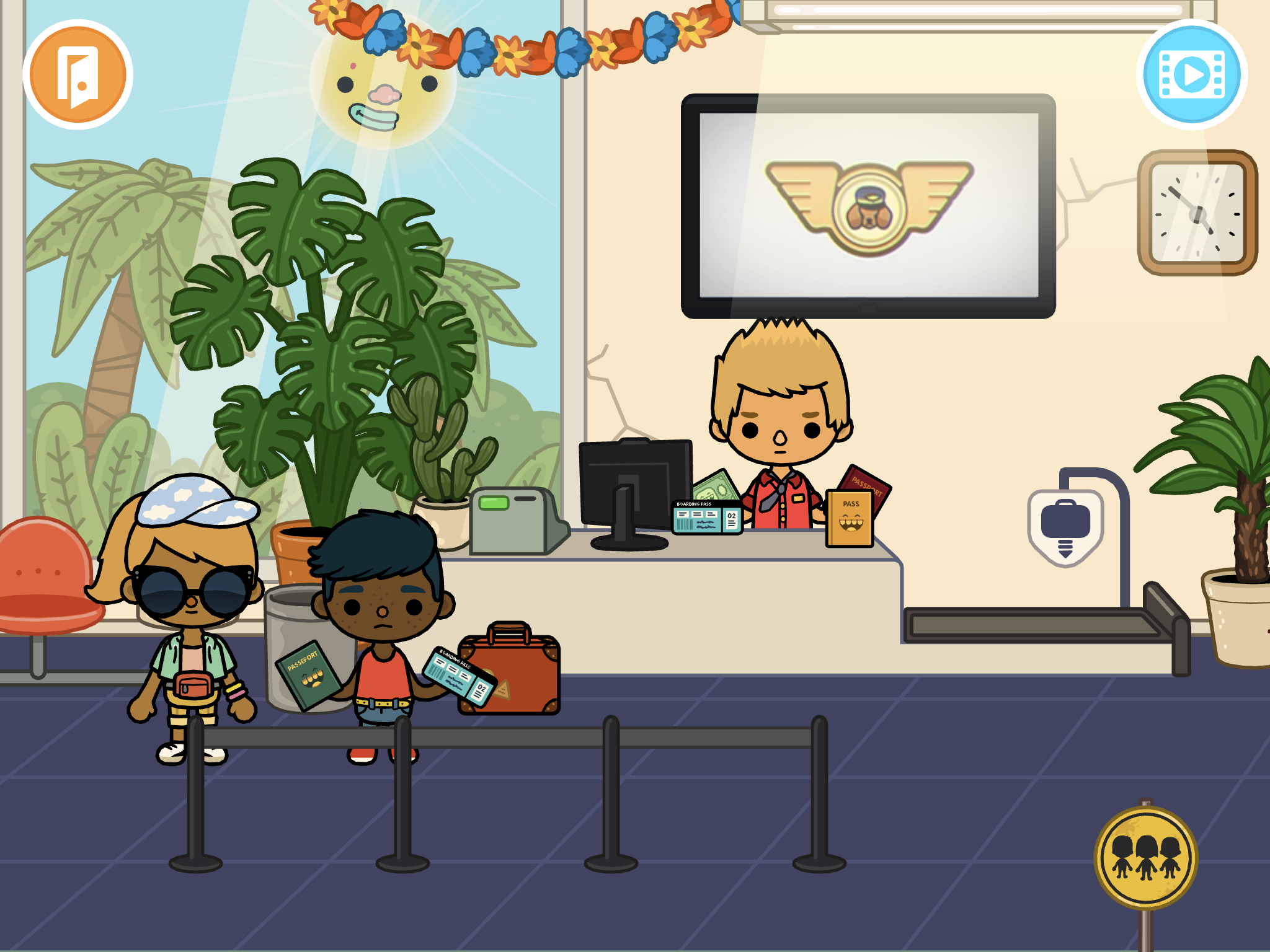
Another Example: 10+ Stories to "Tell" with Toca World

Continuing here to post some companion pieces to my session this week at the SLP Summit (available in its recorded form with others until August 15, register here). One of the app resources I discussed were those available through Toca Boca's Toca Life apps. These are available individually, for example, Toca Life: Vacation which I will discuss here, or the Toca Life: World (also playable on newer Macs w M1 chips) has a way of pulling together your previously purchased apps. 

The Toca Life apps are just filled with real-world contexts and therefore can be used to model, co-create, and play out stories in very structured ways or loosely. Make a scene, involve lots of movement onscreen, or record whatever you do as a story through the screen recording feature. This can be done individually or with a group taking turns, or as explicitly or implicitly as you see fit (e.g. with story grammar cues or not). See my recent post on Mindwing's blog about models of learning and instruction.

Taking Toca Life: Vacation, let's consider how the context can lead us to scaffold a bunch of different stories with students.

Airport: Besides the process of arriving, checking in, going through security, waiting at the gate, and taking off in the plane, what if...

1. You need to buy a ticket (use the ATM etc)?

2. Your flight is not listed on the board of funny-sounding destinations and you need to ask for help?

3. You left something at home (if you have Vacation and City added in Toca World, you can move characters in and out of the panel at the bottom and change locations)?

4. A parent surprises you at school with a vacation (same, start at School and move the characters to the airport in Vacation)?

5. Your flight is delayed (good vocab word)?

6. A dog flies the plane and you don't end up where you planned?

This or other parts of the app could be used in conjunction with Google Earth to "fly" to a location and see some landmarks in 3D!

Hotel: Besides checking in, taking the elevator to your room and doing hotel stuff (bathing, sleeping, changing from your luggage, etc), what if...

7. You win a shopping spree at the gift shop?

8. You eat EVERYTHING at the buffet?

9. You make a mess of your room and need help or equipment from housekeeping?

Beach: Besides all sorts of watersports and maybe a wedding (?), what if...

10. Someone gets trapped on the island?

11. The fish get silly and decide to live on land? 

And don't miss the treasure chest out on the island...

As I mentioned in the session, check out short videos like this that can show you lots of potential stories you wouldn't even know were there!

Tuesday, July 26, 2022

Another example: Storytelling with Google Slides or Jamboard

I had great experience presenting live for SLP Summit yesterday! The people and responses were wonderful. My session will be available in its recorded form as will the other excellent presenters' until August 15. Register here, the conference is presenting more live sessions practically as we speak; CEUs for live/recorded sessions are available for a small fee. To thank the many who attended and (I noticed!) subscribed to this blog as a result of the conference, I thought I'd elaborate on the content with some additional examples over the coming weeks. 

In the session I started by describing how Google Slides and Jamboard can be used to create, interact with and retell stories through activities like making a scene or story mapping. I had previously posted a video on this you can check out. Another example is making a visually supported story retelling activity, in which you can think of Slides or Jamboard as sort of like the old Colorforms- images you insert can be like your stickers!

You can do this with most any context or story, but this past spring I really enjoyed reading We Found A Hat (Jon Klassen) with some groups. There are others in this series but they are a bit darker in ending. The author uses exaggerated eye illustrations (and not much else) to signal thoughts and intentions. Use the book or a video like this one!


For a playful way to work on retelling, make this book a scene. You can do this in either Slides or Jamboard. Slides would offer you more ways to play with formatting; Jamboard would allow easier collaboration (and if you wanted to sketch to change/highlight eye gaze you could do it more easily here). The basics as I show below would be the same.

Start with a blank slide- (either remove any text boxes and such or insert a new blank slide). If you have nothing selected on the slide you should see Background on the bottommost menu. Click that, Choose Image and the Google Image Search choice usually does a good job for any kind of background. 


For your mobile (to click and drag about) turtles and hat you can try Insert>Image>Search the Web. This worked well for a hat. Remember to use the term PNG to try to get images without backgrounds. 


Sometimes you may have trouble getting images that actually are PNGs. I just go over to Google Image Search (open a new tab and search on Google, again using PNG). From here you can right click and copy images to your creation.


A word about this- be aware of copyright, don't republish or attempt to sell something you have created using Google Images unless you have searched for images that are ok for reuse. This goes for all digital storytelling creations. 


Here I copied and pasted the turtle and clicked on Format Options to flip one of them.

From here, use your imagination! 
-move the elements to model a story retell and then have students do the same (a SmartBoard might be fun here)
-You can make Google Slides look less cluttered by collapsing menus or hiding elements under View.
-Add text boxes or shapes for dialogue.
-Make a "same but different story" where the turtles find something else besides a hat. Would they make a different decision? Why?
-Talk about cool things you've "found" (bridge to personal narrative)


Thursday, May 19, 2022

Minecraft Education Edition

I have previously written about using contexts like Minecraft without getting into the thing itself. I've come around on this a bit and next time I'll talk about some simple uses of Minecraft (creative mode, I am still not interested in having kids kill each other in a game), but recently I discovered I CAN USE MINECRAFT EDU!

I had heard about Minecraft EDU for years but, not having an .edu email address, couldn't access it. I have been supervising at Boston University this semester and discovered my email address (plus having a Microsoft account at BU, so you need this too) was the key, as it probably is for many school-based clinicians reading this blog. MC EDU has many created "worlds" that are structured and relate to school topics, so are a nice place to start. 

So, if you have a .edu email, head first to MC EDU and sign in to create an account. From there, I find Minecraft most navigable on an iPad- simplified controls and such. For the EDU activities you'll need the free iPad app. Explore the worlds and see what you might like to use. They are not all amazing, but I highly recommend the very well-done world called The Mindful Knight. Through this activity I grabbed the attention of a student who I have struggled to help with practicing self-regulation strategies, and through several of the "quests" learned about the value of deep breaths and presence (e.g. Five Senses noting of things in the environment).

The deep breathing exercise is practiced by navigating the Knight to an elevator, with great visuals.

I apologize that this is still somewhat of a complicated resource to reach, with the necessity of the .edu address and MS account, but there's a work-around. Look on YouTube for "Mindful Knight Minecraft" and you'll find gameplay vids like this one that can make for good lessons, too!

Friday, November 12, 2021

Free Options for Group Games

I have previously written about the motivational and engagement value (thus promoting communication) of "room based" games. Now that we have transitioned back to in-person groups, we are incorporating some distanced card play, but this tech-mediated piece still serves a purpose (kids can use their own devices, stay far apart). Jackbox is a bit pricey and I wanted to share a few free options I have tried out. 

VXN's Mutter Nonsense and Drawn Out offer good potential for building communication skills in a fun way (including joining in a paced manner, using humor, visualization, association).  Here's a trailer for Mutter Nonsense (think Apples to Apples).


I also recently discovered that Jeopardy Labs has millions of pre-made games that you can choose from, including many related to vocabulary and social skills. Choosing and using group topical interests can also be a great way to use a resource like Jeopardy Labs. Don't fully love the content of a board? Clone it and make some changes. Do I have anything else to say about Jeopardy? Stay tuned...


Speaking of play, if you're headed to ASHA Convention, come see my session next Thursday!

Thursday, May 20, 2021

GoReact (Update)

I wrote about Chicago's Museum of Science and Industry's GoReact app some years ago, but their porting of it to a web version is even more useful in teletherapy or if students have their own devices available. GoReact is an interactive Periodic Table of the Elements; click on any element and you will see a photo of a functional real-life use of it. Even more fun, the Featured Reactions have categories such as health and beauty aids which you are given directions to "assemble." It therefore is a great source of activities for following directions, play, and language links to curriculum.


Consider pairing this activity with Julia Dweck's GiftedTawk's Periodic Table Jamboard, which has great contexts for describing visuals and inferring as you match element "comic book superheroes" with their elements.

We also had fun sliding this into a social topic and making characters ourselves that personify elements with Plotagon Story and having them have conversations that show big, medium and small reactions!

Wednesday, May 5, 2021

Flowing with a Theme

I have spent a lot of time in recent presentations talking about establishing flow (the positive psychology concept) for ourselves and our students by incorporating interests. Flow can also be considered to refer to contextual flow within or across sessions which has been shown to facilitate efficacy. So, to that end, a few activities I whipped up on the theme of May the Fourth Be With You (International Star Wars Day); I realize this is past but you can always observe later, or next year!

Read and discuss Darth Vader and Son (Jeffrey Brown) or another in this series. Many of the single panel cartoons are also usable from Google Images. These cartoons are great context to do picture interpretation of what is implied in the scene, or discuss humor (hyperbole, irony).

Take a field trip to Star Wars: Galaxy's Edge in Google Earth (just search for the location in either Disney park). Students can take turns "driving" via cursor control or in person, make observations and comments, or look closely at the setting (enter Street View by dragging over the Peg Man...my group observed a family wearing masks and inferred the shot was taken during the pandemic). You can also look for POV videos of any of the rides on YouTube which can lead to further observation, commenting, and narrative language.

Use a post such as this one to read about Star Wars' droids (like the EET, they prompt green-group, blue-do, but also stories). My group is now sketching our own droids in Jamboard. I love that Set Background> + > Google Image Search lets you quickly set a contextual background and show students how to do so also.

This post on Instagram also had us doing some fun picture interpretation. "Oh, what do you think the artist wanted to focus on here...?" prompting discussion of characters, setting, representations (e.g. Kylo Ren in Last Jedi with no helmet on looking more human).

Finally, this clip of Yoda generated some good discussion and critical thinking about growth mindset:


Friday, April 30, 2021

Elinor Wonders Why (PBS Kids)

The PBS Kids activities corresponding with the series Elinor Wonders Why provide a number of language targets and are another example of modern web design (i.e. not flash-based). I also like activities with outdoor themes that you can couple with small "field trips" of your own if working in-person. These are now added to the PBS Kids task-analysis spreadsheet.

Curious Campout- good narrative play, like a mini "Toca Life." Click to interact with objects e.g. to set up the tents or put wood on the fire.


Hide and Seek- for one or two players (one covers eyes), hide 4 characters across a wooded area and take turns finding them. Good for spatial concepts and causals, as players are more hidden with clothes colors that camouflage them. 

Two more are added to the linked spreadsheet above!

Friday, October 2, 2020

Full Moon

October has two full moons, including the current one! Full Moon is a good example of the kind of game adaptable to therapy given a task analysis.


In this game you navigate a bunny through various levels to get what he wants. In the above level, to get the apple, you have to infer that you need to click on the light bulbs, discover that the middle one turns all the bulbs off, illuminate the apple (in the right tree) and click the apple to drop it to the bunny.

This game prompts:

-use of remote cursor control, or perhaps not (might be better if students have to tell you what to do)

-spacial concepts

-cause and effect reasoning

-observation, collaborating and conversation

It is untimed so you can move at any pace you wish. Plus it has thought balloons which I love in any context as a social cognitive symbol! Here's a walkthrough (always useful if you are going to use games in therapy).

Monday, June 8, 2020

Shortcut

Shortcut by Donald Crews has always been one of my favorites to use in therapy. It's a personal narrative, so good for teaching story elements, with some suspense. This story has an important message about evaluating dangers- a family of kids had been told not to take the shortcut (railroad tracks) and is surprised by a freight train running off schedule. Suspense is built as the situation unfolds but the children escape safely- reporting at the end that they never talk about the event again, but also clearly have thought/felt about it because they never take the shortcut either (more landscape of consciousness).


Shortcut is also a good representation of black characters in a different time.

As I reported to the parents of group members this week, the book also points to a bigger picture/main idea relevant to our current time (here represented with Story Grammar Marker® icons, Note: Author has a contractual consultative relationship with Mindwing Concepts for provision of blog and presentation content, but receives not royalties should you buy their products).

Note: your use of story mapping need not always be super-pretty, this was in an email.

I found this book on YouTube and planned to turn off the sound and read it aloud. Working with a terrific graduate student in telepractice sessions, I prepped him to do the follow-up activity. I had always had my students make a map of the story, because the setting is so integral here. I sent my student a quick Jamboard sketch (remember, Jamboard available in your Google tools) of what his target might look like, guiding him that he could ask questions like: where did they start? where were they going? where did the road run? where did the tracks run (must make a "shortcut")? other setting elements so it could end up looking something like this?


As activities often show, the students had their own vision when engaging in collaborative drawing, and did more of a micro-setting look at the story. It ended up being more of a mood-board than our original vision. But especially now, it's important to let our students express themselves how they choose, and reinforce their cooperation, inclusion of narrative elements, sharing imagination and following a group plan (terms from Social Thinking®).


Wednesday, May 27, 2020

Pairing Picture Books With Apps in Teletherapy

I've long been a fan of the contextual approach described by Hoggan & Strong in their influential article The Magic of Once Upon A Time-- that of pairing a picture book with pre- during- and post- narrative/language teaching opportunties. I have been presenting about this with many iterations for years, and last year published a pamphlet about it (free) on Teachers Pay Teachers.

We can consider "apps" in this context as including websites and webtools. Last week I used a picture book via it's YouTube read-aloud. There are usually several versions available for any picture book, I like to make choices around the style of reading and a slide-show look. I mentioned I have been picking lots of picture books with emotional vocabulary or self-regulation themes. In this case, I liked this version of Good News, Bad News (Jeff Mack) also because the visuals were a little quick. It provided the opportunity for many stopping points targeting situational observation and use of association and causals:

"Now he has an umbrella, so that's good news. What do you think the bad news will be?"
"Hmm that went by kinda fast, what did you see as the good news there?"


One post activity suggested by Hoggan & Strong is an "art" activity! I set up a collaborative art activity with the group using Jamboard- an interactive/collab whiteboard that is part of the Google Suite (find it in your little "matrix" of Google Apps- upper right corner of Gmail, Drive etc). In cases where I have used Jamboard, I have just clicked on Share and made it editable to anyone with the link, then put that link in the chat of Zoom or Meet, and students navigated to it easily. In this case, I thought we could do a good news-bad news cause effect chain in a different setting- my students chose a supermarket, I started them off and it played out like this:


Here's the resulting Jam. It owes something to Nancy Tarshis, Ryan Hendrix, and Kari Palmer who presented a verbal play activity I once saw called "Yay! Oh No!" Our activity with some coaching involved:
-Student 1: The lights go out at the supermarket!
-Student 2: But good news- the rabbit has a flashlight
-Student 1: But then bad news, dinosaurs invade the supermarket.
-Me: But good news, they are herbivores and just wanted lettuce
-Student 2: Bad news- they have no money.
-Student 1: Good news- there's a cash machine
-Student 2: But it's broken!
-Student 1: a repairman comes (but we should make him an animal to fit the story)
And we all decided everyone gets money to shop!

The boys did well with this playful narrative activity!

Monday, April 27, 2020

Chateau Meddybemps

Chateau Meddybemps is a rich site with many activities you might consider in teletherapy, particularly for young students and for those you are experimenting with incorporation of interactive websites. Activities on this site might be ones you screen share and have the student observe the visuals and verbalize choices, or offer many opportunities for remote cursor control. For students who need buildup of skills in using the mouse in therapy, there are simple mouse skills activities. Also, there are a number of PDF based printable "activity centers" that you may be able to use for play on both sides if you've got willing parents.

Check out the Super Menu for activities like this one in which students can organize a zoo, thereby targeting naming, animal sounds, describing and using causals.


Saturday, February 29, 2020

10 years and 10 uses of my favorite app

This past week I noticed that I started this website 10 years ago (2/24/10). Time flies! I am grateful to all who have read it over the years, and for the opportunities it has provided me: opening doors to many friendships, presenting around the country (and Canada), many trips to ASHA Conventions, and publications there and elsewhere. Thanks everyone!


Of that decade, by far the simple but eminently useful app Pic Collage (free for iOS, Android, Windows) has been my favorite. I recall the day the awesome Sarah Ward showed it to me. It is a great resource for SLPs to make quick visual supports and to co-create with students. Here are 10 things you can do with Pic Collage:


Make a vocabulary board. Note that the Web Image Search makes this a very quick process to do with students (they can choose pictures associated well with vocab words (BING Search is nicely restricted)


Play! Play is about adding thoughts and ideas (see Social Thinking®'s We Thinkers). Here we decorated a treasure chest. Hands-on is great too but sometimes you may be lacking in materials or time. Note that any picture added by Web Image can then be double tapped to "Cutout."


More related to We Thinkers and Story Grammar Marker®- explore what different characters think about, you are therefore relating story events.


Make "Colorforms" from photos to retell/act out a story with dramatic play. In this case Gilbert Goldfish Wants a Pet.


Visualize to scaffold students' personal narrative. In this case we talked about how setting linked to actions and events.


Set the stage for cooperative play with yet another cooperative activity. These students created a sign before playing Lemonade Stand on the Echo Dot.


Target emotional vocabulary based on the 6 universal feelings (happy, sad, mad, scared, disgusted, suprprised). These high school students passed Pic Collage and added to kinds of angry (relate to Zones of Regulation®) after watching a Star Wars clip.


Create any kind of story. Here, setting, initiating event and reaction are visualized.


Use dual-focus vocabulary strategies (semantic and structural per Diane German).


Make curriculum language and categories more salient and visual. In this case a consumer science class was covering "ways to pay."


Make comics showing triggers/initiating events and use of tools and strategies such as self-talk.


Show circular sequences. Think of doing the same for Numeroff's If you Give... series.

OK, that's 12 instead of 10 but I couldn't decide which to share!

Thursday, September 5, 2019

Get on a Roll this Year (Part 2)

In the last post, I talked about how context can be your friend, not only in planning activities and engaging students, but also clinically. Incorporating curriculum topics is a key strategy for clinicians, but we need not be arbitrary about it. Please take these examples of contextual work as exactly that- examples. You can find out from teachers what they are working on and perhaps offer students a choice of topics to "roll with," especially if you are working on social objectives.

One tool I use frequently when making decisions as a group is the Levels of Like chart, a strategy I learned about from SLP Jenny Sojat. You can make one of these on a board to explore sample topics; it's also a good way to use Pic Collage:


Use Text tool to add the levels. Use the Web Image tool to search for images related to options being discussed. Poll students on their "thoughts" (good entry to perspective taking) and where each option lies. Try not to decide on something that anyone has below the OK level.

Let's say you explore pets as a topic. Pets are a nice entry point to curriculum as they relate to social studies (human interaction with environment, etc) and a number of science topics such as describing animal features, habitats etc. Some examples if you settle on, say, cats. Cats are cool!

Memes: A meme is, in internet parlance, something that is shared, often for humor. Memes are essentially narratives and often take on a "same but different" theme with different versions of a meme. But animal memes are usually a story, so think narrative language. Be careful where you get your memes; you can save images from icanhazcheeseburger, find cute groups related to animals on Facebook, or search for kid-friendly memes. You can organize them for presentation in a Google Slides format like I did below:


Note that each one is a (partial) story involving observation and prediction.
Character: owner and cat
Setting: bathtub
Initiating event: The owner is taking a bath WHEN the cat comes to visit and perch on the faucet
Sequential events/reactions: you guess
Also a good figurative language term in slide 1.

Books: Pets feature in a ton of narrative/expository picture books. Try Creature Features or It's all about ME-ow, which have science and social extensions.

Apps: Lots of apps revolve around pets. Many are not great! But check out Toca Life: Pets to tell stories and play (also great for categories/following directions), and apps like How to Draw a Cat Step By Step are good contexts for following directions.


Videos: Phrasal Verbs Friends is a series of fun cat vids teaching about Phrasal Verbs (basically figurative language). Thanks FreeTech4Teachers for that suggestion. Also see the Simon's Cat series for wordless narratives.

More Academic: see what BrainPop, NewsELA or EPIC! Books have for material on cats and teach expository text structures and strategies.


I'll sign off with a meow, then!


Tuesday, August 27, 2019

Get on a roll this year!

Context helps us achieve flow in our work, both in our own and students' enjoyment of it, as well as ease of planning. A study by Gillam, Gillam and Reece (2012) also found context linked to EBP, with improvements in sentence and discourse formulation measures when "clinicians treated multiple linguistic targets using meaningful activities with high levels of topic continuity." What contexts you pick are up to you, but I have one suggestion to start: the playground and recess. A couple ideas in this flow:

Scratch Jr.
This free resource from MIT Media Lab is available as an iPad app or on Chromebooks. Coding is basically language teaching, a context for us to help students follow directions, work with characters and settings, and describe movements that result. It is also a big causal (because/so) and conditional (if/then) context. Scratch Jr. provides mini-curriculums including one allowing you to simulate playground games! The teaching guides here can be modified by taking a screenshot of the key directions, like so:


Tells you what to do...


Shows your students what to do
Not so complicated, and very fun!

Practice Playground Games
Make visual supports via Comic Strip Conversations (with marker and whiteboard or Doodle Buddy/Book Creator) and practice playing active games. This will give your students many language opportunities and also be skill-building activities for actual recess.

Pair with Picture Books about Recess
Try The Recess Queen (O'Neill) or Do Not Bring Your Dragon to Recess (Gassman), both providing context for social and narrative teaching opportunities.  Psst: find read-aloud video versions on YouTube.

Playground Physics
For upper elementary students, try this free app from the series of "Noticing Tools" from the New York Hall of Science. You can video students running or doing playground actions and measure speed and various scientific measures. Lots of narrative and expository language can ensue, as well as being a social context of moving to an outdoor space together and observing ("body in the group").


Also consider that a good chunk of the fun and instructive Zones of Regulation: Exploring Emotions app plays out in a playground setting, exploring how daily events change our zones and prompt us to use tools to regulate ourselves.

I'm sure you can think of many other activities going with this context, tech-related or not! Please let us know in the comments if you do.

Considering your professional development schedule this year? Check out Sean's offerings for training sessions.

Thursday, May 16, 2019

Out of the Loop- a fun social game

Out of the Loop is a great game to try with any of your groups (free for iOS and Android, additional content packs with in-app purchases). I used both with a high school and upper elementary group. It first of all has figurative language in its title-- I asked two of my groups what this commonly used idiom means, and none of them knew. Teachable Moments!
-The game is played by entering player names and then passing the iPad to have each player (3+ players) follow the on-screen prompts.
-All players are shown a word except for one, who is Out of the Loop. Players need to position their screen so that no one sees, a good opportunity to emphasize Thinking with the Eyes (see work of Social Thinking®).
-You can also pre-teach the concept of bluffing and "going with the flow" (flexible thinking/adding thoughts) so that no one knows which player doesn't know the word.
-Prompts on-screen then tell players to ask a specific player a question about the word, so the responder needs to a) answer promptly so no one thinks they are "out" and b) not answer the question too specifically so players know they are "in".
-At the end all make guesses about in/out.
The game is a good opportunity to emphasize knowing others' names, which are shown on screen throughout as a helpful visual support. I also found in each case I played there were opportunities for language or perspective taking/Comic Strip Conversational review of "notes to self." Out of the Loop comes with a food category, and everyone likes talking about food!


Considering your professional development schedule next year? Check out Sean's offerings for training sessions.

Friday, August 17, 2018

Incorporating Movement in Sessions

A theme of my agendas for sessions last year included engaging my students more in movement. Movement at the beginning of or during sessions promotes self-regulation (it can be a Green Zone of Regulation® "tool") and following a Group Plan (via Social Thinking®) but also can be a way to practice the language of giving and following directions. Anytime we get our regulation-challenged kids up from a table also gives us a lot of teachable moments. With one group last year I did short movement activities we framed as "Jedi Training" as they were all interested in Star Wars. I noted they liked doing activities like planks in unison or one at a time, providing opportunities to "think with their eyes."

Check out Sworkit Kids (free for iOS and Android) which has short "workouts" with exercises shown via video models (also touching on an EBP). It's simple, and you can skip exercises and do what you want within a 5 minute "activity." A lot of these have kids on the floor so you may want to get some mats of some kind. I'm going to try these this year with a few different groups as part of "Jedi" or other themed "training."


Friday, June 8, 2018

Do Not Touch (By Nickelodeon)

Do Not Touch (By Nickelodeon) is a fun tongue-in-cheek free app for iOS that provides a nice warm-up activity. This augmented reality (AR) app overlays digital visuals in your real space; point the iPad at a floor or table and interactive animations will appear. As a language activity this can be used to have students share space, follow a "group plan," observe, describe and take turns. The interactive pieces such as the whack-a-mole also could be used to target spatial concepts (i.e. point the iPad up). As the app is free, it's nothing ventured, nothing gained, but two caveats: a) you need to have students who won't dysregulate from humor related to farting and poop (one activity has you shifting position to allow a poop-emoji to climb and dive into a toilet) b) you'll need iOS 11 to download the app. In context, this app could be a good dramatic play situation to pair with a book like Mo Willems' That is Not A Good Idea!


Thursday, February 8, 2018

Considering Games with the FIVES Criteria

When considering whether a game-based or "game-like" app is useful for an intervention context, I've found that a number of characteristics or features related to the FIVES criteria can be considered. I actually was looking for a game-based app related to the Winter Olympics but came up short...until Fiete emailed me this morning with an announcement about Fiete Wintersports (I had already been a fan of their Summer Olympics app and was looking to see if they had a winter one). This app provides a good example of some aspects of FIVES that make it very worthwhile:

F- Fairly Priced?
The app is free to download and provides you with two sports- skiing and bobsled. 14 in total can be unlocked with one in-app purchase of $2.99. To me, fair, given the below.

I-Interactive?
With games, you want interactivity to be within limits. Fiete Sports has a timed aspect but you can't time out, and no matter what, you get a medal. There is no way to stall or go off-course with any of the sports. Each sport shows you how to interact with the screen VERY SIMPLY (e.g. tap quickly, tap and drag) as the sport launches. The activities are very short, promoting the possibility of children in a group having many turns, or you can divide the play of one event among several students.


V-Visual?
Each sport gives you a visual sense of how it works- much of which would be new to young learners and build semantic knowledge. The visuals would promote verbal expression as students could be asked to describe how the event works, perhaps using a frame like Ward/Jacobsen's STOP- Space, Time, Objects, People. I found that using the app while mirroring to an Apple TV in my clinical setting kept all engaged with the visual, and commenting on the event.

E-Educationally Relevant?
An app about the Olympics relates to current events, social studies and geography. Though the app provides limited verbal information about the events or Olympics in general, it provides a post-activity to reviewing picture books or other texts about the Olympics, focusing on vocabulary, figurative language (see my book collection at EPIC Books for Kids, the "Winter Olympic Sports" series has some nice slang), or look up the Olympics on Newsela.

S-Speechie?
The app itself targets no clinical objectives- but the language you can elicit around it within your activities would elicit cause-effect statements of why the event went as it did, categorizations of sports (winter vs summer, individual vs. team, ones played on flat surfaces vs. hills), and any activities done around text as mentioned above. Pair with a YouTube video about sportsmanship and you can do some narrative language, observational and social cognitive work. As mentioned in my previous post, explore how to re-create events in "real life" play and target the group planning aspects of this!

Saturday, February 3, 2018

A Cat in Therapy

Some years ago at the ASHA Convention, I saw in the program a poster entitled "A Cat In Therapy: Cute, but Effective?" I thought this title intriguing and at the same time, funny, and I was sad to have not been able to locate the poster. Fiete Cats AR ($1.99) gives you the opportunity to test this proposition out. AR--Augmented Reality-- is technology that overlays digital content over our world, often through the camera. In this case, the app makes a cat appear in any room, including your treatment space, and offers a number of interactions:

-Name up to 3 cats
-Observe the cat's needs (think with your eyes)
-Pet and play with the cat
-Feed it when it gets dirty (from playing in paint)
-Provide him food and drink when hungry/thirsty
-Put him to bed
-Record your interactions to make a short movie (saves to Photos app)


My kitty using his litter box ON MY RUG! Oh, NO!

Effective? Well, for sure the app is engaging, and provides a context for social observation, labeling actions, and using cause-effect and conditional structures.

This app is also a great pairing with picture books (narrative or expository) about cats. Consider making your own "picture book" with Book Creator, which would allow you to import screenshots or the videos recorded within the app. Students can write about their interactions with the cat, a context for any number of objectives.
 
.