Showing posts with label syntax. Show all posts

Sunday, May 1, 2022

Simple visual engagement resources for youngsters

Whether doing tele- or in-person therapy, you should be aware of the cute, simple and useful resources of Dr.  Karen Fried at Oaklander training, such as the online sand tray and dollhouse interactive activities on the site (go to the tools and resources tab). There's apparently a whole approach to using these tools as psychological therapy with young children, but as a sort of stickerbook they have specific linguistic opportunities. Consider vocabulary, concepts, syntactic expansion, and storytelling!

Friday, September 17, 2021

Consider This: Make A Scene

Tech-based scenes, in which story grammar settings are presented and we can add characters and objects, suggest the creation of stories and other language targets. One of the simplest series of tools for this is the apps from, well-titled, make a scene (inexpensively priced at $.99 for iOS, Amazon devices and Android Tablets). These include themes that can be used to build semantics such as Dinosaurs, Jungle, Polar Adventure and Transport. The apps are simple, promoting use for many grade levels ranging down to preschool. Additionally, each app contains related scenes to choose from for a variety of stories to create.

Make A Scene: Transport. Create a traffic jam for an "initiating event!"

Consider This:
-Make A Scene apps and websites (fewer options) function like a stickerbook or (if you remember) Colorforms for very simple co-creation activities.
-The iPad remains alive as a great tool for clinicians to have on hand for its portability, ease of use, and functions such as screenshotting which allow you to revisit previous creations and the language involved with them. The iPad can also be mirrored to computer screens for use in telepractice, or connected to a projector or interactive whiteboard in a classroom.
-In addition to story creation, scene creators can be used to target microstructure aspects: vocabulary, elaborated noun and verb phrases, syntax and sentence formulation e.g. temporal and causal clauses.
-Scene creation begs for pairing of apps with picture books of similar themes to set a larger context in therapy activities. See my free booklet on this topic on Teachers Pay Teachers.
-Particularly for telepractice, to allow for interactivity it is easy to create your own scenes in Google Slides. Students can interact with the scene through remote cursor control or setting the sharing settings to allow the student to edit the Slides. 

Interested in professional development for your department, school, or organization? Sean is booking in-person or remote trainings for the 2021-2022 school year

Tuesday, June 23, 2020

GIFs- simple animations

In a terrific recent PD I watched, Rachel Madel made a great point: why use static photos or drawings to demonstrate verbs, when we have GIFs. GIFs (arguably pronounced with a soft "g" or like the peanut butter) are a format that shows photos or cartoons as a short looping video. Like this:


The weather today in Boston got me like...

As Rachel said, GIFs can be great for verbs but also:
-emotions
-basic narratives
-sentence formulation
-connection to curriculum
-concepts
-figurative language
-are simple stimuli that don't require much sustained attention
-and not least of all, are cool.

GIFs live best in Google Slides, which would give you a place to put them in a flow of context, and you can place them next to typeable space for formulating and visually supporting language.

GIPHY is a great place to get GIFs. To put one in Slides, search for what you would like, select it and click through to it. Click Copy Link and copy the FULL link. Back in Google Slides Insert>Image> By URL. Click to select the image and click INSERT.

Thursday, May 28, 2020

Some metaliguistics for you

I went to grammar school. I mean it was intense diagramming-sentences kind of grammar back then. I learned what the subjunctive mood was. Actually my mother taught my eighth grade ELA class, but that's another trauma to not talk about for now.

Anyway, for this reason as an SLP I've always had a lens on syntax, at least in its functional capactity of comprehending and producing complex sentences. This involves building some syntactic awareness of parts of speech and the functions of words. There is evidence that knowledge of parts of speech and how they go together impacts language and reading comprehension. Approaches like sentence combining are research supported and require this kind of awareness in students.

For these reasons, interactives around parts of speech can be considered on-point in our therapy. Check out Sheppard Software (overall) and their specific ELA interactives. Their Parts of Speech tutorial is adorbs and a fun visual way to explore the functions of nouns, adjectives, and verbs (note also that adjective+noun equals elaborated noun phrase which we can be measuring as microstructure in narrative).


The sparkly cloud


The sparkly cloud is hiding

Finding an interactive website of this type is helpful as you can follow the activities in a sequence, which helps with session flow. I have added this website to the Teletherapy Resources List.

As a child of this era also I loved Schoolhouse Rock and have used their engaging grammar videos in therapy to build awareness of parts of speech.

Monday, April 27, 2020

Chateau Meddybemps

Chateau Meddybemps is a rich site with many activities you might consider in teletherapy, particularly for young students and for those you are experimenting with incorporation of interactive websites. Activities on this site might be ones you screen share and have the student observe the visuals and verbalize choices, or offer many opportunities for remote cursor control. For students who need buildup of skills in using the mouse in therapy, there are simple mouse skills activities. Also, there are a number of PDF based printable "activity centers" that you may be able to use for play on both sides if you've got willing parents.

Check out the Super Menu for activities like this one in which students can organize a zoo, thereby targeting naming, animal sounds, describing and using causals.


Friday, April 24, 2020

Creating a make-a-scene in Google Slides

Make-a-scenes are like Colorforms, for people who remember those. They present a setting, and allow for choices of elements to put in the setting. They therefore can work on thematic vocabulary, categories, syntax such as verbs, present progressive or causals, or on several levels of narrative- descriptive if choices are just items in a setting, action sequence if actions, or reaction sequence if more initiating events/problems.

Pic Collage has always been my go to for this, but if you want to involve some simple interaction in a teletherapy session, try with Google Slides. Even if you are using Google Hangouts Meet you have the potential to share the Google Slide file with the student so they can choose elements.

Here's a short video showing some tricks on creating a Make-a-scene in Google Slides. Have a good, safe, and as-positive-as-possible weekend.

Friday, January 24, 2020

Looking back at ASHA 2019!

I said awhile back that I would provide updates on ASHA Convention this year, and I never got to it! Well, I never got to it here. ASHA is always a great experience, and I was thrilled this year to have three presentation slots (my 10th year in a row presenting)! All went very well, and I certainly enjoyed the break from the weather in Boston.


Just to share with you a few resources and ideas...

My favorite new speaker (to me) that I saw was Cathy Alexander, who presented scads of fun, practical, contextual ideas for working on morphology and, for older students, morpholological awareness and vocabulary. You should check out her website and some of her resource offerings here.

I summarized two sessions I was involved with over on the Mindwing Concepts blog. You can see a discussion of integrating EBPs into telepractice (also useful for in-person therapists) here, and some info on my Pairing Picture Books with Apps update themed around "showing them the world" (semantics/social studies) here.

Though it started at 7:30 AM, I was very happy to have a good crowd for my 2-hour session Not Just For Mickey Mouse: Applying Animation Tools in Language and Social Interventions. You can get the gist of this one by giving my slides a skim at this link (with many research references for you).

Considering your professional development schedule? Check out Sean's offerings for training sessions.

Thursday, September 12, 2019

Get on a Roll this Year (Part 3)

Being on a contextual roll can involve curriculum topics. SLPs can go this route without watering down our therapy and while emphasizing specific therapeutic targets. One of the best examples I have found of this approach was written up by Theresa Ukrainetz, a context maven (2017); I have used this quote to launch collaborative activities in workshops:

“SLPs can link to the curriculum with thematic whole-part treatment units. For example, a 6- to 8-week unit on the topic of national parks can address a small number of specific skills, perhaps one for each of vocabulary, syntax, discourse, and self-regulation that come together in communicative activities. The SLP can choose a particular park (e.g., Yellowstone National Park), features (e.g., geological formations), or issues common to many parks (e.g., being “loved to death” by high visitation rates). To encourage engagement, students can have choices of the culminating project (e.g., speech, brochure, newsletter). The SLP looks toward the classroom in selecting information sources and crafting treatment activities. An extended process of reading sources; taking notes; composing, practicing, revising, and delivering the presentation; and then reviewing performance allows RISE+ (Repeated opportunities for Intensive interaction with systematic Scaffolding of Explicitly targeted skills) within these integrated skill tasks (Ukrainetz, 2006, 2015a, 2015d). Additional practice opportunities for individual skills can occur through brief focused skill tasks (e.g., constructing 10 relative clause sentences to express two pieces of information, such as “Yellowstone Park's geysers are holes in the ground that release hot plumes of steam.” After the student achieves some competence in this controlled setting, the SLP moves to coaching application of the skills within related activities in the classroom.”

You all may know I'm a national parks nut, so this topic would definitely engage me as well. Here Ukrainetz focuses on gearing the context toward the creation of a product or artifact, but you could also consider mini-projects. To be specific, some ideas integrating technology and specific clinical targets related to the above:

1. Use EPIC! Books for Kids highly visual materials--great for SmartBoards--to set the context, in the process targeting vocabulary (tier 2 or 3), expository text structure (e.g. a list, sequence, cause-effect graphic organizer) or do a conjunction search on a page to promote understanding and use of complex syntax.


2. As I know from planning my trips, every National Park has a website, and in turn a printable map and guide (on the MAPS page). Following a model, for self-regulation/executive function have students summarize the important situational aspects of visiting a park (Space, Time, Objects, People by Ward/Jacobsen), maybe with a visual made in Pic Collage, an easy way to display text and photos, or on a Google Slide. For example:

Zion National Park
Space: close to Las Vegas, the Canyon area most popular, East side accessed by a tunnel, also a remote area in Northwest of park. 
Time: e.g. most popular times to visit, how to enter the park on shuttle.
Objects: WATER is vital for any visit in summer
People: Very popular park, parts people want to visit include Angels' Landing (EEK, no) and the Narrows.

3. The above could lead toward a prioritization activity in which students use Google Earth and add the top 3 attractions to "My Places," along with a written rationale/description targeting causal language, which would make an engaging presentation.


4. Target functional reading comprehension and conceptual reasoning by having students map out a budget for visiting a park and researching air and hotel costs with Kayak.

5. Lastly, Google Slides would also be a good landing spot for students to create one slide with 5 complex sentences about a park (perhaps with targets because, so, if, when, otherwise)

Considering your professional development schedule this year? Check out Sean's offerings for training sessions.

Friday, June 7, 2019

"Fails" as Narrative Instruction

The Internet loves a "Fail," which Urban Dictionary defines as [noun, in this case] "a glorious lack of success." From a narrative standpoint, however, a fail is an initiating event, a critical story element to work with in our students' language. Graphic organizers reduce cognitive load and help students identify and internalize narrative structure, which assists with comprehension and production of narrative language. One level I like to work with my students around is the Reaction Sequence, which looks like:

Character
Setting
Initiating Event
Reaction (what the person DOES in response to the IE, note that this is not a Response or Feeling, which is part of the next level of narrative development, often called the Abbreviated Episode)


The Reaction Sequence is sometimes represented as Somebody Wanted But So. You can use SWBS, Story Grammar Marker®, Story Champs, or other approaches such as the Gillams' SKILL for your graphic organizers, or make your own. Good idea to have some sort of consistency in the icons or GOs you use, however.

So, the tech part: humor is great in therapy, but be careful about where you get your fails. I like America's Funniest Home Videos (AFV) as it is super family-friendly. Take this video compliation:


It provides a great 15-30 min activity in having students formulate the narrative of what they see. Of course, use the pause button, and a few other ideas
-Zoom in on character, some students have a difficult time reading nonverbal signals around age and relationship between people (a skill measured in assessments like the Social Thinking® Dynamic Assessment Protocol). Scaffold statements like "a brother and sister" or "a kid who is probably like, 8 years old."
-NOTE that with the above you are working on microstructure such as noun phrases and use of conjunctions (also linking between the story elements: "A group of kids is surfing at a beach WHEN a huge wave comes.")
-Zoom in on setting, many of my students would just say "outside"- scaffold specificity such as a beach, a lake, a hiking trail, and so on.
-Consider adding a pragmatic element with an ersatz barrier task- one student can watch and narrate, then show the video to the group.

May your summer be free of Fails!

Considering your professional development schedule next year? Check out Sean's offerings for training sessions.

Thursday, February 14, 2019

Happy Birthday!

Here at post 731, and next week is the 9 year Blogobirthday of SpeechTechie. Thanks for continuing to read!

At a recent conference, I presented how play-based apps can be contexts for all kinds of language targets within an engaging context (e.g. vocabulary, microstructure aspects of verbs, noun phrases, pronouns, causals, social langauge).

Additionally, we consider how a particular app or apps from a developer hits upon a particular play stage, moving from dramatic to removed-event sociodramatic play, thus targeting expanded semantic knowledge and cognition particularly for early learners.

Check out Bamba Birthday Cake and other apps from Bamba- at times simulating events a child would have experienced and in others moving into sociodramatic play (e.g. Bamba Post Office). This app is fre,e but you are better off paying (remember the F- Fair Pricing) a dollar or so in tokens on the home screen to offer students unlimited choices. I generally eschew in-app purchases and would prefer a full version were offered, as is the case with many other apps by this developer. However, this app fits the theme (we miss you, Toca Birthday Party) and this does a nice job with the context of making a cake, picking the birthday character and friend, and allowing for a "party," then taking a "photo!" At each step, descriptors can be used along with silly/absurd choices.


Wednesday, August 8, 2018

Still summer...so want some lemonade?

They say August is one long Sunday. Here in Massachusetts we still have about a month left until school even starts, so its difficult to see posts from friends across the country who have already started, as well as the ubiquitous "back to school" and "summer's almost over, so..." ads. It pulls you out of it a bit, you know? I've spent my summer working on getting fit, hiking and doing some traveling, so it's been great. But HOT!

So consider some Lemonade! Remember the old Lemonade Stand game? You are given weather information and need to decide several things: how many cups of lemonade to make, how much to charge for it, and how many signs to make to advertise your stand. In the process, we can engage students in a number of language and social competencies:
-"listening with the brain*" and language comprehension
-using visual supports, however we provide them
-applying functional math and problem solving
-causal and conditional language ("It's going to be hot, SO let's make more cups...")
-following a "group plan,*" i.e. making logical rather than silly decisions to sell as much as possible

*language from the Social Thinking® methodology

Here are two ways to play it.
-Classic Lemonade Stand is a free app for iOS that uses the 'ol Apple IIe text interface, but is still fun
-Toward the end of the school year, I played the Alexa version on Echo Dot (enable the skill by saying "Alexa, launch Lemonade Stand"). This free skill provided a few extra elements that I found helpful: more opportunity for auditory comprehension and listening work, turn taking in speaking, using visual supports, and processing the humor and figurative language offered in this particular skill.


I always like pairing activities for further context, and our students before playing worked together to make a lemonade stand "sign." This engaged them in pretend play and lots of conversation. This could be done with poster materials or with the free app Pic Collage as we did below (You could also do this with Google Drawings on a laptop):


Friday, November 24, 2017

Dispatches from ASHA, Part 3

A third session I attended at ASHA leads me to a tech-tie-in on this blog and was called Consider the Big Picture: Using Classroom Expectations to Guide Assessments and Develop Educationally Relevant Interventions (Chinen and Ireland). A take-away from this session was that diagnostic activities such as dynamic assessment and language sample analysis are essential to supplement testing components of evaluations.

Now, I'm a HUGE narrative person, so consider that bias (if a focus on functional communication can be considered a bias). But as I was hiking through a park in LA with some friends I hadn't seen in awhile, I got meta for a moment. I thought about how much of the welcome and meaningful experience of hanging out with them again consisted of narratives. Spoiler alert: all of it.

One resource recommended by Chinen and Ireland is called SUGAR (Sampling Utterances and Grammatical Analysis Revised), and a couple of keystrokes brought me to a brand new article from July, 2017 with updated research, language elicitation protocols and norms for ages 3-7;11.

You all know how to read a research article, so besides a few points I will just say: PLEASE READ IT. The article would also make a great study-and-apply activity with colleagues

Pavelko and Owens' aim is to make these vital assessment processes easier for busy clinicians, and they do:
-"LSA (Language Sample Analysis) may be 'the only assessment measure that captures a speaker's typical and functional language use.'"
-A recent survey of school-based SLPs revealed that only 2/3 had used LSA in the last year and of those, about half had only done so in no more than 10 cases.
-The authors recommend using digital recording tools rather than attempting to transcribe live, which is stressful, inaccurate, and probably hampers clinicians' ability to elicit in a functional context. I like the Voice Memos app on my iPhone or Voice Memos for iPad. Tip: try to "rewind" as little as possible. Transcribe and get what you can. Then re-listen and edit.
-Protocol and techniques are offered for eliciting (among others):
"Ask process questions 
How did/do…
What happened…
Why did…
Use “Tell me…” or “I wonder…” statements. 
Use Turnabouts 
Comment + cue for child to talk
Use Narrative Elicitations 
Build on what the child says or what you know.
Begin with 'Your mom says you… that sounds like fun. Tell me what happened.'
'I know that you… Tell me what happened.'
'Did you ever… Tell me what you did.'"

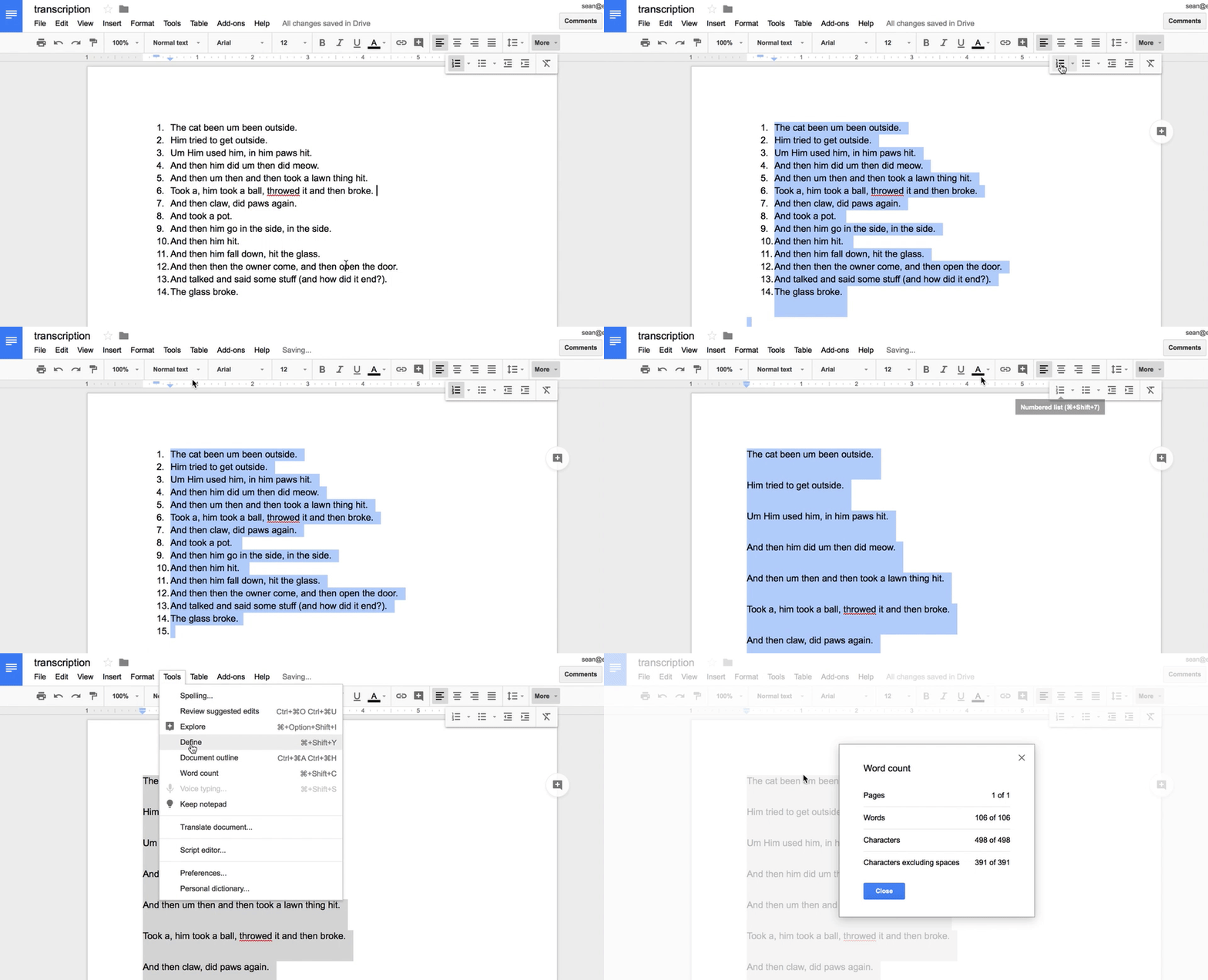
So, the tech tie-in. Pavelko and Owens demonstrate simple uses of word processors to help clinicians quickly calculate total number of words, mean length of utterance in morphemes, words per sentence and clauses per sentence, and provide normative data for all of these for ages 3-7;11. These involve using the numbering feature and word count of MS Word; I would also point out that the same features are available in Apple's Pages and Google Docs.

Clinicians might also benefit from the File>Duplicate option or Make a Copy in Google Docs when working with the sample and taking different measures, so as not to be confused by the required edits to the sample (e.g. using spaces to mark morphemes).

In Google Docs, some of the techniques suggested:

https://gyazo.com/f2722130b711e1875474a8f139c19817

An important read. If working with older students I also recommend Hadley's Language Sampling Protocols for Eliciting Text-Level Discourse and Heilmann and Malone's Rules of the Game.

Monday, December 5, 2016

Using Google Slides in Language Intervention

ASHA 2016 in Philly was a whirlwind, and given a few other busy weeks following it, I am still sort of flummoxed that it has come and gone! I enjoyed presenting with Nathan Curtis and Amy Reid of Waldo County General Hospital in Maine on resources that can be used for co-engagement and co-creation in interventions both in-person and via telepractice. One of the resources we discussed was Google Slides, which is part of your Google Apps available through personal or school accounts, and I wanted to share a video I made demonstrating some possibilities:

(email subscribers please click through to the post in order to see the video)


Some main points here:
-Google Slides is a free tool you can access from your Drive page, just click New to start a new slide series.
-The tool can be used like a Book Creator (in fact, like the Book Creator app itself) to combine pictures and text to make a "book"- think a repeated line book or any book used to convey a narratiev or expository topic.
-The Explore tool under Tools>Explore allows you to search for images and simply drag them into the presentation (these are copyright-friendly)
-One advantage of Slides particularly for telepractice is that you can share the file with anyone with a google account and they can continue working on it.
-You can create and edit Slides presentations from the iPad as well, but the Explore feature to search images is not available (you'd have to leave the app, go to Safari, search and save images to add).
-Check out this post for good ideas on how to use Google Slides in "unusual" ways!

Friday, September 23, 2016

Kahoot! Create game show style activities!

Kahoot! is a website that allows you to create quizzes that are presented in an extremely engaging fashion, for free. I had seen Kahoot! used a number of times over the past few years, and recently I decided to use it with my social cognition groups. The kids who had used Kahoot! in their classrooms had a huge, excited response when I said we were going to use it!

At GetKahoot.com you can create your free account and build quizzes, discussions and surveys- all great ways to target language and have students explain ideas. Compose questions and accompany them with pictures (great for vocabulary or social cognition), then write multiple choice responses. You also can try some featured Kahoots if you don't want to reinvent the wheel or just want to gauge your students' response to this type of activity- there are searchable pre-made quizzes on a large variety of topics.

image from getkahoot.com

Playing a Kahoot works like this:
-From GetKahoot.com, launch a particular activity.
-On screen will appear a PIN, and students can use their own or provided devices* to navigate to kahoot.it and enter this pin and a nickname for play (they love that part).
-You control the pace of the game as students respond to the questions, results are displayed and you will have moments to discuss (an important aspect that makes the site good for speech and language activities)
*Kahoots are best created on a desktop or laptop as you'll need to type and possibly add pictures or video. Students can play on any device that has a web browser- I like to use "Team mode" in bigger groups to foster collaboration. Devices do not need the Kahoot! app, but this app directs you immediately to enter the PIN, so it takes the web navigation part out for the student.

As I mentioned, Kahoot! is a great resource for vocabulary review or creating quizzes where students identify expository text structure key words, subordinate clause markers, or demonstrate morphological awareness. I have also transformed a number of "Thinksheets" from the Social Thinking® resources into quiz form. This was also a great context to work on skills while playing the game (e.g. Defeating DOF- The Destroyer of Fun from Superflex®)

Friday, May 29, 2015

Pic Collage, Revisited

Pic Collage (Free from Cardinal Blue for iOS and Android) continues to be one of my go-to apps for all sorts of visual tasks. With it's ease of use, unlimited opportunities to help our students "see" language and social concepts, and again, freeness, it's just gold. You can read my column on the many uses of Pic Collage for ASHA Leader here.

I have also been very impressed by the developers' responsiveness to questions and concerns as an educator. They were very quick to clarify for me that the iOS Settings for the app (Settings>Pic Collage) allows the turning off of social features (which were also linked to ads) and videos if need be.

The app's Web Images search is a unique feature that allows us (and students, who take to the app very quickly) to build a visual very quickly. These searches are based on Google's most restrictive search settings; recently, I was working with a group of teachers around the app and we searched for all sorts of dirty words and found no results (something might slip by, so monitor what your students are searching for).


Creating Pic Collages can be part of a sequence of activities, as in the above example. Students interviewed each other to work on asking wondering questions, then added images to a "People File" (Both concepts targeted within Social Thinking® and specifically the comic book Superflex® takes on One-Sided Sid, Un-Wonderer and the Team of Unthinkables)

I recently learned that Pic Collage has released a Kids Edition, also free, which automatically turns off social features, so enjoy that without having to navigate to and switch off any settings.

Pic Collage has also added GIFs to its image search. GIFs (pronounced JIFs, so you don't seem uncool) are briefly animated, looping visuals--kind of like a Vine but shorter. This image format has gained popularity in social media because of its ability to show movement or more of a story.

I initially was a bit annoyed by the ability to add GIFs, as I thought they were too distracting, and I sometimes restrict doing so by directing students to go to the Images tab within Web Images. However, for language therapy goals such as describing actions or formulating an action sequence narrative, well, GIFs are actions! See for example this quickly-created collage of all the actions a cat might perform (note that you don't have to save your collage as a link but tapping on the share button and Share Link allows you to do so). When reviewing a collage in the app with a student, you can pinch out to zoom in on an image to make it larger and screen out other distracting GIFs. Note also that when creating collages that are designed to be printed, you should avoid GIFs as they won't print in action mode.

Thanks to Richard Byrne for pointing out this new edition of Pic Collage- his blog is a great one to follow!

Monday, February 23, 2015

Sentopiary

Sentopiary ($4.99) is a new and very interesting app from one of the creators of Popplet (a favorite of mine) that has nice potential for use in targeting complex syntax. With Sentopiary, you can explore sentence building with students within two modes:
-The "create a sentence" mode lets you build leveled sentences (e.g. at level 1 with articles, nouns, pronouns and present-tense verbs whereas when you increase difficulty, tenses, adjectives, prepositional phrases and adverbs come into play)
-Similarly, the leveled "challenge" mode asks you to recreate a sentence using the above grammatical categories.


Check out this video to see how it works.


SENTOPIARY - Create - A Hungry Bull from eeiioo on Vimeo.

Sentopiary is fun and engaging, as well as aligning with research demonstrating the importance of phrase elaboration for development of literate language. Kahmi (2014) states "There are three basic ways to make sentences more complex: (a) noun phrase elaboration, (b) verb phrase elaboration, and (c) conjoined and embedded clauses." This app includes contexts for (a) and (b), but not (c)- so I wrote to the developer and requested that they consider this! They promised to do so for future updates.

Kahmi also writes "My general principle for targeting complex syntax in therapy is this: Target the meanings and/or functions conveyed by the syntactic structure rather than the structure itself"- i.e. to make the intervention pragmatically appropriate. This app would seem to contradict that principle with its emphasis on labeling the structures. However, the metalinguistic aspects do align with curriculum goals (e.g. identifying nouns and verbs) and clinicians can easily incorporate strategies to emphasize meaning as I often recommend "around the app" such as:
-incorporating sketching or visualization strategies about constructed sentences and at the same time increasing bombardment/elicitation of the structure.
-utilizing the app's potential for absurdity in constructing sentences.


So check out Sentopiary- looks like a great tool for a wide age range!

Wednesday, February 18, 2015

SpeechTechie is Five Years Old...Looking Back!

Next week marks my 5th Blogoversary! This is always a great time to look back at how this blog has affected my life- putting me in touch with all you great people via these posts, and sometimes in person! Thanks for reading!

Again looking back, I often like to compare analogue or even "retro" tools to the tools that are available to us today. "Sticker book" apps- those that let us make a simple visual scene- provide a good example. I always ask groups, "Remember Colorforms?" I certainly do- those low-tech (and Farily Priced) visual scene sets were often given to me as a reward for enduring some kind of epic shopping trip as a kid. Apps that let you assemble characters and objects within a scene are often FIVES-Friendly- Fairly Priced, Interactive as a creation tool, Visually representative of language, Educationally Relevant to Curriculum Contexts, and useful towards speech and language objectives, or "Speechie"

I have pointed people in the direction of the Buildo or ClickySticky apps for these purposes but was recently pleased to stumble across the free, simple, but context-rich Colorforms Revolution app.


Check out the app and consider the following "Speechie" activities:
-Create scenes with visual contexts for language targets (pronouns, verbs, elaborated phrases, causals). 
-Structure action sequences within a setting or add an initiating event or "Kickoff" in Story Grammar Marker® parlance (perhaps an absurd element from another set, as these are accessible in the app) to develop narrative skills. 
-Analyze the scenes and objects for articulation targets.
-Screenshot your scene and then use the image (App-smashing) with an app that allows you to add text (Pic Collage) or audio (Book Creator, Screenchomp). 

Friday, March 2, 2012

Animonths: Go! Animate's Quick Video Maker

Go! Animate's Quick Video Maker is a web tool (flash-based, not iPad friendly) you can use to create simple dialogues between animated characters in a particular setting.  Go! Animate allows you to do quite a bit, though with limitations, with your free account.  Within the Quick Video Maker itself, certain settings and characters require a "plus" account, and you are limited to 10 lines of dialogue. Creating the video is simple:

Go! Animate's Birthday Card Creator
Just type, and your characters will say what you like! The Quick Video Maker is somewhat like a simpler version of xtranormal.

Be aware, as I have said in my post about Domo Animate, Go! Animate is not moderated.  You will not want to click the Explore tab as you may encounter videos that have inappropriate language. Also, the human characters, particularly females, in Go! Animate are a bit more...developed. So I would limit use of those character sets to middle or high school students.  That said, there are a number of cute character sets for use with lower elementary students.

Why would SLPs want to use this tool? Click here for a video about the "language lens" and Go! Animate.

Click through to see the video...

Tuesday, January 10, 2012

Crayola Create & Color

Coloring sure is fun for kids, but it can be too time-consuming within speech and language sessions (unless it's carefully structured).  However, what if you could use a session to help students create a coloring page that they can complete at home?


You can do exactly that with Crayola Create & Color.  This is a super-cool FREE site kids can use to combine Backgrounds, Pictures (i.e. associated or silly items inserted into the background), and word/thought balloons.  The process of creating the printable coloring pages is a great context to develop spatial concepts, proposition use (for an App-lication of this type of activity, see Smarty Ears' House of Learning), description and story grammar.  Sending the pages home would be a nice opportunity to generalize and further practice skills with parents. How psyched will kids be when they tell their parents they created their own coloring book?

Friday, December 23, 2011

Language Builder and Assessment Options

I recently had several evaluations in which the students had variable ability to engage in traditional standardized assessments. Specifically, the often quite useful CELF-4 Formulated Sentences subtest, in which the student is asked to produce a sentence to correspond with a presented picture using a target word, put these particular kids at a dead-end of silence and "I don't know"s. The subtest features a series of colorful pictures designed to serve as contexts for target words that increase in abstraction and complexity (e.g. always, because, until), and though I had never really analyzed it before, I realized that it involved even more advanced aspects: perspective taking and self-talk.  For example, the "practice" picture in which the examiner asks the child to use the word when depicts a cafeteria scene in which all sorts of things are going on: kids sitting at a table, a child ordering food, another throwing out the contents of a tray. On-target responses could include anything from:

When is lunch?

to the more complex

When I finish my lunch, I throw away my tray.

In either case, and in most of the items, the child is asked in some sense to put themselves in the scene to be a voice within the picture.  Some kids, of course, struggle to do that, and as my students exhibited a level of frustration and anxiety that prompted me to discontinue this subtest after a few items, I was left with the need to quantify their syntactic abilities (and, oh well, no Core Language Score).  Language sampling was on the agenda, of course, but both kids were very engaged by the iPad, so I found myself turning to Mobile Education Store's Language Builder ($7.99, iPad only).


Language Builder is an open-ended tool within this app studio's line of apps in which audio can be recorded to match picture and language prompts.  Or, in this case, I used the most open-ended option in the app, simply asking my students to "Make a sentence about the picture." In both cases, it was an enjoyable and engaging experience for the child, and gave me key information about their sentence formulation abilities, along with transcribable (or demonstrable for parents) audio samples in response to the pictures.  Language Builder has different levels of "hints" that prompt various language structures, and could of course be used for all those kids that complete Formulated Sentences and don't do so well with it. I actually have also been using it in conjunction with the excellent Conversations with Conjunctions program (Catherine Harkins May, Pro-Ed), which involves the use of ASL signs for conjunctions in order to provide a visual and kinesthetic cue. Overall, it's a great go-to app to address the difficult-to-assess (and treat) area of complex sentence development!
 
.