Friday, March 26, 2021
A Google A Day and Search Literacy Lessons
Friday, March 19, 2021
Clifford- A Dog's Life Activity
You may have noticed that the Flashpocalypse occurred at the beginning of 2021. Flash was long fated to disappear eventually and a number of your favorite websites or interactives would have become inaccessible after December 2020 as web browsers stopped supporting Flash. This happens, and is part of the life cycle of technology. We grieve and move on. PBS Kids, however, is generally cleaned up enough that you aren't going to run into disappointments as you search for interactive activities. I have been working to update a spreadsheet developed by Waldo County General Hospital in Maine, the folks there you may know as longtime collaborators of mine and telepractice mavens!
The original spreadsheet was presented some years ago by Nathan Curtis in a session we did that many viewed at the beginning of the COVID emergency under ASHA's free Learning Pass. As I mentioned I am working to update it but that work is in progress (some links may not work). Please do not request permission for the spreadsheet, you can make a copy or download if you wish but that would not reflect the updates I plan to make. Click here to view PBS Kids resources spreadsheet.
Let's take Clifford- A Dog's Life, a game that has 4 parts. Emily Anne greets us and asks us to take care of Clifford awhile (character, setting, initiating event...). There are four activities we can engage Clifford (and our students) with including playing fetch and washing him. Looking at the language contexts for Fetch, it's a beach setting we can observe and describe, and we can throw different objects (function talk) near or far. Sometimes something cool happens besides Clifford retrieving the object, such as a crab catching it (WH-questions). The bath activity has neighborhood helper characters and spatial concept contexts such as needing to go high/low/left/right to rinse Clifford!
I'm all about the Pairing Picture Books with Apps/Interactives thing, so see this resource from Mindwing Concepts detailing how Clifford's books can be used for story grammar!
Thursday, March 11, 2021
Strategies for Using Picture Books on YouTube
As I have, for now, continued to be doing mostly teletherapy for the past YEAR (that anniversary has been painful, so apologies for the quiet blog), I have found picture books invaluable. Pssst...shhh...largely any picture book you might want has a YouTube read aloud.
One strategy I use is to evaluate what's there, as often several are available. I prefer those that look more slide-show than a person with a book, and also tend to avoid videos with too much zooming. Going full-screen with the video by clicking the lower right icon is helpful.
This facilitates the second strategy- YOU read it aloud. This allows you to pace, pause, and interact with your students (e.g. model think alouds, direct their attention toward illustrations that foster inferences, use questions...). Turn that video sound right off!
So, for example, take How to Catch a Leprechaun by Wallace and Elkerton. This duo's series about catching various creatures has given me a ton of mileage with one particular group. They are not at all game for too-structured conversation, but keep it naturalistic with rich illustrations that have "things to say" that are not described in the text, and they talk! This one may help you in the coming week. There are a number of read-alouds of this book that you can compare to the simple one by PV Storytime. Search the book on YouTube to see what I mean.
Friday, February 12, 2021
i-Spy
i-Spy is a rich, simple interactive website that's like a Where's Waldo of New Zealand. You can play 5 different scenes and locate hidden animals, objects or people. I'd recommend the free play mode as the challenge mode is timed. A search icon will bring you to the general vicinity of the target with a visual cue.
Activities like these are visually packed and not for all students, but for many can serve as "thinking with the eyes" collaborative "group plan" activities (both Social Thinking® terms) and also connect well to narrative elements of setting and action sequences. Consider researching or Google Earth-traveling to the places beforehand and filling out a setting map/graphic organizer.
Saturday, February 6, 2021
Playing games with Jamboard (Whoonu)
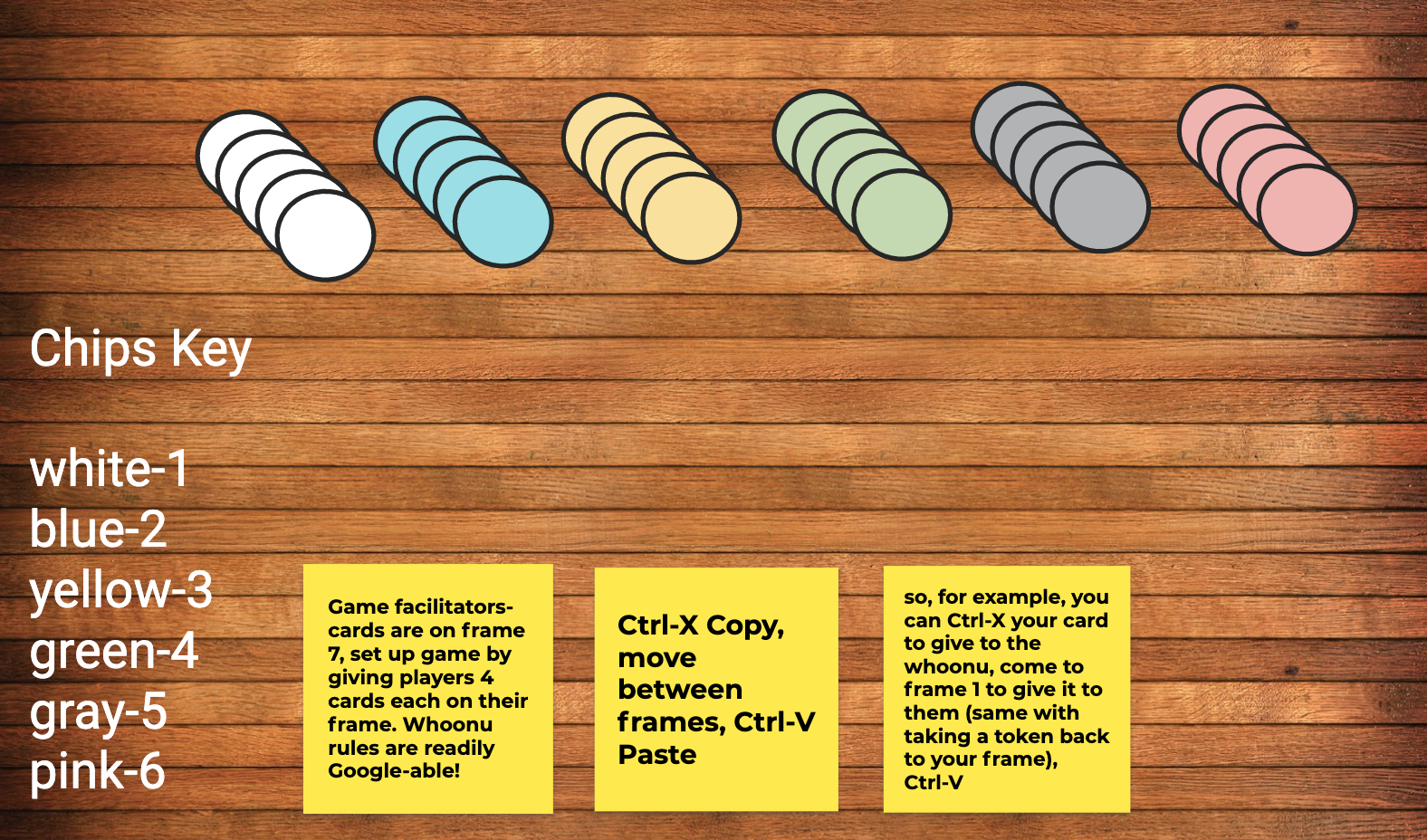
I have been researching and using a lot of Google Jamboard recently, and realized that it provides a good "table" to play games. One of my faves ever is Cranium Whoonu, a great get-to-know-others game. In Whoonu, players have cards with activities, places, and things on them, and they make guesses about a target (rotating) player's favorite things. That player (the Whoozit) then sequences them in order from most (most points) to least favorite, and players take tokens indicating their score.
Saturday, January 30, 2021
A few Google Experiments for you
Google Experiments are, well, experimental websites that play with new features and aspects such as artificial intelligence (AI). These can show great use of the I- Interactive aspect of my FIVES criteria, as well as the V-Visual, and thereby be great contexts for language use.
Check out QuickDraw, which gives you 20 seconds to draw an object. You have pause time to discuss strategy or features (think Expanding Expression Tool) with students, and this is especially fun if you can give remote cursor control. The AI will then verbally guess what you are drawing, often with funny results that are sure to get a reaction from your students!
Blob Opera is also a blast and a fun way to play and explore voice pitch with students, as well as vocabulary about it (e.g. bass, tenor).
Check out the full range of Google Experiments here.
Thursday, January 14, 2021
Multiple Meaning Commercials
Sometimes it pays to watch the commercials! GEICO has been doing a series of humorous ads for home insurance where the homeowners make a complaint that turns out not to be what we thought they meant- rather an alternate meaning of their plight. Video can be a motivating way to explore metalinguistics with your students, and each of these has a social/situational awareness element as well (e.g. why passive aggressive comments from aunts--pronounced ants--can be a problem).
Thursday, January 7, 2021
Jamboard Icebreakers
Happy 2021! Not the happiest week, but I am still hopeful!
If you are like me, you may have students moving in and out of groups and introduction activities can be helpful in "breaking the ice" and helping them make connections. I tried one yesterday that was very successful and I wanted to share it with you.
This activity uses Jamboard which is part of Google Workspaces/Apps and all have access to it with a Google account (just go to your "waffle" in the upper right corner of any Google app and locate Jamboard). I created an image with shapes to use as a background for the "Jam." You could choose to label each space but I instead had the students think around an acronym I like to use for "people files" (credit Social Thinking® but the acronym is mine and feel free to use) with different aspects of our social memory/sharing about ourselves prompted by the letters in the word FILE:
FILE= F (Friends, Family, Pets, Where you live) I (Interests) L (Likes/Dislikes) E (Experiences, your stories, things you've done or would like to do).
The activity is located here. To use it:
1) Make a copy of the Jam in your Google account. Please do not request access, you can make a copy and it is yours to use. The background is not editable but you can make something similar in PowerPoint, save it as an image and Set as Background.
2) Use the top central frame viewer to duplicate the blank frames for a student group. You can see that mine is in there as a model (and can delete it).
3). I recommend making frames for the group members and placing their name someplace on the frame to avoid chaos.
4.) To use in a group, I like to model how to use the sketch (top tool), image search (use Google Image Search for quick completion), and text box features while making an "example."
5) You can have students join the Jam under Share by making it editable to anyone with the link, or sharing it within Google Classroom.
6) You can foster time management/executive function and "matching the pace" of the group by toggling what you are sharing (if teletherapy) with Online Stopwatch. I prefer to use the analog clock and mark it up with Page Marker extension to show a timeframe the group will be working in (start, middle and end points ala Sarah Ward).
6) Encouraging students to use images as much as possible will promote more verbal description (e.g. I used this picture because...) and conversation.
Have fun! I'd love to hear about your Jamboard activities in the comments!
Tuesday, December 22, 2020
Wrapping up 2020. Thank God!
It was some year, for sure. In short, 2020 saw many of us becoming more tech-savvy because we had no choice and were working through an emergency. Still are. But there's hope ahead.
Myself, I admit to leaning in and then leaning out a bit. 2020 saw me writing about double the posts I had written in the past five years, because I wanted to be of use in the early days of the pandemic. Like everyone else I settled into "just keep swimming" mode and I hope weekly tidbits have been helpful enough.
So, without further ado, here are the 10 most popular posts of 2020 in terms of page views:
10. What to: Using Google Slides for simple session agendas and visuals in telepractice
9. Demonstration of one activity you could do with Pear Deck
7. Mr. Nussbaum's Learning Fun
6. Explore ideas in EdTech Blogs
5. Creating a make-a-scene in Google Slides
4. Pairing Picture Books With Apps in Teletherapy
2. ASHA Presentation 2019 on Telepractice
Happy Holidays and here's to a brighter new year in 2021!
Thursday, December 17, 2020
Memorizer.me
As SLPs, at times we need to assist our students with work that is a bit pointless. I recall that Social Thinking® had some material about this; as students we are expected to follow the "group plan" and sometimes complete tedious tasks. Memorization of lists or passages is perhaps a good example. I recently needed to assist a student with memorizing a lengthy section from a book, I won't say which one. While the requirement was maybe in that zone of "Why tho?" it still was a good opportunity to apply Ehren's concept of the "strategic/therapeutic focus" and work on:
-ensuring comprehension of the passage as a whole and its vocabulary, sentence structure
-paraphrasing
-looking for opportunities for visualization
-noting language structure such as the flow from main idea to details in the passage, also several sentences had parallel structures that could be used as a memory trick i.e. adjective-infinitive, adjective-infinitive, adjective-infinitive.
Putting the passage in Google Docs and commenting in the sidebar with these memory tricks while discussing and eliciting paraphrasing and connections from the students made for a good teletherapy activity for a high schooler!
A quick Google search also found us this gem, which was great to leave my student with so that he could work on the actual memorization independently. Memorizer.me allows you to paste a passage or ordered list, then provides strategies and prompts to help you work on memorizing the language. For example, the website manipulates your pasted text to provide first letter or beginning of line cues.