Friday, May 27, 2022

Again

Nine years ago I had the opportunity to visit Sandy Hook and work with some educators along with Pamela Ely, the director of the Ely Center, LLC where I work, and Sheila and Maryellen Moreau of Mindwing Concepts. We talked for the day about supports in the area of social interaction and narrative language that might be helpful for the students trying to move on with their lives in the face of unspeakable events. I hoped that day that we might never have to grapple with such a horrible situation again, but here we are, and somewhat more depleted given the past few years.

Like you, I am sure, for me it is hard to find much to offer this week, but we can find strength in helping others.

A few ideas:

-Email someone offering a resource. This post, a PDF you have that has helped you, a journal article, whatever. Reaching out and helping is a tool.

-The Happiness Lab has a great episode on Languishing. I picked up a few ideas from it and this week taught a lesson based on one of the concepts discussed. You can listen to The Happiness Lab on Spotify or Apple/Google Podcasts.

-Newsela has a small kit related to the events in Uvalde. I used the piece on "Ways to stay calm when you're feeling stressed" with a group this week. 

-NYT has a robust resource list for talking and teaching about these events.

-Here's my self-care toolkit from this past winter.

Take care, folks.


Thursday, May 19, 2022

Minecraft Education Edition

I have previously written about using contexts like Minecraft without getting into the thing itself. I've come around on this a bit and next time I'll talk about some simple uses of Minecraft (creative mode, I am still not interested in having kids kill each other in a game), but recently I discovered I CAN USE MINECRAFT EDU!

I had heard about Minecraft EDU for years but, not having an .edu email address, couldn't access it. I have been supervising at Boston University this semester and discovered my email address (plus having a Microsoft account at BU, so you need this too) was the key, as it probably is for many school-based clinicians reading this blog. MC EDU has many created "worlds" that are structured and relate to school topics, so are a nice place to start. 

So, if you have a .edu email, head first to MC EDU and sign in to create an account. From there, I find Minecraft most navigable on an iPad- simplified controls and such. For the EDU activities you'll need the free iPad app. Explore the worlds and see what you might like to use. They are not all amazing, but I highly recommend the very well-done world called The Mindful Knight. Through this activity I grabbed the attention of a student who I have struggled to help with practicing self-regulation strategies, and through several of the "quests" learned about the value of deep breaths and presence (e.g. Five Senses noting of things in the environment).

The deep breathing exercise is practiced by navigating the Knight to an elevator, with great visuals.

I apologize that this is still somewhat of a complicated resource to reach, with the necessity of the .edu address and MS account, but there's a work-around. Look on YouTube for "Mindful Knight Minecraft" and you'll find gameplay vids like this one that can make for good lessons, too!

Friday, May 13, 2022

Dino Tracker

Dino Tracker is a fictionalized interactive website that has been released as a promotion for Jurassic World Dominion, an upcoming film in the series. The premise of this film is that dinosaurs are no longer confined to Isla Nublar but living (and hunting) alongside humans. The purpose of the site is ostensibly to provide information to the public about "sightings" of various dinosaurs- the therapeutic potential in the site is scaffolding language around the locations (through a clickable Google-like map), the "descriptions" of the dinosaurs and cause-effect language of "Dos" and "Do Nots."


I was recently discussing with a colleague how high school students often have remaining difficulty with the geographic literacy aspects of continent-country-state or other division and how this connects to situational awareness and the ability to digest information about the world and current events. Browsing the world map provided could be an exciting (MS and HS students who can understand the artifice of the content) opportunity to review continents and some of the spatial strategies for recalling them, then moving down to more micro areas. The videos provided are a form of narrative and the "field report" expository text that can be mapped with graphic organizers, or used as a model to tell "same but different" creative item e.g. a report from another location.  Overall Dino Tracker represents how interactive websites designed for very different purposes can provide access to academic language- one strategy I like is to search for "interactive websites" and under tools set the time limit to the past month or week, you can find some gems.

Friday, May 6, 2022

LearnHip

LearnHip has some useful and simple activities designed for English language learners but also useful for speech and language therapy. It may be particularly useful as a warm-up or to make use of a short amount of extra time in a session. Some of the activities it includes: makers such as a scrambled sentence, reveal the picture and board game creator, conversation cards on a wide variety of themes (e.g. annoyances), and story cards and silly/engaging contexts such as describe the picture and what happens next (in the form of GIFs) "quizzes." Go Hip would be good to have in your bookmarks for classroom, group or teletherapy sessions for a variety of verbal expression objectives.


Sunday, May 1, 2022

Simple visual engagement resources for youngsters

Whether doing tele- or in-person therapy, you should be aware of the cute, simple and useful resources of Dr.  Karen Fried at Oaklander training, such as the online sand tray and dollhouse interactive activities on the site (go to the tools and resources tab). There's apparently a whole approach to using these tools as psychological therapy with young children, but as a sort of stickerbook they have specific linguistic opportunities. Consider vocabulary, concepts, syntactic expansion, and storytelling!

Thursday, April 21, 2022

TinyTap Online

Tiny Tap was previously described here as a good mobile app resource for both making interactive activities and finding visual content for lessons. I recently noticed TinyTap has ported content online, so this would be playable on your laptop or in a classroom with projector or interactive whiteboard. This format for Tiny Tap makes it also a nice resource for telepractice. Sign in at TinyTap (click Connect) and you can favorite activities to create a resource list. The activities are geared toward language basics and topic exploration, many taking the form of an interactive book, and therefore are particularly good for developing vocabulary, categories, or foundational descriptive skills. This Desert-themed activity provides a good example, but see what else you can find on the site! I was able to access many activities for free, but TinyTap provides an educator sign-in.


Thursday, March 10, 2022

Radio Garden

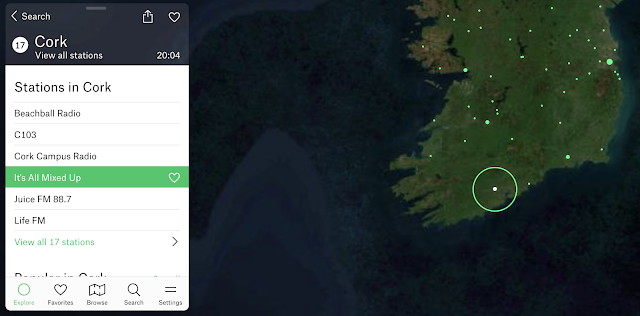
Flowing a bit from my last post (context is your friend), Google Experiment Radio Garden is worth a therapeutic visit. Your students will think it's just a chill moment, but secretly it can be a great way to practice having them call out:

-Continents and then countries
-Responses (conversation/comments) to what they hear
-Characterization of the language (nonverbal aspects such as tone etc) and type of music you may hear. Music genres are a category and can connect us with peers!

Why not pair this with looking up a current event from the country you "visit" for narrative/expository comprehension? 

Now more than ever, it's important to foster global awareness.

Oh, and Happy St. Patrick's Day, here's my homeland:


Thursday, March 3, 2022

Globle can become a cooperative group game

I have been a longtime fan of maps as therapy tools. They promote spacial description skills, situational awareness and (literal) world knowledge, and can be used to link to narrative and expository language. 

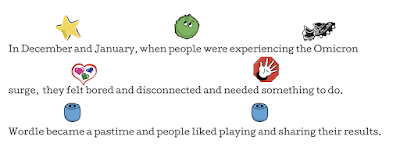
Let's start with Wordle though. A huge fad, one this Jeopadevotee has used to shore up his skills with the anagram category that didn't appear in his game...yeah, I am still in some kind of transitional phase. Anyway, I am not sure it is such a great therapy tool unless it is paired with a visual support such as searching for words with various forms (see same but different below), but it kind of has a story. Here related in Story Grammar Marker® icons:

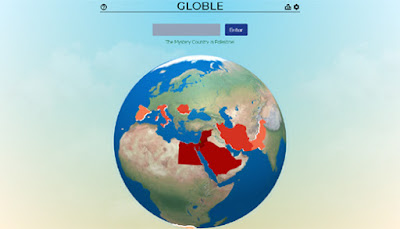
There have been many spin-offs of Wordle including one in IPA that SLPS would love, and Globle is one in which you guess the "country of the day." As mentioned above, for students working on building this knowledge, it's great to have a tab open for reference and research to help them make educated guesses. As I described to families of students I played with this week, "In a cooperative way we enjoyed an introduction to the game Globle, a variation on Wordle where we guess countries, get color coded clues back, and zero in on the day's target, therefore using thinking with the eyes, following the plan, and adding connected thoughts based on the info that we were receiving. The boys figured out Portugal quickly by building off each others' clues!"


Friday, February 4, 2022

Be Zen with Your Tabs

It seems as though everyone is starting to exhale and feel a bit of optimism again after a disruptive turn in the pandemic this January 2022. It seems a good time to take stock and continue to use our tools to keep ourselves productive and feeling purposeful!

One of my tricks is around windows and tabs- it's important to be mindful of how many you have open. First of all, having a huge array of applications, windows, and tabs within your browser open is overwhelming and isn't conducive to focus. Here's a great post on Zen Habits about this issue. Additionally, having all this stuff open is taxing on your computer's memory and even power, so you may find it moving more slowly. Take a few minutes a few times each day to close those tabs that are making your brain go all over the place, pulling your focus and/or causing you some anxiety. 

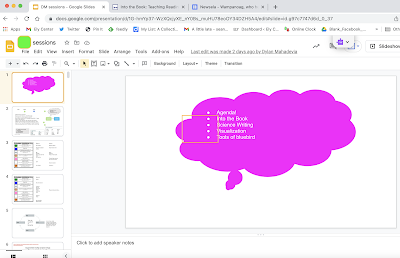
One strategy I like to do--it may sound counter to the above but is really an organizational/prep strategy, so, regulating-- is to set up upcoming sessions in a window or windows along with any resources I plan to use- whether it be a telepractice or in-person session, as I am currently doing both. For tele it is helpful to have the tab you will want to go to first be the active one, as in Zoom it will be the one visible for screen sharing.


For this session you can see the (1-1) student's Google Slides deck, with agenda and other activities like practice with the EET, reading comprehension practice we are doing with Into the Book, and a Newsela article we would work through with Story Grammar Marker®. Student done, close the window!

Stay Zen, folks!

Friday, January 21, 2022

At a Distance, Again

Well, besides the Jeopardescapade, this has been quite a crappy month for everyone. In Massachusetts, a huge surge in COVID infections after the holidays forced a lot of us to make changes again in how we are working with students. Schools have stayed pretty much as "new normal" here, with the exception of more testing and quicker on the draw to cancel school days for weather. Working in a private practice, we have made a shift to move as many sessions as possible into a temporary telepractice format for individuals and groups, while keeping in-person services for those that struggle to engage online (or are just over it). Of course we are taking extensive precautions: vaccine requirements, temp checks, health screens, powerful air filtration, double masking, distancing...
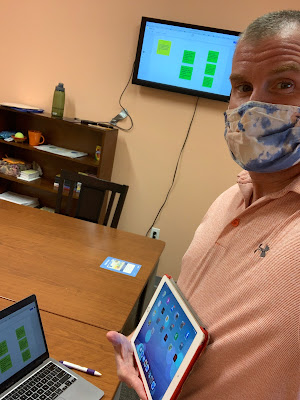
On that last one, I find technology to be a big help. We have an Apple TV (old ones work fine) with HDMI-ported TVs (just your basic TVs these days) in each clinic room. I have a Mac which can screen mirror to these, but if I didn't, an HDMI cable would do. The Mac just gives me more mobility. The use of a screen (like you would a board/projector in a classroom) can keep engagement up visually and can prompt session structure and communication from students in a variety of ways, while maintaining distance within the room. It can help also to reduce or eliminate shared "touched" materials, and though these really aren't the problem with an aerosol-spread virus, it's a step that can't hurt and can be reassuring to families. Here are a few examples:

-Use Jamboard activities that are game/play-like and prompt discussion and collaboration. I have mentioned Julia Dweck's collection and this week used the Traffic Jam game.

-Activities students can participate in actively via their smartphones. You can make a worksheet/thinksheet into a google form and email to them, or shorten the link with bit.ly. Kahoot is almost always a draw, whether you choose from topics of interest or social/language based games. Jackbox Games are worth an investment, and often on sale- these are joined by phone.

-Have a discussion and document the language in a simple Google slide like a flipchart. I guarantee they'll want to correct your typing, which means they are paying attention. Insert images! SlidesCarnival has good templates for free if you want to jazz it up visually.

-Anything visual that prompts discussion- consider infographics on topics of interest or something related to holidays or current events. With Chinese New Year coming up there are a variety of websites and graphics that describe the personality traits of the various animals/years. Great to connect to and have students self-reflect on how they might be same or different.

-Books that are visual with limited text. This week I used Jon Klassen's darkly humorous I Want My Hat Back and This is Not My Hat on YouTube. You read 'em, sound muted, pause at will- there is plenty to discuss with some facial expression interpretation.

 
.