When targeting narrative language, one objective is to move students toward more complexity and elaboration with inclusion of elements such as character response (feelings) and plans. Additionally this can facilitate the microstructure within narratives including complex sentences (e.g. The Patriots turned the game around so we were excited but not surprised). This corresponds with movement toward a "landscape of consciousness" (Bruner, 1986) in mature narrative, describing mental states and emotions, as opposed to merely relating action.
Emoji are fun, and incorporate one way students currently communicate- through texts, Instagram posts and even Venmo cash transfers, noted to be a place where people mark the rationale for the money with emoji. However, they can also serve as a visual support and scaffold for including the story grammar element of character response to events when students are writing personal or summary narratives. Here are 3 easy ways to include emoji- see also my previous post for Mindwing Concepts about this topic.
On iPad through Predictive Text
Predictive Text, when turned on (Settings>General>Keyboard>toggle on "Predictive") provides blocks of predicted text above the keyboard as you type. This is one example of how features previously only available as "assistive technology" have turned out to be incorporated in operating systems to benefit everyone. As you type a word for which an emoji is available, it will trigger an emoji suggestion in the Predictive. You can choose to replace the word with the emoji, rebus-style, or type the word and then type it again and replace with emoji. This also can save time versus having students scroll through pages of emoji within the keyboard.
Equip your Mac or Chromebook with Emoji
If you have a Mac, the Mac App Store has a free app called Emoji Lite. You can search and copy any symbol into a word processing, presentation or other document. As we do lots of typing into a web browser, you can also add the Emoji Keyboard by EmojiOne™ to your Chrome Browser (also a good option for Chromebooks).
Within Google Docs
EasyPeasy. While writing in a Google Doc or Slides presentation, just use the Insert menu, select Special Characters, and change to emoji via the dropdown.
Saturday, January 27, 2018
Friday, January 26, 2018
Look to MedBridge for high quality PD courses
When it comes to professional development, it’s great to have options. The end of your certification maintenance interval can sneak up on you. Additionally, it seems of late unfortunately difficult for clinicians to obtain release time to attend professional development and continue our high level of training--I know this as a frequent PD speaker!
Online learning has always been an option, and MedBridge has elevated the format with their professional development courses. After developing many offerings for PT and OT, they have reached into speech-language pathology in the past several years, and specifically have endeavored to create relevant courses for school-based clinicians. I was asked to create several courses for MedBridge in the past year (see disclosure), and have been very impressed with their process.
The features of their courses and website are designed to leverage all of the possibilities of the format, for sure. First of all, the process of creating the course is geared toward maximizing learner engagement. Presenters go onsite to MedBridge’s studio and film their course in person (I felt like I was on TV myself!) so that the result is a high-quality video presentation. There are many additional features to their courses that make the experience comparable to attending PD sessions in person, including:
Over the past several months, I myself completed two courses through my MedBridge membership:
Balancing & Scheduling Speech-Language Workloads in Schools, presented by Kathleen Whitmire.
In this course, Dr. Whitmire describes the workload model to managing productivity in the school setting. I had seen Dr. Whitmire previously, and her presentation years ago inspired me to implement the 3-1 Consultation model at my school, revolutionizing my role and teaching me how to be an effective collaborator and consultant. These skills are hugely important to my current work in private practice and consulting to schools. This course was very engaging and I found several elements to be helpful to me and potentially extremely helpful to clinicians first encountering these ideas. Dr. Whitmire describes “activity clusters” which help define the workload vs. caseload approach and will be very valuable to SLPs looking to open conversations with administrators about optimizing their role in their settings. Additionally, one major issue with transitioning to a workload and/or 3-1 approach is getting started. Dr. Whitmire offers some very do-able suggestions to taking these steps gradually. As is often the case within the MedBridge library, one course may lead to another. I plan also to take Dr. Whitmire’s courses in effective collaboration and educationally relevant speech-language services.
Focusing on Friendship: Building Social Groups That Work for Children with Autism, presented by Laura DeThorne
Dr. DeThorne’s information on engaging with first-person perspectives of students, including a Q/A with an autistic researcher (he describes why he prefers that descriptor), were very informational to me and changed MY perspective on identity- vs. person-first language. It is important to note that this discussion suggests steps that align with considering client values, a tenet of evidence-based practice. This aspect of the course dovetailed extremely well with the following chapters, which provided practical advice on creating interest-based social “affinity” groups, including examples of potential activities and measurable goals that focus on “interaction rather than individual skills.”
I hope that you will check out MedBridge’s offerings when planning your PD activities over the coming year. My courses are still in post-production, and include one on developing narrative and expository language using tech resources, and another on alignments between research-based practices and app-based activities. Currently you can subscribe to MedBridge’s offerings using my affiliate link at a greatly reduced price of $95.
Disclosure: Sean Sweeney has contracted with MedBridge to provide two courses and is part of their affiliate partner program. He will receive a royalty when his courses are available and are completed by members. Additionally, he receives a commission for each membership purchased through his affiliate link. However, the review detailed in this post represents Sean’s independent evaluation of several courses he completed through the MedBridge site.
Online learning has always been an option, and MedBridge has elevated the format with their professional development courses. After developing many offerings for PT and OT, they have reached into speech-language pathology in the past several years, and specifically have endeavored to create relevant courses for school-based clinicians. I was asked to create several courses for MedBridge in the past year (see disclosure), and have been very impressed with their process.
The features of their courses and website are designed to leverage all of the possibilities of the format, for sure. First of all, the process of creating the course is geared toward maximizing learner engagement. Presenters go onsite to MedBridge’s studio and film their course in person (I felt like I was on TV myself!) so that the result is a high-quality video presentation. There are many additional features to their courses that make the experience comparable to attending PD sessions in person, including:
- Engaging visual presentations; these courses are more like watching a talk show than a PowerPoint
- Modeling of techniques with students and clients
- Q/A sessions with real professionals within the videos
- An easy-to-follow progression of “chapters” within each course, along with the ability to complete each course with breaks, at your own pace
- Downloadable handouts and extension activities for you to apply the material in the course
- Learning assessments that feature real-world, practical (but short) case studies followed by questions to gauge your own understanding of the material presented
- Multiple-part courses (each with CEU value) for in-depth learning
Over the past several months, I myself completed two courses through my MedBridge membership:
Balancing & Scheduling Speech-Language Workloads in Schools, presented by Kathleen Whitmire.
In this course, Dr. Whitmire describes the workload model to managing productivity in the school setting. I had seen Dr. Whitmire previously, and her presentation years ago inspired me to implement the 3-1 Consultation model at my school, revolutionizing my role and teaching me how to be an effective collaborator and consultant. These skills are hugely important to my current work in private practice and consulting to schools. This course was very engaging and I found several elements to be helpful to me and potentially extremely helpful to clinicians first encountering these ideas. Dr. Whitmire describes “activity clusters” which help define the workload vs. caseload approach and will be very valuable to SLPs looking to open conversations with administrators about optimizing their role in their settings. Additionally, one major issue with transitioning to a workload and/or 3-1 approach is getting started. Dr. Whitmire offers some very do-able suggestions to taking these steps gradually. As is often the case within the MedBridge library, one course may lead to another. I plan also to take Dr. Whitmire’s courses in effective collaboration and educationally relevant speech-language services.
Focusing on Friendship: Building Social Groups That Work for Children with Autism, presented by Laura DeThorne
Dr. DeThorne’s information on engaging with first-person perspectives of students, including a Q/A with an autistic researcher (he describes why he prefers that descriptor), were very informational to me and changed MY perspective on identity- vs. person-first language. It is important to note that this discussion suggests steps that align with considering client values, a tenet of evidence-based practice. This aspect of the course dovetailed extremely well with the following chapters, which provided practical advice on creating interest-based social “affinity” groups, including examples of potential activities and measurable goals that focus on “interaction rather than individual skills.”
I hope that you will check out MedBridge’s offerings when planning your PD activities over the coming year. My courses are still in post-production, and include one on developing narrative and expository language using tech resources, and another on alignments between research-based practices and app-based activities. Currently you can subscribe to MedBridge’s offerings using my affiliate link at a greatly reduced price of $95.
Disclosure: Sean Sweeney has contracted with MedBridge to provide two courses and is part of their affiliate partner program. He will receive a royalty when his courses are available and are completed by members. Additionally, he receives a commission for each membership purchased through his affiliate link. However, the review detailed in this post represents Sean’s independent evaluation of several courses he completed through the MedBridge site.
Friday, January 19, 2018
Find the right tool for the right task
I have a student who was struggling with map tests. Don't ask me whether I think students need to memorize maps nowadays but...anyway, he had to. He was very frustrated, but at least thought the whole thing was over. It's important to establish rationale-or the presence of pointless work that nonetheless is required and might develop our skills and strategies- I had to break it to him that many more map tests await.
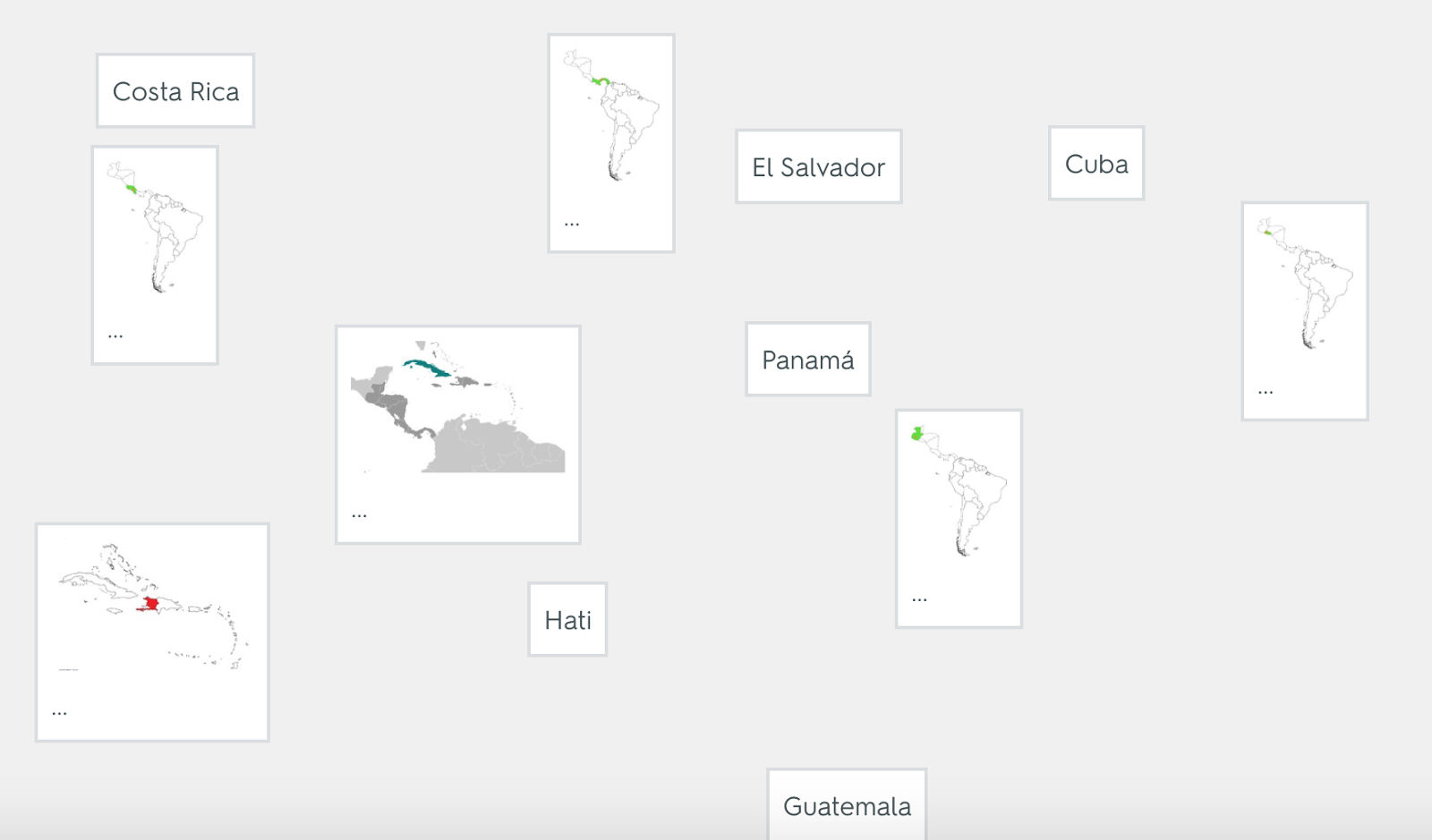
He showed me that the recommended study guide was Quizlet, which he was using via a matching task:
Now don't get me wrong, Quizlet is GREAT, and I'd recommend it for many tasks such as reviewing vocab or even literary elements of novels, etc. It's also excellent that they have evolved to include visual elements. But in this case, you can probably see immediately why this might not be the best tool for this task. Studying a map requires literally and figuratively a "big picture." This is just one stack but the images of the countries are small and it's hard to relate part to whole.
I showed him an old standby, Sheppard Software, a website built in Flash so it must be used on a laptop or chromebook. He liked it much better, and here's where curriculum contexts can always be blended with a strategic focus. Reviewing a region in "Learn" mode (via big picture), we made up a silly sentence cueing the country names roughly from north to south. Anyone remember the old BrainCogs program? I loved that. In any case, the verbal mediation was meaningful to him. In Quiz mode we also practiced strategies based in language, helping to make the blob of countries have a meaning, "Oh, French Guiana is closer to France than Guyana is. Ecuador is literally on the Equator."
The experience of tackling this task reinforced a few things for me. Rationale. Tool Selection. Strategic Focus.
He showed me that the recommended study guide was Quizlet, which he was using via a matching task:
Now don't get me wrong, Quizlet is GREAT, and I'd recommend it for many tasks such as reviewing vocab or even literary elements of novels, etc. It's also excellent that they have evolved to include visual elements. But in this case, you can probably see immediately why this might not be the best tool for this task. Studying a map requires literally and figuratively a "big picture." This is just one stack but the images of the countries are small and it's hard to relate part to whole.
I showed him an old standby, Sheppard Software, a website built in Flash so it must be used on a laptop or chromebook. He liked it much better, and here's where curriculum contexts can always be blended with a strategic focus. Reviewing a region in "Learn" mode (via big picture), we made up a silly sentence cueing the country names roughly from north to south. Anyone remember the old BrainCogs program? I loved that. In any case, the verbal mediation was meaningful to him. In Quiz mode we also practiced strategies based in language, helping to make the blob of countries have a meaning, "Oh, French Guiana is closer to France than Guyana is. Ecuador is literally on the Equator."
The experience of tackling this task reinforced a few things for me. Rationale. Tool Selection. Strategic Focus.
Thursday, January 11, 2018
Teaching in Social Media Contexts
Social Media is part of life--and a good context for targeting social cognition and narrative language. In general, social media is now one context for us all to be sharing our stories through words and pictures, and also is a way we send messages about ourselves and interact around them. Of course this should be self-monitored; I've shared with my students that I set an intention of at least 2 hours daily in which I don't look at Facebook or Instagram (if you have a goal, you need a measurable action plan). Don't always make it, but I'm trying.
A few contexts in which I have used social media in the last several months:
GCF Learn Free has great simple tutorials on social media outlets. These are good if you are working with individuals who want to begin to use social media as an interactive outlet (learning more about others and making connections).
Related to this, I have been working with a wonderful SLP who uses Instagram photos (mine and many others) to help students "get the story" (situational awareness) implied by a photo, make inferences about relationships depicted in photos, etc. Identifying a few resources you can use with students (screenshot, perhaps, instead of showing them your feed) make for great lessons. These students have also stepped into sharing on Instagram with parental guidance.
There are a number of good resources you can use to make mock text conversations, Twitter, Facebook, Instagram and Snapchat posts. These can be great for presenting narratives and exploring expected and unexpected social media behaviors. Just google and you'll find ones like Status Clone- they produce an image of a fake interaction that you can use in an activity. ClassTools.net also has student-friendly versions of these for you to use for co-creation (see their FakeBook, Twister and SMS Generator).
A few contexts in which I have used social media in the last several months:
GCF Learn Free has great simple tutorials on social media outlets. These are good if you are working with individuals who want to begin to use social media as an interactive outlet (learning more about others and making connections).
Related to this, I have been working with a wonderful SLP who uses Instagram photos (mine and many others) to help students "get the story" (situational awareness) implied by a photo, make inferences about relationships depicted in photos, etc. Identifying a few resources you can use with students (screenshot, perhaps, instead of showing them your feed) make for great lessons. These students have also stepped into sharing on Instagram with parental guidance.
There are a number of good resources you can use to make mock text conversations, Twitter, Facebook, Instagram and Snapchat posts. These can be great for presenting narratives and exploring expected and unexpected social media behaviors. Just google and you'll find ones like Status Clone- they produce an image of a fake interaction that you can use in an activity. ClassTools.net also has student-friendly versions of these for you to use for co-creation (see their FakeBook, Twister and SMS Generator).
Here's an example (note: that's not an actual spoiler).
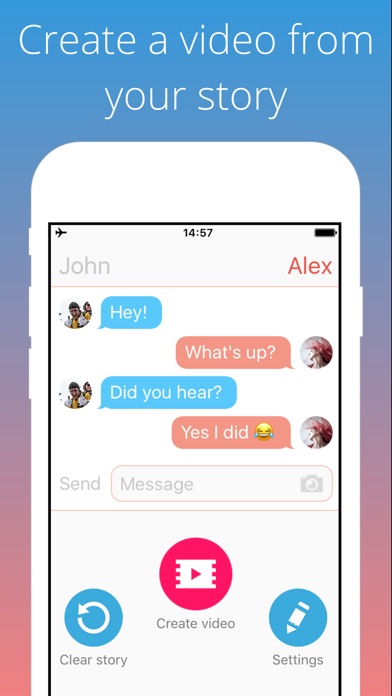
On iPad, I haven't always found similar tools. Social Dummy performs similar functions but I would never use it in front of students because of its horrible name (Dummy meaning fake, not in the way it might be interpreted)! You can use this app to make teaching images saved to your photos app, however. A recent free tool is Texting Story Chat Maker, which allows you to make a dynamic video of a text conversation unfolding. These are additionally good contexts in which to explore the use of emoji, which are easily accessible on mobile devices.
Friday, December 22, 2017
On Technology Training
I highly recommend checking out a recent article published in ASHA Perspectives (yes, you need to be a SIG member, by which you get access to the unified SIG Perspectives journal) Technology Training in Speech-Language Pathology: A Focus on Tablets and Apps (Edwards & Dukhovny, 2017). The article is specific to technology integration in clinical training programs in universities, but the information is relevant not only to those in higher education, but clinical supervisors and clinicians in general. A few key points:
See it at:
Edwards, J. & Dukhovny, E. (2017). Technology Training in Speech-Language Pathology: A Focus on Tablets and Apps. Perspect ASHA SIGs, 2 (SIG 10), 33–48. doi: 10.1044/persp2.SIG10.33
- The authors site many rationales for integrating apps in intervention, including "client motivation, streamlined data-capturing, potential cost savings compared to printed materials, and the particular intervention advantages of visual, dynamic, and interactive presentation."
- The goal of their work was also avoiding tech integration pitfalls such as "unclear paths to generalization," distracting features within apps, and focusing on implementation at the expense of client needs, as well as our field's tendency to utilize word of mouth and lay user reviews rather than more clinically oriented information.
- The article recommends that "students and faculty need structured educational opportunities ranging from explicit instruction to guided exploration of relevant technologies."
- It is noted that limited documentation is available on apps (at least within developer-provided information) and it is unlikely that studies will be conducted on low-cost resources. Consider also (my note) the recent death of hundreds of apps with iOS 11 and our need to always race against obsolescence.
- Through a process of pre/post surveys and an AT "open house" at the university, the authors describe a process of instructing student clinicians on available resources and provide a rubric by which clinicians need to request new apps be made available with specific detail on their relationship to client needs.
See it at:
Edwards, J. & Dukhovny, E. (2017). Technology Training in Speech-Language Pathology: A Focus on Tablets and Apps. Perspect ASHA SIGs, 2 (SIG 10), 33–48. doi: 10.1044/persp2.SIG10.33
Labels:
apps,
FIVES,
professional development
Thursday, December 14, 2017
A Holiday Lesson...
One of my favorite holiday activities with students is to role-play giving and receiving gifts, and here are some updates on that.
You can do an actual gift exchange if time permits, or use an empty box or gift bag for pretend play, but there are some ways to tech up this lesson and add context, strategy and social cognition concepts, and engagement.
This coming week I am going to have students prepare for this activity by reading Llama Llama Holiday Drama (it's available on Kindle if you don't have time to get it). This book explores anxiety and mindfulness, and contains some good "hidden rules" about the season and the meaning of giving gifts. It is also multi-denominational.
I created a thinksheet for the activity which you can access here. Feel free to Make a Copy under File if you would like to modify it for your purposes.
As you can see, the preparation steps will target asking and answering questions, using wondering and People Files about others (Social Thinking®), as well as categorization and making choices. The "Levels of Like" concept is one I learned from SLP Jenny Sojat. She presented on this at a conference and uses this to make group decisions- poll group members to get them to state whether they love, like, are ok with (the "yes" line of compromise) or dislike an idea such as an outing, game, snack, etc. In this case students would just be using to to gauge another's opinion.
Have students save a photo of the "gift" they will be giving. On iPad you can look up photos in Safari, tap to enlarge, then tap and hold to save to the Photos app. If you want to add math concepts and flexible thinking, give them a budget and ask them to look up the item on Amazon.
I'd suggest "wrapping" the gift with Bag Game. It adds an element of a hidden item as the student hands the other student the iPad.
Pre-exchange, the 5 Point Scale provides a great tool. You can emphasize the perspectives and reactions of the giver at each level as well. I like to develop scales with students by using anchor points such as a 5 and 1 and having them label the other levels.
Then, exchange by having students deliver their iPad "gifts" to each other! Another good strategy is to provide an explicit challenge to students to generalize the concepts and report back. For example, ask students to be aware of their reactions when receiving gifts and report back on them. This is always a good narrative development activity as well.
Happy Holidays!
You can do an actual gift exchange if time permits, or use an empty box or gift bag for pretend play, but there are some ways to tech up this lesson and add context, strategy and social cognition concepts, and engagement.
This coming week I am going to have students prepare for this activity by reading Llama Llama Holiday Drama (it's available on Kindle if you don't have time to get it). This book explores anxiety and mindfulness, and contains some good "hidden rules" about the season and the meaning of giving gifts. It is also multi-denominational.
I created a thinksheet for the activity which you can access here. Feel free to Make a Copy under File if you would like to modify it for your purposes.
As you can see, the preparation steps will target asking and answering questions, using wondering and People Files about others (Social Thinking®), as well as categorization and making choices. The "Levels of Like" concept is one I learned from SLP Jenny Sojat. She presented on this at a conference and uses this to make group decisions- poll group members to get them to state whether they love, like, are ok with (the "yes" line of compromise) or dislike an idea such as an outing, game, snack, etc. In this case students would just be using to to gauge another's opinion.
Have students save a photo of the "gift" they will be giving. On iPad you can look up photos in Safari, tap to enlarge, then tap and hold to save to the Photos app. If you want to add math concepts and flexible thinking, give them a budget and ask them to look up the item on Amazon.
I'd suggest "wrapping" the gift with Bag Game. It adds an element of a hidden item as the student hands the other student the iPad.
Pre-exchange, the 5 Point Scale provides a great tool. You can emphasize the perspectives and reactions of the giver at each level as well. I like to develop scales with students by using anchor points such as a 5 and 1 and having them label the other levels.
Then, exchange by having students deliver their iPad "gifts" to each other! Another good strategy is to provide an explicit challenge to students to generalize the concepts and report back. For example, ask students to be aware of their reactions when receiving gifts and report back on them. This is always a good narrative development activity as well.
Happy Holidays!
Tuesday, December 12, 2017
Scene But Not Heard
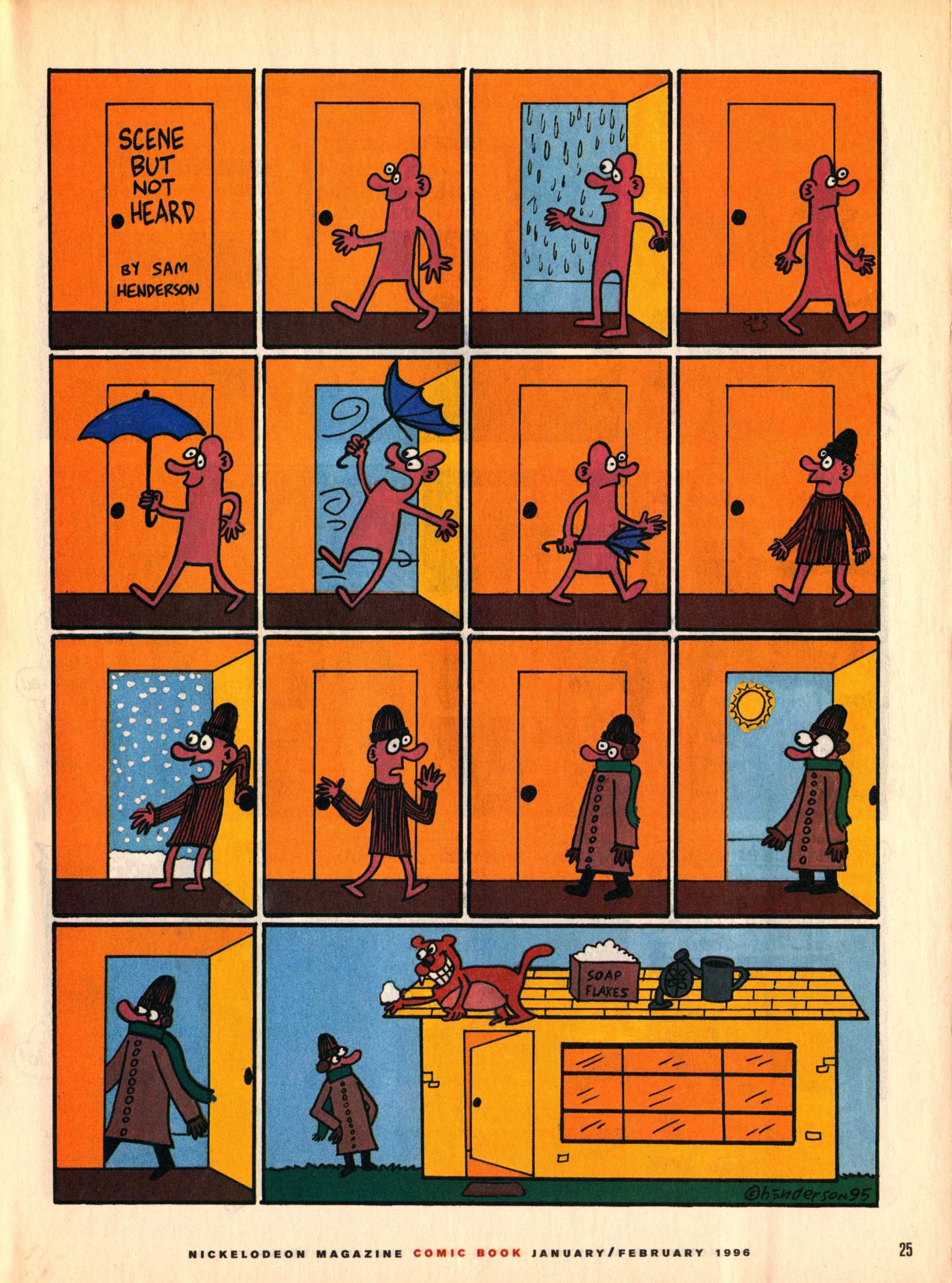
Back in the day, I used to subscribe to Nick Jr. Magazine for its ads (great expository text contexts) and visual content. This included a comics section with a series called "Scene But Not Heard" by comic artist Sam Henderson. The adventures of Pink Guy and Bear are humorous, exaggerated, and related without words. Like wordless picture books, wordless videos and comics are helpful materials for students to work on interpreting nonverbal cues, "thinking with the eyes," and constructing narrative language and the microstructure (vocab, verbs, complex sentences) within it. In those days I used to collect the series and use laminated versions in classrooms for push-in services along with graphic organizers from Story Grammar Marker®. The content is engaging for mid-elementary through high school students.
Nick Jr. is no more, but I recently discovered that much of "Scene But Not Heard" is available digitally. Just Google it and then click Images, and you have a treasure trove. This feature about the series also contains a gallery. In either case you can:
-save the comic materials to your device (tap and hold on full size image on iPad, or ctrl/right click on a laptop).
-make a collection- you can use Adobe Acrobat Reader, Mac Preview, tap the share button on your iPad and then save as PDF to iBooks, or simply make a folder in your laptop or Google Drive.
-Use the zooming features contained by these technologies to zoom in on the action and limit the visual array (I like to use these to teach students to verbally mediate and "talk out" the nonverbal content).
-Consider integrating with Google Docs- insert a comic into a Doc and have students write a summary.
Nick Jr. is no more, but I recently discovered that much of "Scene But Not Heard" is available digitally. Just Google it and then click Images, and you have a treasure trove. This feature about the series also contains a gallery. In either case you can:
-save the comic materials to your device (tap and hold on full size image on iPad, or ctrl/right click on a laptop).
-make a collection- you can use Adobe Acrobat Reader, Mac Preview, tap the share button on your iPad and then save as PDF to iBooks, or simply make a folder in your laptop or Google Drive.
-Use the zooming features contained by these technologies to zoom in on the action and limit the visual array (I like to use these to teach students to verbally mediate and "talk out" the nonverbal content).
-Consider integrating with Google Docs- insert a comic into a Doc and have students write a summary.
Friday, December 1, 2017
Realistic Expectations, and some tips
Technology that we like can tend to go away.
It's just how it works. Most technology resources have an element of planned obsolescence. I wanted to write about this because with the launch of iOS 11 this fall, many in our field discovered that a good number of their apps no longer worked, i.e. they wouldn't launch.
Why did this happen?
Apple introduced a higher level 64-bit processor to its devices in 2013 and at that time began encouraging developers to update apps that were built for the 32-bit processor. That was 4 years ago. So Apple gave developers plenty of time to work on securing a longer life for their apps. With iOS 10, users began receiving messages when launching old apps that an update would be needed and the app would not work with future versions of iOS. That line was drawn with iOS 11, and something like 180,000 apps (mostly games, followed by education apps, see source) ceased to launch once the device was updated to the newest version of iOS.
Another why, which I can say from being involved in app development, is that creating technology is very difficult and complicated, and these creations are not intended to last forever. Kudos to Smarty Ears for keeping all their apps, including the five I worked on, up to date. I have had to mourn many web resources over the years and I knew the day would come for some apps to buy the farm as well. Let's pour one out for the original Toontastic, now replaced by Toontastic 3D, which I also like but perhaps not as much, and Tellagami, for now.
I could not find a reference indicating how long tech consumers should expect resources to work--hardware or software. But I'd say it's reasonable for us to expect about 3-5 years, even if we paid for that resource.
Things happen. People move on. So should we. Should we expect a company that floundered so much that they were sold and reabsorbed, or just went away, to update its apps? These things are unfortunate and disappointing, but it is what it is!
What can you do?
First of all, if you haven't updated to iOS 11 yet, I recommended previously that you do so carefully.
-Check first to see if there are apps you absolutely can't live without, or whose data you need to extract somehow. Settings>General>About>Applications. If apps you need are listed in the "No Updates Available" section, take note of these.
-Contact developers, if you want to go that route, to see if there is going to be an update. Probably if they are still in that bin, it's unlikely.
-If there are a lot of apps on this screen that you can't live without, wait awhile...but only until you figure out how to replace them in your workflow.
Let go. If you hang back on your operating system too long, you are going to be missing out on updates to other apps and new releases.
BUT, once you update, unfortunately those non-functional 32-bit apps are not deleted and just take up space on your device like an annoying shell. I had the additional problem of my iPad being nearly full after updating. After deleting a lot of items like old video clips and photos, here's the process I followed:
-I navigated to the above screen (Settings>About>Applications) and took a photo on my phone of the apps at top of the list.
-I considered if there were any apps I wanted to wait a bit more on, and kept those in mind.
-I navigated to the easiest place to delete apps, Settings>General>iPad Storage
-This screen takes a moment to index, but lists all apps on the device. Most of your stragglers are probably going to be down at the bottom of the list as in my observation the non-updaters are smaller apps that performed discrete functions. Scroll down and tap on any app and it will bring you to a screen where you can tap Delete App. WAIT for Settings to kick you back to the storage screen rather than tapping Back or you are likely to cause a freeze.
-If Settings freezes anyway in this process, wait awhile or Force Quit it.
-I referred to my photo and deleted apps that I could let go of (most)
-Then I navigated back to the No Updates Available screen and repeated the process, after deleting the previous photo from my iPhone and taking a new one, until I only had a few apps I'm holding out for. Remember that if a deleted app is updated in the future (you'd have to check the App Store to find out if it reappeared), you always can reinstall.
This process was, frankly, a major pain in the ass. But having gone through it, I am happy to have a cleaner device and to have purged dozens of apps that I really wasn't using anyway. As I have 2 iPads, following this I backed up the "clean" one to iTunes, updated the 2nd one to iOS 11, then reset it and restored it from the backup of the clean iPad.
Moving on!
It's just how it works. Most technology resources have an element of planned obsolescence. I wanted to write about this because with the launch of iOS 11 this fall, many in our field discovered that a good number of their apps no longer worked, i.e. they wouldn't launch.
Why did this happen?
Apple introduced a higher level 64-bit processor to its devices in 2013 and at that time began encouraging developers to update apps that were built for the 32-bit processor. That was 4 years ago. So Apple gave developers plenty of time to work on securing a longer life for their apps. With iOS 10, users began receiving messages when launching old apps that an update would be needed and the app would not work with future versions of iOS. That line was drawn with iOS 11, and something like 180,000 apps (mostly games, followed by education apps, see source) ceased to launch once the device was updated to the newest version of iOS.
Another why, which I can say from being involved in app development, is that creating technology is very difficult and complicated, and these creations are not intended to last forever. Kudos to Smarty Ears for keeping all their apps, including the five I worked on, up to date. I have had to mourn many web resources over the years and I knew the day would come for some apps to buy the farm as well. Let's pour one out for the original Toontastic, now replaced by Toontastic 3D, which I also like but perhaps not as much, and Tellagami, for now.
I could not find a reference indicating how long tech consumers should expect resources to work--hardware or software. But I'd say it's reasonable for us to expect about 3-5 years, even if we paid for that resource.
Things happen. People move on. So should we. Should we expect a company that floundered so much that they were sold and reabsorbed, or just went away, to update its apps? These things are unfortunate and disappointing, but it is what it is!
What can you do?
First of all, if you haven't updated to iOS 11 yet, I recommended previously that you do so carefully.
-Check first to see if there are apps you absolutely can't live without, or whose data you need to extract somehow. Settings>General>About>Applications. If apps you need are listed in the "No Updates Available" section, take note of these.
The App Compatibility/Sadness screen
-Contact developers, if you want to go that route, to see if there is going to be an update. Probably if they are still in that bin, it's unlikely.
-If there are a lot of apps on this screen that you can't live without, wait awhile...but only until you figure out how to replace them in your workflow.
Let go. If you hang back on your operating system too long, you are going to be missing out on updates to other apps and new releases.
BUT, once you update, unfortunately those non-functional 32-bit apps are not deleted and just take up space on your device like an annoying shell. I had the additional problem of my iPad being nearly full after updating. After deleting a lot of items like old video clips and photos, here's the process I followed:
-I navigated to the above screen (Settings>About>Applications) and took a photo on my phone of the apps at top of the list.
-I considered if there were any apps I wanted to wait a bit more on, and kept those in mind.
-I navigated to the easiest place to delete apps, Settings>General>iPad Storage
The App Storage Screen- Tap any app to Delete it. You can also find the icon on the home screen, tap-hold until it jiggles, then tap the X. Apps are hard to find this way, if you have many apps.
-This screen takes a moment to index, but lists all apps on the device. Most of your stragglers are probably going to be down at the bottom of the list as in my observation the non-updaters are smaller apps that performed discrete functions. Scroll down and tap on any app and it will bring you to a screen where you can tap Delete App. WAIT for Settings to kick you back to the storage screen rather than tapping Back or you are likely to cause a freeze.
-If Settings freezes anyway in this process, wait awhile or Force Quit it.
-I referred to my photo and deleted apps that I could let go of (most)
-Then I navigated back to the No Updates Available screen and repeated the process, after deleting the previous photo from my iPhone and taking a new one, until I only had a few apps I'm holding out for. Remember that if a deleted app is updated in the future (you'd have to check the App Store to find out if it reappeared), you always can reinstall.
This process was, frankly, a major pain in the ass. But having gone through it, I am happy to have a cleaner device and to have purged dozens of apps that I really wasn't using anyway. As I have 2 iPads, following this I backed up the "clean" one to iTunes, updated the 2nd one to iOS 11, then reset it and restored it from the backup of the clean iPad.
Moving on!
Friday, November 24, 2017
Dispatches from ASHA, Part 3
A third session I attended at ASHA leads me to a tech-tie-in on this blog and was called Consider the Big Picture: Using Classroom Expectations to Guide Assessments and Develop Educationally Relevant Interventions (Chinen and Ireland). A take-away from this session was that diagnostic activities such as dynamic assessment and language sample analysis are essential to supplement testing components of evaluations.
Now, I'm a HUGE narrative person, so consider that bias (if a focus on functional communication can be considered a bias). But as I was hiking through a park in LA with some friends I hadn't seen in awhile, I got meta for a moment. I thought about how much of the welcome and meaningful experience of hanging out with them again consisted of narratives. Spoiler alert: all of it.
One resource recommended by Chinen and Ireland is called SUGAR (Sampling Utterances and Grammatical Analysis Revised), and a couple of keystrokes brought me to a brand new article from July, 2017 with updated research, language elicitation protocols and norms for ages 3-7;11.
You all know how to read a research article, so besides a few points I will just say: PLEASE READ IT. The article would also make a great study-and-apply activity with colleagues
Pavelko and Owens' aim is to make these vital assessment processes easier for busy clinicians, and they do:
-"LSA (Language Sample Analysis) may be 'the only assessment measure that captures a speaker's typical and functional language use.'"
-A recent survey of school-based SLPs revealed that only 2/3 had used LSA in the last year and of those, about half had only done so in no more than 10 cases.
-The authors recommend using digital recording tools rather than attempting to transcribe live, which is stressful, inaccurate, and probably hampers clinicians' ability to elicit in a functional context. I like the Voice Memos app on my iPhone or Voice Memos for iPad. Tip: try to "rewind" as little as possible. Transcribe and get what you can. Then re-listen and edit.
-Protocol and techniques are offered for eliciting (among others):
"Ask process questions
How did/do…
What happened…
Why did…
Use “Tell me…” or “I wonder…” statements.
Use Turnabouts
Comment + cue for child to talk
Use Narrative Elicitations
Build on what the child says or what you know.
Begin with 'Your mom says you… that sounds like fun. Tell me what happened.'
'I know that you… Tell me what happened.'
'Did you ever… Tell me what you did.'"
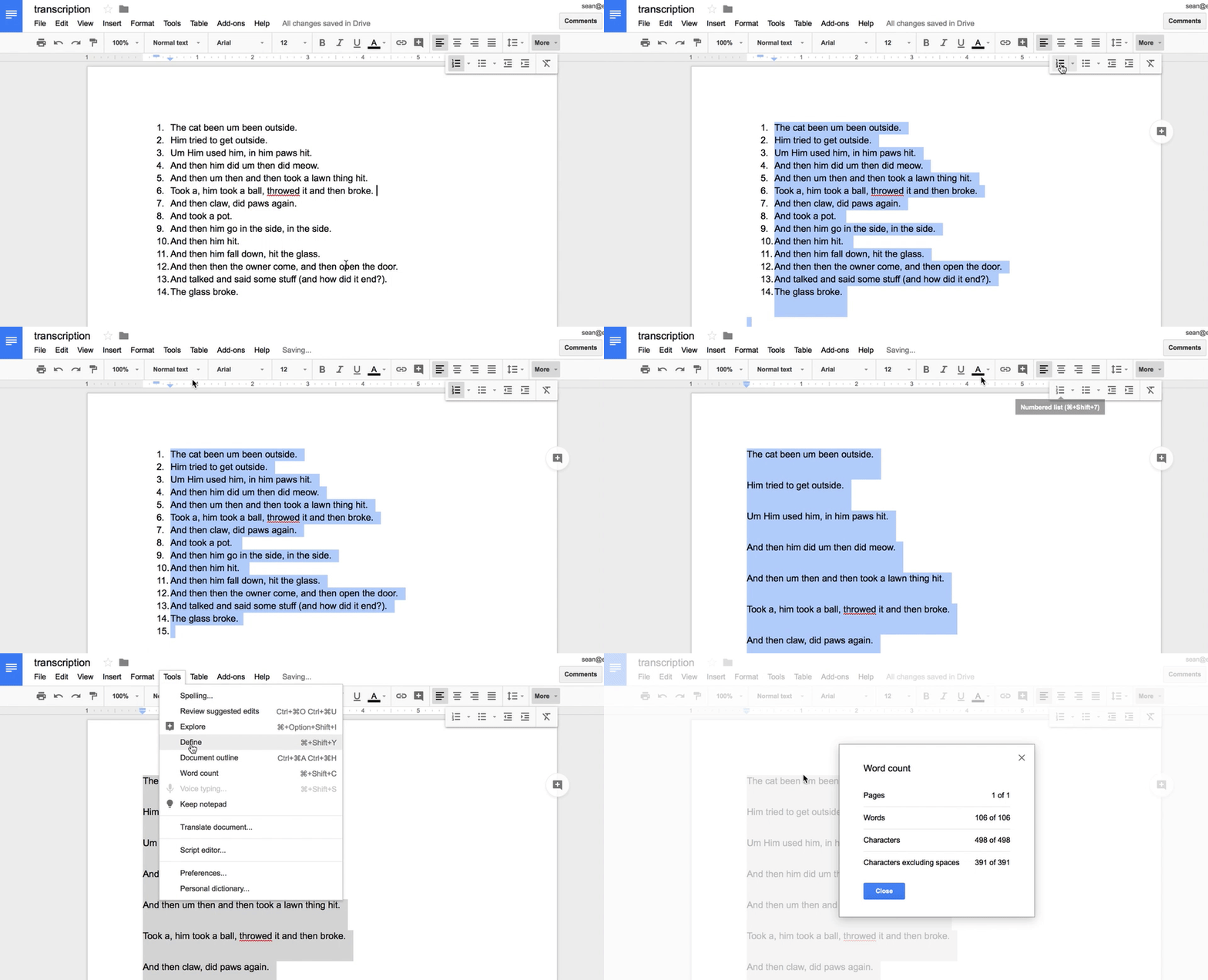
So, the tech tie-in. Pavelko and Owens demonstrate simple uses of word processors to help clinicians quickly calculate total number of words, mean length of utterance in morphemes, words per sentence and clauses per sentence, and provide normative data for all of these for ages 3-7;11. These involve using the numbering feature and word count of MS Word; I would also point out that the same features are available in Apple's Pages and Google Docs.
Clinicians might also benefit from the File>Duplicate option or Make a Copy in Google Docs when working with the sample and taking different measures, so as not to be confused by the required edits to the sample (e.g. using spaces to mark morphemes).
In Google Docs, some of the techniques suggested:
An important read. If working with older students I also recommend Hadley's Language Sampling Protocols for Eliciting Text-Level Discourse and Heilmann and Malone's Rules of the Game.
Now, I'm a HUGE narrative person, so consider that bias (if a focus on functional communication can be considered a bias). But as I was hiking through a park in LA with some friends I hadn't seen in awhile, I got meta for a moment. I thought about how much of the welcome and meaningful experience of hanging out with them again consisted of narratives. Spoiler alert: all of it.
One resource recommended by Chinen and Ireland is called SUGAR (Sampling Utterances and Grammatical Analysis Revised), and a couple of keystrokes brought me to a brand new article from July, 2017 with updated research, language elicitation protocols and norms for ages 3-7;11.
You all know how to read a research article, so besides a few points I will just say: PLEASE READ IT. The article would also make a great study-and-apply activity with colleagues
Pavelko and Owens' aim is to make these vital assessment processes easier for busy clinicians, and they do:
-"LSA (Language Sample Analysis) may be 'the only assessment measure that captures a speaker's typical and functional language use.'"
-A recent survey of school-based SLPs revealed that only 2/3 had used LSA in the last year and of those, about half had only done so in no more than 10 cases.
-The authors recommend using digital recording tools rather than attempting to transcribe live, which is stressful, inaccurate, and probably hampers clinicians' ability to elicit in a functional context. I like the Voice Memos app on my iPhone or Voice Memos for iPad. Tip: try to "rewind" as little as possible. Transcribe and get what you can. Then re-listen and edit.
-Protocol and techniques are offered for eliciting (among others):
"Ask process questions
How did/do…
What happened…
Why did…
Use “Tell me…” or “I wonder…” statements.
Use Turnabouts
Comment + cue for child to talk
Use Narrative Elicitations
Build on what the child says or what you know.
Begin with 'Your mom says you… that sounds like fun. Tell me what happened.'
'I know that you… Tell me what happened.'
'Did you ever… Tell me what you did.'"
So, the tech tie-in. Pavelko and Owens demonstrate simple uses of word processors to help clinicians quickly calculate total number of words, mean length of utterance in morphemes, words per sentence and clauses per sentence, and provide normative data for all of these for ages 3-7;11. These involve using the numbering feature and word count of MS Word; I would also point out that the same features are available in Apple's Pages and Google Docs.
Clinicians might also benefit from the File>Duplicate option or Make a Copy in Google Docs when working with the sample and taking different measures, so as not to be confused by the required edits to the sample (e.g. using spaces to mark morphemes).
In Google Docs, some of the techniques suggested:
An important read. If working with older students I also recommend Hadley's Language Sampling Protocols for Eliciting Text-Level Discourse and Heilmann and Malone's Rules of the Game.
Thursday, November 16, 2017
Dispatches from ASHA, Part 2
My second session (I was super lucky this year!) at ASHA revolved around visual supports and the ease through technology tools of...
Co-engagement: presenting a visual material and scaffolding language around it
Co-creation: using a tool that allows us to make something (an image creator, animation tool, book maker, video shooter) and scaffolding language through the process of using the app (not worrying so much about the product).
I stressed that we need to continue to provide visual supports to our students across the lifespan. Since everything to me is narrative in some form, I shared that when I arrived at the convention center I felt very dysregulated and confused by the layout, and that it was helpful for me to make a visual support of where my sessions would be over the two days!
One type of visual support I discussed is the 5-Point Scale, which I have talked about here before. A theme of the presentation was that simple visual tools such as PowerPoint, Google Slides or Keynote are great for making visual supports because (feature-matching for us!) you can easily add images, text, and whatever and move them around. I sometimes make visual supports live with students on these tools and use the Apple TV to engage them visually and verbally (you can do this via a projector or interactive whiteboard in a classroom situation as well).
I made a new 5-Point Scale for a group I have that is occasionally having difficulty with Tone:
Co-engagement: presenting a visual material and scaffolding language around it
Co-creation: using a tool that allows us to make something (an image creator, animation tool, book maker, video shooter) and scaffolding language through the process of using the app (not worrying so much about the product).
I stressed that we need to continue to provide visual supports to our students across the lifespan. Since everything to me is narrative in some form, I shared that when I arrived at the convention center I felt very dysregulated and confused by the layout, and that it was helpful for me to make a visual support of where my sessions would be over the two days!
One type of visual support I discussed is the 5-Point Scale, which I have talked about here before. A theme of the presentation was that simple visual tools such as PowerPoint, Google Slides or Keynote are great for making visual supports because (feature-matching for us!) you can easily add images, text, and whatever and move them around. I sometimes make visual supports live with students on these tools and use the Apple TV to engage them visually and verbally (you can do this via a projector or interactive whiteboard in a classroom situation as well).
I made a new 5-Point Scale for a group I have that is occasionally having difficulty with Tone:
An additional visual support is to create comics, which also can be done using technology. I described how I find Pixton (web only, won't work on iPad) to be a still useful tool because it (feature-matching!)
-has a simple mode for you to make a comic
-has built-in characters and settings
-once you make a comic, you can copy it and change aspects to show nuance/reaction change.
I integrated Pixton into a discussion context with my group (co-engaging over 5 comics showing the different levels) and a game with Kahoot. Kahoot can be both a visual and interactive support as you can add photos and videos to your questions. At my presentation session we viewed these comic examples and the whole crowd played the game:
Hope it was helpful for you to see this snippet of this session. Thanks to those who made it to this or my other session!
Labels:
social pragmatics,
social thinking,
visual teaching
Subscribe to:
Posts (Atom)