Monday, August 26, 2013

CloudSpotter

Is it just me, or have the clouds been more noticeably pretty and dramatic this summer? Warmth probably brings more remarkable clouds, or at least one tends to pause and look at the sky more when it's not 2ยบ out. In any case, it has been a wonderful summer in the Northeast and I have found myself doing quite a bit of cloud gazing.

To the point, clouds are a pretty great language context- they can be described, compared, associated with other shapes, and they are very educationally relevant to science units on weather and the water cycle. At EdCampBLC in mid-July, a participant shared the CloudSpotter app during the closing app-sharing session (these are called "Smackdowns"), and I was instantly intrigued. CloudSpotter ($1.99, found under iPhone apps but usable on iPad) is like a field guide to clouds; you can explore a cloud library of main cloud types as well as more exotic clouds and phenomena, in which each is clearly and even humorously explained, the text serving as a good context for mapping expository text. This section also has a short, engaging animated film on the water cycle. CloudSpotter is also interactive in a very fun way: snap a photo of a cloud, attempt to identify it, and submit it, and you will be able to contribute to your own cloud collection. The creators of the app review your submission and indicate if you have identified the cloud correctly (I identified several clouds and received a response within 24 hours)!


Language Lens:
-I have found taking pictures of clouds to be a fun task with kids, stretching back to the days when I would then connect the digital camera, insert the picture in a PowerPoint slide, and have them write about the weather for the day (good schema-building). With iPad, not surprisingly, it is so much easier! Screenshot your cloud pics from CloudSpotting and add them to any app that allows you to combine pictures and text, Popplet Lite, for example.
-This app could be used in conjunction with other resources that allow you to build descriptive language through the context of weather: viewing weather forecasts on TV station websites, EdHeads' Weather Activities, Swackett.
-Combine this app with the use of Tellagami and create weather forecasts!
-This app would pair well with a few picture books to build language: It Looked Like Spilt Milk and Cloudette (which has a great narrative structure for story mapping).

Hope you have all had a great summer and your transition back to school treats you well!

Tuesday, July 23, 2013

Follow-Up on ASHA Schools: Tellagami

I had a terrific time attending and presenting at this past weekend's ASHA Schools Conference in Long Beach, CA. I have been to many ASHA Conventions (and will be presenting in Chicago, more info to come), but this was my first Schools Conference. It has a very different feel- more low-key and definitely user-friendly.  As presenters we were encouraged to engage our audiences and make our sessions as practical as possible, which I appreciated. I really enjoyed seeing the motivational, positive-psychology based opening session by Murray Banks, and sessions on executive functioning and instructional strategies for academic writing by Sylvia Diehl and Bonnie Singer, respectively. It was an honor to be invited and counted among the faculty of this great conference, and I would encourage you all to make it to this event at some point if you work in the schools.

I had the opportunity at the conference to present on one of my favorite topics: digital storytelling or content creation apps. For me, though not designed for speech and language, these apps serve as "blank slates" for us to simply create (for or with students) products that can target all manner of skills: academic language, concepts and vocabulary, narrative, expository text, sentence structure or social cognition. It all depends on what you ask the students to do.

A great example of these types of apps and always a favorite when I present it: Tellagami. This free app allows you to create a talking avatar (called a "Gami") and place it in context with any background image.


See Tellagami's YouTube channel for a few other ideas on how to use Tellagami.

Here's how to use Tellagami:

Photo Creative Commons Licensed for Remixing by HarshLight on Flickr
1. Save a background image using Safari. The app also has some pre-loaded contexts. Tap Background to load an image from the app or Camera Roll.
2. Customize your character's appearance (the app allows you to choose aspects such as skin color, hair, gender, clothes).
3. Choose an emotional state for the character.
4. Tap the Character button twice and you will be able to either type text for the character to speak, or record audio which the character will lip-sync.
5. When you are pleased with your creation, you can tap Share and save it to the Camera Roll as a video.

The app is super-simple to use and the results are often hysterical! Here are a few ways to think of Tellagami through the Language Lens:
-As the app allows you to place a single "speaker" in a context, it is a nice one to use to create "newscasts" or advertisements.
-In doing so, you can incorporate virtually any academic context by saving a picture and having a "reporter" avatar speak from that location.
-In turn, you can plan the creation using strategies to structure language such as story grammar or expository text structure, or use this opportunity to target areas of difficulty such as pronoun or tense use.
-Because audio can be recorded, the app can also be used as a motivating way to work with articulation, voice or fluency.
-From a social standpoint, you are limited to one character speaking at a time (though Tellagami kindly responded to me on Twitter that they are considering adding additional characters through an update). Nevertheless, the app could be used as another way to deliver a Social Story™ or perhaps an "advice column" on the expected and unexpected behaviors- based on the work of Social Thinking®- in a particular setting (which you of course would depict with a background photo).

I hope you enjoy Tellagami! The folks at ASHA Schools sure did!

What ideas do you have for using Tellagami? Let us know in the comments!

Saturday, July 13, 2013

Create Narrated Slide or Video Shows with Videolicious

I am giving a session on Digital Storytelling in speech and language intervention at today's ASHA Schools conference in Long Beach, CA, and thought I would feature one of my favorite tools in this genre.

Videolicious is a simple video creator- it allows you select photos or videos from your photo library/camera roll and talk over them, effectively creating a narrated video. What a great language tool- and did I say it's free? It's freeness comes with two limitations- videos are limited to 10 minutes, and the saving process sends your video to the service's website (unless you follow the directions below).

Videolicious is really simple to use. You will first need to have photos or videos in your photos app- either shoot them or save images from the Internet (again, see the directions below to avoid violating copyright). Once they are there, select them by tapping them in sequence within the app:


You are then given the opportunity to record a "Selfie" introduction to the video (you talking to the camera). You can select the option of using "mic only" so that you or the student do not appear in the video. As you record your narration, you tap the selected images or videos in order to time when they will appear in your video. Thus, a narrated slideshow.


Language Lens:
-You can use Videolicious to have students (including adults) practice describing, sequential language, storytelling, persuading- whatever form of discourse you would like.
-Videolicious, as it records audio of one speaking, is also a nice tool to work on articulation, voice, and fluency.
-As your project in Videolicious can include video, it can also be used for video modeling, having kids narrative the steps to social or functional sequences.
-Many creation apps are more about the process than the product. Use the process to help students to plan their language using a graphic organizer or script.

BUT!
Videolicious, if used exactly as designed, saves the finished project both to your photos app AND the Videolicious website. This presents several issues:
a) You don't want to be sending video of your students to the Internet unless you have explicit permission.
b) If you saved images from Google Images, they were likely copyrighted. These are OK to use in any project that stays on your iPad in the app itself or if it is saved locally to the Camera Roll (this is Fair Use), but not to be republished to the Internet. You can use tools such as Flickr Creative Commons or other Creative Commons search websites to save the photos. You should still site them in some way, either orally within the video or by creating a text image (maybe with Doodle Buddy) attributing the image.

OR
...you can avoid publishing the project to the site by following these steps (given to me by a Videolicious support person):
1. Create your video. Don't tap Save.
2. Leave the Videolicious app and turn on Airplane Mode in the Settings app of your iPad. This disconnects your iPad from the Internet.
3. Return to Videolicious and complete the steps of saving the video. This will save it to the Camera Roll (Photos app) and NOT the site.
4. When saving is complete, tap the Share button (arrow coming out of the square) and Delete Video. It will remain in your photos app but then the app will not attempt to upload it when you turn off Airplane Mode.


5. Go back to the Settings app and turn Airplane Mode off.

This does seem like a lot of steps, I know. Nevertheless, this is one of the easiest and best apps I know of to make a narrated video, so I still highly recommend it.

Monday, July 8, 2013

Thinking about Social Thinking®, and the iPad Essential of Album Creation

I am really happy to have been asked to be part of the Social Thinking® Blogging Team, a group of folks who will be writing about some of the products and conferences offered that are related to the Social Thinking approach, based on the work of Michelle Garcia Winner. We agreed that since this is a tech-infused place, I would be featuring some of the Social Thinking products over the coming months along with a technology tie-in. This aligns well with my experience in presenting at the Social Thinking Provider's Conferences about webtools and apps that, though not designed for supporting social cognition, can easily be leveraged to that end.

The folks at Social Thinking asked us to start with Thinking about YOU, Thinking about ME: Teaching perspective taking and Social Thinking to persons with Social Cognitive Learning Challenges, 2nd Edition. This is perfect, as this book is where I would recommend anyone starting when exploring implementation of Social Thinking in your practice. Summer is a great time to pursue new avenues in your practice, or take time to deepen your knowledge of strategies you have already started applying.

I first saw Michelle Garcia Winner speak over 10 years ago, when this book was published in its first edition. One can think of it as THE core book for Social Thinking, an essential approach in working with high-functioning students with social learning issues. Social Thinking is all about language and concepts that teach students the why of social interactions. The essential ideas and strategies can be taught and then practiced in individual or group sessions, and the vocabulary related to social behavior can then be conveyed to parents and teachers for carryover and reinforcement in situations across the day. Thinking about YOU, Thinking about ME gives you an overview of social cognition and levels of functioning, but also an entry point to some key intervention strategies, such as:

- The Four Steps of Communication: concrete, universally followed steps to approaching others and "hanging out" in a group.
-Developing cognitive vocabulary (what it means to think, know, or guess) through use of videos such as the Wallace and Gromit series (I have also recommended Shaun the Sheep for this).
-Using video both as a feedback technique and as a group project to develop social behaviors in a naturalistic context.
-Social Memory and creating "People Files" about others both as an expected behavior and strategy to aid in initiating interactions.
-Specific language, visuals and goal ideas on teaching physical presence and awareness of how our bodies (and eyes!) should look when "staying with the group."
-A focus on conversational interactions through various strategies- using the "Add-A-Thought" and conversation tree, or Conversation Street Vocabulary describing how conversational behavior can mirror moves on the road.
-Social Behavior Mapping- an essential therapy tool when students have "graduated" from Social Stories™, can be used to teach any situation's associated expected behaviors and consequences.
-Strategies for building the foundations of self advocacy in students, i.e. knowing about their own IEP.

Besides providing information to get you started on all of these intervention strategies, Thinking about YOU, Thinking about ME contains another essential tool: the Social Thinking Dynamic Assessment Protocol. This is a qualitative assessment procedure I have found invaluable in the last several years.  I first started applying it in the school setting along with other colleagues, and the information provided as you work through it with students are essential to an informed assessment of social cognition (this book also provides analyses of norm-referenced assessments) and treatment planning. If you don't yet have the book, you can find some of this information (and many other free resources) on the Social Thinking website here.

That article linked above describes the Double Interview Task within the Protocol; in this task, the clinician interviews the student and makes observations of his or her conversational skills, then turns the table and asks the student to do an interview. This task is very telling! One aspect of the task involves asking the student to view and interpret personal pictures of the clinician. Can the student describe the context and the relationships between the people depicted? Does the student make "smart guesses" about you based on the pictures? Does the student recognize people shown in multiple pictures?

Here's where my tech spin on Thinking about YOU, Thinking about ME comes in. To do the Double Interview Task, you need pictures of yourself. Since many of these are exchanged electronically these days, and also to save the bother of collecting and having more materials around, you can keep your pictures in an album within the Photos app of your iPad.  Here's how you do it:

1. "Collect" your Photos

You may have a built-in collection of usable photos for this task on Facebook. Just save some where you don't have a "beverage."


Navigate to a usable picture in the Facebook app on iPad, and you can tap on the 3 Dots to save the picture to the Photos app.

If you have photos saved elsewhere, or can scan them on a computer, you can then email them to an account accessible in the Mail app on your iPad (to add Mail accounts, open Settings>Mail, Contacts, Calendars). Open the mail and tap and hold on the photo file, then choose Save to Camera Roll.


2. Organize an Album

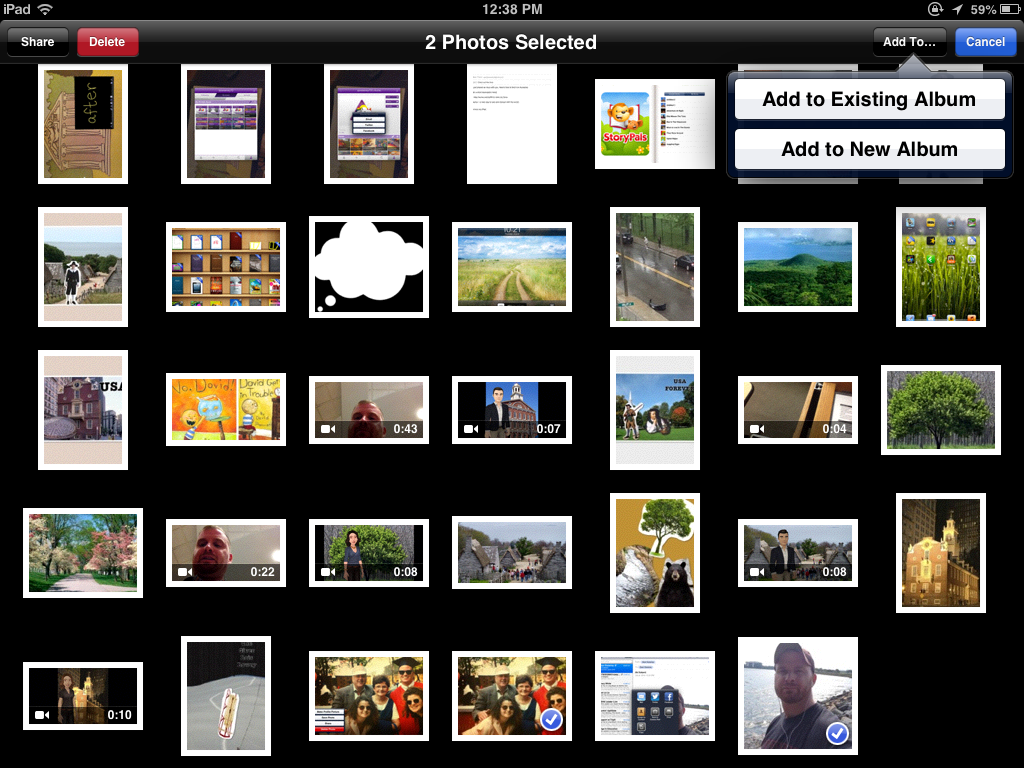
When doing the assessment, you don't want to have to sweep through all your photos to locate the pictures you plan to show the student. You can facilitate this by creating an Album in the Photos app.

There are several ways to do this but I will show you my favorite way.
a. Open the Photos app and ensure that in the top menu, Photos is selected.
b. Tap Edit. Notice that the menu has disappeared and the words Select Items are displayed.
c. Tap the photos you want to put in your album.
d. Tap Add To...


e. Add to a New Album and Name the Album.
f. You will then see your Album under the Albums section of your Photos app.

If you would like to see this as a video, here is a good representation of the process (after more comprehensive screenshots).

I have found having my photos on the iPad is very convenient as it helps me prepare for these assessments, and it also adds an engagement factor for the student when they are asked to view the photos on the iPad.

I hope you do explore this book when you have some time this summer!

Disclosure: Author was provided a copy of Thinking about YOU, Thinking about ME. However, I owned dog-eared copies of both the first and second editions of this book already! The opinions are all mine.

Thursday, June 27, 2013

Summer Watching: Body Language and Life Outcomes

It is rare that I watch a TED talk that it doesn't change my thinking in some way, at least temporarily. Isn't that what learning is about? I often intend to watch more of these talks and don't succeed, but I recently noticed that TED is available on Netflix. Not that it was hard to access the resources from the multidisciplinary Technology, Entertainment, Design (and much more) conferences, given the great (free) website and iPad app, but streaming it on my TV is even better.

Check out this talk from Amy Cuddy on body language and its consequences for communication and even "life outcomes" such as getting a job or making a date. There is some interesting science here and definitely some clinical implications for working with our students. Amy discusses the simple strategy of the "power pose" and how it shapes our thinking and behavior, and therefore consequences in our own life and our own feelings about ourselves. Sound familiar? There's a good connection here to Social Thinking's Social Behavior Mapping technique.

See Amy Cuddy's TED Talk here.


Tuesday, June 18, 2013

Update on SLP Blogs Bundle: Now Follow Blogs Using Feedly!

For a few years, I have been a strong advocate of following blogs using an aggregator tool such as Google Reader. I even created a "bundle" of SLP blogs that anyone could subscribe to all at once using Reader. Unfortunately, several months ago, Google announced that it was retiring this product, causing much of the edtech world to spin into a panic (NOTE: If you subscribe to this or other blogs via email, none of this affects you, though I recommend reading on to learn about another way to receive blog content). Though Reader will not be accessible after July 1, 2013, and the SLP Blogs Bundle can therefore have no new subscribers after that time, a substitute has risen to the top: Feedly.

Feedly has been my go-to reading tool since the announcement of the demise of Reader, and I wanted to post about it in conjunction with SLP and fellow SpeechTechie Janelle Albrecht, who had a similar reaction to this bad news. Janelle supported me in those early, dark days after Google broke my heart. This post will give you some information and steps to follow whether or not you currently are a Reader/Feedly user.

Janelle and I conversed over a Google Hangout recently about the advantages of blog aggregators and how Feedly has become our savior:


Sorry that the video is a bit quiet on Janelle's end- you may need headphones to hear her side of the conversation. Key points:
-After July 1, 2013, Google Reader will be no more.
-If you log in to Feedly before July 1 with your Google Account, all your subscriptions and starred items will be migrated to Feedly seamlessly.
-Feedly is a free, clean and efficient tool that you can use to skim all blogs you subscribe to, share posts with others, and curate posts for later reading by "saving for later" or tagging posts in categories for your organization.
-Feedly became our top new tool (after a brief mourning period aligning with the stages of grief outlined by Elizabeth Kubler-Ross) because of its wide array of features, similarity to Reader, clean look and feel, and cross-platform nature (you can use Feedly for free via any web browser, iOS and Android)
-Feedly has developed a critical mass of converts following the Google Reader announcement and has made key steps to ensure users' easy transition to the tool, which bodes longevity.
-Blogs are a GREAT "receptive" way to engage in social media and professional development. No need to interact if you don't want to; just read!
-You can start using Feedly even if you have never used Google Reader, and you should! If you follow more than two or three blogs, it is better to use such a tool than to individually navigate to blogs via bookmarks in your browser, which is inefficient and does not support easy sharing or curation of posts.
-Folks also like Flipboard and Zite, news aggregators that provide different experiences and features.
-You can still give yourself a jumpstart with a collection of blogs by subscribing to the Google Reader SLP Blogs Bundle before July 1 (navigate to Reader while signed into a Google account, then click on this link to add the bundle). Sign into Feedly as well before that date to migrate these subscriptions.
-After July 1, the SLP Blogs bundle will be unavailable for new subscribers, but will stay in your Feedly.
-I will make it a summer project to replace this bundle with a list or resource links of blogs you can add to your Feedly related to speech-language pathology. Heidi Kay of Pediastaff and Jenna Rayburn of Speech Room News have done this here and here very well so I am not sure how much I will reinvent the skillfully constructed wheel. It's very easy to add individual blogs to Feedly, as you can see in the tutorial below.

Overall, Feedly is super easy to use! In addition to the video above, which is more of a discussion, I made a tutorial on using the web or iPad versions of Feedly:


This post may trigger a number of questions. Please feel free to leave any questions in the comments and I will be sure to respond!  Thanks to the nearly 1,000 people who subscribed to the SLP Blogs Bundle over the past several years. I was very happy to promote all the good work of SLP Bloggers. Hopefully Feedly will come up with a similar bundling feature as it evolves.  Thanks also again to Janelle Albrecht for your time, insights, and patience with my "technical difficulties" on the morning of our recording!

Last Tips: Be sure to add something to your Feedly that makes you laugh or think (or both). Lately, I am enjoying the guilty pleasure of BuzzFeed, and Lifehacker always gives me good ideas. Both of these blogs, and some others, can be very prolific. DO NOT feel like you need to read every post of anything. That is sure to short out your brain and make you want to stop following blogs. Liberate thyself whenever the number of unread posts stresses you our- you can remove the subscription or "Mark all as Read." No one will know. Be Zen. Whatever you read is just the right amount for you to read.

Friday, June 14, 2013

Interactive Books and More with Collins' Big Cat Series

Harper Collins' "Big Cat" Series of apps for iPad is not to be missed- you should be sure to download all 8 of the apps while they are free! These interactive books are great for your early learners or those working on developmentally lower skills. Each book consists of a short, simple story which can be read to students via audio, or students can read themselves, activating small interactive elements (animations) which boost engagement along the way. The books contain rich illustrations without many words, so that clinicians will have the opportunity to stop and elicit language, which can also be recorded and played back to the student for engagement and auditory feedback.


An illustration from "Playing"- a contextual means to elicit pronouns, verbs, causals, or other targets.

Each book smartly has a contextual language theme or category woven into a story- weather, directionality, etc. The stories themselves have an action sequence narrative structure, and could be used with tools such as Story Grammar Marker® to target narrative elements and retelling of characters, settings and actions.

The BEST part of the "Big Cat" apps is that each is also a creation tool in which you can make your own "books" within the app. Students can arrange backgrounds and visual elements from the story, adding text and audio for a retelling or their own creations. This is truly an awesome feature for a free app! Although these creations cannot be shared outside of the app, this is where screenshots come in handy.

Grab 'em and spread the word!

Note: author has a contractual relationship with Mindwing Concepts, creator of Story Grammar Marker, for creation of blog content.


Wednesday, June 12, 2013

Boston Area Peeps, Come Learn Together this Summer

I am happy once again to be offering the "Technology Links to Language Intervention" this summer. This is a hybrid course with a 6-hr face-to-face workshop in Waltham followed by an online component, offered for PDPs and an optional graduate credit available from Framingham State College.

In this class, you will:
-experience models of technology integration with curriculum contexts and IEP objectives
-evaluate web and mobile (iPad) resources according to the FIVES criteria
-learn many tech tricks and practice them with peers
-create pre- and post-activities around technology resources and contexts that further clinical objectives
-access channels for further learning about technology integration in your work.

My favorite part of the course is when I get to step back a bit (but not totally!) and let participants engage with each other around selected articles related to tech integration and language-enriching methodologies, as well as create and share with each other exemplars of work created with tools such as Popplet, Domo Animate, Toontastic, Puppet Pals, and other wonderful creation resources. This summer, this online component will likely be hosted on Edmodo, itself a great communication tool.

This course is designed to be helpful to SLPs and anyone else who works closely with language development issues, such as ESL/ELL teachers, literacy specialists, or special education teachers.

You can find all the information and registration materials here! Hope to see some of you there

Other summer situations:

July 12-13, 2013- Long Beach, CA: ASHA Schools Conference- Presenting two sessions, "One Digital Story at a Time: Apps to Target Narrative and Expository Language" and "'Out of the Box': Apps through a Language Lens." I will also be facilitating a roundtable discussion during Friday's event.
Click for More Information

July 22, 2013- Boston MA: EdCamp BLC at Building Learning Communities- I am helping to organize this free unconference in which the agenda is built and executed by participants. Now a veteran of 7 Edcamps, I will say again that I learn more at these events than I do from traditional PD!
Click for More Information and Registration- now open!

8/19/13- Fredricton, New Brunswick, CA: Exploring the iPad for Language-Based Teaching and Interventions-In this day-long workshop, participants will learn "top tech tricks" for utilizing the iPad as a teaching and learning tool, including accessing photo/video production and organizational strategies, accessibility functions, and other native apps. A wide variety of apps in various categories that support students with language difficulties and other learning needs will be demonstrated, along with an evaluation framework for choosing apps for intervention and special education. Attendees will also choose from a selection of free apps to create a project to use with students, and access a variety of information resources to continue learning about technology integration.
Click for Registration

Tuesday, June 11, 2013

Guest Post: Interesting Biofeedback Study

I was recently contacted by fellow BU alumni Tara McAllister Byun about a study she is leading in the NYC area. Rather than report on the information myself, I invited her to write a guest post, and she was happy to do so! I hope you find this of interest, especially if you are in the New York area.

Using biofeedback technology for treatment-resistant /r/ errors: Call for participants in NYC area

Most children’s speech sound errors will resolve, either spontaneously or through intervention, by nine years of age. However, nearly every SLP has encountered a client whose /r/ or /s/ errors simply won’t go away, no matter what tricks the clinician tries. In fact, an estimated 30% of children with SSD continue to exhibit errors affecting sibilant and rhotic sounds at 9 years of age, and 9% show these errors from 12-18 years and beyond. (1) At present, there is no gold standard of intervention for these cases of residual or persistent speech sound errors, which have been described as “one of the most neglected research areas in speech therapy.” (2)

The Biofeedback Intervention for Speech Lab at NYU is researching the possibility that technologically-enhanced intervention could offer a solution for these persistent speech errors. Specifically, we are looking at visual biofeedback therapy, which uses instrumentation to create a real-time representation of some aspect of speech that is difficult to perceive under ordinary circumstances. We show the child a real-time display of the acoustic signal of his/her own speech, as well as a visual model representing correct articulation of the target sound. The child can then modify his/her own output to achieve a closer match with the visual model. A number of preliminary studies have demonstrated the exciting potential for visual biofeedback intervention to eliminate residual errors that have not responded to traditional forms of therapy. (3) However, there is a need for larger studies to demonstrate that biofeedback is an efficient as well as effective form of intervention.

With funding from the National Institutes of Health, my lab is running a study that will systematically compare visual biofeedback versus traditional intervention methods for children with residual /r/ errors. We are currently looking for children in the New York City area, ages 9-14, with treatment-resistant /r/ errors. Children who participate in our study will receive 10 weeks of free biofeedback intervention at NYU. In addition, clinicians who refer participants to our study will be eligible for free participation in a continuing education seminar on biofeedback intervention. If you may be interested in referring a participant and would like to learn more about the study, click here.

If you would like to learn more about biofeedback in general, click here.

1 Lewis & Shriberg, 1994.
2 Gibbon & Paterson, 2006.
3 Shuster, Ruscello, & Smith, 1992; Shuster, Ruscello, & Toth, 1995; McAllister Byun & Hitchcock, 2012.


Thanks for the information, Tara! Please share this information with anyone you think might benefit.

Thursday, May 30, 2013

What can we do over the summer?

As the school year winds down, activities for carryover and maintenance are a frequent request of   parents to their child's SLPs and special educators. For parents of younger ones, PBS has provided a great answer with their free app, PBS Parents Play & Learn HD (also for Android, especially nice since not all families have iOS devices, and bilingual in English/Spanish, as not all families speak English!). This app is part interactive resource, part guide to increasing linguistic interactions between parent and child in natural contexts.

This app provides a wide variety of contexts (the park, in the car, bathtime, kitchen, supermarket, etc) that kids experience with their parents each day, along with a minigame and verbal activities for each place. Minigames are interactives played on screen targeting skills like counting, association and categorization in engaging ways. The activities, scaled from baby to toddler and preschooler, but likely appropriate for primary students with language difficulty as well, are suggested verbal interactions that parents can use in context of these locations. For example, the app suggests that at the supermarket, parents have children name all the items as they go on the conveyer belt as parents model/discuss/elicit how they will be used. This is a simple idea that parents perhaps might not recognize as a "teachable moment."

The app also provides an open-ended scene creation activity, great for narrative and skills such as recognizing and talking about absurdity:


Thank you, PBS, for offering this unique and free resource.


.